02Java 最小知识包
只讲这个项目里真的用到的 Java 语法,每个例子都来自你的代码
- 分清类(class)和对象(object):一个 CPosition 类,地图上却有很多个 Position 对象
- 读懂一行代码里的字段、参数、返回值、
this,以及构造器里的this(...)和super(...) - 说出
public、private、protected和“什么都不写”的区别,说出Player.moveTo为什么什么都不写 - 看懂 if、for、while、提前 return、三元运算符,以及 List、Map、EnumMap、LinkedHashMap 和带字段的枚举
- 指出继承、抽象类、接口、多态在你代码里的位置:同一句
item.use(player, enemy)为什么一会儿让敌人只剩 1 HP,一会儿把能量回满 - 看懂 lambda
event -> useSkill(skill)、try / catch 和 null - 用一句英语说:Position is immutable: move() returns a new Position instead of changing the old one.
这一章只讲你的项目里真的用到的 Java 写法。每一段代码都是从你交上去的代码里原样拿出来的,左边的灰色数字是真实的行号。能配图的地方,都配了游戏真实运行时的截图,告诉你这几行代码在屏幕上造成了什么。
第 1 章已经说过几个最基本的词:类、对象、new、方法、字段、构造器、null。这一章会一边用一边把它们讲得更细。不用一次全记住:每一节都至少有一个“容易搞错”的框,考试前把这些框翻一遍就行。
1. 类和对象:从 Position 开始
你看到的:玩家站在 (10,18)
选好 Mokepon、点 Choose Mokepon,进入地图。玩家(白色的小星星)站在第 10 列、第 18 行,写成 (10,18)。列从左往右数,行从上往下数,都从 0 开始数。这个位置写在数据文件 mokepon.game 里:
431map.player.image=assets/sprite_light.png432map.player.startingPos=10,1810,18 在文件里只是一串文字。程序要把它变成一个“有 x、有 y 的东西”,才能拿来算、拿来比较。做这件事的是 CGameData 的方法 getPosition。下面是代码,代码下面是它在屏幕上的结果:
28 /* A position is written as x,y, for example 10,18. */29 public Position getPosition(String key) {30 String[] parts = getText(key).split(",");311 return new Position(Integer.parseInt(parts[0].trim()), Integer.parseInt(parts[1].trim()));32 }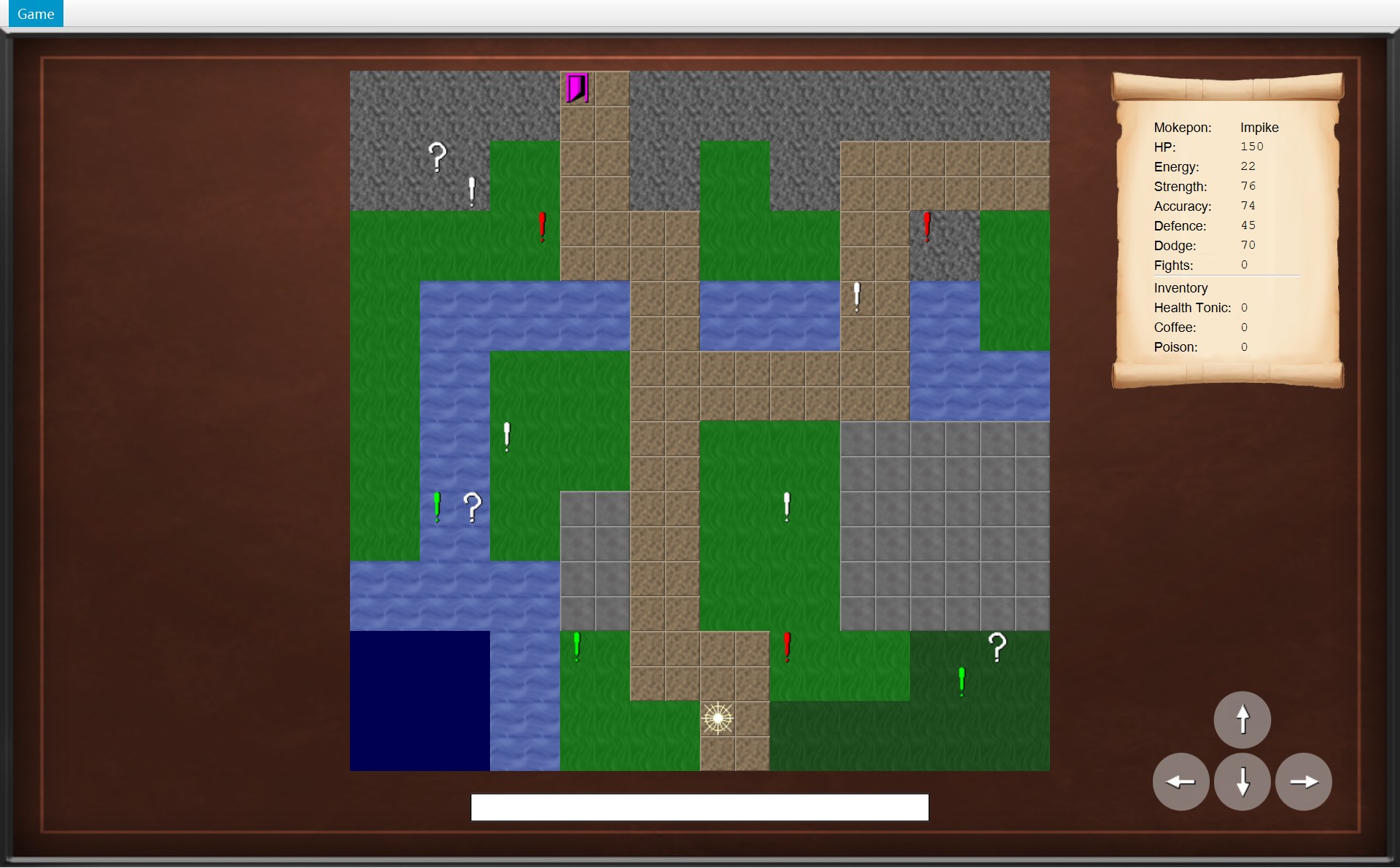
- 1玩家站在 (10,18):就是第 31 行 new 出来的那个 Position 对象记着的格子
- 第 29 行 是方法头。
public:谁都能调用它。Position:返回值的类型,这个方法做完会交回一个 Position。getPosition:方法名。括号里的String key是参数(parameter):调用它的人交进来一个 String,在方法里叫 key。这里交进来的是"map.player.startingPos"。 - 第 30 行:
getText(key)拿到文字"10,18"。.split(",")在逗号处切开,得到一个数组(array)["10", "18"],存进局部变量(local variable)parts。局部变量只在这个方法运行时存在。 - 第 31 行:
parts[0]是第一块"10"(数组从 0 开始数),.trim()去掉两头的空格,Integer.parseInt(...)把文字"10"变成整数 10。parts[1]一样得到 18。最后new Position(10, 18):按 CPosition 这个类造一个新对象,并且用return把它交回去。
是谁调用了 getPosition?CMapParser 的 parse 方法第 27 行:data.getPosition("map.player.startingPos")。造出来的对象存进 CGameMap 的字段 startPosition。开新游戏时,COverworld 的构造器把它交给 new Player(...),于是玩家的字段 position 也指着它。(程序启动的全过程在 第 5 章。)
Position 这个类长什么样
下面先是 CPosition 的前 28 行,再是老师会打印的那种 UML 图。UML 里的每一行都能在代码里找到(反过来不一定:代码里的 equals 和 hashCode,UML 没画,见下面的“容易搞错”)。下面每一条都写了“代码第几行 ↔ UML 哪一行”:
1package au.edu.unimelb.swen.oop.mokepon.world;2 3import java.util.Objects;4 5/* A tile on the map. x is the column and y is the row, and (0, 0) is the top left tile.6 * A position never changes; moving makes a new position instead.7 */81public class Position {92 private final int x;10 private final int y;11 123 public Position(int x, int y) {13 this.x = x;14 this.y = y;15 }16 174 public int getX() {18 return x;19 }20 21 public int getY() {22 return y;23 }24 25 /* The position one tile away in the given direction. */265 public Position move(Direction direction) {27 return new Position(x + direction.getXChange(), y + direction.getYChange());28 }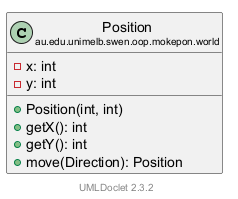
- 第 8 行
public class Position {:声明一个类。从这个{到文件最后一行的},中间都属于这个类。↔ UML 最上面一格:名字 Position 和前面的 C 圆圈。 - 第 9–10 行:两个字段
x和y,类型是int(整数)。private:只有 Position 自己的代码能直接碰它们。final:赋值一次以后就不能再改(第 3 节细讲)。↔ UML 第二格的x: int、y: int,前面是红色方块(private)。 - 第 12–15 行:构造器(constructor)。名字和类名一模一样,前面没有返回类型。写
new Position(10, 18)时它就会运行,把 10 和 18 存进这个新对象。↔ UML 第三格第一行Position(int, int)(绿色圆点 = public)。 - 第 17–23 行:两个取值方法(getter)。
public int getX():返回类型是 int,方法里只有一句return x;,把字段 x 的值交回去。别的类碰不到 private 的 x,只能通过它来读。↔ UML 的getX(): int、getY(): int:冒号后面是返回类型。 - 第 26–28 行:
move。参数是一个 EDirection(方向),第 27 行return new Position(x + direction.getXChange(), y + direction.getYChange());返回一个新的 Position。↔ UML 的move(Direction): Position。它为什么不改自己,本节后面的动画会一步一步演示。
一个类,很多个对象
类只是一份图纸:它写着“每个 Position 都有 x 和 y,都会 getX 和 move”。程序运行时,按这份图纸造出来的每一个具体的 Position 才是对象。每个对象有自己的一份 x 和 y。地图上就有很多个:
- 1玩家的 position:x = 10,y = 18
- 2出口门的 position:x = 6,y = 0
- 3一个问号箱的 position:x = 2,y = 2
- 4一个绿色感叹号的 position:x = 17,y = 17
它们在数据文件里分别写成 map.player.startingPos=10,18、map.exit.location=6,0、map.items.2.location=2,2 和 map.mokeponWeak.2=17,17。同一个类,四个对象,四份不同的 x、y:
不只这四个。CMapView 画地图的时候,给 20 × 20 = 400 个格子每个都 new 了一个 Position(MapView 第 65 行 new Position(column, row))。同一个类,想造多少个对象都行。
用 getX / getY 把格子变成像素
Position 记的是“第几列、第几行”。画到屏幕上时,CMapView 用 getX 和 getY 把它换成像素:
90 /* A tile's pixel position is its column or row times the tile size. */91 private void placeOnTile(ImageView imageView, Position position) {92 imageView.setLayoutX(position.getX() * TILE_SIZE);93 imageView.setLayoutY(position.getY() * TILE_SIZE);94 }玩家在 (10,18):getX() 返回 10,10 × 32 = 320;getY() 返回 18,18 × 32 = 576。TILE_SIZE 是 32,每个格子 32 像素(它是一个常量,第 3 节讲)。这是玩家在地图里面的位置。
地图自己的左上角在截图的 (320, 65),这两个数也是代码算出来的:COverworldScreen 第 61 行 mapX = (UiStyle.GAME_WIDTH - map.getWidth() * MapView.TILE_SIZE) / 2.0 = (1280 − 20 × 32) ÷ 2 = 320,让地图左右居中;第 63 行把 mapX 和 MAP_Y = 40 交给 MapView;整个画面又在 25 像素高的菜单栏下面,所以 y 是 40 + 25 = 65。于是玩家在截图里是 x = 320 + 320 = 640,y = 65 + 576 = 641。两个 320 只是碰巧一样。
方法、参数、返回值:Player.moveTo
9public class Player {10 private final Mokepon mokepon;11 private final Inventory inventory;12 private Position position;13 /* The tile before the last move, so the player can run back to it. */14 private Position previousPosition;15 private int fightsWon = 0;16 17 public Player(Mokepon mokepon, Position startPosition, Inventory inventory) {18 this.mokepon = mokepon;19 this.inventory = inventory;20 this.position = startPosition;21 this.previousPosition = startPosition;22 }⋯ 省略第 23–31 行32 public Position getPosition() {33 return position;34 }35 36 public int getFightsWon() {37 return fightsWon;38 }39 40 void moveTo(Position newPosition) {41 previousPosition = position;42 position = newPosition;43 }- 第 12 行和第 14 行:字段
position和previousPosition的类型都是 Position。它们存的不是两个数,而是指向某个 Position 对象的引用(reference)。下面的动画里,引用画成箭头。 - 第 15 行
private int fightsWon = 0;:字段可以在声明的时候就给初始值。 - 第 17–22 行:构造器有三个参数。第 20、21 行让 position 和 previousPosition 都指向同一个起点对象。
- 第 32–34 行:getPosition 交回 position 指着的那个对象。交回的是同一个对象的引用,不是复制一份。
- 第 40 行
void moveTo(Position newPosition):void 表示这个方法什么都不返回。参数 newPosition 是调用的人交进来的新位置。前面什么修饰符都没写,第 3 节解释为什么。 - 第 41–42 行:先把旧位置记进 previousPosition(逃跑时要退回去),再让 position 指向新位置。注意:没有任何一个 Position 对象被改了,改的只是 Player 的两个字段指着谁。
动画:走一步,内存里发生了什么
玩家站在 (18,18),按 ↑ 键。COverworld.move 里真正挪玩家的只有一行:player.moveTo(player.getPosition().move(direction));(另外,逃跑时 runAway 里的 player.moveBack() 会把玩家退回上一格)。这一行背后有好几个对象参与。这种 a.b().c() 的写法叫连着调用:从左往右,先算 player.getPosition(),得到一个对象,再调用这个对象的 move。
下面的动画里,图画的是内存:每个圆角框是一个对象,空心菱形箭头是“这个字段指着那个对象”,线上写着字段名。图旁边是真实的截图(手机上在图的下面):前 8 步是按 ↑ 之前,第 9 步起换成按 ↑ 之后。每一步只有用到的部分是亮的(变红),其余变淡。最下面是这一步正在运行的代码。
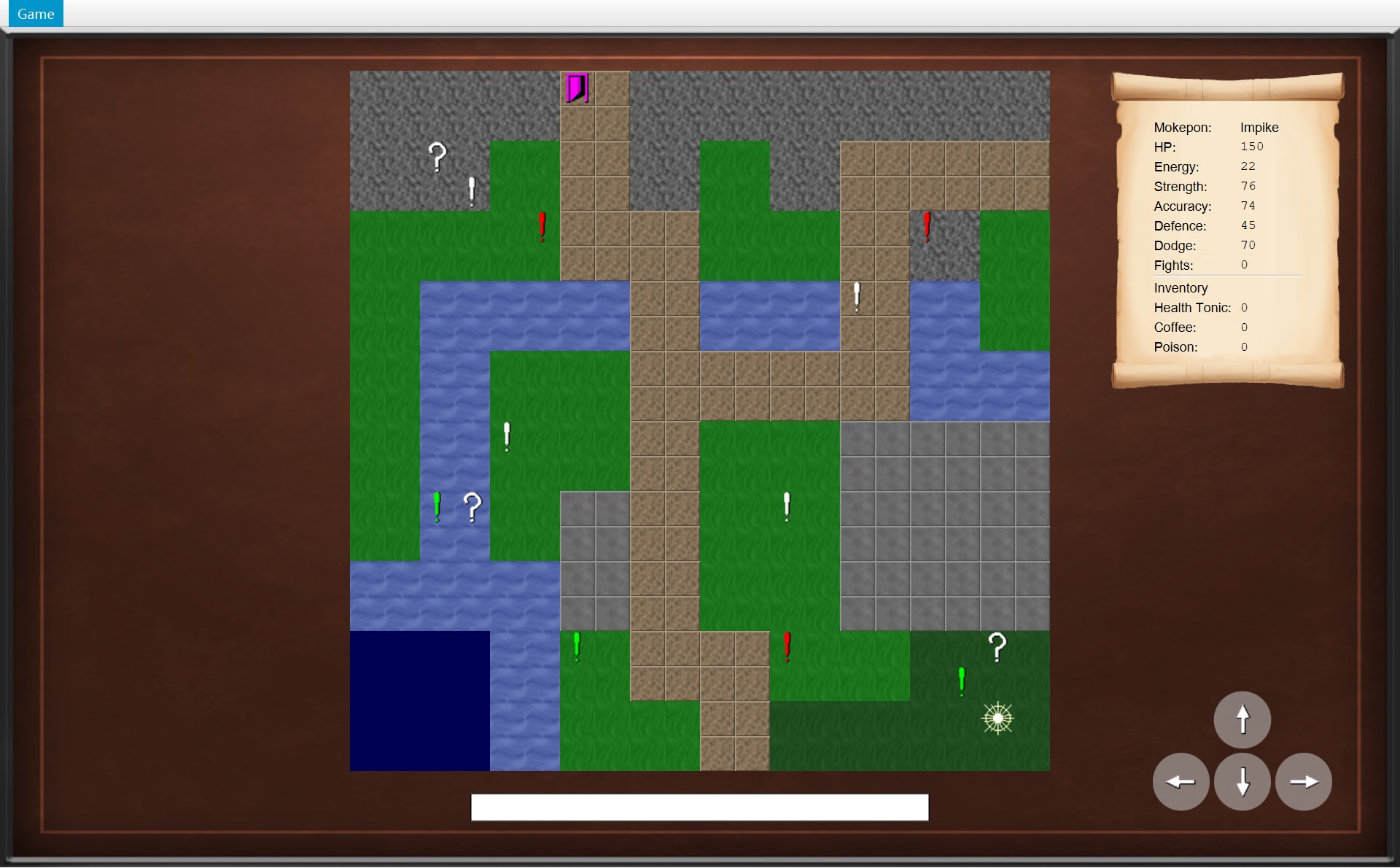
- 1按 ↑ 之前:玩家在 (18,18)
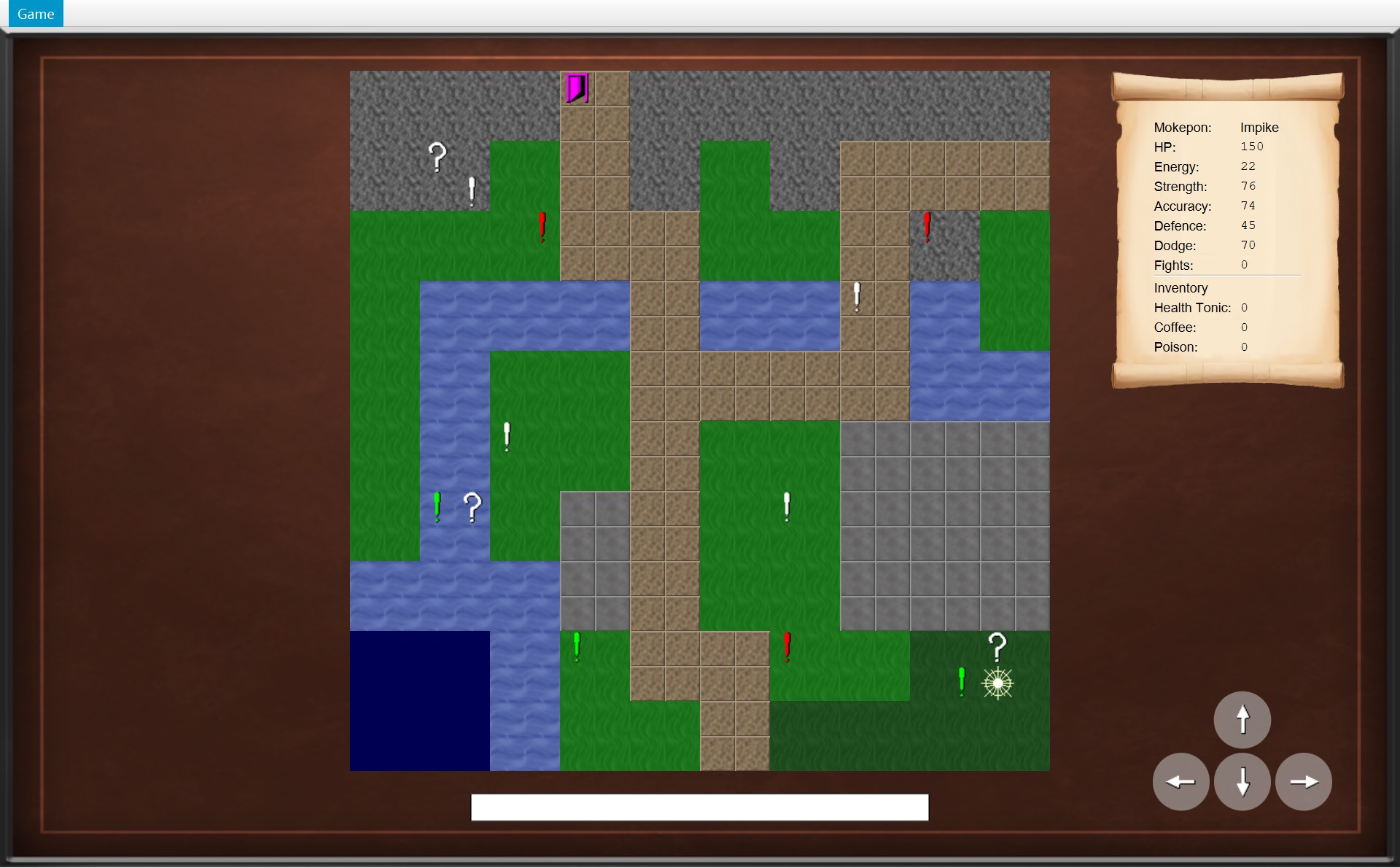
- 1按 ↑ 之后:玩家在 (18,17),y 从 18 变成 17
61 public boolean canMove(Direction direction) {62 return map.isWalkable(player.getPosition().move(direction));63 }64 65 /* Move the player one tile, then let every object on the new tile react. */66 public void move(Direction direction) {67 if (!canMove(direction)) {68 return;69 }70 player.moveTo(player.getPosition().move(direction));71 notifyListeners(listener -> listener.onPlayerMoved());12 public Position(int x, int y) {13 this.x = x;14 this.y = y;15 }⋯ 省略第 16–25 行26 public Position move(Direction direction) {27 return new Position(x + direction.getXChange(), y + direction.getYChange());28 }12 private Position position;13 /* The tile before the last move, so the player can run back to it. */14 private Position previousPosition;⋯ 省略第 15–39 行40 void moveTo(Position newPosition) {41 previousPosition = position;42 position = newPosition;43 }- 开始:玩家站在 (18,18)(看截图)。对象 player 的字段
position指着 x = 18、y = 18 的那个 Position;previousPosition指着上一步的 (17,18)(玩家是从 (17,18) 往右走过来的)。图里亮的就是这两根箭头和它们指着的两个对象。 - 你按 ↑ 键。COverworldScreen 把它换成
Direction.UP,调用world.move(Direction.UP)。现在参数direction指着 Direction.UP 这个对象(右上角亮的框)。枚举的常量在第一次用到 Direction 时就全部造好了,以后不会多也不会少,每个常量只有一个对象(第 6 节)。 - 第 67 行先问
canMove(direction),跳到第 61–62 行。player.getPosition()交回字段 position 指着的那个对象 (18,18)。交回的是引用,同一个对象,没有复制。 - 接着调用这个对象的
.move(direction)。现在运行的是 (18,18) 这个对象的 move,所以第 27 行的 x、y 就是它的 18 和 18。它调用 UP 的两个 getter:x + 0 = 18;y + (−1) = 17。往上走 y 变小,因为 y 是从上往下数的。 new Position(18, 17):运行第 12–15 行的构造器,造出一个新对象(右下角“临时”的那个)。旧的 (18,18) 一点都没变,它的 x、y 是 final,也改不了。move 把新对象 return 回去。- 第 62 行拿这个新对象问
map.isWalkable(...)。(18,17) 是 FOREST,能走,返回 true。!是“不”:!canMove(...)是 false,所以第 68 行的 return 不执行(它没有亮)。这个临时对象用完了,没有任何字段指着它,Java 以后会自动把它收走(垃圾回收)。 - 第 70 行从括号最里面开始算:又是
player.getPosition().move(direction),又 new 了一个 x = 18、y = 17 的对象(图里正下方那个“新”的)。没看错:canMove 和 move 各 new 了一次,一共造了两个。 - 把这个新对象交给
player.moveTo(...),它就是参数 newPosition。第 41 行previousPosition = position;:previousPosition 改成指向 (18,18)(亮的那根弯箭头)。图换了一张:原来指着 (17,18) 的箭头没有了,(17,18) 那个对象现在没人指着。position 还指着 (18,18),所以这一刻两根箭头指着同一个对象。 - 第 42 行
position = newPosition;:position 改成指向新的 (18,17),原来指着 (18,18) 的那根 position 箭头也没有了。玩家现在在 (18,17),截图也换成了按 ↑ 之后的画面。 - 第 71 行通知画面“玩家动了”(这一句里的 lambda 在第 8 节讲)。画面的 onPlayerMoved 调用 update(),CMapView 第 58 行拿新的 position 调用 placeOnTile:在地图里面是 x = 18 × 32 = 576,y = 17 × 32 = 544;地图本身在截图的 (320, 65),所以白星在截图里的 (896, 609),就是截图里白星的位置。
- 回头看:从头到尾没有一个 Position 对象被改过,变的只是 player 的两根箭头(亮的那两根)。这样的对象叫不可变对象(immutable)。还有一件事:图里有两个 x = 18、y = 17 的对象。它们算不算“同一个位置”?看下一小节。
为什么要不可变?因为同一个 Position 对象会被好几个地方同时指着:起点对象被 CGameMap 的 startPosition 和 CPlayer 的两个字段一起指着,而且每开一局新游戏都会再交给新的 Player。如果 move 直接改它的 x、y,地图的起点也跟着变了。不可变的对象,随便共享都不会出事。
equals:两个 Position 什么时候算“相等”
比较两个对象有两种写法,意思完全不同:
a == b:是不是同一个对象(两根箭头是不是指着同一个框)。两个分别 new 出来的对象,== 永远是 false,哪怕 x、y 都一样。a.equals(b):内容算不算一样。怎样算一样,由这个类自己的 equals 方法决定。
30 /* Two positions are equal when they point to the same tile. */31 @Override32 public boolean equals(Object other) {33 if (this == other) {34 return true;35 }36 if (other == null || getClass() != other.getClass()) {37 return false;38 }39 Position position = (Position) other;40 return x == position.x && y == position.y;41 }42 43 /* Equal positions must give the same hash code. */44 @Override45 public int hashCode() {46 return Objects.hash(x, y);47 }- 第 31 行
@Override:这是一个注解,告诉编译器“下面这个方法改写(override)了父类的同名方法”。哪个父类?没写 extends 的类自动继承 Java 自带的 Object 类。Object 自带一个 equals,默认只有“同一个对象”才相等。Position 把它换成了自己的规则。 - 第 32 行:参数类型是 Object,什么对象都能传进来。
- 第 33–35 行:是同一个对象,当然相等。
- 第 36–38 行:
other == null(什么都没有),或者getClass()不一样(根本不是 Position),就不相等。||是“或者”(逻辑运算符)。 - 第 39 行:
(Position) other是强制类型转换(cast):告诉 Java“我确定它是 Position”,这样才能读它的 x 和 y。 - 第 40 行:x 相等并且(
&&)y 相等,就算相等。 - 第 44–47 行:hashCode。Java 的规矩:改写 equals,就要一起改写 hashCode,让相等的对象算出同一个数。HashMap、HashSet 靠这个数找东西(equals 和 hashCode)。这个项目没有把 Position 当 HashMap 的键,但规矩照样遵守了。
真实运行时哪里用到它?玩家走到问号箱的格子上:
23 public boolean isAt(Position other) {24 return position.equals(other);25 }72 73 /* Loop over a copy, because a mystery box removes itself from the list. */74 for (MapObject object : new ArrayList<>(objects)) {751 if (object.isAt(player.getPosition())) {762 object.interact(this);77 }78 }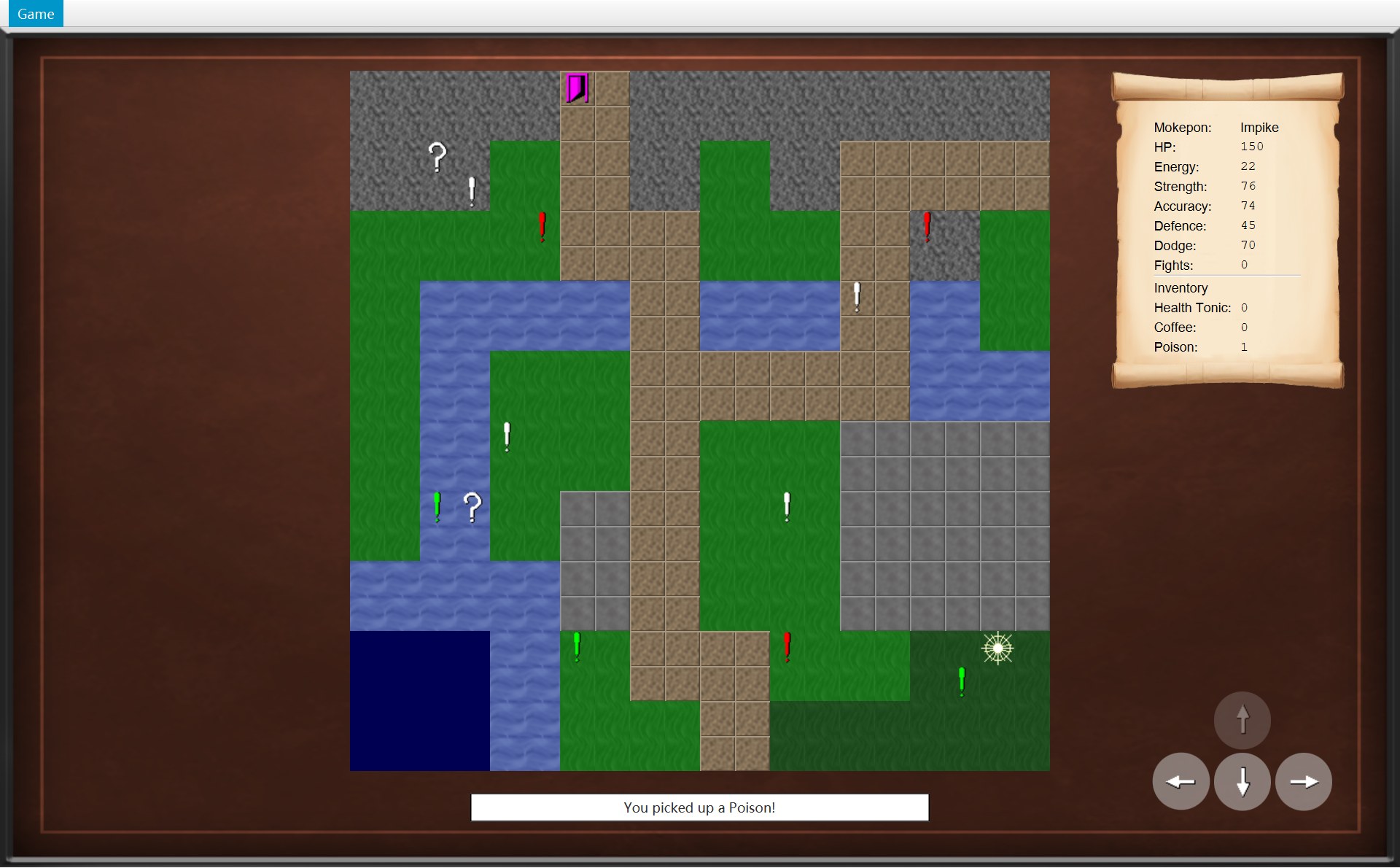
- 1玩家的 Position(18,16) 是 move 刚 new 的;箱子的 Position(18,16) 是读
map.items.1.location=18,16时 new 的。两个不同的对象,== 是 false,equals 是 true,所以第 75 行 isAt 返回 true - 2于是第 76 行 interact 运行:箱子从地图上拿掉,状态栏写 You picked up a Poison!
- 第 74 行
for (MapObject object : new ArrayList<>(objects)) {:for-each 循环(第 4 节细讲),把地图上的每个物体轮一遍。new ArrayList<>(objects)是先复制一份列表,再在复制品上走。为什么?捡箱子时 interact 会让 Overworld.collect 把这个箱子从objects里删掉;一边在一个列表上走、一边从同一个列表里删东西,Java 会抛出异常(ConcurrentModificationException)。第 73 行的注释就写着这个原因。 - 第 75 行:对每个物体问
isAt(player.getPosition()),里面用的就是 equals。
2. 构造器:重载和 this(...)
两个构造器:Battle
一个类可以有好几个构造器,只要它们的参数不一样(个数不同,或者类型不同)。这叫重载(overload)。CBattle 就有两个:
24 /* Start a battle against an enemy that picks random skills. */25 public Battle(Fighter player, Fighter enemy, Inventory inventory) {261 this(player, enemy, inventory, new RandomEnemyStrategy(), new Random());27 }28 29 /* Start a battle with a chosen enemy strategy and random number generator. */30 public Battle(Fighter player, Fighter enemy, Inventory inventory,31 EnemyStrategy enemyStrategy, Random random) {32 this.player = player;33 this.enemy = enemy;34 this.inventory = inventory;35 this.enemyStrategy = enemyStrategy;36 this.random = random;372 log.add("Player chose " + player.getName() + ". Began a fight against enemy "38 + enemy.getName() + "!");39 }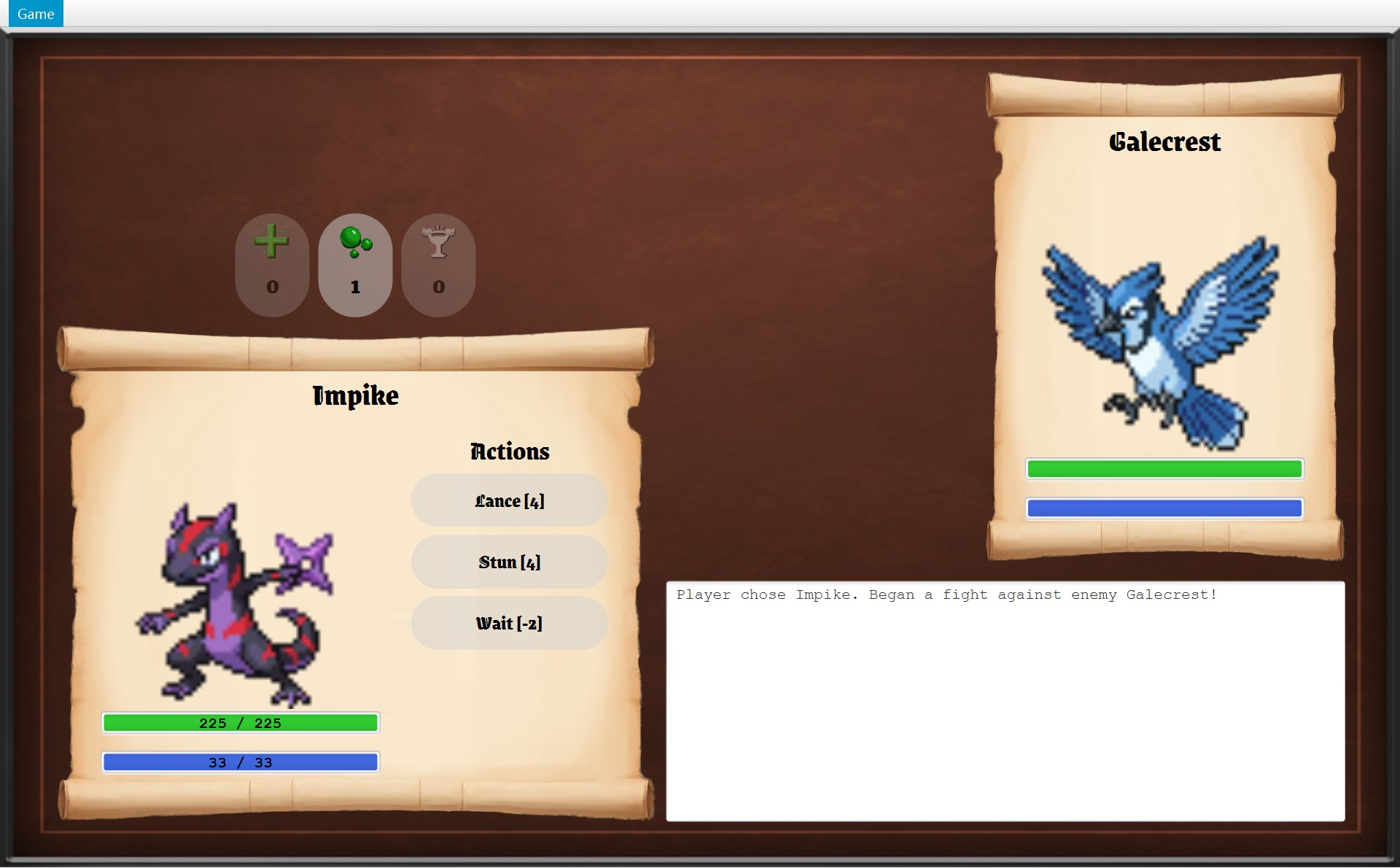
- 2日志第一句:五个参数的构造器第 37–38 行写进去的
- 第 25 行:三个参数的构造器。游戏里用的就是它:CEncounter.createBattle 写的是
new Battle(player, enemyFighter, inventory)。 - 第 26 行(红圈 1)
this(player, enemy, inventory, new RandomEnemyStrategy(), new Random());:this(...)的意思是“去运行本类的另一个构造器”,这里是五个参数的那个。它自己补上后两样:一个随机出招的策略对象,一个随机数生成器。这叫构造器链。 - 第 30–39 行:五个参数的构造器才真正干活:把 5 样东西存进字段,再往日志里写第一句(红圈 2)。所以截图里战斗刚开始,日志就有
Player chose Impike. Began a fight against enemy Galecrest!。
为什么这样写?准备工作只写一遍,写在长的那个里。长的那个还允许别人自己指定敌人怎么出招、用哪个随机数生成器(比如想让每次运行结果都一样)。在你的项目里,长的那个只被短的那个通过 this(...) 调用。COverworld 是同样的写法:第 29–31 行的三参数构造器用 this(map, mokepons, playerChoice, new Random()) 交给四参数的那个。
this(...) 的另一个例子:Sprite 要不要染色
CSprite 记着地图上一个物体的图片和颜色。它也有两个构造器:
7public class Sprite {8 /* An empty colour means the image is shown as it is. */9 private static final String NO_TINT = "";10 11 private final String imagePath;12 private final String colour;13 14 /* A sprite that is not tinted, such as a mystery box. */15 public Sprite(String imagePath) {161 this(imagePath, NO_TINT);17 }18 192 public Sprite(String imagePath, String colour) {20 this.imagePath = imagePath;21 this.colour = colour;22 }- 1问号箱:
new Sprite(图片)走第 16 行,颜色是空字符串,不染色 - 2感叹号:
new Sprite(图片, 颜色)走第 19 行。这一组的颜色是 lime(绿),上面那个白色组是 white
56 /* All markers in one group share the same image, colour and picker. */57 private List<MapObject> parseMarkers(GameData data, String group, EnemyPicker picker) {58 Sprite sprite = new Sprite(data.getText(group + ".image"), data.getText(group + ".colour"));⋯ 省略第 59–67 行68 /* All mystery boxes share one image, and each box holds one item. */69 private List<MapObject> parseMysteryBoxes(GameData data) {70 Sprite sprite = new Sprite(data.getText(ITEMS_PREFIX + "image"));⋯ 省略第 71–80 行81 private Exit parseExit(GameData data) {82 Sprite sprite = new Sprite(data.getText("map.exit.image"), data.getText("map.exit.colour"));83 return new Exit(data.getPosition("map.exit.location"), sprite);第 70 行给问号箱造 Sprite 时只给了图片,走第 15–17 行的构造器。第 16 行 this(imagePath, NO_TINT) 把活交给第 19 行的构造器,颜色填 NO_TINT,也就是空字符串 ""。第 58 行(感叹号)和第 82 行(出口门,颜色 magenta)多给了一个 data.getText(... + ".colour"),走两个参数的构造器。画地图时 CMapView 先问 sprite.hasTint():颜色不是空的才染色(Sprite 第 33 行 !colour.isEmpty())。
一个构造器都没写的类
CRandomEnemyStrategy、CMokeponParser、CSkillCatalogue 一个构造器都没写。Java 会自动送一个不带参数、什么都不做的默认构造器。所以 Battle 第 26 行能写 new RandomEnemyStrategy(),CMain 能写 new MokeponParser()。只要你自己写了任何一个构造器,Java 就不再送这个了。
再看一个:GameButton 的两个构造器
181 public GameButton(String text, Font font, int cornerRadius) {19 super(text);20 this.cornerRadius = cornerRadius;21 setFont(font);22 setBackgroundOpacity(NORMAL);23 }24 25 /* A button that only shows an image, such as a movement arrow. */262 public GameButton(ImageView icon, int cornerRadius) {27 this("", Font.getDefault(), cornerRadius);28 setGraphic(icon);29 }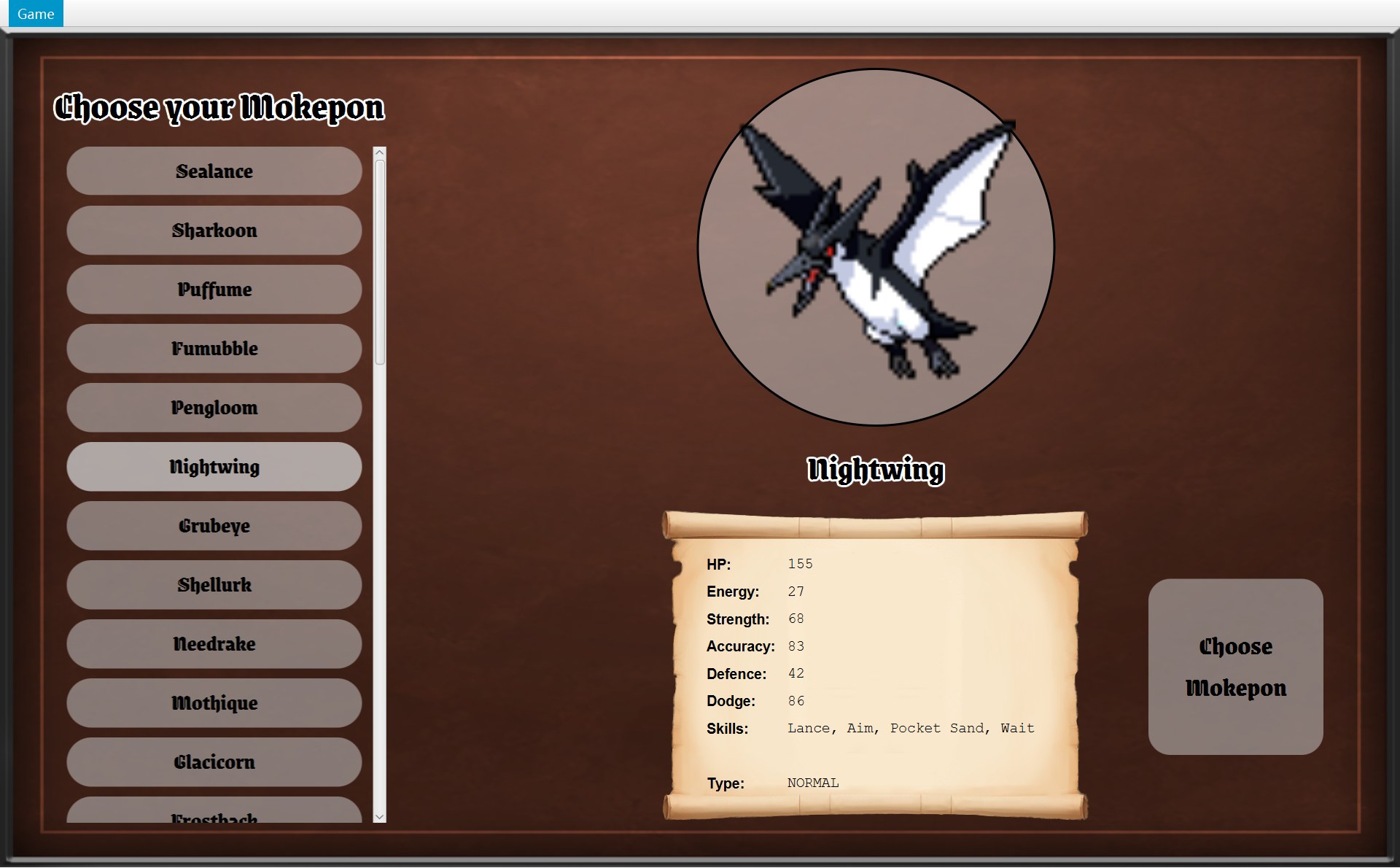
- 1Choose Mokepon 按钮:
new GameButton("Choose\nMokepon", 字体, CHOOSE_RADIUS)(\n是换行,所以按钮上的字分两行),走第 18 行的构造器(SelectScreen 第 238–239 行)。技能按钮、名字按钮也都是这样造的
- 2方向按钮:
new GameButton(icon, BUTTON_SIZE / 2),走第 26 行的构造器(OverworldScreen 第 169 行)
- 第 18–23 行(红圈 1):带文字的构造器。技能按钮、选择界面的名字按钮、Choose Mokepon 按钮都用它。第 19 行
super(text)是去调用父类 JavaFXButton的构造器,把文字交给它(第 7 节讲 super)。 - 第 26–29 行(红圈 2):只有图片的构造器,用来造地图右下角的四个方向按钮。第 27 行
this("", Font.getDefault(), cornerRadius)先交给第一个构造器(文字是空的),第 28 行再把图片放上去。
3. 谁能用、属于谁、能不能改:修饰符、static、final
四种访问权限
方法和字段前面的 public、private 这些词叫访问修饰符,决定“谁能用它”。包(package)就是放类的文件夹:world、battle、ui……(第 9 节)。
| 写法 | 谁能用 | UML 图标 | 你代码里的例子 |
|---|---|---|---|
public | 所有类 | 绿色圆点 | getX() |
private | 只有这个类自己 | 红色方块 | Battle 的字段 |
protected | 子类,和同一个包 | 黄色菱形 | handleKey |
| 什么都不写 | 只有同一个包(枚举的构造器例外,见第 6 节) | 蓝色三角 | moveTo |
英文名分别是 public、private、protected 和 package-private(包内可见)。UML 文字版里分别写成 + − # ~。
private:Battle 的字段别人碰不到
14public class Battle {15 private final Fighter player;16 private final Fighter enemy;17 private final Inventory inventory;18 private final EnemyStrategy enemyStrategy;19 private final Random random;20 private final List<String> log = new ArrayList<>();21 private boolean finished = false;22 private boolean playerWon = false;⋯ 省略第 23–60 行61 /* Other classes can read the log but cannot change it. */62 public List<String> getLog() {63 return Collections.unmodifiableList(log);64 }8 个字段全是 private。CBattleScreen 想显示日志,只能调用 public 的 getLog()。它拿到的是 Collections.unmodifiableList(log):原来那个 log 列表的一个只读视图(read-only view,Java 文档里叫 unmodifiable view)。它就像一扇看着原列表的窗口:能看,不能改,也不是复制品。想往日志里加一句,只有 Battle 自己的方法能做(playTurn、useItem……)。把数据藏起来、只开放需要的方法,叫封装(encapsulation)。好处是:日志里的每一句都只可能来自 Battle 的规则,画面不可能把它写乱。
什么都不写:Player.moveTo 只给 world 包用
32 public Position getPosition() {33 return position;34 }35 36 public int getFightsWon() {37 return fightsWon;38 }39 40 void moveTo(Position newPosition) {41 previousPosition = position;42 position = newPosition;43 }44 45 /* Go back to the tile the player stood on before the last move. */46 void moveBack() {47 position = previousPosition;48 }49 50 void addWin() {51 fightsWon++;52 }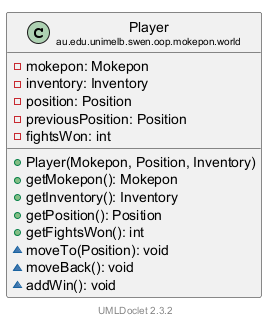
第 40、46、50 行的 moveTo、moveBack、addWin 前面什么都没写。CPlayer 在 world 包里,所以只有 world 包里的类能调用它们。实际上只有 COverworld 在调用:move 里先用 canMove 检查,再 moveTo(第 70 行);runAway 里 moveBack(第 89 行);winEncounter 里 addWin(第 97 行)。
CMapView 在 ui 包。它真的写了 world.getPlayer().getPosition()(MapView 第 58 行,用来把白星放到玩家的格子上):getPosition 是 public,能读。但如果 ui 包里的哪个类写 world.getPlayer().moveTo(...),代码根本编译不过。COverworldScreen 只能调用 world.move(direction)(第 129 行)。所以任何界面代码都没法把玩家直接“传送”到墙上,所有移动都必须经过 Overworld 的规则。AMapObject 的 abstract void interact(Overworld world);(第 30 行)也一样,只有 Overworld.move 能触发地图上的物体。Overworld 自己的 startEncounter、collect、reachExit 也没写修饰符,只给 world 包里的 CMarker、CMysteryBox、CExit 调用。
protected:留给子类
28 /* Template Method: key presses are ignored while a dialog is open, and key combinations29 * are left for the menu shortcuts (Ctrl+R, Ctrl+B and Alt+F4).30 * Any other key is passed to the screen.31 */32 public final void handleKeyPress(KeyEvent event) {33 boolean isCombination = event.isControlDown() || event.isAltDown()34 || event.isMetaDown() || event.isShiftDown();35 if (isDialogOpen() || isCombination) {36 return;37 }38 handleKey(event);39 }⋯ 省略第 40–50 行51 /* Screens with keyboard controls override this. Other screens ignore the keys. */52 protected void handleKey(KeyEvent event) {53 }107 /* Keys 1 to 4 press the matching skill button. A disabled button ignores the key. */108 @Override109 protected void handleKey(KeyEvent event) {110 int index = SKILL_KEYS.indexOf(event.getCode());111 if (index >= 0 && index < skillButtons.size()) {112 skillButtons.get(index).fire();113 event.consume();114 }115 }- GameScreen 第 52–53 行
protected void handleKey(KeyEvent event) { }:方法体是空的,意思是“默认不管按键”。选择界面 CSelectScreen 没改写它,所以在选择界面按键什么都不发生。 - BattleScreen 第 108–115 行:
@Override protected void handleKey(...),按 1–4 就等于点第 1–4 个技能按钮。COverworldScreen 第 115–122 行也改写了它,处理方向键。 - GameScreen 第 38 行:public 的 handleKeyPress 先检查(有没有对话框、是不是组合键),再调用
handleKey(event)。这时运行的是哪个子类的 handleKey,由这个画面对象实际是什么决定(第 7 节的多态)。
protected 让子类能改写、能调用它,而不在 ui 包里、又不是子类的类用不了。AItem 的 describeUse 也是 protected(第 7 节)。按键从窗口一路走到 handleKey 的全过程在 第 6 章。
static:属于类,不属于哪个对象
普通字段每个对象一份:每个 Position 都有自己的 x。加了 static 的字段整个程序只有一份,属于类本身,用的时候写 类名.名字。
15public class UiStyle {161 public static final int GAME_WIDTH = 1280;171 public static final int GAME_HEIGHT = 768;18 public static final String SCROLL_FILE = "assets/scroll.png";18 protected GameScreen(GameNavigator navigator) {19 this.navigator = navigator;201 view.setPrefSize(UiStyle.GAME_WIDTH, UiStyle.GAME_HEIGHT);21 view.getChildren().add(UiStyle.createBackground());22 }- 1游戏区:宽
UiStyle.GAME_WIDTH= 1280,高UiStyle.GAME_HEIGHT= 768。第 20 行用这两个常量定下每个画面的大小 - 2菜单栏(左边的 Game 就是菜单):最上面 25 像素,不算在游戏区里,所以截图一共高 793
- static final 合起来就是常量:只有一份,永远不变。名字习惯全大写,单词之间用下划线:
GAME_WIDTH、TILE_SIZE。CFighter 第 19 行private static final int DAMAGE_SCALE = 50;是伤害公式里的 50(第 12 章)。用常量而不直接写 1280、50,是为了让人一看就知道这个数是什么意思,改的时候也只改一处。 - UML 里 static 的东西带下划线:Fighter 的 UML 第一行
DAMAGE_SCALE: int就有下划线。 - 程序的入口
Main.main也是 static 的:程序刚开始时还没有任何对象,只能先调用一个属于类的方法。
static 方法也一样,不用先 new 对象,直接用类名调用:
10public class SkillCatalogue {11 private static final List<Skill> SKILLS = List.of(12 new Bite(), new Tackle(), new Lance(), new Stun(), new PocketSand(),13 new Bunker(), new Aim(), new Swole(), new Nimble(), new Wait());14 15 /* Find a skill by its exact, case-sensitive name. */16 public static Skill find(String name) {17 for (Skill skill : SKILLS) {181 if (skill.getName().equals(name)) {19 return skill;20 }21 }22 throw new IllegalArgumentException("Unknown skill: " + name);23 }- 1数据文件写着
mokepon.5.skills=Lance|Aim|Pocket Sand|Wait。每个名字都交给SkillCatalogue.find,第 18 行用 equals 找到名字一样的技能对象
CMokeponParser 第 46 行直接写 SkillCatalogue.find(skillName.trim()),没有 new 任何 SkillCatalogue。别的例子:CMapParser 第 50 行 Terrain.fromSymbol(letters.charAt(column))、CBattleScreen 第 213 行的 UiStyle.loadImage(...)、COverworld 第 38 行的 ItemCatalogue.getAll()。第 11–13 行的 SKILLS 也是 static 的:整个程序只有这一份列表,也只有一个 Lance 对象。所有会 Lance 的 Mokepon 共用这一个对象。技能对象的字段都是 final,不会变,所以共用没问题。
final:只能赋值一次
- final 字段:Position 的 x、y,Battle 的 player、enemy……赋值一次以后(在声明处或构造器里)就不能再改,写
x = 5;会编译出错(final)。 - 不写 final 的字段才会变:Battle 的
finished和playerWon(第 21–22 行)一开始都是 false。战斗结束时 finish 把 finished 设成 true,把 playerWon 设成 finish 收到的参数:赢了是 true,输了还是 false(第 135–136 行)。Player 的position每走一步都换。 - final 方法:ASkill 第 30 行
public final String use(...),子类不能改写它(模板方法,第 12 章)。上面 AGameScreen 第 32 行的 handleKeyPress 也是 final。
4. 做选择、做重复:if、return、for、while
if / else:赢了写 You win,输了写 You lose
133 /* Stop the battle and record who fainted and the result. */134 private void finish(boolean playerWon) {135 this.finished = true;136 this.playerWon = playerWon;137 log.add("");138 log.add("");139 if (playerWon) {1401 log.add("Enemy's " + enemy.getName() + " fainted!");141 log.add("You win");142 } else {1432 log.add("Player's " + player.getName() + " fainted!");144 log.add("You lose");145 }146 }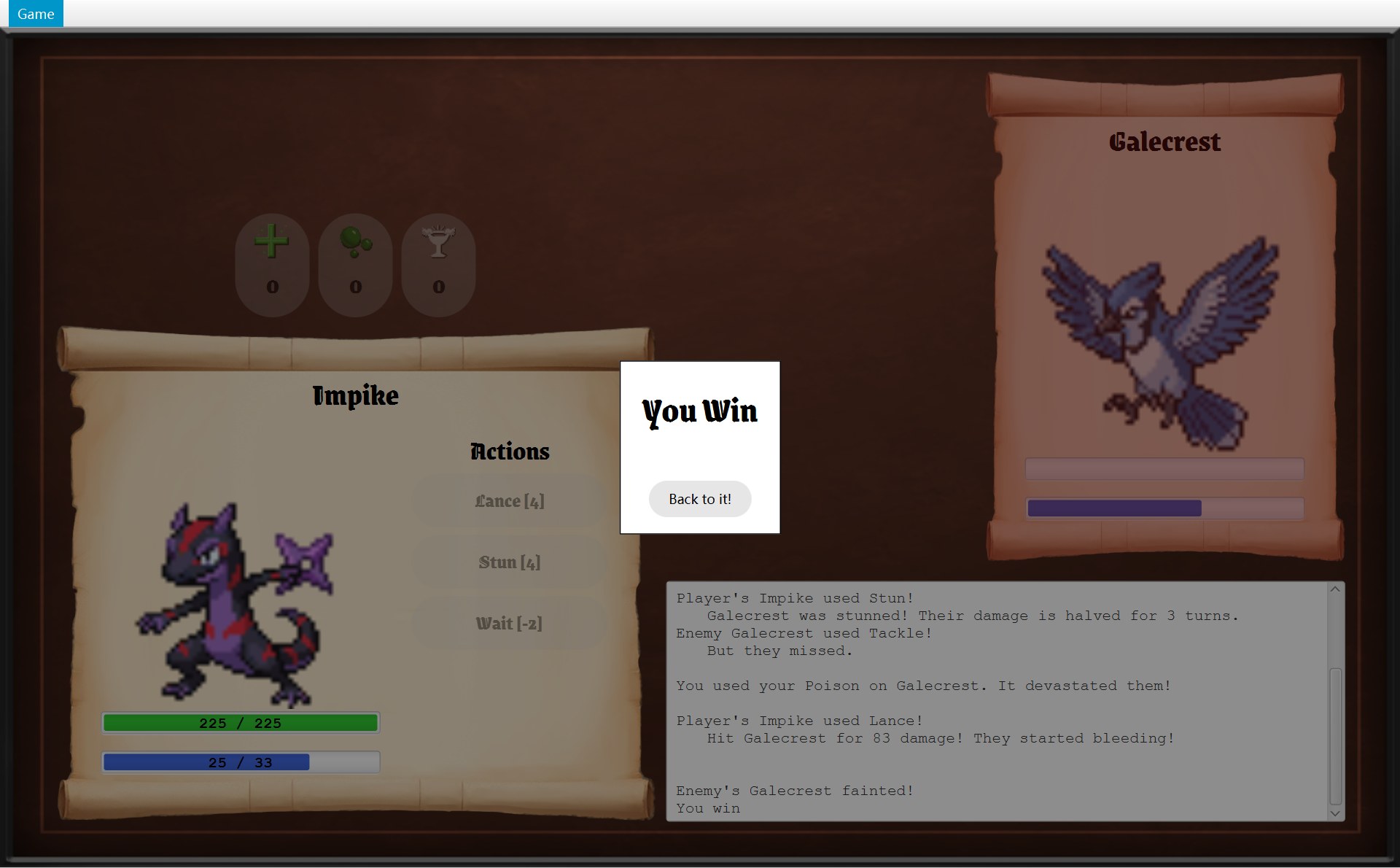
- 1playerWon 是 true:走 if 那一支
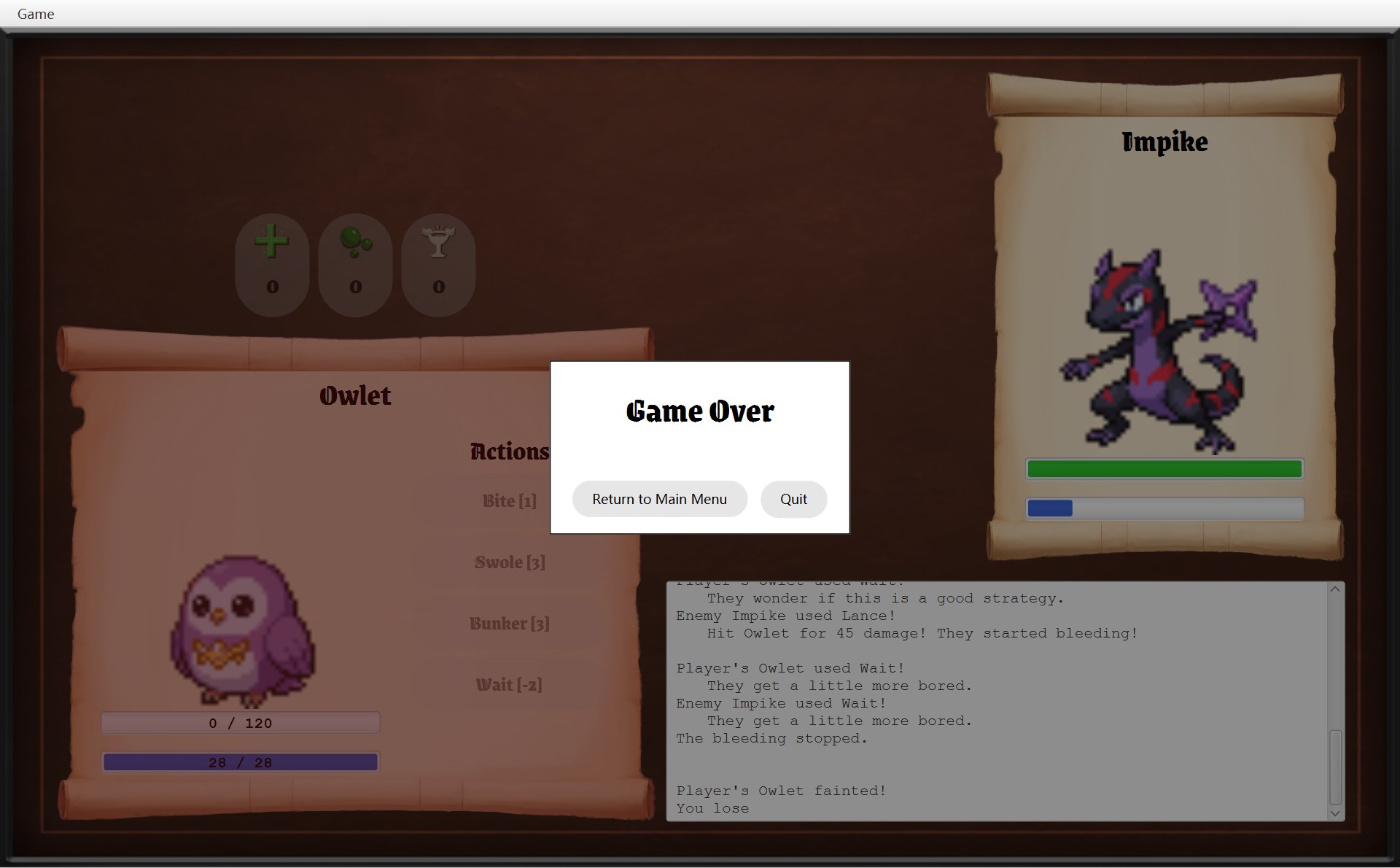
- 2playerWon 是 false:走 else 那一支
两张截图都是在 You Win / Game Over 对话框弹出以后拍的,对话框后面的画面被压暗了,所以日志的字是灰的。
if (条件) { A } else { B }:条件是 true 就做 A,否则做 B(if / else)。这里的条件就是参数 playerWon,类型是 boolean(只有 true 和 false 两个值)。第 137–138 行先加了两个空字符串,所以日志里 fainted 上面空着两行。注意第 136 行 this.playerWon = playerWon;:参数和字段同名,又用上了 this。
提前 return:Battle.playTurn 的几道关
66 /* Play one turn: the player acts first, then the enemy if it is still standing.67 * The lingering effects act last.68 */69 public void playTurn(Skill playerSkill) {70 if (finished) {71 return;72 }73 74 if (!player.canUse(playerSkill)) {75 log.add("Not enough energy.");76 return;77 }78 79 log.add("");801 log.add("Player's " + player.getName() + " used " + playerSkill.getName() + "!");81 log.add(playerSkill.use(player, enemy, random));82 if (!enemy.isAlive()) {832 finish(true);84 return;85 }86 87 Skill enemySkill = enemyStrategy.chooseSkill(enemy, random);88 log.add("Enemy " + enemy.getName() + " used " + enemySkill.getName() + "!");89 log.add(enemySkill.use(enemy, player, random));90 if (!player.isAlive()) {91 finish(false);92 return;93 }94 95 endTurn();96 }- 1点 Lance:第 80 行写“谁用了什么”,第 81 行写技能交回的那句话
- 2两行空白、fainted、You win:第 83 行 finish(true) 写的。接着第 84 行 return,所以下面没有 “Enemy Galecrest used …”
- 第 70–72 行:战斗已经结束,就直接
return;。在 void 方法里,return;的意思是“到此为止,后面的都不执行了”。 - 第 74–77 行:能量不够(
!是“不”),写一句 Not enough energy.,然后 return。实际上能量不够的按钮已经变灰、点不了,这是第二道保险。 - 第 79–81 行:你出手。先加一个空行,再写“谁用了什么”,再写技能
use交回的那句话。 - 第 82–85 行:你出手以后敌人倒下了:finish(true),return。敌人没有机会还手,截图里就是这样。
- 第 87–89 行:策略对象替敌人挑一个技能,敌人出手(策略在第 7 节讲)。
- 第 90–93 行:敌人出手以后你倒下了:finish(false),return。
- 一道关都没挡住,最后才走到第 95 行
endTurn()。
这种写法叫提前返回(early return):先把“不该继续”的情况挡掉,正常的流程就不用套好几层 if。回合的完整流程在 第 11 章。
另一个提前 return:前面是墙
613 public boolean canMove(Direction direction) {621 return map.isWalkable(player.getPosition().move(direction));63 }64 65 /* Move the player one tile, then let every object on the new tile react. */66 public void move(Direction direction) {672 if (!canMove(direction)) {68 return;69 }70 player.moveTo(player.getPosition().move(direction));71 notifyListeners(listener -> listener.onPlayerMoved());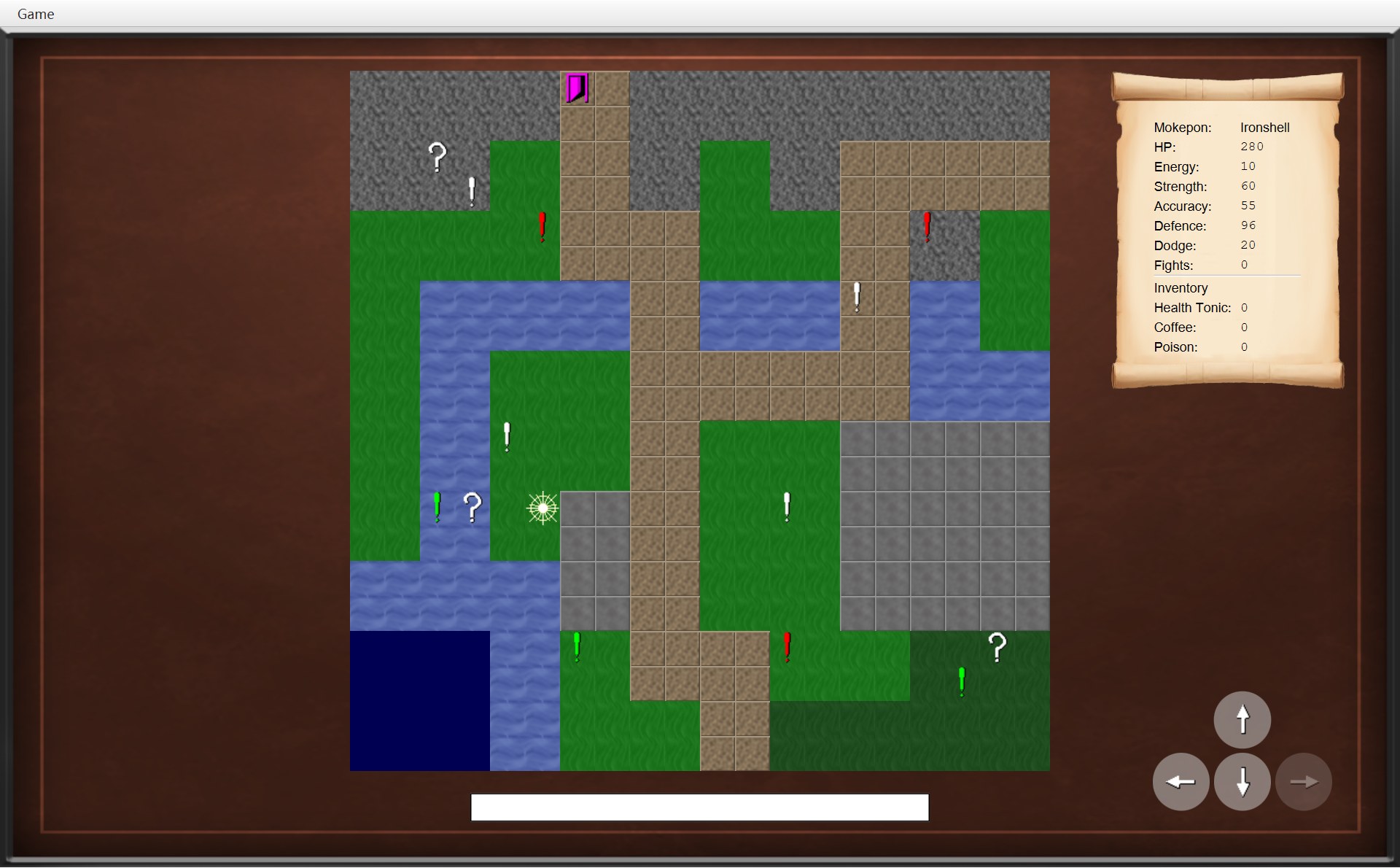
- 1(6,12) 是 BARRIER(数据文件里的字母 B),不能走:第 62 行 isWalkable 返回 false
- 2玩家在 (5,12)。按 → 键:canMove 是 false,第 68 行 return,玩家不动
- 3→ 按钮也变灰了:画面更新时用同一个 public 的 canMove(RIGHT) 算出来的(OverworldScreen 第 138 行)
第 67 行的 if (!canMove(direction)) { return; } 读成:“如果不能往这个方向走,就什么都不做,直接结束。”走不过去的时候,后面的 moveTo、通知画面、检查物体都不会发生。
for-each:把一串东西从头到尾走一遍
47 /* The Mokepon's stats never change on the overworld, so they are written once. */48 Mokepon mokepon = player.getMokepon();49 int row = 0;50 addRow(grid, row++, "Mokepon:", createLabel(mokepon.getName(), nameFont));511 for (Stat stat : Stat.values()) {52 String value = String.valueOf(mokepon.getStat(stat));53 addRow(grid, row++, stat.getLabel() + ":", createLabel(value, numberFont));54 }- 1这 6 行就是 for 循环转的 6 圈:每圈一个 Stat,依次是 HP、Energy、Strength、Accuracy、Defence、Dodge
for (Stat stat : Stat.values()) 读成:“对 Stat.values() 里的每一个 stat,把大括号里的事做一遍。”Stat.values() 按顺序给出 6 个常量,所以循环转 6 圈。第一圈 stat 是 Stat.HP:第 52 行 mokepon.getStat(stat) 得到 150,String.valueOf(...) 把 150 变成文字 "150";第 53 行 stat.getLabel() + ":" 得到 "HP:",和 "150" 一起放进卷轴的一行。第 53 行的 row++ 是“先用 row 的值,再给它加 1”(自增),所以每圈放在下一行。这种写法叫增强 for 循环(for-each)。
同样的写法也能走一遍列表。CFighter 的 getMissChance:
128 /* The extra chance that this fighter's targeted skills miss, for example when blinded.129 * If there are several effects, only the strongest one counts.130 */131 public double getMissChance() {132 double missChance = 0;133 for (StatusEffect effect : effects) {134 missChance = Math.max(missChance, effect.getMissChance());135 }136 return missChance;137 }先看返回类型 double(double):带小数的数,比如 0.5。int 只能放整数,double 能放小数。effects 里有几个效果就转几圈,每圈用 Math.max 留下更大的那个数。没有任何效果时一圈都不转,返回一开始的 0;中了 Pocket Sand(CBlinded,它的 getMissChance 返回 0.5)就返回 0.5。
普通 for 和三元运算符:要用到“第几个”的时候
147 /* A skill can only be used while the battle is running and there is enough energy. */148 private void updateSkillButtons() {149 List<Skill> skills = battle.getPlayer().getSkills();150 for (int i = 0; i < skillButtons.size(); i++) {1511 boolean usable = !battle.isFinished() && battle.getPlayer().canUse(skills.get(i));152 skillButtons.get(i).setUsable(usable);153 }154 }50 /* A disabled button fades out as a whole, including its text and image. */51 public void setUsable(boolean usable) {52 setDisable(!usable);53 setBackgroundOpacity(NORMAL);542 setOpacity(usable ? 1 : DISABLED_OPACITY);55 }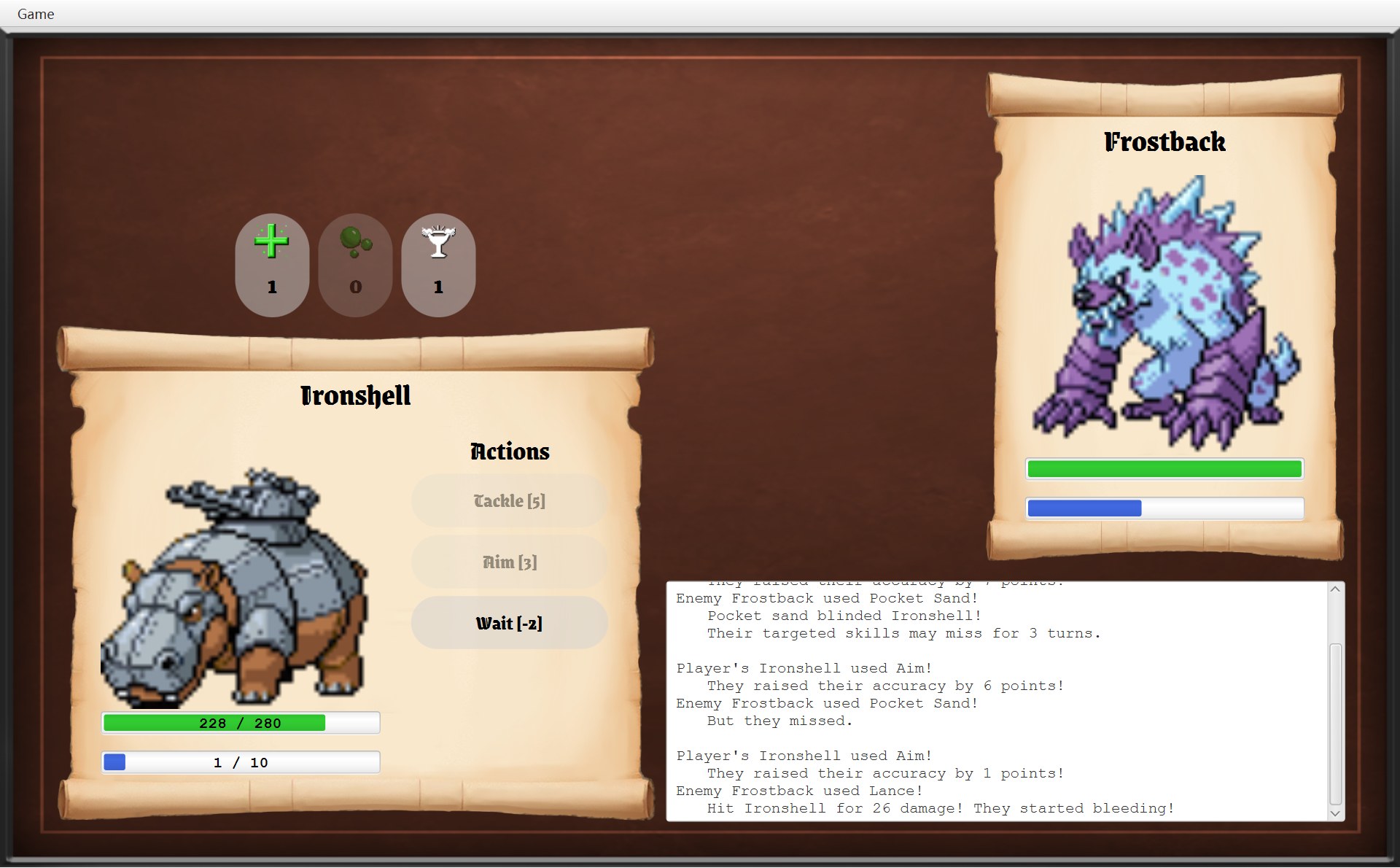
- 1Tackle [5] 和 Aim [3]:能量只有 1,1 < 5、1 < 3,canUse 是 false,所以 usable 是 false
- 2Wait [-2]:1 ≥ −2,usable 是 true,
usable ? 1 : DISABLED_OPACITY取 1,不透明。上面两个取 0.4,所以变淡
for (int i = 0; i < skillButtons.size(); i++):i 从 0 开始;每圈结束 i 加 1;只要 i 还小于按钮个数就继续(普通 for 循环)。这里要用 i,因为要同时拿第 i 个技能 skills.get(i) 和第 i 个按钮 skillButtons.get(i)。第 151 行的 &&:战斗没结束并且能量够,才算能用。(技能按钮的全部代码在 第 14 章。)
GameButton 第 54 行的 usable ? 1 : DISABLED_OPACITY 是三元运算符:条件 ? A : B,条件是 true 取 A,否则取 B。它像一个很短的 if / else,但它本身是一个值,可以直接写在括号里。另一个例子在选择界面:
92 private static final double NORMAL = 0.5;101 private static final double HIGHLIGHTED = 0.75;⋯ 省略第 11–44 行45 /* Darken the background to show this button is the current choice. */46 public void setHighlighted(boolean highlighted) {47 setBackgroundOpacity(highlighted ? HIGHLIGHTED : NORMAL);48 }⋯ 省略第 49–56 行57 private void setBackgroundOpacity(double opacity) {58 setStyle("-fx-background-color: rgba(211,211,211," + opacity + ");"59 + "-fx-background-radius: " + cornerRadius + ";"60 + "-fx-text-fill: black;");61 }- 1选中的 Nightwing:highlighted 是 true,取 HIGHLIGHTED = 0.75。浅灰色的背景更不透明,所以这个按钮看起来更亮、更白
- 2没选中的:false,取 NORMAL = 0.5。浅灰色只盖上一半,下面的深棕色透出来,看起来更暗
第 47 行 highlighted ? HIGHLIGHTED : NORMAL:选中就取 0.75,没选中就取 0.5,然后交给第 57–61 行的 setBackgroundOpacity。第 58 行把它拼进 rgba(211,211,211, 透明度):211,211,211 是浅灰色,最后一个数是不透明度(alpha),越大浅灰色盖得越实。按钮后面是深棕色的背景,所以数越大,按钮越亮。注意:第 45 行的注释写的是 Darken(变暗),但真实的效果是变亮,以截图为准。(选择界面怎么调用 setHighlighted,见 第 7 章。)
while:数一数有几只 Mokepon
34 /* Count numbered entries such as mokepon.0.name, mokepon.1.name and so on.35 * Numbers start at 0 and have no gaps, so stop at the first missing one.36 */37 public int countEntries(String prefix, String suffix) {38 int count = 0;391 while (has(prefix + count + suffix)) {40 count++;41 }42 return count;43 }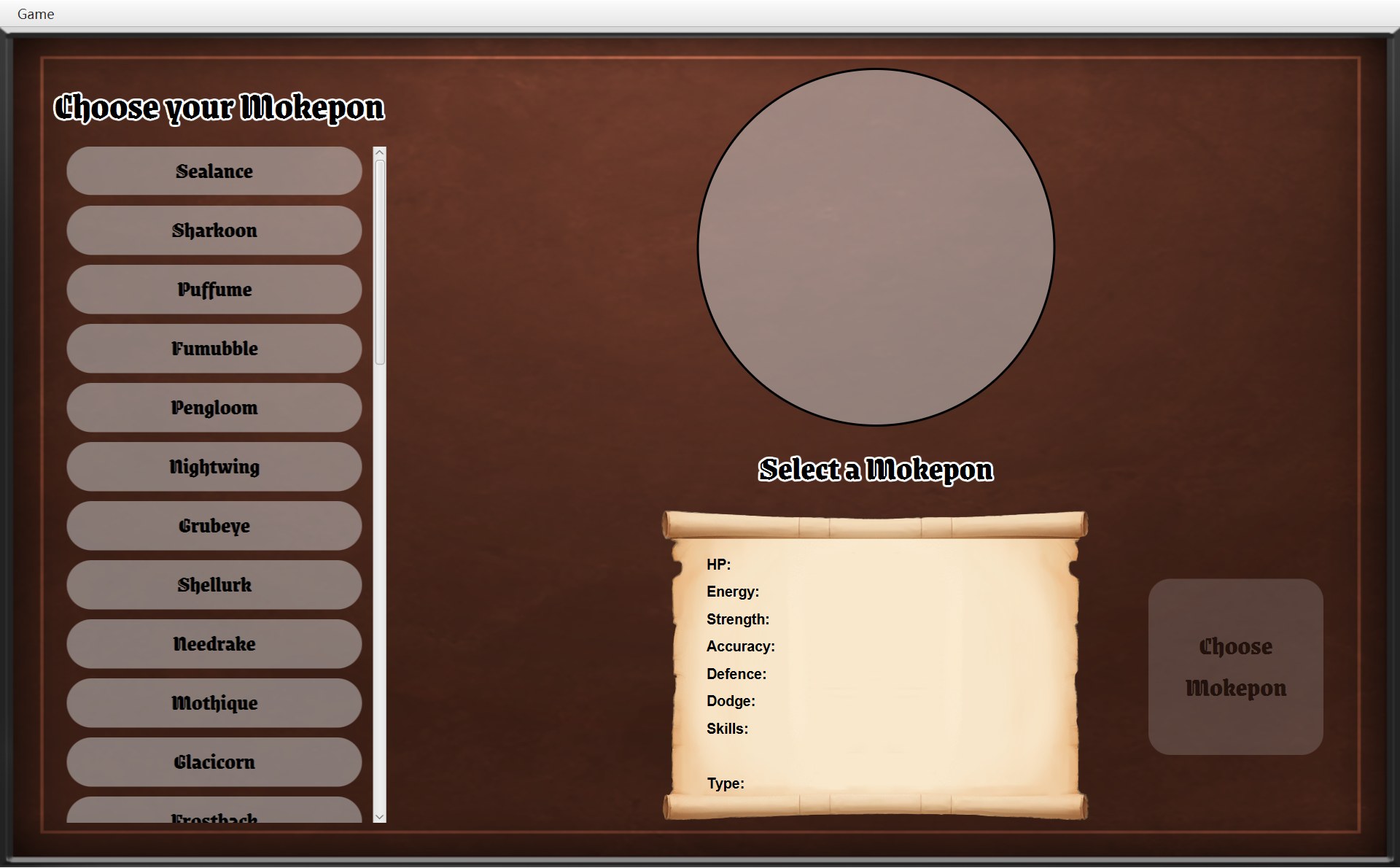 1
1- 1名字列表一共 36 个按钮:countEntries("mokepon.", ".name") 数出 36,MokeponParser 才知道要读 36 只
while (条件) { ... }:只要条件是 true,就一直重复(while 循环)。它和 for 不同:事先不知道要转几圈。这里每圈问一次“有没有 mokepon.数字.name 这个键”:
| count | 问 has(…) | 结果 |
|---|---|---|
| 0 | mokepon.0.name | 有,count 变成 1 |
| 1 | mokepon.1.name | 有,count 变成 2 |
| … | … | … |
| 35 | mokepon.35.name | 有,count 变成 36 |
| 36 | mokepon.36.name | 没有,停,返回 36 |
同一个方法还数出地图有 20 行(map.tiles.0 到 map.tiles.19)。另一个 while 在 CFighter.countDownEffects 里,配合迭代器(iterator)一边走一边删掉结束的效果(第 13 章)。
5. 集合:List、Map 和尖括号
List:一排按顺序放好的东西
19 private final Random random;20 private final List<String> log = new ArrayList<>();⋯ 省略第 21–36 行371 log.add("Player chose " + player.getName() + ". Began a fight against enemy "38 + enemy.getName() + "!");⋯ 省略第 39–78 行79 log.add("");802 log.add("Player's " + player.getName() + " used " + playerSkill.getName() + "!");81 log.add(playerSkill.use(player, enemy, random));⋯ 省略第 82–86 行87 Skill enemySkill = enemyStrategy.chooseSkill(enemy, random);883 log.add("Enemy " + enemy.getName() + " used " + enemySkill.getName() + "!");89 log.add(enemySkill.use(enemy, player, random));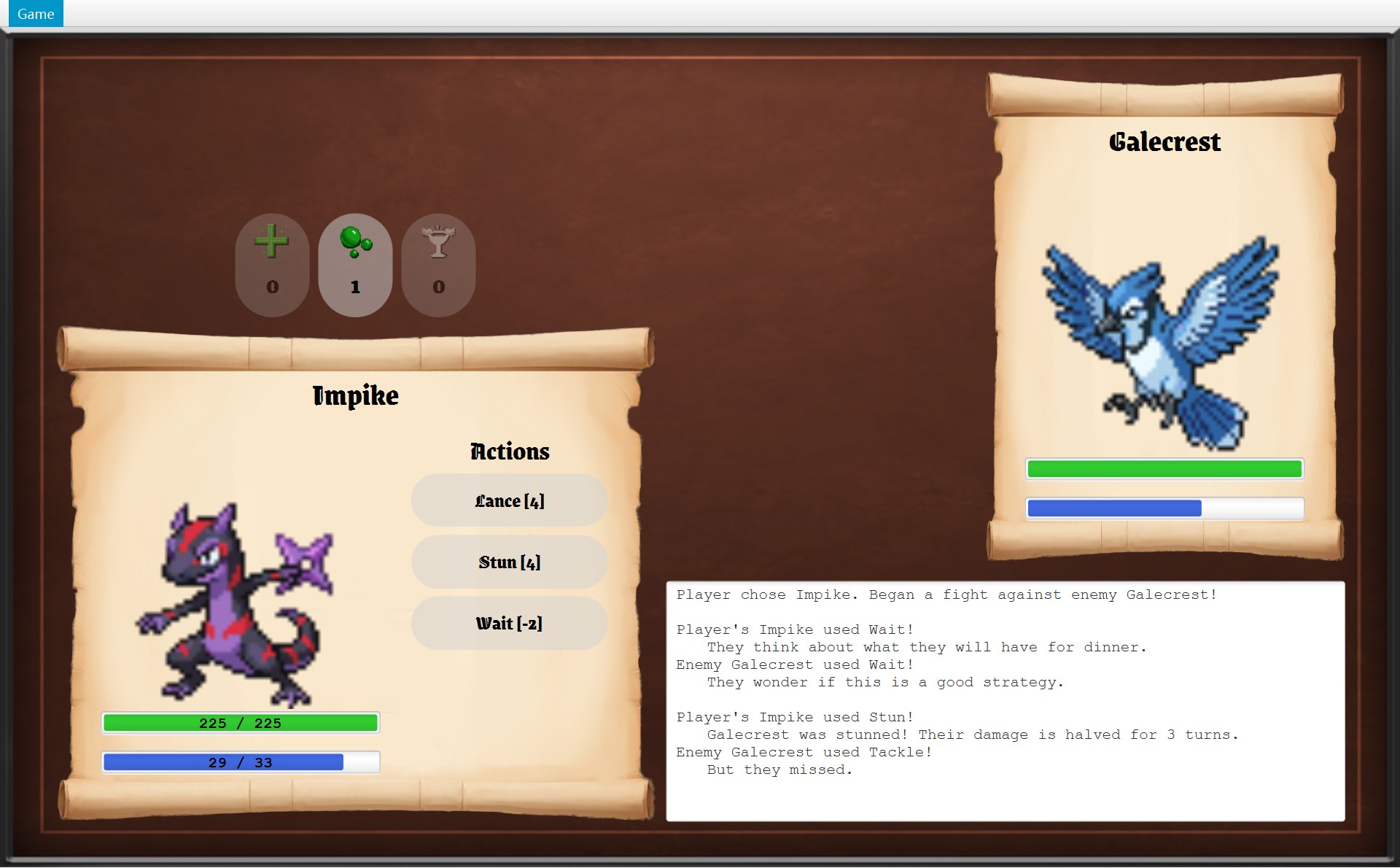
- 1第 1 行:构造器第 37 行 log.add(...)
- 2你出手:第 79 行先加一个空行,第 80、81 行再加两行
- 3敌人出手:第 88、89 行加的两行
- 第 20 行
List<String> log = new ArrayList<>():List<String>读成“一排 String”。尖括号里写“里面装的是什么类型”,这叫泛型(generics)。装错类型(比如往里放一个 int)编译就报错。 ArrayList是真正干活的类,一个能变长的列表(ArrayList)。后面的<>是省略写法,Java 自己会照着左边填上 String。- 字段的类型写的是 List(一个接口,第 7 节讲),实际 new 的是 ArrayList。这叫声明类型和实际类型不一样,以后会经常见到。
log.add(...)加在最后面。CBattleScreen 用String.join("\n", battle.getLog())把所有行用换行符接起来,放进日志框。
你的代码里有四种造 List 的方法,区别在于能不能改:
| 写法 | 能 add 吗 | 例子 |
|---|---|---|
new ArrayList<>() | 能 | Battle 的 log |
List.of(a, b, c) | 不能 | SkillCatalogue 的 SKILLS |
List.copyOf(list) | 不能(复制一份) | Mokepon 的 skills |
unmodifiableList(list) | 不能(只读视图) | Battle.getLog() |
List.of 和 List.copyOf 造出来的列表,谁调用 add 都会抛出异常(UnsupportedOperationException)。CMokepon 的构造器用 List.copyOf(skills) 复制一份自己的:外面的人就算以后改了自己手里那个列表,也影响不到这只 Mokepon(防御性复制)。unmodifiableList 不复制:原来的 log 变了,通过这个只读视图也能看到新的内容。(BattleScreen 每次 update 都会在 showLog 里重新调用一次 getLog(),见第 141–142 行。)
Map:用“键”查“值”
21 private final Mokepon mokepon;22 /* The stats at the start of this battle, after the terrain effect. */23 private final Map<Stat, Integer> startingStats = new EnumMap<>(Stat.class);24 /* The stats right now. They only change through the methods below. */25 private final Map<Stat, Integer> stats = new EnumMap<>(Stat.class);⋯ 省略第 26–51 行52 public int getStat(Stat stat) {53 return stats.get(stat);54 }55 56 public int getHp() {571 return getStat(Stat.HP);58 }59 60 public int getMaxHp() {612 return startingStats.get(Stat.HP);62 }- 1228:getHp() → getStat(Stat.HP) →
stats.get(Stat.HP),现在的 HP - 2280:getMaxHp() →
startingStats.get(Stat.HP),开打时的 HP,不会变
- Map 存的是一对一对的“键 → 值”。第 23、25 行
Map<Stat, Integer>:键是 EStat,值是 Integer。 - 读:
stats.get(Stat.HP)给出 HP 那一格的值。写:stats.put(Stat.HP, 新值)把旧值换掉(takeDamage 第 83 行就是这么扣血的)。 - 第 23、25 行等号右边的
new EnumMap<>(Stat.class):键是枚举时最合适的 Map(EnumMap)。括号里的Stat.class告诉它是哪一个枚举。它按枚举里写的顺序排:HP、ENERGY、STRENGTH…… - 为什么有两张?
stats是现在的数,打着打着会变;startingStats是开打时那一份,一直不变,所以血条右边一直是 280。Fighter 为什么要另存一份属性,在 第 10 章。
LinkedHashMap:记住放进去的顺序
10public class Inventory {11 /* A LinkedHashMap keeps the items in the order they were added. */12 private final Map<Item, Integer> counts = new LinkedHashMap<>();13 14 /* Start with none of each item. */15 public Inventory(List<Item> items) {16 for (Item item : items) {171 counts.put(item, 0);18 }19 }20 21 public List<Item> getItems() {22 return List.copyOf(counts.keySet());23 }24 25 public int getCount(Item item) {26 return counts.getOrDefault(item, 0);27 }28 29 public boolean has(Item item) {30 return getCount(item) > 0;31 }32 33 public void add(Item item) {34 counts.put(item, getCount(item) + 1);35 }- 1三行的顺序就是第 17 行 put 的顺序:Health Tonic、Coffee、Poison。都是 0,也是第 17 行 put(item, 0) 放的
第 12 行 private final Map<Item, Integer> counts = new LinkedHashMap<>();:背包要按 Health Tonic、Coffee、Poison 的顺序显示。普通的 HashMap 不保证顺序,遍历出来可能是乱的,所以这里用 LinkedHashMap(第 11 行的注释就这么写着)。构造器收到的 items 是 ItemCatalogue.getAll(),顺序就是这三个。
第 26 行 counts.getOrDefault(item, 0):有这个键就给它的值,没有就给 0(getOrDefault)。HashMap 用在不在乎顺序的地方,比如 CImageParser 第 30 行的 images 和 CMapView 第 26 行的 loadedImages。背包的全部代码在 第 13 章。
走一遍 Map:Map.Entry
156 /* Each item button shows how many are left, and is disabled when there are none. */157 private void updateItemButtons() {158 Inventory inventory = battle.getInventory();159 for (Map.Entry<Item, GameButton> entry : itemButtons.entrySet()) {160 Item item = entry.getKey();161 GameButton button = entry.getValue();1621 button.setText(String.valueOf(inventory.getCount(item)));1632 button.setUsable(!battle.isFinished() && inventory.has(item));164 }165 }- 1Health Tonic 和 Coffee:各有 1 个,第 162 行 setText("1")
- 2Poison:0 个,has 是 false,第 163 行 setUsable(false),变淡
第 159 行 for (Map.Entry<Item, GameButton> entry : itemButtons.entrySet()):entrySet() 给出所有的“键值对”,每一对是一个 Map.Entry<Item, GameButton>(Map.Entry):getKey() 是道具,getValue() 是它的按钮。String.valueOf(1) 把数字 1 变成文字 "1"。itemButtons 也是 LinkedHashMap,按 ItemCatalogue.getBattleOrder()(Health Tonic、Poison、Coffee)放进去的,所以按钮从左到右是这个顺序,和地图卷轴里的顺序不一样。(update() 每次都把按钮和 Battle 对一遍,见 第 14 章。)
泛型方法:一个方法读三种枚举(认得就行)
14 public GameImages parse(GameData data) {15 Map<MokeponType, String> typeImages =16 readImages(data, "mokepon.type.", MokeponType.values());17 Map<Terrain, String> tileImages = readImages(data, "map.tiles.images.", Terrain.values());18 Map<Direction, String> buttonImages =19 readImages(data, "map.buttons.", Direction.values());20 return new GameImages(typeImages, tileImages, buttonImages, readItemImages(data),21 data.getText("map.player.image"));22 }23 24 /* Generic method: read one image for each value of an enum. The key ends with the25 * value's name in lower case, for example map.tiles.images.grass for GRASS.26 * A value without a key is left out, which is how the normal type has no image.27 */28 private <T extends Enum<T>> Map<T, String> readImages(GameData data, String prefix,29 T[] values) {30 Map<T, String> images = new HashMap<>();31 for (T value : values) {32 String key = prefix + value.name().toLowerCase();331 if (data.has(key)) {34 images.put(value, data.getText(key));35 }36 }37 return images;38 }- 1Nightwing 是 NORMAL:数据文件里没有
mokepon.type.normal,第 33 行 has 是 false,没存图片,所以名字后面没有图标
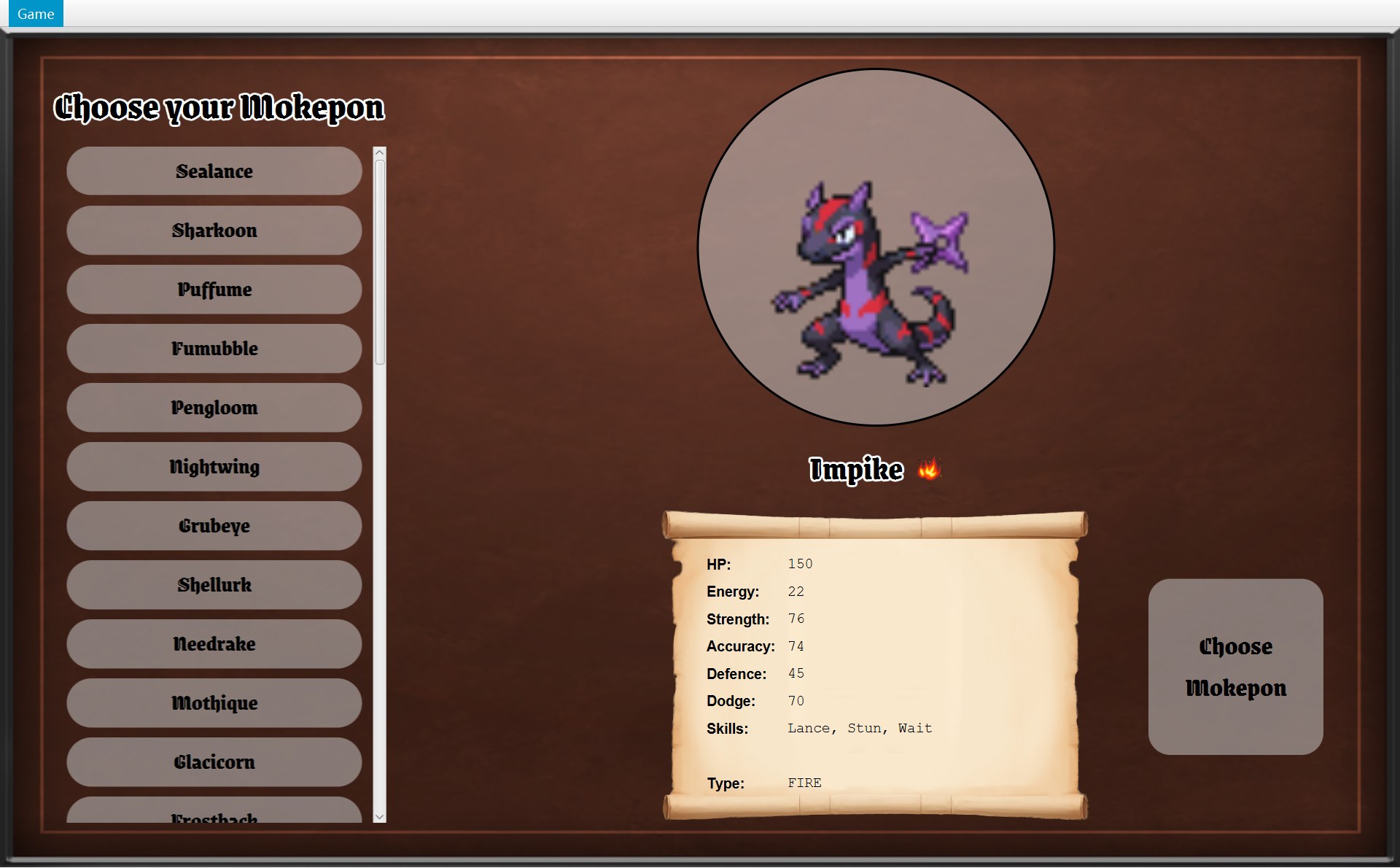
- 2Impike 是 FIRE:有
mokepon.type.fire=assets/sprite_fire.png,所以有火焰图标
第 28 行 <T extends Enum<T>>:T 是一个“先空着的类型”,调用的时候才确定,而且必须是某一种枚举(泛型方法)。第 16 行传进 MokeponType.values(),T 就是 MokeponType;第 17 行传 Terrain.values(),T 就是 Terrain。第 32 行 value.name().toLowerCase():GRASS 变成 "grass",拼成键 map.tiles.images.grass。同一段代码,三种枚举都能用,不用写三遍。
6. 枚举 enum:一组固定的对象
Stat:6 个常量,每个带 3 个值
1package au.edu.unimelb.swen.oop.mokepon.model;2 3/* The six stats of a Mokepon, and the legal range of each one. */41public enum Stat {52 HP("HP", 1, 1000),6 ENERGY("Energy", 1, 100),7 STRENGTH("Strength", 1, 100),8 ACCURACY("Accuracy", 1, 100),9 DEFENCE("Defence", 1, 100),10 DODGE("Dodge", 1, 100);11 12 private final String label;13 private final int minimum;14 private final int maximum;15 163 Stat(String label, int minimum, int maximum) {17 this.label = label;18 this.minimum = minimum;19 this.maximum = maximum;20 }21 22 public String getLabel() {23 return label;24 }25 26 /* Move a value into the legal range of this stat. */274 public int limit(int value) {28 return Math.max(minimum, Math.min(value, maximum));29 }30}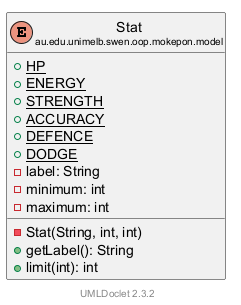
- 第 4 行
public enum Stat:枚举(enum)就是一个只有固定几个对象的类。这几个对象在第一次用到 Stat 时一起造好,以后不会多,也不会少。 - 第 5–10 行:6 个常量。
HP("HP", 1, 1000)的意思是:造一个叫 HP 的对象,把 "HP"、1、1000 交给构造器。用的时候写Stat.HP。 - 第 16–20 行:枚举的构造器。它只在造这 6 个常量时运行,别人不能写
new Stat(...)。第 16 行前面什么都没写,UML 里却是红色方块(private),原因看下面的小课堂。 - 第 27–29 行:普通的方法,把一个数压回合法范围。第 28 行
Math.max(minimum, Math.min(value, maximum)):Stat.STRENGTH.limit(114)=Math.max(1, Math.min(114, 100))= 100(限制范围)。
这个 limit 在真实运行时改过数字。Impike 在 FOREST 上打仗,FIRE 类型在森林里占优势,每个属性 × 1.5:
28 /* Prepare a Mokepon for a battle on a terrain that gives it the given effect.29 * Every stat is multiplied, rounded and kept inside its legal range.30 */31 public Fighter(Mokepon mokepon, TerrainEffect terrainEffect) {322 this.mokepon = mokepon;33 for (Stat stat : Stat.values()) {341 int value = stat.limit(terrainEffect.adjust(mokepon.getStat(stat)));35 startingStats.put(stat, value);36 stats.put(stat, value);37 }38 }- 2地图卷轴:Impike 原来的 HP 150、Energy 22,存在 Mokepon 里,从来不变
- 1战斗里:150 × 1.5 = 225,22 × 1.5 = 33
| Stat | 原来 | × 1.5 四舍五入 | limit 之后 |
|---|---|---|---|
| HP | 150 | 225 | 225(上限 1000) |
| ENERGY | 22 | 33 | 33 |
| STRENGTH | 76 | 114 | 100 |
| ACCURACY | 74 | 111 | 100 |
| DEFENCE | 45 | 67.5 → 68 | 68 |
| DODGE | 70 | 105 | 100 |
第 34 行 int value = stat.limit(terrainEffect.adjust(mokepon.getStat(stat))); 要从里往外读:mokepon.getStat(stat) 拿原来的数,terrainEffect.adjust(...) 乘 1.5 再用 Math.round 四舍五入(Math.round),stat.limit(...) 压回合法范围。Strength、Accuracy、Dodge 超过了 100,都被压回 100。
屏幕上看不到 Strength,但第 1 章里 Lance 打出的 83 点伤害,就是用这个 100 算的。Galecrest 在森林里吃亏(× 0.5),它的 Defence 59 × 0.5 = 29.5,四舍五入是 30。CFighter.calculateDamage(第 119–121 行):0.5(Lance 的 power,CLance 第 10 行 HALF_STRENGTH)× 100(Impike 的 Strength)× 50(DAMAGE_SCALE)÷ 30(Galecrest 的 Defence)= 83.33…;Impike 身上没有效果,倍数是 1;最后 (int) 去掉小数,得到 83。
Terrain 和 Direction:每个常量记着自己的数据
4public enum Terrain {5 BARRIER('B', false),6 FOREST('F', true),7 GRASS('G', true),8 OCEAN('O', false),9 PATH('P', true),10 ROCKS('R', true),11 WATER('W', true);12 13 private final char symbol;14 private final boolean walkable;15 16 Terrain(char symbol, boolean walkable) {17 this.symbol = symbol;18 this.walkable = walkable;19 }20 21 public boolean isWalkable() {22 return walkable;23 }24 25 /* Find the terrain for one letter of a map.tiles row. */26 public static Terrain fromSymbol(char symbol) {27 for (Terrain terrain : values()) {28 if (terrain.symbol == symbol) {29 return terrain;30 }31 }32 throw new IllegalArgumentException("Unknown tile: " + symbol);33 }3/* The four ways the player can move. y grows downwards, so up takes one away from y. */4public enum Direction {5 UP(0, -1),6 DOWN(0, 1),7 LEFT(-1, 0),8 RIGHT(1, 0);9 10 private final int xChange;11 private final int yChange;12 13 Direction(int xChange, int yChange) {14 this.xChange = xChange;15 this.yChange = yChange;16 }BARRIER('B', false):'B'是一个字符(char,用单引号;双引号是 String);false 表示不能走。数据文件map.tiles.12=GGWWGGBBPP…第 6 个字母(从 0 数)是 B,所以 (6,12) 是墙,就是第 4 节截图里挡住玩家的那一格。fromSymbol是 static 方法:用 for-each 走一遍values(),terrain.symbol == symbol用 == 比较两个 char(char 是基本类型,可以用 ==)。哪个都对不上,第 32 行就抛出异常Unknown tile:加上那个字母(第 8 节)。UP(0, -1):往上走,x 不变,y 减 1。本章第 1 节的动画里,Position.move 读的就是这两个数。
MokeponType 和 TerrainEffect:遇敌框里的那两句话
7 /* A normal Mokepon has no strong or weak terrain, so both are null. */8 NORMAL(null, null),9 FIRE(Terrain.FOREST, Terrain.WATER),10 ICE(Terrain.ROCKS, Terrain.GRASS),11 WATER(Terrain.WATER, Terrain.ROCKS),12 LIGHTNING(Terrain.GRASS, Terrain.FOREST);⋯ 省略第 13–21 行22 /* Find whether this type is at an advantage, a disadvantage or neither on the terrain. */23 public TerrainEffect getEffectOn(Terrain terrain) {24 if (terrain == strongTerrain) {25 return TerrainEffect.ADVANTAGE;26 }27 if (terrain == weakTerrain) {28 return TerrainEffect.DISADVANTAGE;29 }30 return TerrainEffect.NEUTRAL;31 }44 /* Messages for the encounter dialog. A neutral Mokepon gets no message. */45 public List<String> getTerrainMessages() {46 List<String> messages = new ArrayList<>();471 addTerrainMessage(messages, "Your mokepon", getPlayerEffect());48 addTerrainMessage(messages, "Your enemy", getEnemyEffect());49 return messages;50 }⋯ 省略第 51–58 行59 private void addTerrainMessage(List<String> messages, String who, TerrainEffect effect) {602 if (effect != TerrainEffect.NEUTRAL) {61 messages.add(who + " will be " + effect.getDescription() + " here!");62 }63 }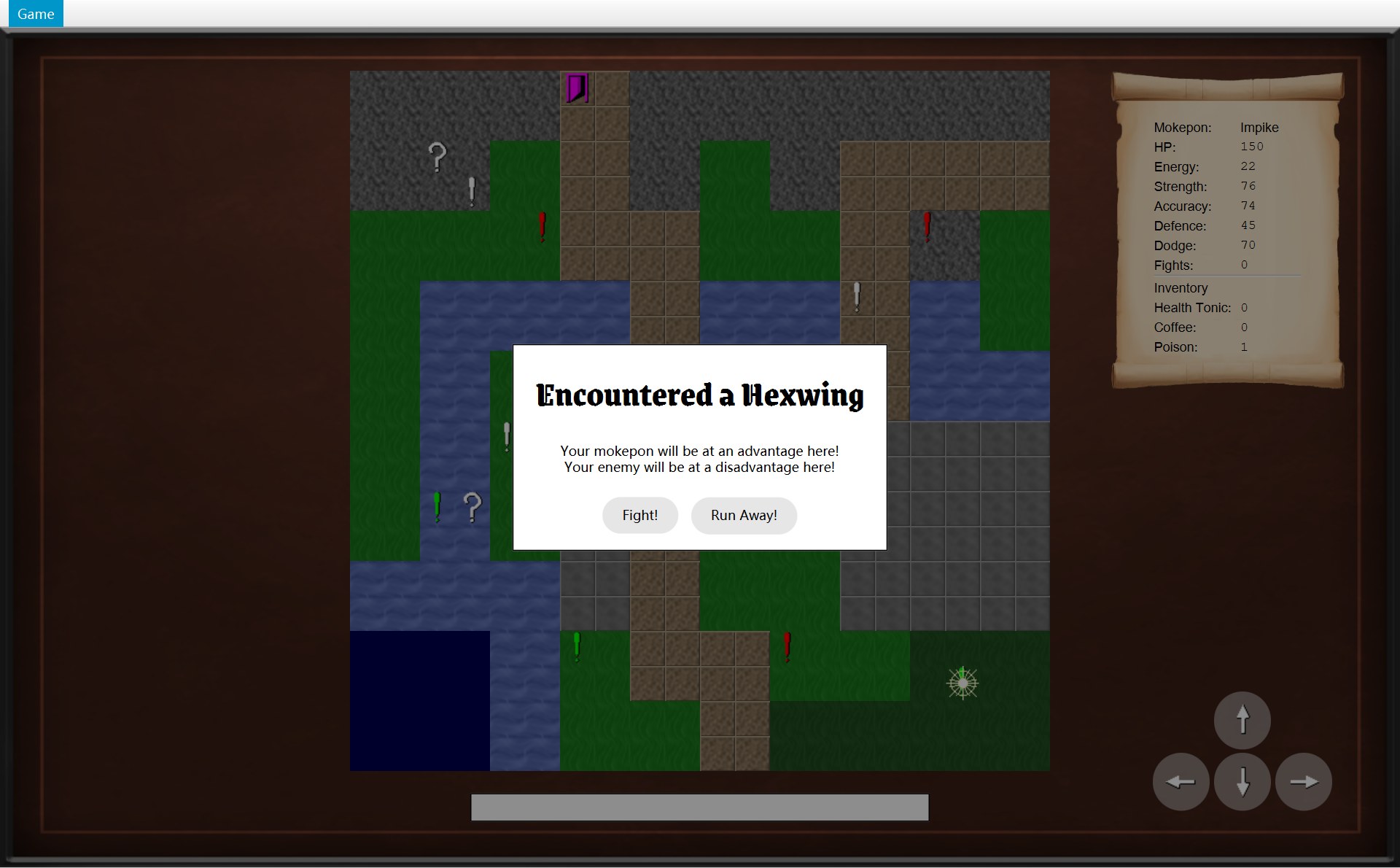
- 1两句地形提示:第 47 行算你的,第 48 行算敌人的
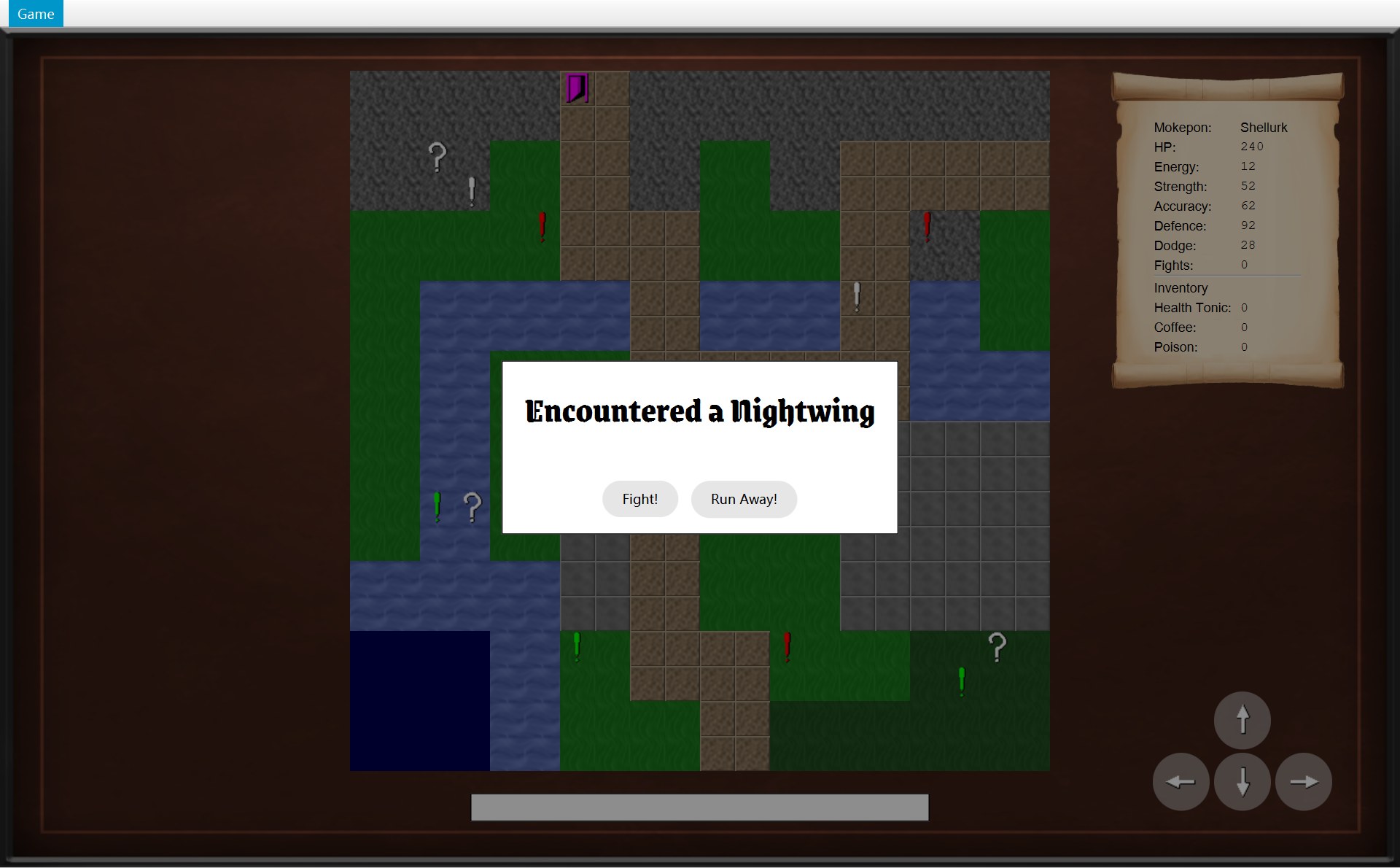
- 2没有提示:Shellurk 和 Nightwing 都是 NORMAL,结果是 NEUTRAL,第 60 行的 if 不成立,什么都没加
FIRE(Terrain.FOREST, Terrain.WATER):一个枚举的常量里,存着另一个枚举的常量。FIRE 的强项是森林,弱项是水。- getEffectOn 用
terrain == strongTerrain比较。枚举可以放心用 ==,因为每个常量只有一个对象(== 和 equals)。 - 真实的一局:(17,17) 是 FOREST。Impike 是 FIRE,
FOREST == strongTerrain,得到 ADVANTAGE;Hexwing 是 LIGHTNING(LIGHTNING(Terrain.GRASS, Terrain.FOREST)),森林是它的弱项,得到 DISADVANTAGE。 - 这一局遇到 Hexwing 时点的是 Run Away!,玩家退回上一格;再踩同一个感叹号时,又随机挑了一次,这次挑到的是 Galecrest(也是 LIGHTNING,在森林里同样吃亏,提示文字一模一样)。所以本章里 Impike 那一局的战斗截图,敌人都是 Galecrest。
- ETerrainEffect 里写着
ADVANTAGE(1.5, "at an advantage")。getDescription() 交回 "at an advantage",第 61 行用 + 拼起来:"Your mokepon" + " will be " + "at an advantage" + " here!"(字符串拼接)。 NORMAL(null, null):普通类型没有强项也没有弱项,两个都是 null。terrain == null永远不成立,所以总是 NEUTRAL,遇敌框里没有提示。
枚举自带的三个方法
27 private Mokepon parseMokepon(GameData data, String prefix) {28 String name = data.getText(prefix + "name");29 String imagePath = data.getText(prefix + "image");30 MokeponType type = MokeponType.valueOf(data.getText(prefix + "type"));31 32 /* Each stat key is the stat name in lower case, for example mokepon.0.hp. */33 Map<Stat, Integer> stats = new EnumMap<>(Stat.class);34 for (Stat stat : Stat.values()) {35 stats.put(stat, data.getNumber(prefix + stat.name().toLowerCase()));36 }37 38 List<Skill> skills = parseSkills(data.getText(prefix + "skills"));39 return new Mokepon(name, imagePath, type, stats, skills);40 }values():全部常量,按写的顺序。第 34 行就在用。valueOf("WATER"):按名字找常量。第 30 行:数据文件写mokepon.0.type=WATER,得到MokeponType.WATER。名字必须一模一样,写成 Water 会抛出异常。name():常量自己的名字。第 35 行stat.name().toLowerCase():HP 变成 "hp",拼成键mokepon.0.hp。(枚举自带的方法)
7. 继承、抽象类、接口和多态
继承:Coffee 是一种 Item
1package au.edu.unimelb.swen.oop.mokepon.item;2 3import au.edu.unimelb.swen.oop.mokepon.battle.Fighter;4 5/* Gives the player's Mokepon all of its energy back. */61public class Coffee extends Item {7 public Coffee() {82 super("COFFEE", "Coffee", "coffee");9 }10 113 @Override12 public String use(Fighter player, Fighter enemy) {13 player.restoreEnergy();14 return describeUse(player, "It restored all your energy!");15 }16}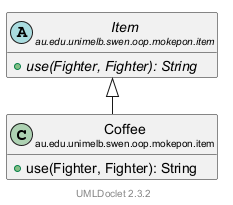
- 第 6 行
extends Item:Coffee 继承 Item。Coffee 是子类(subclass),Item 是父类(superclass)。读成 a Coffee is an Item(“是一种”关系)。 - 第 8 行
super("COFFEE", "Coffee", "coffee"):super(...) 调用父类 Item 的构造器(Item 第 14–18 行),把三个名字存进 Item 的三个字段。和 this(...) 一样,它写在构造器的第一句(第 2 节的小课堂)。 - 第 11–15 行
@Override public String use(...):改写父类的 use。第 14 行的 describeUse 是从 Item 继承来的,Coffee 自己没写它也能用。
6public abstract class Item {7 /* How the data file names this item in a mystery box, for example HEALTH. */8 private final String typeName;9 /* The name shown to the player, for example Health Tonic. */10 private final String name;11 /* The end of the data file key for its battle image, for example heal for items.heal. */12 private final String imageName;13 141 protected Item(String typeName, String name, String imageName) {15 this.typeName = typeName;16 this.name = name;17 this.imageName = imageName;18 }19 20 public String getTypeName() {21 return typeName;22 }23 242 public String getName() {25 return name;26 }⋯ 省略第 27–31 行32 /* Use the item in a battle and return the message for the battle log.33 * Using an item always works, so there is no hit check.34 */353 public abstract String use(Fighter player, Fighter enemy);36 37 /* Every item message starts the same way, for example38 * "You used your Coffee on Fumubble. It restored all your energy!".39 */404 protected String describeUse(Fighter target, String result) {41 return "You used your " + name + " on " + target.getName() + ". " + result;42 }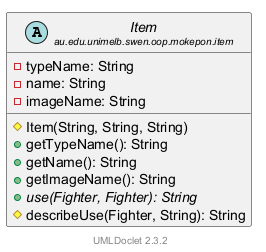
Coffee 从 Item 那里得到了什么?
- 字段 typeName、name、imageName:每个 Coffee 对象里都有这三个字段,由 Item 的构造器赋值。但它们是 private 的,按 Java 的说法,private 的成员不算被继承:Coffee 的代码看不到它们,不能直接写
name,要用getName()。 - public 方法(红圈 2 那几个 getter):继承下来,Coffee 自动就有。地图卷轴里的 “Coffee:” 就是
getName()返回的。 - protected 方法(红圈 4)第 40 行
protected String describeUse(Fighter target, String result):继承下来,子类可以调用。所以三种道具的日志都是 “You used your … on …” 开头,这句话只写了一遍。 - 构造器不继承(红圈 1)。第 14 行的构造器是 protected:只有子类能通过 super(...) 调用它;再加上 Item 是 abstract,外面的人根本没法直接造一个 Item。每个子类自己写构造器,再用 super(...) 交给父类。
抽象类:为什么不能 new Item()
Item 第 6 行 public abstract class Item,第 35 行(红圈 3)public abstract String use(Fighter player, Fighter enemy);:只有方法头,没有大括号里的方法体,用分号结束。这叫抽象方法。意思是“每种道具都必须会 use,但怎么用由子类自己决定”。
- 有抽象方法的类必须是抽象类(abstract class)。抽象类不能 new:写
new Item(...)编译出错。只能 new 具体的子类(具体类):new Coffee()。 - 子类必须把全部抽象方法都写出来,否则它自己也得写成 abstract。
- UML 里抽象的东西是斜体,圆圈里是 A。
- ASkill 也一样:第 36 行
protected abstract String applyEffect(...)。中间层 ATargetedSkill、AAttackSkill、ABoostSkill 也是抽象类,十个具体技能在最下面(第 12 章)。
接口:EnemyPicker 只规定“要会 pick”
8/* Strategy: chooses which Mokepon the player meets at a marker.9 * Random, strong and weak markers only differ in the picker they use.10 */11public interface EnemyPicker {12 Mokepon pick(List<Mokepon> mokepons, Terrain terrain, Random random);13}8/* Picks any Mokepon from the list. The terrain does not matter. */9public class RandomEnemyPicker implements EnemyPicker {10 11 @Override12 public Mokepon pick(List<Mokepon> mokepons, Terrain terrain, Random random) {13 return mokepons.get(random.nextInt(mokepons.size()));14 }15}接口(interface)里只写方法头:第 12 行 Mokepon pick(List<Mokepon> mokepons, Terrain terrain, Random random);,同样用分号结束。接口里的方法默认就是 public、abstract,所以不用写这两个词。implements EnemyPicker(implements)的意思是“我保证把 pick 写出来”。还有一个实现是 CTerrainEnemyPicker:它先挑在这个地形上有优势(或劣势)的 Mokepon;一个都没有时,谁都可能出来(TerrainEnemyPicker 第 30–32 行)。
29 /* Each marker group has its own way of choosing the enemy. */30 List<MapObject> objects = new ArrayList<>();311 objects.addAll(parseMarkers(data, "map.mokeponRandom", new RandomEnemyPicker()));322 objects.addAll(parseMarkers(data, "map.mokeponStrong",33 new TerrainEnemyPicker(TerrainEffect.ADVANTAGE)));343 objects.addAll(parseMarkers(data, "map.mokeponWeak",35 new TerrainEnemyPicker(TerrainEffect.DISADVANTAGE)));- 1白色(mokeponRandom):picker 是 RandomEnemyPicker,谁都可能出来
- 2红色(mokeponStrong):TerrainEnemyPicker(ADVANTAGE),挑在这里占优势的
- 3绿色(mokeponWeak):TerrainEnemyPicker(DISADVANTAGE),挑在这里吃亏的
三种感叹号用的是同一个 CMarker 类,区别只在造它的时候交进去的 picker 对象。Marker 只知道“我有一个 EnemyPicker”,第 21 行调用 picker.pick(...),不知道也不关心它到底是哪一种。这叫面向接口编程,也是策略模式(Strategy,第 9 章、第 16 章)。上面截图第 3 个绿色感叹号,就是第 6 节里遇到 Hexwing、后来又遇到 Galecrest 的那一个:两只都是 LIGHTNING,在森林里吃亏,正好是“weak”这一组想要的。
战斗里也有一个一模一样的结构:CBattle 的字段 private final EnemyStrategy enemyStrategy; 的类型是接口 IEnemyStrategy,第 87 行 enemyStrategy.chooseSkill(enemy, random) 让它替敌人挑技能。现在只有一个实现 CRandomEnemyStrategy(在敌人能量够用的技能里随便挑一个)。EnemyStrategy 的注释写着:以后想要更聪明的敌人,写一个新的实现就行,不用改 Battle。
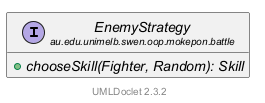
| 抽象类 Item | 接口 EnemyPicker | |
|---|---|---|
| 关键字 | abstract class,子类 extends | interface,实现类 implements |
| 对象自己的字段 | 能有(typeName 等) | 不能有 |
| 写好的方法 | 能有(getName、describeUse) | 你的接口里都没有 |
| 一个类能接几个 | 只能 extends 一个 | 能 implements 好几个 |
最后一行的例子:public class OverworldScreen extends GameScreen implements OverworldListener,同时继承一个父类、实现一个接口。
多态:同一句 item.use(player, enemy)
98 /* Use one item from the inventory. An item always works,99 * and using it does not give the enemy a turn.100 */101 public void useItem(Item item) {102 if (finished || !inventory.has(item)) {103 return;104 }105 inventory.remove(item);106 log.add("");107 log.add(item.use(player, enemy));108 }参数 item 的类型写的是 AItem(声明类型),但它实际指着的对象是 CPoison、CCoffee 或 CHealthTonic 中的一个(实际类型)。程序运行到第 107 行时,Java 看的是实际的对象:是 Poison 就运行 Poison 的 use,是 Coffee 就运行 Coffee 的 use。这叫多态(polymorphism),背后的机制叫动态绑定。Battle 里没有一句 “如果是咖啡……否则如果是毒药……”。
先用顺序图看一遍点 Poison 时谁调用谁。读法见第 1 章第 3 节:每根竖虚线是一个对象,从上往下是时间,实线箭头 = 调用,虚线箭头 = 返回,绕回自己 = 调用自己的方法。
第 1 步是 BattleScreen 自己的 private 方法 useItem(第 122–125 行),它和 Battle 的 useItem 同名,但不是同一个方法:它先调用 battle.useItem(item)(第 2 步),等 Battle 做完再调用 update()(第 10 步)。第 3 步 has(item) 就是 Battle 第 102 行的检查:背包里没有就直接 return。
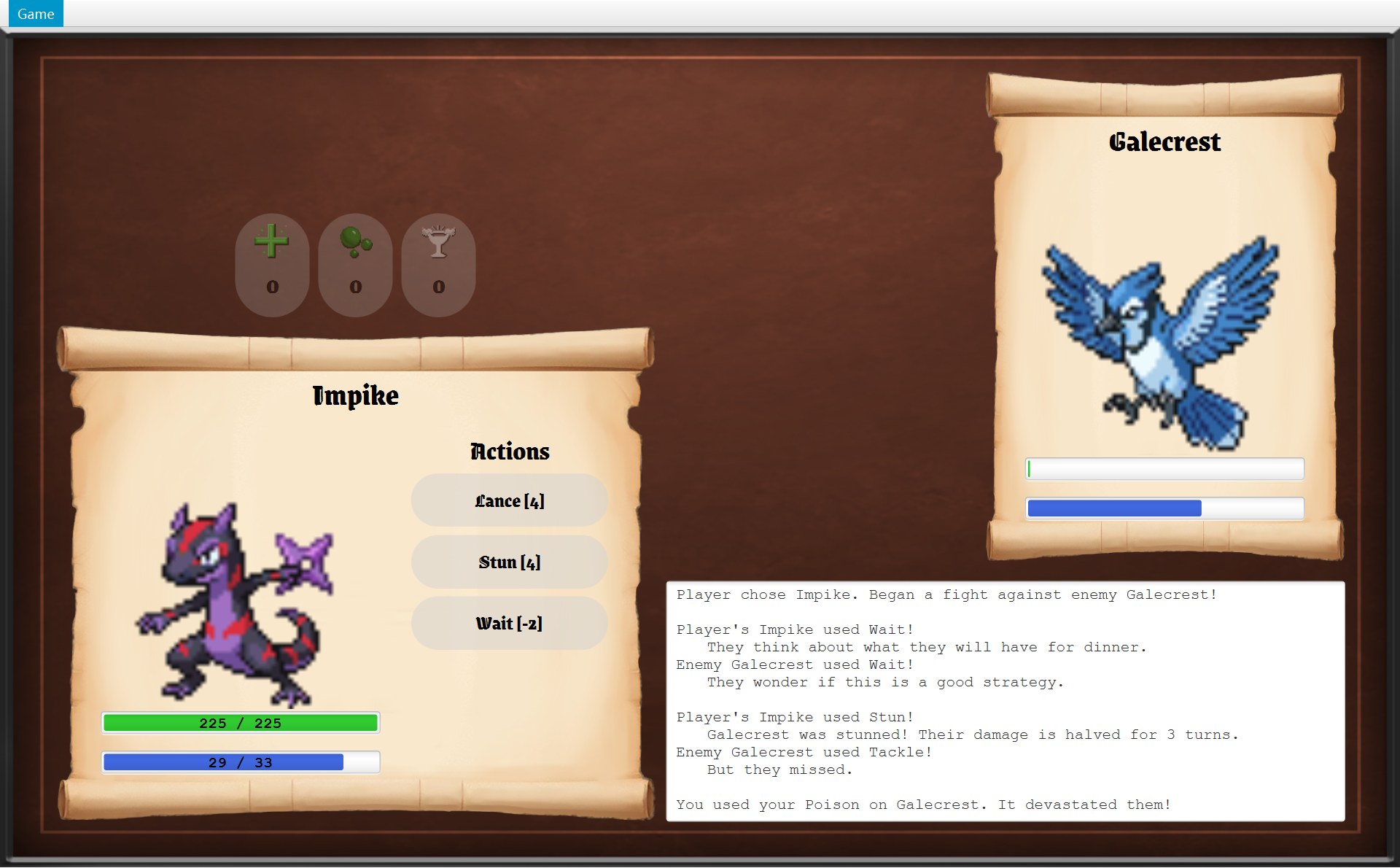
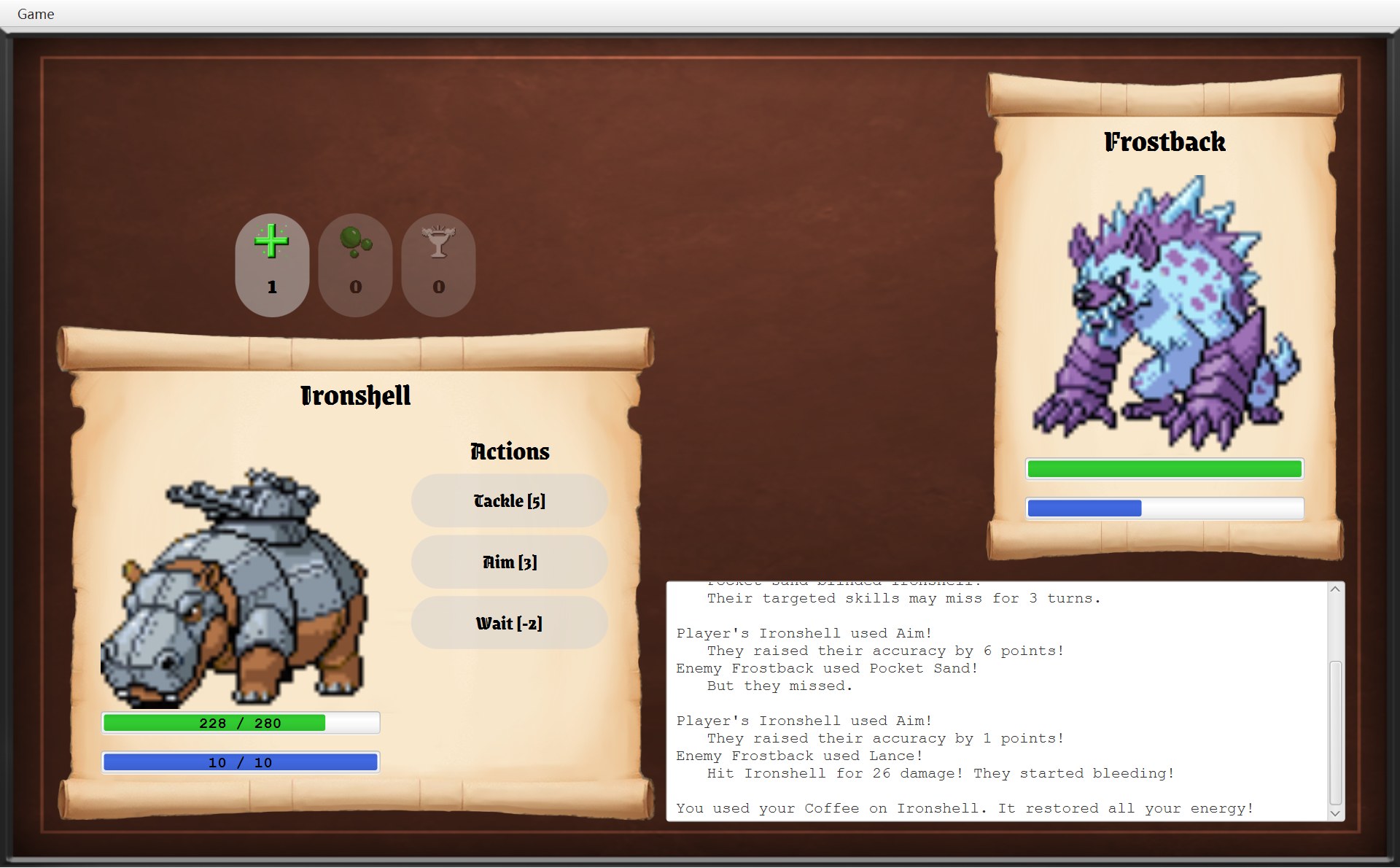
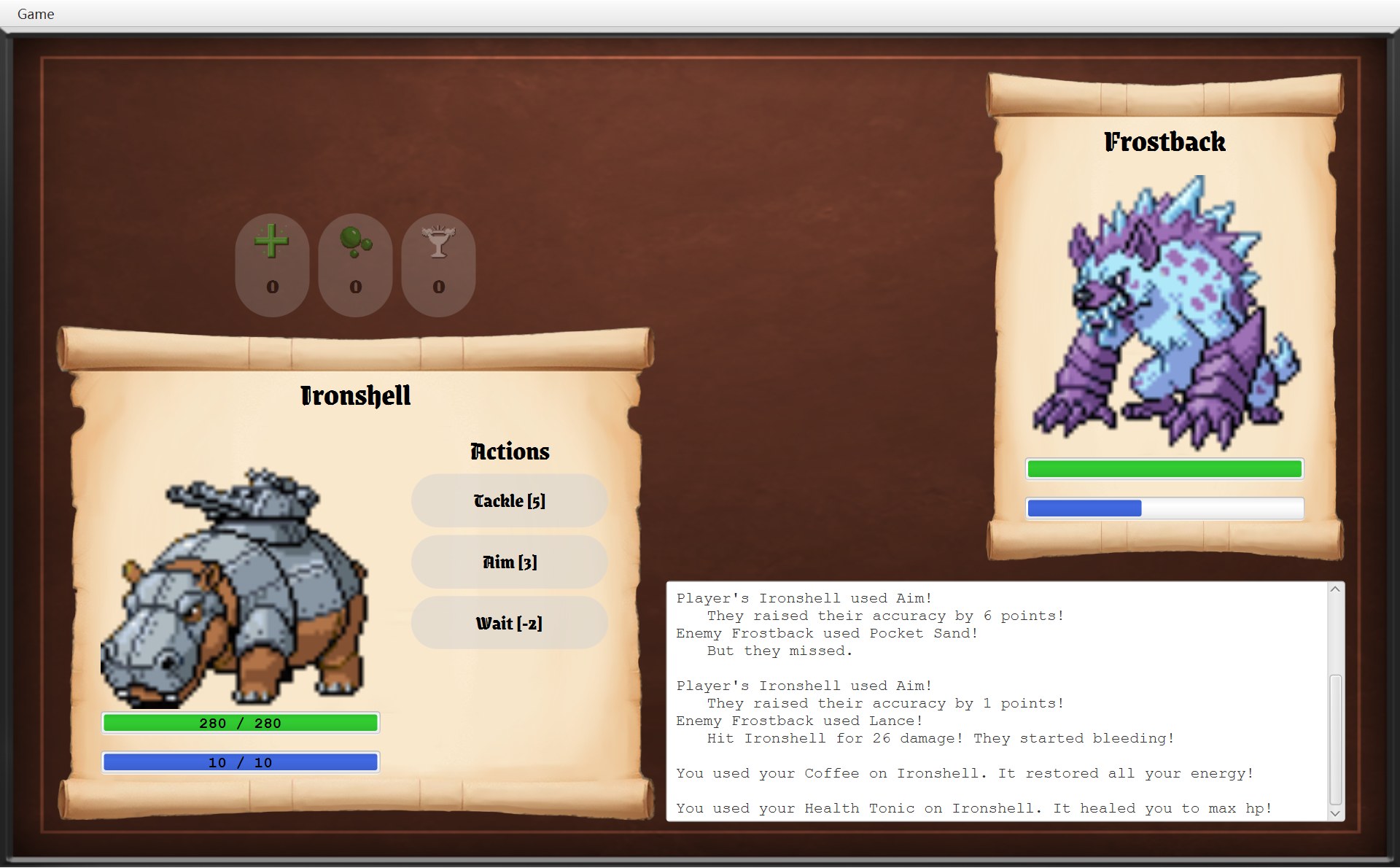
下面的动画把三种道具都跑一遍:前三步是 Impike 那一局用 Poison(敌人 Galecrest),后面是另一局(玩家选了 Ironshell,敌人 Frostback)连着用 Coffee 和 Health Tonic。左上角(手机上是最上面)的 useItem 代码一直不变,它下面的代码框换成当时真正运行的那个 use。其余都是放大的真实截图,数字的意思:1 = 这一步用的道具按钮,2 = 这个道具改掉的那个数,3 = 日志里新加的一行。
101 public void useItem(Item item) {102 if (finished || !inventory.has(item)) {103 return;104 }105 inventory.remove(item);106 log.add("");107 log.add(item.use(player, enemy));108 }11 @Override12 public String use(Fighter player, Fighter enemy) {13 enemy.reduceHpToOne();14 return describeUse(enemy, "It devastated them!");15 }11 @Override12 public String use(Fighter player, Fighter enemy) {13 player.restoreEnergy();14 return describeUse(player, "It restored all your energy!");15 }11 @Override12 public String use(Fighter player, Fighter enemy) {13 player.restoreHp();14 return describeUse(player, "It healed you to max hp!");15 }- 1Poison 按钮:1 个
- 1Poison 按钮:0 个,变淡
- 1Coffee 按钮:1 个(另一局)
- 1Coffee 按钮:0 个,变淡
- 1Health Tonic 按钮:1 个
- 1Health Tonic 按钮:0 个,变淡
- 2敌人 Galecrest 的 HP:93 / 93,满的
- 2敌人 Galecrest 的 HP:1 / 93,绿条只剩一点点
- 2Ironshell 的能量:1 / 10
- 2Ironshell 的能量:10 / 10
- 2Ironshell 的 HP:228 / 280
- 2Ironshell 的 HP:280 / 280
- 3日志新的一行:Poison.use 交回的文字
- 3日志新的一行:Coffee.use 交回的文字
- 3日志新的一行:HealthTonic.use 交回的文字
- Impike 那一局。背包里有 1 个 Poison(1),敌人的血条还是满的(2;敌人的血条上不写数字)。你点 Poison 按钮:按钮里存着的 lambda
event -> useItem(item)(BattleScreen 第 218 行,第 8 节讲)开始运行,经过 BattleScreen 自己的 useItem,调用到 Battle 的useItem(item)。这里的 item 就是 Poison 那个对象。 - 第 102 行先检查:战斗没结束,背包里也有这个道具(has 是 true),所以不 return。第 105 行从背包拿掉一个,第 106 行日志先加一个空行。
- 第 107 行
item.use(player, enemy)。item 实际是 Poison,所以运行的是 Poison.use 那个代码框里的 use:第 13 行enemy.reduceHpToOne(),敌人 HP 变成 1(2:绿条只剩一点点);第 14 行交回You used your Poison on Galecrest. It devastated them!,Battle 把它加进日志(3)。按钮变成 0 个(1)。 - 换到另一局:Ironshell 的能量只剩 1 / 10(2),所以 Tackle 和 Aim 都灰了(第 4 节“三元运算符”那张截图就是这一刻)。背包里有 1 个 Coffee(1)。点 Coffee:调用的是同一个 useItem,第 101–106 行和刚才完全一样。
- 还是第 107 行这一句,一个字都没变。但这次 item 实际是 Coffee,运行的是 Coffee 的 use:
player.restoreEnergy(),能量回到 10 / 10(2)。第 14 行 describeUse 传的是 player,所以日志写 “on Ironshell”(3);刚才 Poison 传的是 enemy,写的是 “on Galecrest”。 - 接着点 Health Tonic(1)。现在 HP 是 228 / 280(2)。又走一遍同样的检查和 remove。日志里还没有新的一行。
- 第 107 行第三次运行,这次 item 是 HealthTonic:
player.restoreHp(),HP 回到 280 / 280(2)。日志多了You used your Health Tonic on Ironshell. It healed you to max hp!(3)。 - 总结:三次都是同一行
item.use(player, enemy),结果不一样,因为对象不一样。还有一点:useItem 里根本没有调用 enemyStrategy,所以用道具不给敌人出手的机会,三次日志里都没有 “Enemy … used”。以后加一种新道具,只要写一个新的 Item 子类,再放进 CItemCatalogue,Battle 一行都不用改。
8. Lambda、异常和 null
Lambda:一小段“以后再运行”的代码
181 /* One button per skill, showing its energy cost, e.g. "Bite [1]". */182 private VBox createSkillButtons(List<Skill> skills) {183 VBox buttonColumn = new VBox(SKILL_GAP);184 buttonColumn.setLayoutX(ACTIONS_X);185 buttonColumn.setLayoutY(SKILLS_Y);186 187 Font font = UiStyle.loadGameFont(SKILL_FONT_SIZE);188 for (Skill skill : skills) {189 GameButton button = new GameButton(skill.getName() + " [" + skill.getEnergyCost()190 + "]", font, BUTTON_RADIUS);191 button.setPrefSize(SKILL_WIDTH, SKILL_HEIGHT);192 button.addPressEffect();1931 button.setOnAction(event -> useSkill(skill));194 skillButtons.add(button);195 buttonColumn.getChildren().add(button);196 }197 return buttonColumn;198 }- 1三个按钮:for 循环转了三圈,每圈第 193 行给按钮装一个自己的 lambda。Lance 按钮的记着 Lance,Stun 的记着 Stun,Wait 的记着 Wait
- 第 193 行
button.setOnAction(event -> useSkill(skill));。event -> useSkill(skill)是一个 lambda:一小段被当成值交出去的代码。箭头左边event是参数(JavaFX 到时候交进来的“点击事件”),箭头右边是要做的事。 - 第 193 行运行的时候(还在造画面),不会调用 useSkill。setOnAction 只是把这段代码存进按钮里。等你真的点了这个按钮,JavaFX 才运行它。这种“先交出去、以后被叫回来”的代码也叫回调(callback)。
skill是循环变量。第 1 圈它是 Lance,第 2 圈是 Stun……每个 lambda 记住的是造它那一圈的 skill。lambda 用到外面的变量,叫变量捕获。
lambda 也可以有好几句,用大括号包起来。比如遇敌框的 Fight! 按钮(COverworldScreen 第 85–88 行):event -> { closeDialog(); getNavigator().startBattle(); }。
Consumer:把“通知什么”当成参数交出去
先看谁在等通知。COverworldScreen 实现了接口 IOverworldListener,开新游戏时 CGameWindow 把它登记到 Overworld 那里:
20/* The overworld screen: the map, the player's stats scroll, the movement buttons21 * and the status bar. It listens to the overworld (Observer), and only shows22 * what happens; the rules for moving live in the Overworld class.23 */24public class OverworldScreen extends GameScreen implements OverworldListener {56 /* Every new game starts with a fresh map, an empty inventory and no fights won. */57 @Override58 public void startGame(Mokepon playerChoice) {59 world = new Overworld(map, mokepons, playerChoice);60 overworldScreen = new OverworldScreen(world, images, this);61 world.addListener(overworldScreen);62 showScreen(overworldScreen);63 }第 61 行 world.addListener(overworldScreen) 把画面放进 Overworld 的 listeners 列表(Overworld 第 23 行)。被登记、等着收消息的对象叫监听者(listener)。然后看 Overworld 怎么通知:
65 /* Move the player one tile, then let every object on the new tile react. */66 public void move(Direction direction) {67 if (!canMove(direction)) {68 return;69 }70 player.moveTo(player.getPosition().move(direction));711 notifyListeners(listener -> listener.onPlayerMoved());⋯ 省略第 72–109 行110 /* Called by a mystery box when the player steps onto it. A box can only be collected once. */111 void collect(MysteryBox box) {112 objects.remove(box);113 player.getInventory().add(box.getItem());1142 notifyListeners(listener -> listener.onItemCollected(box.getItem()));115 }⋯ 省略第 116–121 行122 /* Send the same message to every registered listener.123 * The lambda says which listener method to call.124 */125 private void notifyListeners(Consumer<OverworldListener> message) {126 for (OverworldListener listener : listeners) {127 message.accept(listener);128 }129 }- 1第 71 行通知 onPlayerMoved:画面 update(),白星挪到 (18,16)
- 2踩到箱子后第 114 行通知 onItemCollected:画面把 You picked up a Poison! 写进状态栏(OverworldScreen 第 98 行)
- 第 125 行:notifyListeners 的参数类型是
Consumer<OverworldListener>(Consumer):“拿到一个 OverworldListener 以后,对它做点事”的那种 lambda。 - 第 126–128 行:for-each 走一遍登记过的监听者(这里只有一个:OverworldScreen)。第 127 行
message.accept(listener)的意思是:对这个 listener 运行交进来的那段 lambda。 - 第 71 行交进来的是
listener -> listener.onPlayerMoved(),所以监听者的 onPlayerMoved() 被调用;第 114 行交进来的是listener -> listener.onItemCollected(box.getItem())。 - 同一个 notifyListeners 被用了 6 次(第 71、90、99、107、114、119 行),每次交进来的 lambda 不一样,循环却只写了一遍。
Overworld 从头到尾只认识接口 OverworldListener,不知道画面长什么样:这就是观察者模式,在 第 8 章细讲。
异常:throw、try / catch
15 /* Find a skill by its exact, case-sensitive name. */16 public static Skill find(String name) {17 for (Skill skill : SKILLS) {18 if (skill.getName().equals(name)) {19 return skill;20 }21 }22 throw new IllegalArgumentException("Unknown skill: " + name);23 }第 22 行 throw new IllegalArgumentException("Unknown skill: " + name);:造一个异常(exception)对象,然后把它“扔”出去(throw)。这个方法马上停下,什么都不 return。异常沿着“谁调用了谁”一层一层往外跑,直到有一个 catch 接住它。一直没人接住的话,Java 在控制台打印一大段错误信息(stack trace):如果是在启动时的 start 里抛出的,程序就此结束(见本节后面的“容易搞错”);如果是点按钮时抛出的,JavaFX 只打印错误,窗口还开着。
14 /* The first argument must look like data=relativeFilePath.15 * If the file is missing, the exception message is its path, for example mokepon.game.16 */17 public GameData read(List<String> arguments) throws IOException {18 if (arguments.isEmpty() || !arguments.getFirst().startsWith(ARGUMENT_PREFIX)) {19 throw new IllegalArgumentException(20 "data file: missing argument in the form data=relativeFilePath");21 }22 23 String argument = arguments.getFirst();24 Path dataFile = Path.of(argument.substring(ARGUMENT_PREFIX.length()));25 Properties properties = new Properties();26 try (InputStream input = Files.newInputStream(dataFile)) {27 properties.load(input);28 }29 30 /* Remove spaces around values before the numbers are converted. */31 for (String key : properties.stringPropertyNames()) {32 properties.setProperty(key, properties.getProperty(key).trim());33 }34 return new GameData(properties);35 }- 第 17 行
throws IOException(throws):读文件可能失败,比如文件不存在。IOException 是受检异常:编译器要求你要么在这里 catch,要么在方法头写 throws,交给调用你的人去处理。 - 第 18–21 行:没有参数,或者第一个参数不是
data=开头,就抛出 IllegalArgumentException。它是非受检异常,不用写在 throws 里。arguments.getFirst()是列表的第一个元素。 - 第 23–24 行:
argument是"data=mokepon.game"。ARGUMENT_PREFIX.length()是 5("data=" 有 5 个字符),substring(5)从第 5 个字符(从 0 数)开始截到最后,得到"mokepon.game";Path.of(...)把它变成一个文件路径。 - 第 25–28 行:
Properties是 Java 自带的“键=值”表(属性文件)。第 26 行try (InputStream input = ...)是 try-with-resources:括号里打开的文件,离开 try 的时候一定会被自动关掉,中间出不出错都一样。第 27 行properties.load(input)把整个文件一次读进来。 - 第 30–33 行:for-each 走一遍所有的键,把每个值两头的空格去掉(trim),后面 parseInt 才不会因为空格出错。
- 第 34 行:把这张表包进一个 CGameData 对象交回去(第 5 章)。
参数是从哪来的?运行游戏用的 Gradle 设置里写着:
34tasks.named<JavaExec>("run") {35 args("data=mokepon.game")36}它交到哪里?CMain.start 第 25 行的 getParameters().getRaw() 是 JavaFX 的 Application 提供的方法,交回启动时的参数列表,这里就是 ["data=mokepon.game"](命令行参数)。这个列表就是 GameDataReader.read 收到的 arguments:
21 @Override22 public void start(Stage stage) {23 GameData data;24 try {251 data = new GameDataReader().read(getParameters().getRaw());262 } catch (IOException | IllegalArgumentException e) {27 /* Stop before opening the game if the data cannot be loaded,28 * for example "Error loading mokepon.game".29 */30 System.out.println("Error loading " + e.getMessage());31 Platform.exit();32 return;33 }34 35 List<Mokepon> mokepons = new MokeponParser().parse(data);36 GameMap map = new MapParser().parse(data);37 GameImages images = new ImageParser().parse(data);38 GameWindow gameWindow = new GameWindow(stage, mokepons, map, images);39 gameWindow.show();40 }出错时控制台里会看到什么
文件不存在(比如参数写成 data=missing.game):第 25 行(红圈 1)调用的 read 在打开文件时(GameDataReader 第 26 行)抛出 NoSuchFileException,它是 IOException 的一种,说明文字就是文件路径。第 26 行(红圈 2)接住它,打印:Error loading missing.game
根本没给 data= 参数:GameDataReader 第 19 行抛出的 IllegalArgumentException 被接住,打印:Error loading data file: missing argument in the form data=relativeFilePath
两种情况都接着 Platform.exit() 和 return,窗口不会打开。
第 26 行 catch (IOException | IllegalArgumentException e):一个 catch 用竖线同时接住两种异常(multi-catch)。e 是被接住的那个异常对象,e.getMessage() 是它的说明文字。try { ... } catch (...) { ... } 的意思是:先试着做 try 里的事,出了这几种异常就跳到 catch 里处理(try / catch)。
null:现在什么都没指着
15 /* The dialog on top of the screen, or null when there is none. */161 private ModalDialog dialog;⋯ 省略第 17–67 行68 /* Show a dialog on top of everything else on the screen. */69 protected void showDialog(ModalDialog newDialog) {70 closeDialog();71 dialog = newDialog;72 view.getChildren().add(dialog.getLayer());73 dialog.focusFirstButton();74 }75 76 protected void closeDialog() {77 if (dialog != null) {78 view.getChildren().remove(dialog.getLayer());79 dialog = null;80 }81 }82 83 protected boolean isDialogOpen() {84 return dialog != null;85 }32 public final void handleKeyPress(KeyEvent event) {33 boolean isCombination = event.isControlDown() || event.isAltDown()34 || event.isMetaDown() || event.isShiftDown();352 if (isDialogOpen() || isCombination) {36 return;37 }38 handleKey(event);- 1遇敌框开着:showDialog 第 71 行把它存进了字段 dialog,现在 dialog 不是 null
- 2这时按方向键,玩家不会动:isDialogOpen() 是 true,第 35 行的 if 成立,直接 return
- 第 16 行
private ModalDialog dialog;后面没写= 什么。对象类型的字段没赋值,默认就是 null(int 默认是 0,boolean 默认是 false,见字段的默认值)。第 15 行的注释也写着:没有对话框时它是 null。 - 第 69–74 行 showDialog:第 71 行
dialog = newDialog;,从这时起 dialog 指着一个对话框。 - 第 76–81 行 closeDialog:先检查
if (dialog != null)再移除,第 79 行最后把它设回 null。这个检查不能省:showDialog 第 70 行一上来就调用 closeDialog(),第一次弹框时 dialog 还是 null。如果不检查,对 null 调用dialog.getLayer()会抛出 NullPointerException:对一个什么都没指着的变量调用方法,程序就会出这个错。 - 第 83–85 行 isDialogOpen:
dialog != null,“dialog 现在指着一个对话框吗?” - 第 33–37 行:
isCombination是一个 boolean 局部变量:按着 Ctrl、Alt、Meta 或 Shift 时是 true(这些组合键留给菜单快捷键)。第 35 行:对话框开着,或者是组合键,就直接 return,不交给 handleKey。
CGameWindow 的 world 和 overworldScreen 也会是 null:
26 /* The game being played and its screen. Both are null on the select screen. */271 private Overworld world;28 private OverworldScreen overworldScreen;⋯ 省略第 29–55 行56 /* Every new game starts with a fresh map, an empty inventory and no fights won. */57 @Override58 public void startGame(Mokepon playerChoice) {592 world = new Overworld(map, mokepons, playerChoice);60 overworldScreen = new OverworldScreen(world, images, this);61 world.addListener(overworldScreen);62 showScreen(overworldScreen);63 }⋯ 省略第 64–81 行82 /* The game being played is thrown away. */83 @Override84 public void returnToMainMenu() {853 world = null;86 overworldScreen = null;87 selectScreen.clearSelection();88 showScreen(selectScreen);89 }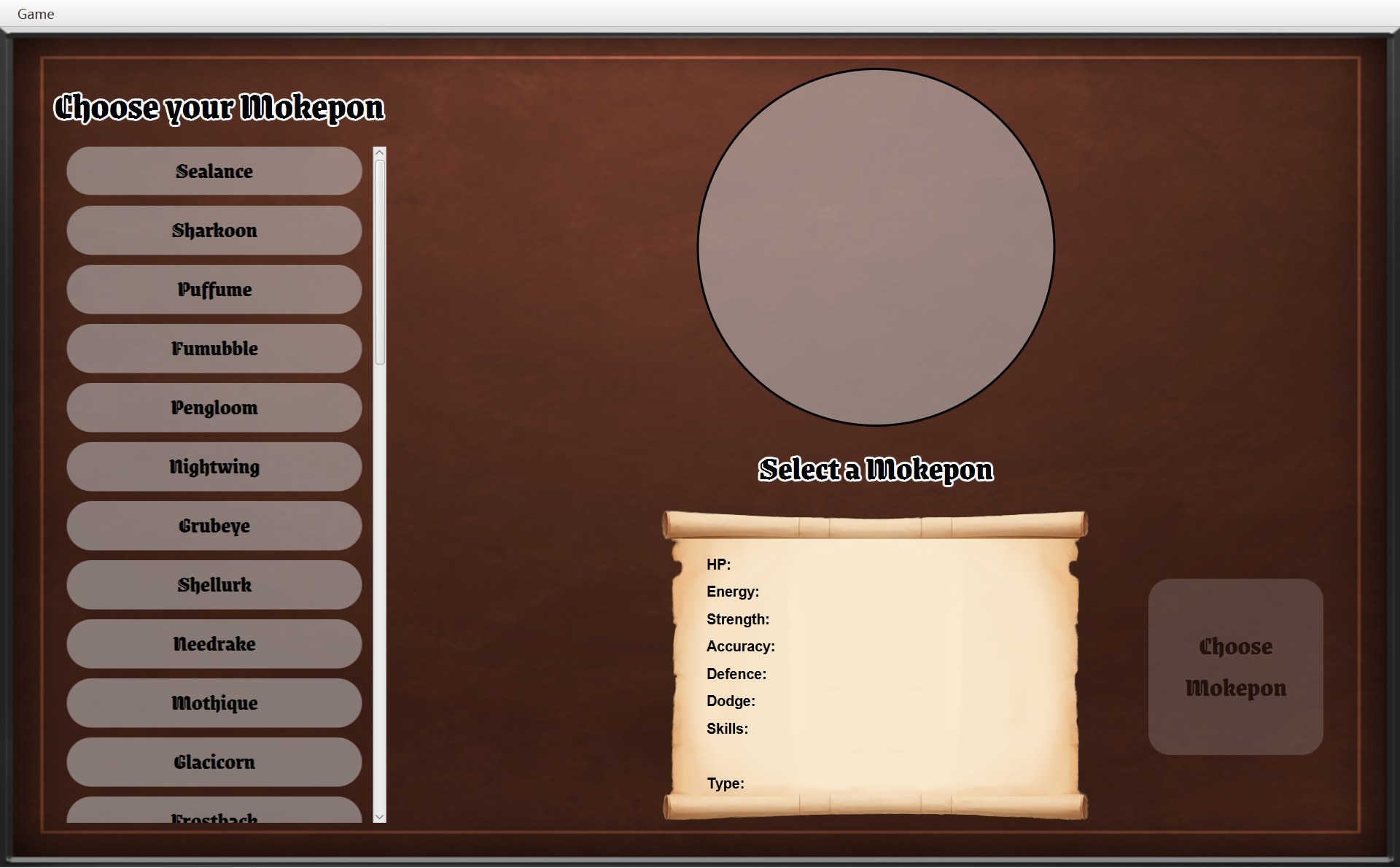
- 1选择界面上:第 27–28 行的两个字段都是 null(第 26 行的注释就这么写着)
- 2选好一只再点 Choose Mokepon:startGame 第 59–60 行才 new 出新的 Overworld 和 OverworldScreen
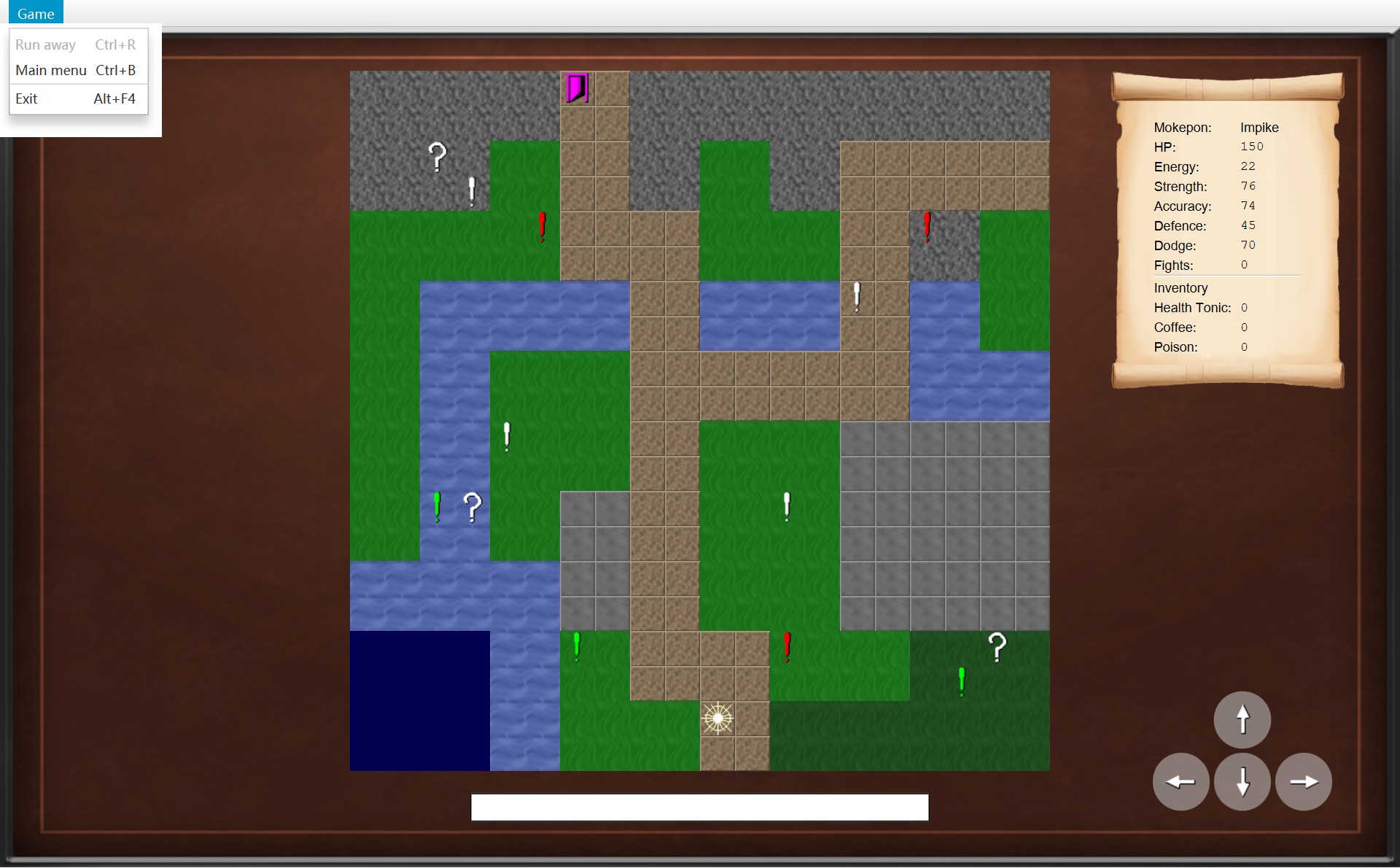
- 3在地图上点 Main menu:returnToMainMenu 第 85–86 行把两个字段设回 null,这一局就被丢掉了,又回到第一张图的样子
world.createBattle()(第 67 行)如果在 world 是 null 的时候被调用,就会抛 NullPointerException。你的代码不会走到那一步,因为 Fight! 按钮只在地图上才有,那时 world 一定不是 null。第 6 节的 NORMAL(null, null) 也是 null 的一种用法:“没有强项地形”。画面切换的全过程在 第 6 章。
9. 包、import 和 module-info
1package au.edu.unimelb.swen.oop.mokepon.world;2 3import au.edu.unimelb.swen.oop.mokepon.battle.Battle;4import au.edu.unimelb.swen.oop.mokepon.item.Inventory;5import au.edu.unimelb.swen.oop.mokepon.item.ItemCatalogue;6import au.edu.unimelb.swen.oop.mokepon.model.Mokepon;7import au.edu.unimelb.swen.oop.mokepon.model.Terrain;8import java.util.ArrayList;9import java.util.Collections;10import java.util.List;11import java.util.Random;12import java.util.function.Consumer;- 第 1 行
package au.edu.unimelb.swen.oop.mokepon.world;:这个类属于哪个包。包名和文件夹一一对应:…/mokepon/world/Overworld.java。你的 72 个类分在 9 个包里,见下图。每个包管什么在 第 4 章。 - 第 3–12 行:要用别的包里的类,先 import。同一个包里的类不用 import:Overworld 直接就能用 Player、Encounter、Marker。
java.lang里的 String、Math、Integer 自动就能用。import 只是让你能写短名字,不会把代码复制过来。
1module au.edu.unimelb.swen.oop.mokepon {2 requires javafx.controls;3 4 exports au.edu.unimelb.swen.oop.mokepon;5}这个文件说明整个程序是一个模块(module)。requires javafx.controls;:要用 JavaFX 的按钮、文字框这些东西。exports au.edu.unimelb.swen.oop.mokepon;:只把根包(Main 所在的包)开放给模块外面,这样 JavaFX 才能找到并启动 CMain。其余 8 个包不对外开放。在模块里面,各个包之间照样可以互相使用 public 的类,前面讲的访问权限照样有效。
到这里,你代码里用到的 Java 写法都见过一遍了。下一章 读懂老师打印的 UML 会把 UML 图里的每个符号讲清楚,本章里那几张 UML 图到时候会再出现。
自测
程序运行时,new Position(10, 18) 是在哪一行运行的?运行完以后,有哪几个字段指着这个对象?玩家走一步,这个对象会被改吗?
CGameData.getPosition 第 31 行(MapParser 第 27 行用 "map.player.startingPos" 调用它)。它先存进 CGameMap 的 startPosition;开一局游戏时,Overworld 把它交给 Player 的构造器,Player 的 position 和 previousPosition(第 20–21 行)也指着它。一共一个对象,三个字段指着它。走一步时它不会被改:x、y 是 private final,Position 没有任何能改它们的方法;move 用 new Position(...) 造一个新的交回去,moveTo 只是让 Player 的字段指向新对象。所以这个起点对象可以放心地被 GameMap 和每一局的 Player 共享。There is only one Position object for the start tile; GameMap.startPosition, Player.position and Player.previousPosition all refer to it. Position is immutable: its fields are private and final, and move() returns a new Position instead of changing the old one.
两个分别 new 出来、x = 18、y = 17 的 Position,a == b 和 a.equals(b) 各是什么?MapObject.isAt 为什么用 equals?
== 是 false(不是同一个对象),equals 是 true(Position 改写了 equals:x 和 y 都相等就算相等)。玩家的位置是 move 新造的,问号箱、感叹号的位置是读数据文件时造的,永远不会是同一个对象,用 == 就永远踩不中任何东西。== compares references; equals() compares the x and y values, because Position overrides equals() and hashCode().
Player.moveTo 前面为什么什么修饰符都不写?如果 COverworldScreen 调用它会怎样?
什么都不写是包内可见(package-private):只有 world 包里的类能调用。OverworldScreen 在 ui 包,调用它会编译出错。这样玩家只能通过 COverworld.move 移动,move 先用 canMove 检查地形,界面没法绕过规则。ui 包的 MapView 只能调用 public 的 getPosition() 来读位置。moveTo() is package-private, so only classes in the world package (in practice Overworld) can move the player, and every move goes through the rules in Overworld.
CBattle 有两个构造器,游戏里用的是哪个?this(...) 做了什么?
游戏里用三个参数的(CEncounter.createBattle 里 new Battle(player, enemyFighter, inventory))。它第 26 行用 this(...) 调用五个参数的构造器,补上 new RandomEnemyStrategy() 和 new Random(),真正的赋值和第一句日志都只写在五参数的那个里。整个过程只造了一个 Battle 对象。Battle has two overloaded constructors; the three-argument one chains to the five-argument one with this(...).
为什么不能写 new Item(...)?CCoffee 从 AItem 那里得到了什么,自己又写了什么?
Item 是抽象类,它的 use 是抽象方法(没有方法体),抽象类不能 new;而且 Item 的构造器是 protected,只给子类通过 super 调用。Coffee 继承了三个 public getter 和 protected 的 describeUse。Item 的三个 private 字段也在每个 Coffee 对象里,但 private 成员不算被继承,Coffee 只能通过 getter 读它们。构造器不继承,所以 Coffee 自己写了构造器,用 super("COFFEE", "Coffee", "coffee") 交给 Item;它还用 @Override 写了自己的 use。Item is an abstract class; Coffee extends Item, calls super(...) in its constructor and overrides the abstract method use(). Item's private fields exist in every Coffee object but are not inherited; Coffee reads them through public getters.
Battle.useItem 里只有一句 item.use(player, enemy),为什么点 Poison 敌人只剩 1 HP,点 Coffee 却是能量回满?
这是多态。item 的声明类型是 Item,但它实际指着的对象是 Poison 或 Coffee;运行时 Java 按实际对象的类去执行那个类的 use(动态绑定)。所以 Battle 不需要任何 if 判断道具种类,加新道具也不用改 Battle。item is declared as Item, but at run time the actual object decides which use() runs: Poison.use() reduces the enemy to 1 HP, Coffee.use() restores the player's energy.
button.setOnAction(event -> useSkill(skill)) 这一行运行时,会马上打出技能吗?数据文件里一个技能名写错了,Main.start 的 catch 能接住吗?
不会马上打。这一行只是把 lambda 存进按钮,等玩家点按钮时 JavaFX 才运行它,那时才调用 useSkill(skill),而 skill 是造这个按钮那一圈循环里的技能。技能名写错接不住:SkillCatalogue.find 是在第 35 行 MokeponParser.parse 里被调用的,这一行在 try 外面,异常会被抛出 start,程序报错结束。The lambda is stored by the button and run later, when the button is clicked. The catch in Main.start only covers reading the file, not parsing it.
两个“代码里没写、其实有规矩”的地方:CBattleScreen 能往 battle.getLog() 交回的列表里 add 吗?为什么它每次都能显示最新的日志?EStat 的构造器前面什么都没写,为什么 UML 里是红色方块?
不能 add:getLog 返回 Collections.unmodifiableList(log),调用 add 会在运行时抛出 UnsupportedOperationException,只有 Battle 自己能往 log 里加。它是原列表的只读视图,不复制,而且 BattleScreen 每次 update 都在 showLog 里重新调用 getLog(),所以总能看到最新的日志。Stat 的构造器:枚举的构造器只能是 private,不写也自动是 private,所以 UML 画成红色方块,不是“包内可见”的蓝色三角。getLog() returns an unmodifiable view of the log, so other classes can read it but cannot change it. Enum constructors are implicitly private, so Stat(String, int, int) is private even without the keyword.