16设计模式和 OOP 原则
模板方法、策略、观察者、依赖倒置、封装、SOLID 在你代码里的具体位置,以及和 Project 1 的对比
- 对每一个模式(模板方法、策略、观察者)说出:中文意思、英文名、在你代码里的哪个类、哪一行、为什么在这里有用、哪里没有完全做到
- 讲清楚依赖倒置:IGameNavigator 和 IOverworldListener 两个接口怎样把“箭头”倒过来
- 说出封装的五种做法(private、复制进来、复制出去、只读视图、包内可见),并指出你的代码里还剩下的隐私泄露
- 用一句话说出 SOLID 五条在你代码里的具体位置
- 用课程用语 instantiation、delegation、containership(association / aggregation / composition)描述真实的类对
- 说明 CSkillCatalogue、CItemCatalogue、CUiStyle 为什么不是单例模式
- 拿 Project 1 和 Project 2 逐条对比:5 个类 vs 72 个类,0 个接口 vs 4 个接口
前面十几章一个类一个类地读过你的代码。这一章换一个方向:按“设计”来整理。考试时卷子上印着你的 UML,题目会问 “Which design pattern did you use? Where? Why?”。这一章就是这些问题的答案库。
每一个模式和原则都按同样的五步讲:
- 是什么:一句中文,一句英文。
- 在哪里:你代码里的类、方法、行号(代码块)。
- 画出来:一张图。
- 为什么在这里有用:用 “因为……所以……” 说。
- 哪里没有完全做到:老实说。考试问 “What would you improve?” 时就用它。
先提醒几个前面学过的词(细讲在 第 1 章、第 2 章):接口(interface)只写“有哪些方法”,不写怎么做;implements 表示一个类答应把接口里的方法都写出来;抽象类(abstract class)不能 new,只能被继承;重写(override)是子类写一个同名同参数的方法,换掉父类的做法。彩色带圆圈的名字(CBattle)是你项目里的类,点一下能看它的卡片。
1. 先看全图:模式和原则在屏幕的哪里
设计模式听起来很抽象,其实每一个都能在屏幕上找到它“干活”的地方。先看战斗中的一帧(你的 Impike 刚对 Galecrest 用了 Stun):
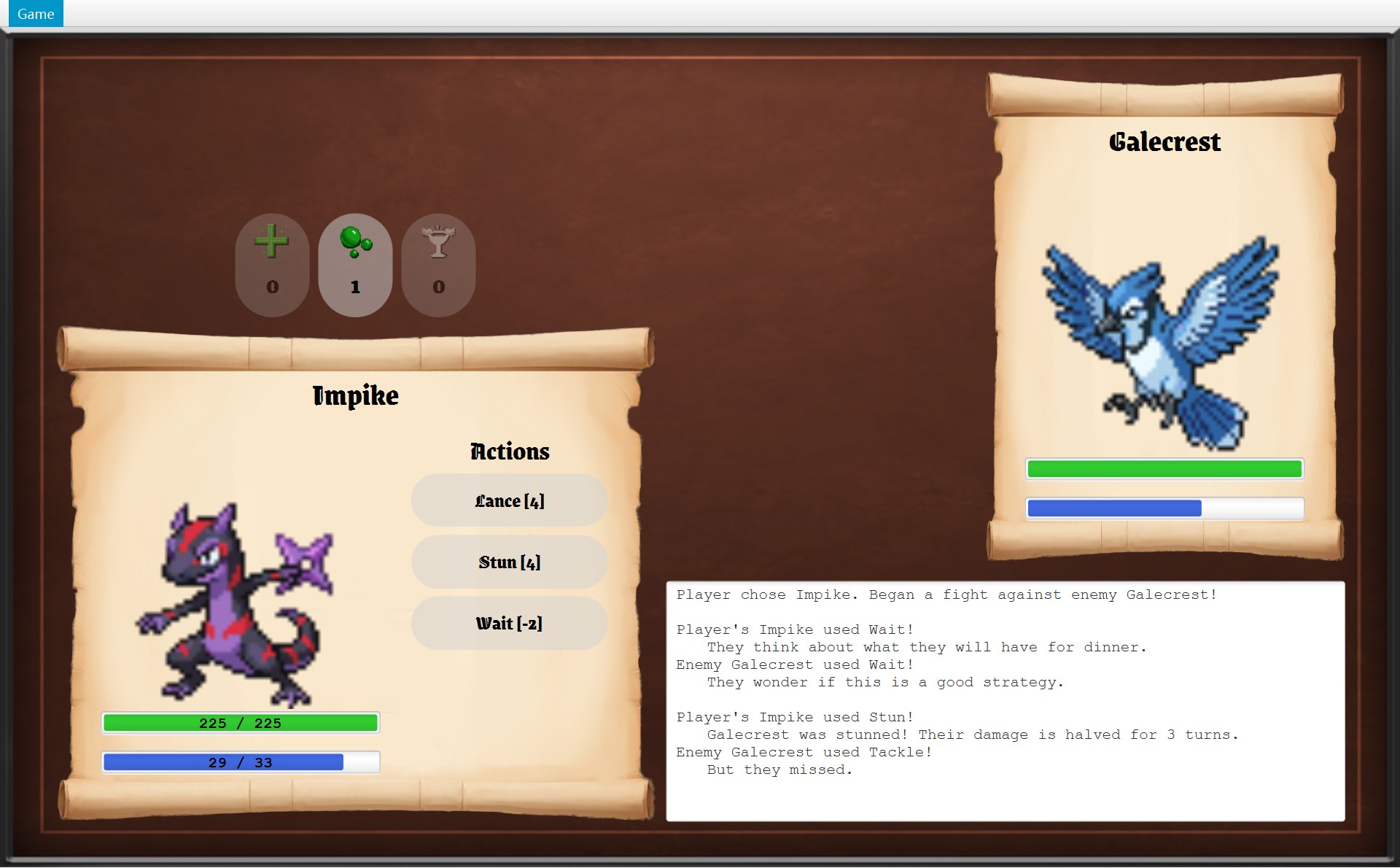 1234567
- 1
- 2“Enemy Galecrest used Tackle!”:敌人出哪一招,是 CBattle 交给 IEnemyStrategy 决定的:策略模式(第 3 节)
- 3整个日志:CBattleScreen 用
battle.getLog()读出来。拿到的是只读视图,改不了(封装,第 6 节) - 4你的 HP 条写着数字:它是 CLabelledStatBar 对象(第 7 节,多态)
- 5
- 6三个道具按钮的顺序来自
ItemCatalogue.getBattleOrder():静态目录类(第 9 节) - 7
再看打赢以后回到地图的那一帧:
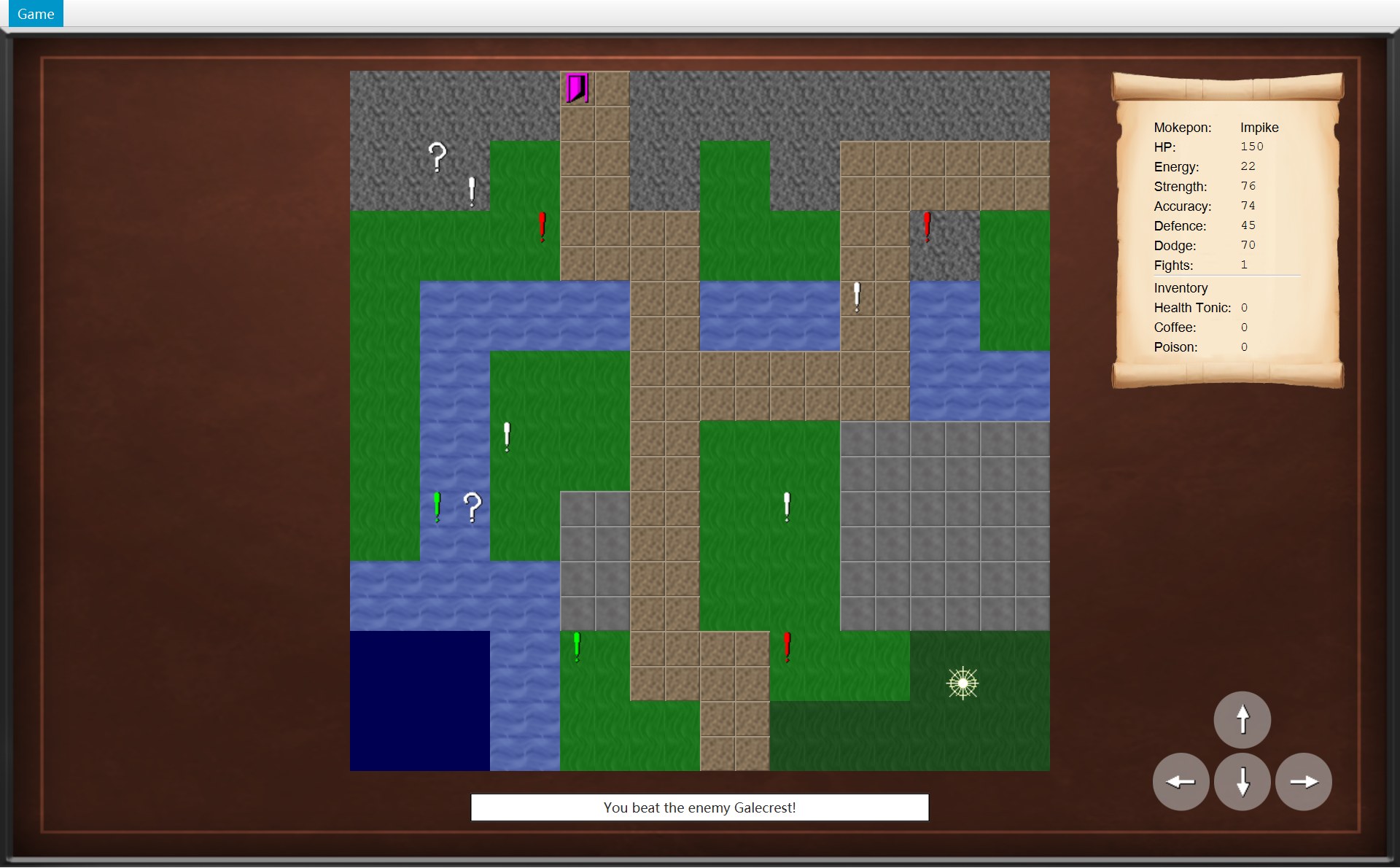 12333445
- 1“You beat the enemy Galecrest!”:规则类 COverworld 发出通知
onEncounterWon,画面收到后写这句话:观察者模式(第 4 节) - 2
- 3红、绿、白三种感叹号是同一个类 CMarker。颜色来自每组自己的 Sprite(数据文件里的
.colour键);挑哪只敌人由字段picker里的 IEnemyPicker 决定:策略模式(第 3 节) - 4问号箱、感叹号、门:踩上去都是同一句
object.interact(this),各做各的事:多态(第 7 节) - 5卷轴的三行道具:来自
inventory.getItems()交出的副本(第 6 节)
一张表把全章串起来。最后一列先写本章第几节,再写以前细讲过的章;这一章不再重复细节,只讲“设计”。
| 模式 / 原则 | 你代码里最主要的位置 | 本章 · 细讲 |
|---|---|---|
| 模板方法 Template Method | ASkill.use、ATargetedSkill.applyEffect、AGameScreen.handleKeyPress | §2 · 12、6 |
| 策略 Strategy | IEnemyStrategy(CBattle)、IEnemyPicker(CMarker) | §3 · 9、11 |
| 观察者 Observer | COverworld → IOverworldListener ← COverworldScreen | §4 · 8 |
| 依赖倒置 Dependency Inversion | IGameNavigator、IOverworldListener | §5 · 6 |
| 封装 Encapsulation | private 字段、复制、只读视图、包内可见 | §6 · 10 |
| 继承和多态 Inheritance, Polymorphism | AItem、AMapObject、AStatusEffect、AGameScreen、CStatBar | §7 · 13、14 |
| SOLID SRP, OCP, LSP, ISP, DIP | 全项目 | §8 |
| 课程用语、静态目录类 instantiation, delegation, containership | CEncounter、CBattleScreen、CBattle、CSkillCatalogue | §9 · 10、4 |
| 和 Project 1 比 | 5 个类 → 72 个类 | §10 |
2. 模板方法(Template Method)
是什么。模板方法:父类里有一个 final 方法,把几个步骤的先后顺序写死;其中某一步不写死,留给子类来写。子类能改步骤的内容,改不了顺序。英文:A final method in the superclass fixes the order of the steps, and subclasses fill in some of the steps.
留给子类的那一步,英文有两种叫法,考试时别混:子类必须写的 abstract 那一步叫抽象步骤(primitive operation),比如 applyEffect、applyHit;父类已经给了一个默认做法、子类想改才改的那一步叫钩子方法(hook method),比如 handleKey(默认什么都不做)。
在哪里:一共三处
| 模板方法(final,定顺序) | 留给子类的那一步(谁来写) |
|---|---|
| ASkill.use(第 30 行):① 付能量 ② 生效 | applyEffect(abstract):ATargetedSkill、ABoostSkill、CWait 写 |
| ATargetedSkill.applyEffect(第 18 行):① 判断命中 ② 没中就返回 miss ③ 中了才生效 | applyHit(abstract):AAttackSkill、CPocketSand、CStun 写(CLance 再改写 AAttackSkill 的版本) |
| AGameScreen.handleKeyPress(第 32 行):① 对话框开着或组合键就不理 ② 否则交给画面 | handleKey(有一个空的默认版本):COverworldScreen(方向键)、CBattleScreen(数字键 1–4)改写 |
27 /* Template Method: pay the energy cost first (even if an attack then misses),28 * then apply the effect. Returns the message for the battle log.29 */30 public final String use(Fighter user, Fighter target, Random random) {31 user.spendEnergy(energyCost);32 return applyEffect(user, target, random);33 }34 35 /* Each subclass decides what the skill actually does. */36 protected abstract String applyEffect(Fighter user, Fighter target, Random random);第 30 行的 final 意思是:没有任何子类能重写 use。所以 10 个技能出手时,一定先执行第 31 行 user.spendEnergy(energyCost),再执行第 32 行 applyEffect(...)。第 36 行的 applyEffect 是抽象方法:只有方法头,没有 { },每家子类自己写。
第 ① 步在屏幕上看得见:点 Stun 之前和之后,你的能量条。
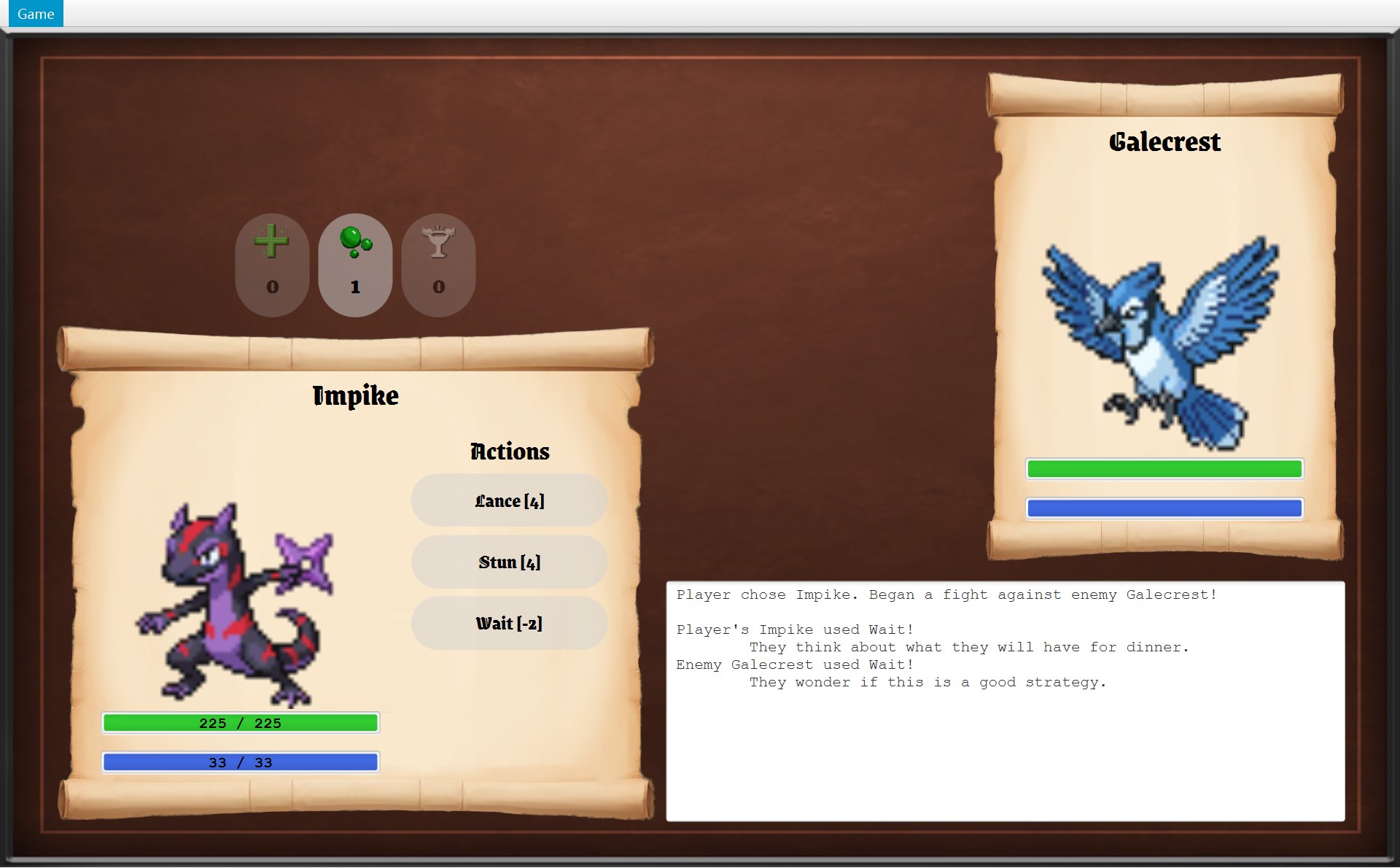
- 1点 Stun 之前:33 / 33
spendEnergy 把它压回 33)真实运行截图 · 用 Wait:日志里是一句随机的发呆台词,然后敌人行动(能量本来就是满的 33 / 33,所以没有变化)- 1之后:29 / 33。第 31 行先扣 4(Stun 的
ENERGY_COST),33 − 4 = 29
第 ② 步走进 ATargetedSkill。它又是一个模板方法:它改写了 applyEffect,又把自己写成 final,在里面再留一步 applyHit 给下一层。同一回合的日志里,两种结果都出现了:
17 @Override18 protected final String applyEffect(Fighter user, Fighter target, Random random) {19 if (!hits(user, target, random)) {202 return MISS_MESSAGE;21 }221 return applyHit(user, target, random);23 }24 25 /* What the skill does once it has hit the target. */26 protected abstract String applyHit(Fighter user, Fighter target, Random random);15 @Override16 protected String applyHit(Fighter user, Fighter target, Random random) {17 target.addEffect(new Stunned());181 return "\t" + target.getName() + " was stunned! Their damage is halved for "19 + Stunned.TURNS + " turns.";20 }- 1你的 Stun 打中了:
hits(...)为 true,第 22 行调用 CStun.applyHit,返回这句话(第 18 行) - 2敌人的 Tackle 没打中:
hits(...)为 false,第 20 行返回MISS_MESSAGE
- 第 18 行:
@Override说明这是在改写父类 ASkill 的applyEffect;final说明 ATargetedSkill 的子类不能再改写它。 - 第 19–20 行:
hits(...)做命中判定(命中率的算法在 第 12 章第 4 节)。!是“不”:没打中就return MISS_MESSAGE,方法到这里结束,第 22 行不会执行。 - 第 22 行:打中了,才调用
applyHit。 - 第 26 行:
applyHit是 abstract 的,留给每个子类写。CStun 第 17 行给敌人加一个 CStunned 效果,第 18–19 行返回那句日志。
注意红 2:Tackle 是 AAttackSkill 的子类,Stun 是 ATargetedSkill 的直接子类,可它们“没打中”的那句话完全一样,因为这句话只写在 ATargetedSkill 第 11 行一个地方。
运行时的调用顺序是这样的:CBattle 只调用了一次 use,剩下的步骤由父类一层一层往下交:
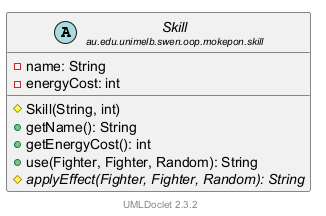
想看这段代码一行一行亮起来的动画,见 第 12 章第 8 节。下面这张图把整棵技能树画出来,每个框下面一行写这个类自己写了哪个方法:
第三处:画面处理按键
画面也用了同一个模式。对话框开着时,按方向键玩家不会动。键盘这条路的规矩写在父类 AGameScreen 的 final 方法 handleKeyPress 里:
28 /* Template Method: key presses are ignored while a dialog is open, and key combinations29 * are left for the menu shortcuts (Ctrl+R, Ctrl+B and Alt+F4).30 * Any other key is passed to the screen.31 */32 public final void handleKeyPress(KeyEvent event) {33 boolean isCombination = event.isControlDown() || event.isAltDown()34 || event.isMetaDown() || event.isShiftDown();351 if (isDialogOpen() || isCombination) {36 return;37 }38 handleKey(event);39 }⋯ 省略第 40–50 行51 /* Screens with keyboard controls override this. Other screens ignore the keys. */52 protected void handleKey(KeyEvent event) {53 }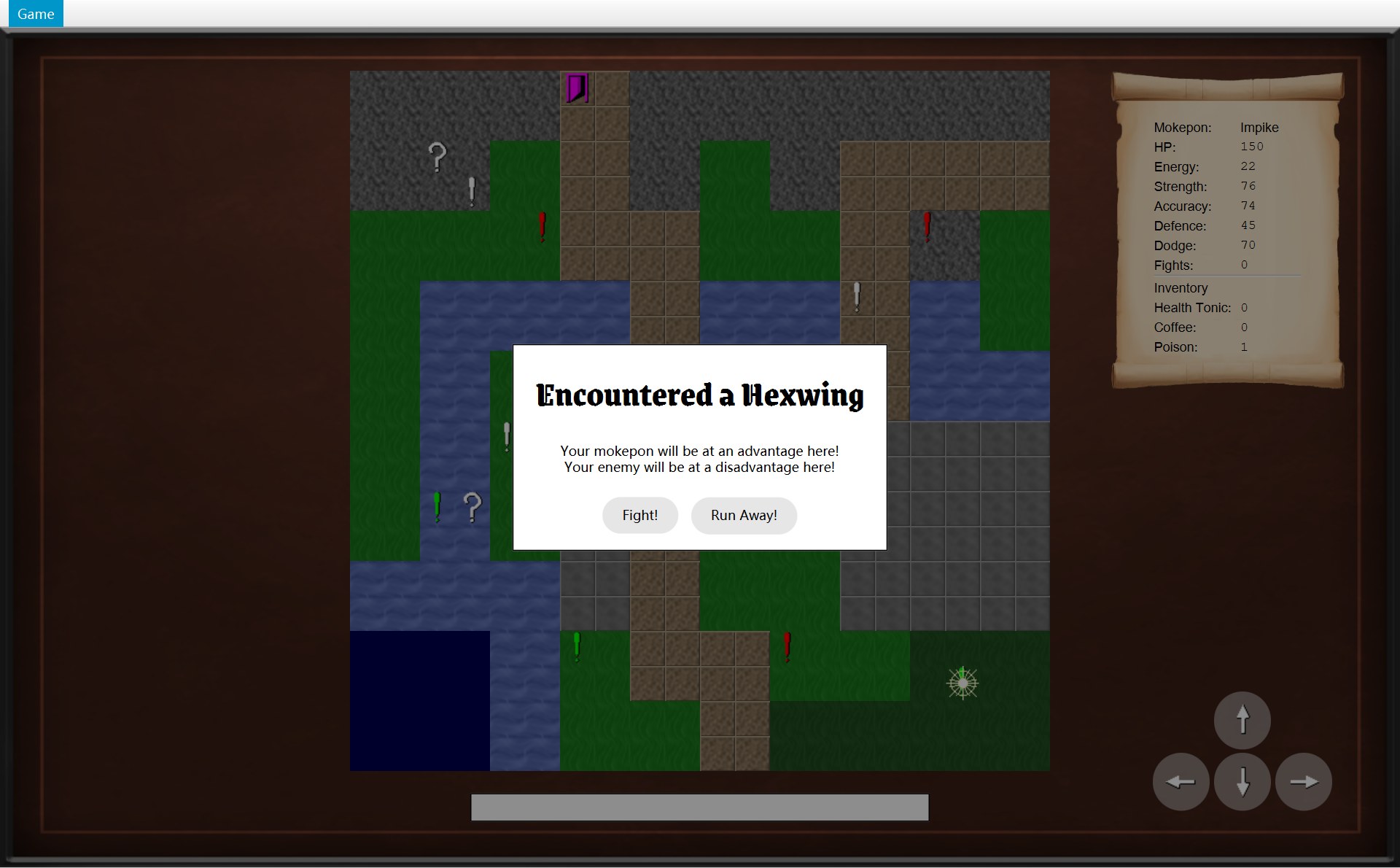
- 1
- 第 32 行:
final,三个画面都不能改写handleKeyPress。CGameWindow 第 46–47 行把窗口收到的每一个按键都交给currentScreen.handleKeyPress(event)(第 6 章第 4 节)。 - 第 33–34 行:按着 Ctrl、Alt、Meta 或 Shift 的键算组合键,
isCombination为 true。这些留给菜单快捷键 Ctrl+R、Ctrl+B、Alt+F4(第 29 行的注释)。 - 第 35–36 行:对话框开着,或者是组合键,就
return,第 38 行不会执行。 - 第 38 行:其余的键交给
handleKey(event)。子类改写的就是这一步。 - 第 52–53 行:
handleKey的默认版本是空的{ },所以它是 hook method。
两个画面改写的那一步:
114 /* The arrow keys move the player. Other keys are not used here. */115 @Override116 protected void handleKey(KeyEvent event) {117 Direction direction = ARROW_KEYS.get(event.getCode());118 if (direction != null) {119 movePlayer(direction);120 event.consume();121 }122 }123 124 /* The overworld does nothing if the move is not possible.125 * Nothing can move while a dialog is open.126 */127 private void movePlayer(Direction direction) {128 if (!isDialogOpen()) {129 world.move(direction);130 }131 }⋯ 省略第 132–172 行173 button.setOnAction(event -> movePlayer(direction));- 第 117 行:在表
ARROW_KEYS(第 25–29 行,一个 Map:键盘上的键 → 方向)里查按下的键。不是方向键就查不到,得到null。 - 第 118–119 行:查到了方向,才
movePlayer(direction)。 - 第 120 行:
event.consume():告诉 JavaFX 这个键已经用掉了,别的控件不用再处理它(consume)。 - 第 127–131 行:
movePlayer又查了一次!isDialogOpen(),才调用world.move。为什么还要查?看第 173 行:屏幕右下角的四个方向按钮被点时,也调用movePlayer,而按钮的点击不经过handleKeyPress。CModalDialog 的类注释说,对话框后面那层暗色会盖住整个画面,按钮本来就点不到;第 128 行是多加的一道保险(注释写着 “Nothing can move while a dialog is open.”)。
107 /* Keys 1 to 4 press the matching skill button. A disabled button ignores the key. */108 @Override109 protected void handleKey(KeyEvent event) {110 int index = SKILL_KEYS.indexOf(event.getCode());111 if (index >= 0 && index < skillButtons.size()) {112 skillButtons.get(index).fire();113 event.consume();114 }115 }- 第 110 行:
SKILL_KEYS(第 30–31 行)是数字键 1、2、3、4 的列表。indexOf找出按下的键排第几(0–3),不在列表里就得到 −1(indexOf)。 - 第 111 行:位置有效,而且这只 Mokepon 真有这么多个技能按钮(Impike 只有 3 个技能,按 4 什么都不发生)。
- 第 112 行:
fire()等于用代码点一下这个按钮,走的是和鼠标点击一样的路(fire)。第 107 行的注释:变灰的按钮不理这个键。
CSelectScreen 没有改写 handleKey,用的就是 AGameScreen 第 52–53 行那个空的默认版本:选择界面按什么键都没反应。细节见 第 6 章第 4 节。
为什么在这里有用
- 因为 10 个技能都要先付能量,所以把这一步写在 ASkill.use 里一次就够了;
final保证没有哪个技能能改成“打中才扣能量”。真实结果:Tackle 没打中,Galecrest 的能量照样从 14 变成 9。 - 因为 5 个“对着敌人”的技能都要做同样的命中判定,所以判定和那句 “But they missed.” 只写在 ATargetedSkill 里一处。CStun 只有 21 行,只管“打中以后”。
- 因为 每个画面都不该在对话框开着时被按键操作,所以这条检查放在 AGameScreen 的 final 方法里,三个子类的
handleKey都不用自己写这一句,也没法跳过它。 - 因为 CBattle 只通过 ASkill 这个类型调用
use()和getName()(canUse再看getEnergyCost()),一个子类的名字都没写,所以加多少个新技能,CBattle 都不用改(第 8 节的开闭原则)。
3. 策略(Strategy)
是什么。策略模式:把一件“可以有好几种做法”的事写成一个接口,每种做法写成一个实现类;使用它的类用一个接口类型的字段存着其中一个对象,需要时调用接口的方法,不关心背后是哪一种做法。换一个对象,就换了做法,使用者一行不改。英文:The context class holds a strategy object through an interface-typed field and calls it; plugging in a different strategy object changes the behaviour without changing the context.
你的代码里有两个策略接口,各只有一个方法:
8/* Strategy: chooses which Mokepon the player meets at a marker.9 * Random, strong and weak markers only differ in the picker they use.10 */11public interface EnemyPicker {12 Mokepon pick(List<Mokepon> mokepons, Terrain terrain, Random random);13}6/* Strategy: decides which skill the enemy uses each turn.7 * The battle only knows this interface, so a smarter enemy can be added later8 * without changing the Battle class.9 */10public interface EnemyStrategy {11 Skill chooseSkill(Fighter enemy, Random random);12}两个接口的注释第一个词都是 “Strategy”。下面分开看。
EnemyPicker:三种感叹号,一个 Marker 类
地图上的感叹号有三种颜色。它们不是三个类,都是 CMarker。CMapParser 造它们时,每一组交进去两样东西:一个 picker 对象(决定挑哪只敌人),一个 Sprite(图片和颜色):
29 /* Each marker group has its own way of choosing the enemy. */30 List<MapObject> objects = new ArrayList<>();311 objects.addAll(parseMarkers(data, "map.mokeponRandom", new RandomEnemyPicker()));322 objects.addAll(parseMarkers(data, "map.mokeponStrong",33 new TerrainEnemyPicker(TerrainEffect.ADVANTAGE)));343 objects.addAll(parseMarkers(data, "map.mokeponWeak",35 new TerrainEnemyPicker(TerrainEffect.DISADVANTAGE)));⋯ 省略第 36–55 行56 /* All markers in one group share the same image, colour and picker. */57 private List<MapObject> parseMarkers(GameData data, String group, EnemyPicker picker) {58 Sprite sprite = new Sprite(data.getText(group + ".image"), data.getText(group + ".colour"));⋯ 省略第 59–62 行63 markers.add(new Marker(position, sprite, picker));439map.mokeponRandom.0=3,3440map.mokeponRandom.1=14,6441map.mokeponRandom.2=12,12442map.mokeponRandom.3=4,10443map.mokeponRandom.image=assets/sprite_exclamation.png4441map.mokeponRandom.colour=white445 446map.mokeponStrong.0=5,4447map.mokeponStrong.1=16,4448map.mokeponStrong.2=12,16449map.mokeponStrong.image=assets/sprite_exclamation.png4502map.mokeponStrong.colour=red451 452map.mokeponWeak.0=2,12453map.mokeponWeak.1=6,16454map.mokeponWeak.2=17,17455map.mokeponWeak.image=assets/sprite_exclamation.png4563map.mokeponWeak.colour=lime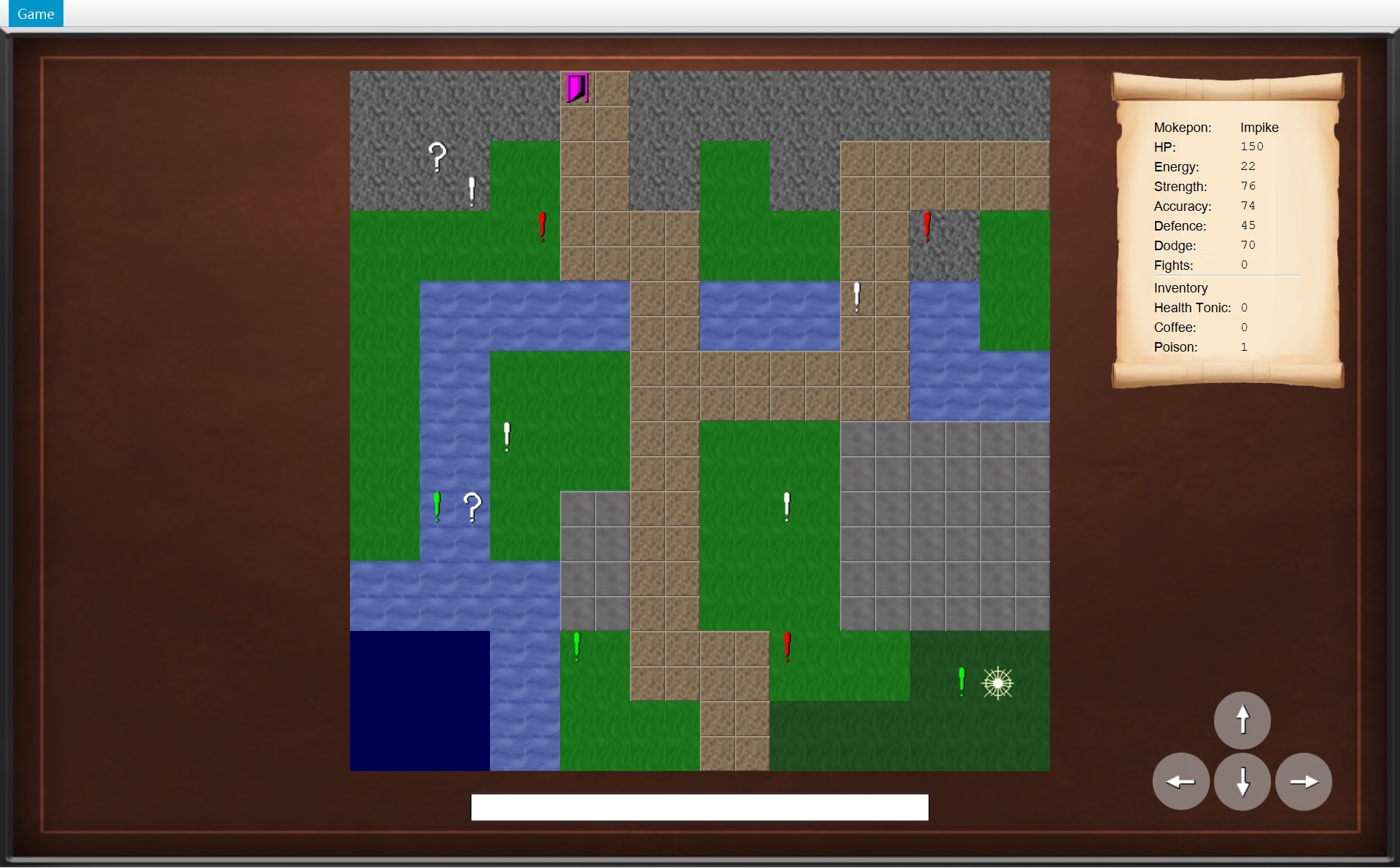
- 1白色(
map.mokeponRandom,colour=white):picker 是new RandomEnemyPicker(),36 只里随便挑 - 2红色(
map.mokeponStrong,colour=red):new TerrainEnemyPicker(ADVANTAGE),挑在这块地形上占优势的 - 3绿色(
map.mokeponWeak,colour=lime):new TerrainEnemyPicker(DISADVANTAGE),挑在这块地形上吃亏的。右边 (17,17) 那个也是绿色,再右边的星形是玩家
- 第 31 行:白色那一组(数据文件的
map.mokeponRandom)配一个new RandomEnemyPicker()。 - 第 32–33 行:红色那一组(
map.mokeponStrong)配new TerrainEnemyPicker(TerrainEffect.ADVANTAGE)。 - 第 34–35 行:绿色那一组(
map.mokeponWeak)配new TerrainEnemyPicker(TerrainEffect.DISADVANTAGE)。 - 第 58 行(在
parseMarkers里):new Sprite(图片, 颜色),颜色读的是数据文件的.colour键:white、red、lime。CMapView 画图时用sprite.getColour()给感叹号上色。 - 第 63 行:
new Marker(position, sprite, picker):同一个类,区别全在交进去的 Sprite 和 picker 上。
所以:颜色来自 Sprite,是数据;挑哪只敌人来自 picker,是行为。策略模式说的只是后一半。
11public class Marker extends MapObject {12 private final EnemyPicker picker;13 14 public Marker(Position position, Sprite sprite, EnemyPicker picker) {15 super(position, sprite);16 this.picker = picker;17 }18 19 /* Choose the Mokepon to fight on this marker's terrain. */20 Mokepon chooseEnemy(List<Mokepon> mokepons, Terrain terrain, Random random) {21 return picker.pick(mokepons, terrain, random);22 }23 24 @Override25 void interact(Overworld world) {26 world.startEncounter(this);27 }CMarker 第 12 行的字段写的是接口 IEnemyPicker,第 21 行 picker.pick(...) 不知道也不关心里面是哪一种 picker。这种“自己不做,交给别的对象做”叫委托(delegation)(第 9 节)。
真实结果:你在 (17,17) 那个绿色感叹号上踩了两次,遇到的敌人不一样:
- 1第一次:Hexwing(LIGHTNING 类型)
- 2两条地形提示:(17,17) 是 FOREST,你的 Impike(FIRE)占优势,敌人吃亏
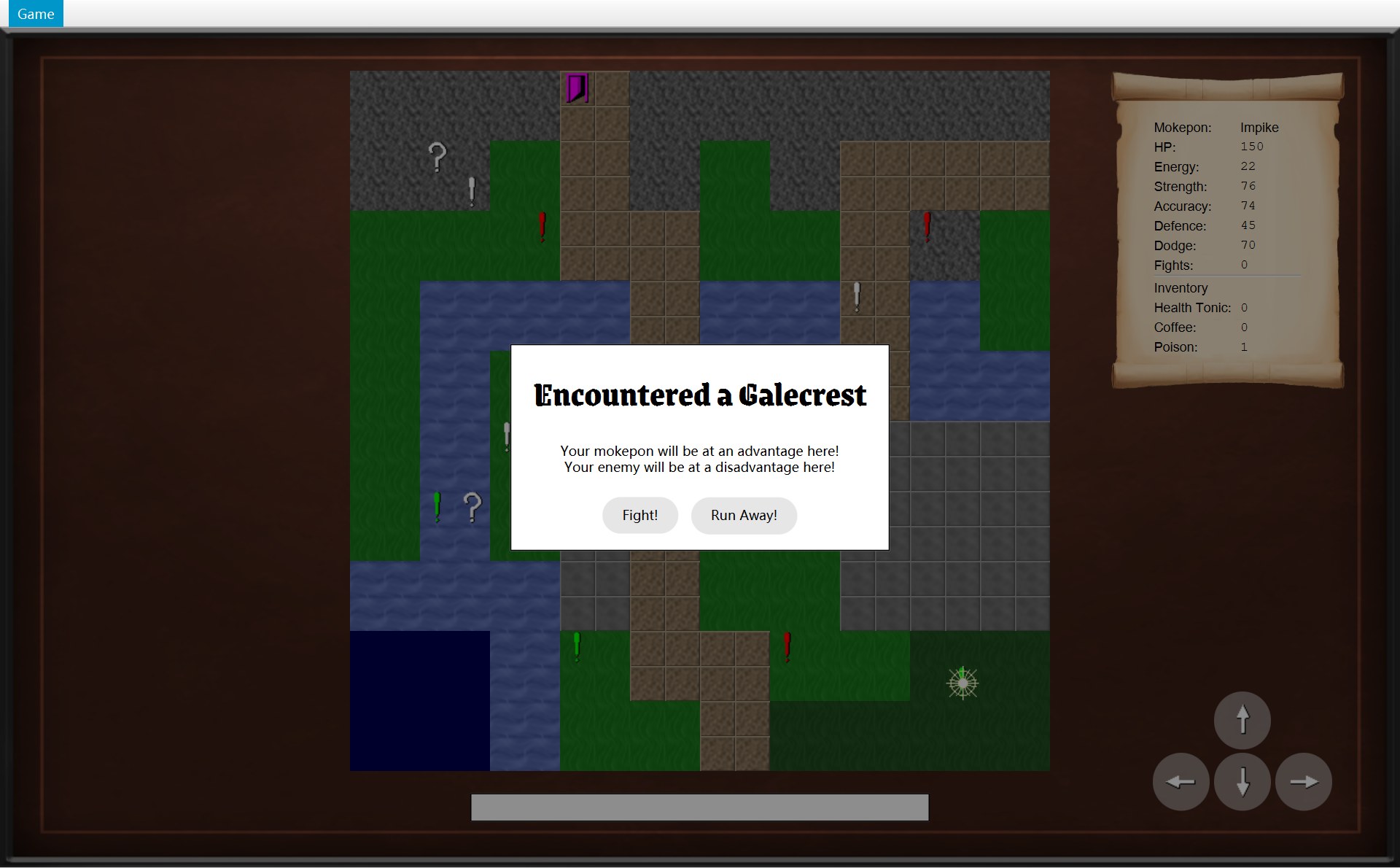
- 1第二次:Galecrest(也是 LIGHTNING)
- 2同样两条:敌人又是一只在 FOREST 上吃亏的
20 @Override21 public Mokepon pick(List<Mokepon> mokepons, Terrain terrain, Random random) {22 List<Mokepon> matches = new ArrayList<>();23 for (Mokepon mokepon : mokepons) {24 if (mokepon.getType().getEffectOn(terrain) == wantedEffect) {25 matches.add(mokepon);26 }27 }28 29 /* If no Mokepon has the wanted effect here, any Mokepon can appear instead. */30 if (matches.isEmpty()) {31 matches.addAll(mokepons);32 }33 return matches.get(random.nextInt(matches.size()));34 }- 第 22 行:先造一个空列表
matches,用来装“符合条件的”。 - 第 23–25 行:把 36 只 Mokepon 一只一只拿出来看:它的类型在这块地形上的效果,是不是这个 picker 想要的
wantedEffect?是就放进matches。 - 第 30–31 行:如果一只符合的都没有,就把 36 只全放进来,任何一只都可能出现(这张地图上不会发生,下面会算出 FOREST 上有 5 只符合)。
- 第 33 行:
random.nextInt(matches.size())在 0 到“个数 − 1”之间随机挑一个位置,返回那一只。
为什么两次都是 LIGHTNING?先看 (17,17) 是什么地形。CGameMap 用 tiles[y][x] 找格子,行号和列号都从 0 数。y = 17 是数据文件里 map.tiles.17 那一行 OOOOWWGGPPPPGGGGFFFF;x = 17 是这一行从 0 数的第 17 个字母(从 1 数是第 18 个),是 F,FOREST。这个 picker 的 wantedEffect 是 DISADVANTAGE。第 24 行只留下“类型在 FOREST 上是 DISADVANTAGE”的 Mokepon:只有 LIGHTNING 的弱项是 FOREST(LIGHTNING(Terrain.GRASS, Terrain.FOREST))。36 只里有 5 只 LIGHTNING:Hexwing、Voltusk、Skydart、Galecrest、Stormtalon。第 33 行再从这 5 只里随机挑一只,所以两次可能不同,但一定是这 5 只之一。
EnemyStrategy:敌人出哪一招
18 private final EnemyStrategy enemyStrategy;⋯ 省略第 19–23 行24 /* Start a battle against an enemy that picks random skills. */25 public Battle(Fighter player, Fighter enemy, Inventory inventory) {26 this(player, enemy, inventory, new RandomEnemyStrategy(), new Random());27 }⋯ 省略第 28–86 行871 Skill enemySkill = enemyStrategy.chooseSkill(enemy, random);88 log.add("Enemy " + enemy.getName() + " used " + enemySkill.getName() + "!");89 log.add(enemySkill.use(enemy, player, random));9public class RandomEnemyStrategy implements EnemyStrategy {10 11 @Override12 public Skill chooseSkill(Fighter enemy, Random random) {13 List<Skill> affordableSkills = new ArrayList<>();14 for (Skill skill : enemy.getSkills()) {15 if (enemy.canUse(skill)) {16 affordableSkills.add(skill);17 }18 }191 return affordableSkills.get(random.nextInt(affordableSkills.size()));20 }- 1CRandomEnemyStrategy 第 19 行挑出了 Tackle;CBattle 第 87 行拿到它,第 88 行写出这一句
- Battle 第 18 行:字段
enemyStrategy的类型是接口 IEnemyStrategy。 - Battle 第 25–26 行:3 个参数的构造器自己
new RandomEnemyStrategy(),再把它交给 5 个参数的构造器(下面的 Java 小课堂)。 - Battle 第 87 行:每回合问一次
enemyStrategy.chooseSkill(enemy, random),不知道里面是哪一种策略。 - RandomEnemyStrategy 第 13–18 行:把敌人的技能一个一个看,
enemy.canUse(skill)(能量 ≥ 消耗)的放进affordableSkills。 - 第 19 行:整句是
return affordableSkills.get(random.nextInt(affordableSkills.size()));:从付得起的里随机挑一个。
算一算这一次怎么挑的(地形把数值乘 0.5 的算法见 第 9 章第 7 节):
| 时刻 | 算式(代码) | Galecrest 的能量 |
|---|---|---|
| 战斗开始 | 数据文件 energy=28,在 FOREST 上吃亏 × 0.5:28 × 0.5 = 14 | 14 / 14 |
| 上一回合用了 Wait | spendEnergy(-2):Math.min(14 - (-2), 14) = min(16, 14),压回上限 | 14 |
| 这一回合挑招 | canUse:14 ≥ 5(Tackle)、14 ≥ 3(Bunker)、14 ≥ 3(Swole)、14 ≥ −2(Wait),4 个都付得起;第 19 行从 4 个里随机挑到 Tackle | 14 |
| Tackle 出手 | use 第 31 行先扣:14 − 5 = 9(没打中也扣) | 9 / 14 ≈ 64%(下图红 1) |
- 1用完 Tackle 以后敌人的能量条(蓝色):9 ÷ 14 ≈ 64%。敌人的条不写数字,上面绿色的是 HP 条,还是满的
为什么在这里有用
- 因为 CBattle 第 18 行的字段类型是接口,所以以后想要一个“更聪明”的敌人(比如“能量够就优先用威力最大的 Tackle”,或者“HP 不到一半时先用 Bunker 加防御”),只要写一个新的
implements EnemyStrategy的类,CBattle 不用改。IEnemyStrategy 的注释就是这么写的:“a smarter enemy can be added later without changing the Battle class”。 - 因为 三种感叹号在行为上的区别只是“怎么挑”,所以写成一个 CMarker 类加三个 picker 对象,而不是 RandomMarker、StrongMarker、WeakMarker 三个子类。这叫组合优于继承:要换行为,换一个部件,不用多一个子类。IEnemyPicker 的注释:“Random, strong and weak markers only differ in the picker they use”(颜色是数据,不算行为)。
- 因为 同一组的感叹号共用同一个 picker 对象(CMapParser 一组只 new 一次,再交给这一组的每个 CMarker),所以整张地图只有 3 个 picker 对象。
4. 观察者(Observer):一次完整的通知来回
是什么。观察者模式:一个对象(被观察的一方,subject)存着一串“监听者”(listener,也叫 observer)。自己身上发生了什么事,就挨个通知它们。它只认识监听者的接口,不知道监听者是谁、收到后会做什么。英文:The subject keeps a list of listeners typed as an interface and notifies each of them when something happens; it does not know what the listeners are or what they do.
| 角色 | 你代码里是谁 | 在哪一行 |
|---|---|---|
| 被观察者(subject) | COverworld | 第 23 行字段 listeners |
| 监听者接口 | IOverworldListener,5 个方法 | 整个文件 |
| 具体的监听者 | COverworldScreen(implements OverworldListener) | 第 24 行类声明,第 72–112 行五个方法 |
| 谁登记 | CGameWindow.startGame | 第 61 行 world.addListener(overworldScreen) |
| 谁发通知 | COverworld 的 move、runAway、winEncounter、startEncounter、collect、reachExit | 都调用第 125 行 notifyListeners |
23 private final List<OverworldListener> listeners = new ArrayList<>();⋯ 省略第 24–43 行44 public void addListener(OverworldListener listener) {45 listeners.add(listener);46 }⋯ 省略第 47–121 行122 /* Send the same message to every registered listener.123 * The lambda says which listener method to call.124 */125 private void notifyListeners(Consumer<OverworldListener> message) {126 for (OverworldListener listener : listeners) {127 message.accept(listener);128 }129 }- 第 23 行:
List<OverworldListener> listeners,列表里放的类型是接口。 - 第 44–46 行:
addListener把交进来的监听者加进列表。 - 第 125–129 行:
notifyListeners对列表里的每一个监听者执行一次message。
下面用一次真实的来回把它跑一遍:打赢 Galecrest 以后点 Back to it!,回到地图看到 “You beat the enemy Galecrest!”。先看调用顺序(顺序图的读法见 第 1 章第 3 节:每根竖虚线是一个对象,从上往下是时间,实线箭头 = 调用,绕回自己 = 调用自己的方法,箭头起点旁的小数字是第几步):
动画里上面的图亮起来的箭头 = 这一步正在发生的调用;左下是这一步运行的代码(太长的行在文字里写全了),右下是屏幕。红框编号:1 Back to it! 按钮,2 状态栏,3 (17,17) 那一格,4 卷轴上的 Fights,5 菜单里的 Run away。
58 public void startGame(Mokepon playerChoice) {59 world = new Overworld(map, mokepons, playerChoice);60 overworldScreen = new OverworldScreen(world, images, this);61 world.addListener(overworldScreen);62 showScreen(overworldScreen);⋯ 省略第 63–70 行71 public void winBattle() {72 world.winEncounter();73 showScreen(overworldScreen);⋯ 省略第 74–100 行101 private void showScreen(GameScreen screen) {102 currentScreen = screen;103 root.setCenter(screen.getView());104 updateMenu();170 private void showResult() {171 getNavigator().updateMenu();172 if (battle.hasPlayerWon()) {173 ModalDialog dialog = new ModalDialog("You Win");174 dialog.addButton("Back to it!", event -> getNavigator().winBattle());175 showDialog(dialog);93 /* The battle was won, so remove the marker and count the win. */94 public void winEncounter() {95 Mokepon enemy = encounter.getEnemy();96 objects.remove(encounter.getMarker());97 player.addWin();98 encounter = null;99 notifyListeners(listener -> listener.onEncounterWon(enemy));100 }⋯ 省略第 101–121 行122 /* Send the same message to every registered listener.123 * The lambda says which listener method to call.124 */125 private void notifyListeners(Consumer<OverworldListener> message) {126 for (OverworldListener listener : listeners) {127 message.accept(listener);128 }129 }102 @Override103 public void onEncounterWon(Mokepon enemy) {104 statusBar.setText("You beat the enemy " + enemy.getName() + "!");105 update();106 }⋯ 省略第 107–132 行133 /* Make the map, the scroll and the buttons match the world. */134 private void update() {135 mapView.update();136 statsScroll.update();137 for (Map.Entry<Direction, GameButton> entry : moveButtons.entrySet()) {138 entry.getValue().setUsable(world.canMove(entry.getKey()));139 }140 }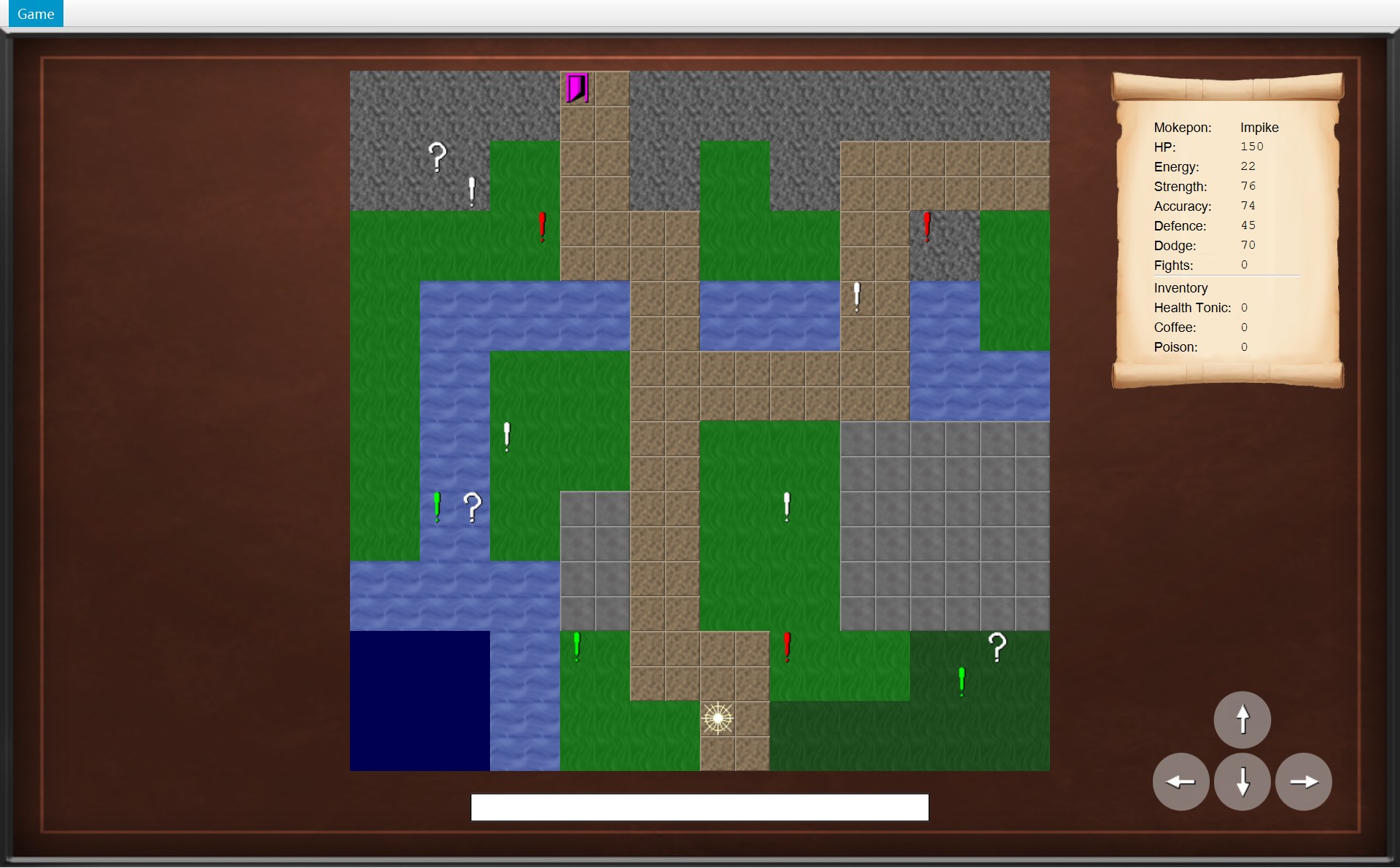
- 3开局时 (17,17) 的绿色感叹号:后面要打的就是它
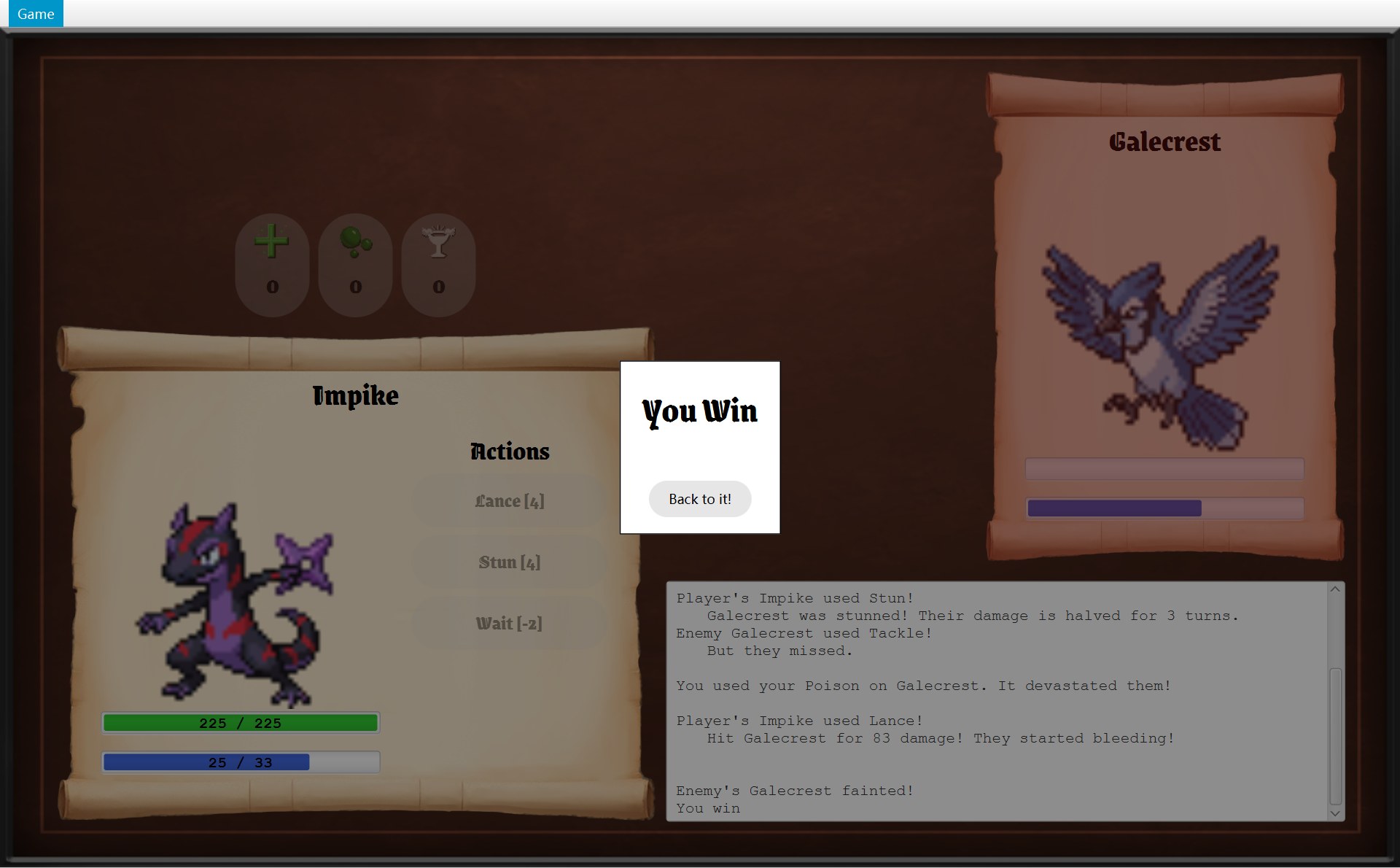
- 1Back to it!
- 2状态栏:You beat the enemy Galecrest!
- 3(17,17):感叹号没了,玩家站在这里
- 4Fights: 1
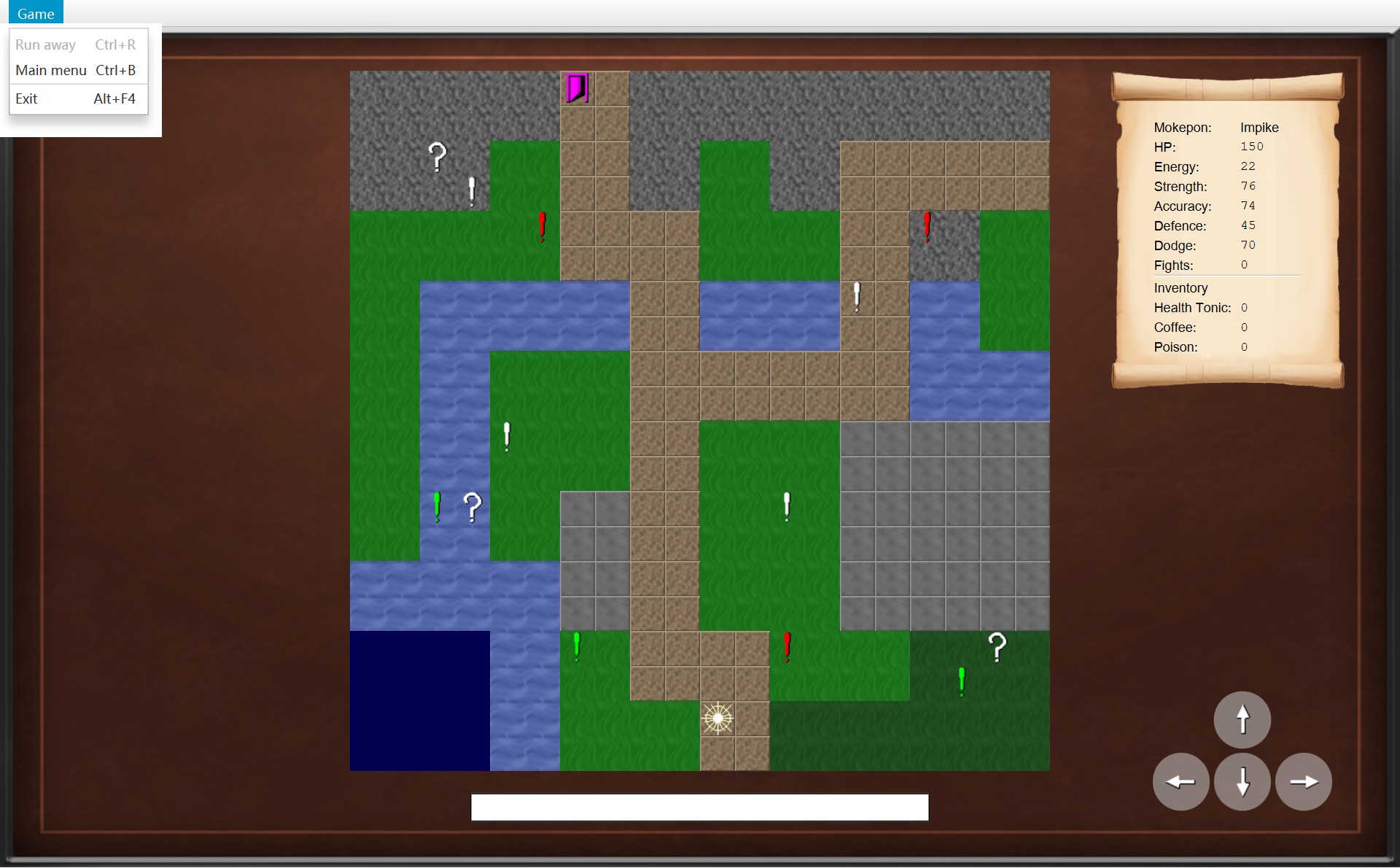
- 5地图画面上 Run away 是灰的(这张是同一个画面在开局时拍的)
46 public void update(GameScreen screen) {47 runAway.setDisable(!screen.canRunAway());48 mainMenu.setDisable(!screen.canReturnToMainMenu());49 }- 登记(开局时)。
startGame第 59 行造规则对象 COverworld,第 60 行造画面,第 61 行world.addListener(overworldScreen)。addListener的参数类型是接口 IOverworldListener,COverworldScreen 写了 implements,所以放得进listeners。这一局里列表一直只有这一个监听者。 - 打赢了。Lance 打倒了 Galecrest(伤害怎么算见 第 12 章)。CBattleScreen.update 看到
isFinished(),调用showResult:第 171 行先getNavigator().updateMenu(),第 173 行造 You Win 框。第 174 行整句是dialog.addButton("Back to it!", event -> getNavigator().winBattle()):按钮 Back to it!(红 1)被点时,lambda 里只做getNavigator().winBattle()这一件事。到这里还没有任何通知:规则对象 COverworld 还不知道你赢了。要等你点了按钮,才会走到winEncounter(第 4 步)和onEncounterWon(第 5 步)。 - 经过第一个接口。你点了 Back to it!。
getNavigator()交出父类 AGameScreen 的字段navigator,它的类型是接口 IGameNavigator,所以 CBattleScreen 不知道背后是谁。真正的对象是 CGameWindow(startBattle里new BattleScreen(..., this)把自己交了进去),所以运行的是 CGameWindow.winBattle。第 72 行先请规则做事:world.winEncounter()。 - 规则改数据。
winEncounter:第 95 行记下敌人 Galecrest;第 96 行objects.remove(encounter.getMarker()),把 (17,17) 的感叹号从列表里拿掉。地图开局有 14 个物体(10 个感叹号、3 个问号箱、1 个门);去 (17,17) 的路上已经捡了 (18,16) 的 Poison 箱,剩 13 个;现在剩 12 个。第 97 行player.addWin(),fightsWon 0 → 1;第 98 行 encounter 清成 null。规则里的数据全改好了,可屏幕一点没变:COverworld 不认识任何画面。 - 经过第二个接口。第 99 行整句是
notifyListeners(listener -> listener.onEncounterWon(enemy));。第 126 行遍历listeners,里面就是第 1 步登记的 COverworldScreen;第 127 行message.accept(listener)等于调用它的onEncounterWon(Galecrest)。图上 COverworld 的箭头只指向接口 IOverworldListener。 - 监听者做自己的事。COverworldScreen 第 104 行:
"You beat the enemy " + "Galecrest" + "!"写进状态栏(红 2)。注意:这时窗口中间显示的还是战斗画面(截图是换完画面以后拍的,这句字在这一步就已经写好了)。地图画面对象一直活着(CGameWindow 的字段overworldScreen存着它),只是没摆在窗口里,但它照样收到通知、照样更新。 - 画面重画。第 105 行调用自己的 private 方法
update()。第 135 行mapView.update()只把world.getObjects()里剩下的 12 个物体的图放回去,(17,17) 的感叹号没有被放回(红 3,现在那格只有玩家)。第 136 行statsScroll.update()把 Fights 写成getFightsWon()= 1(红 4)。第 137–139 行:moveButtons是一个 Map(方向 → 按钮),Map.Entry是其中的一对(键,值);对每一对,按钮能不能用 =world.canMove(那个方向)。 - 回到窗口。通知做完,回到
winBattle第 73 行showScreen(overworldScreen)。showScreen是 CGameWindow 自己的 private 方法:第 102 行currentScreen换成地图画面,第 103 行root.setCenter(screen.getView())向画面要它的 Pane(图上那根箭头)摆到中间,第 104 行updateMenu()→ CGameMenu.update 第 47 行:COverworldScreen 没改写canRunAway(),用父类默认的 false,Run away 变灰(红 5)。战斗画面再没人存着,被丢掉。 - 总结。一圈:CBattleScreen → 接口 IGameNavigator → CGameWindow → COverworld → 接口 IOverworldListener → COverworldScreen。CBattleScreen 的代码里一次也没写过 “GameWindow”;COverworld 所在的 world 包一行
import ...ui都没有。两个接口,两次“倒置”(第 5 节)。
五个通知各在什么时候发、画面各做什么,第 8 章第 6 节有一张表;走路一步的完整回放也在那一章。
为什么在这里有用
- 因为 COverworld 只认识接口,所以规则包 world 完全不依赖界面包 ui,也不 import JavaFX。可以不开窗口,只用代码测试“走一步、捡箱子、打赢”这些规则。
- 因为 通知的是一个列表,所以以后想多一个监听者(比如一个把每一步写进文件的记录类),只要实现接口再
addListener,COverworld 不用改。 - 因为 规则一改完就主动通知,所以画面不用每隔一会儿去问“变了没有”,也不会忘了更新:上面第 6 步画面还没显示,状态栏就已经写好了。
5. 依赖倒置(Dependency Inversion)
是什么。依赖倒置:高层的代码不要直接依赖低层的具体类;两边都依赖一个抽象(接口)。“倒置”指的是箭头的方向:本来 A 直接指着 B,现在 A 指着接口,B 也指着接口(B implements 它)。英文:High-level code should not depend on concrete low-level classes; both should depend on an abstraction.
你的代码里有两处,上一节的动画两次都经过了。先看“假如没有这两个接口”会是什么样,再看你的代码:
两处各是谁高谁低:
- OverworldListener 这一处:COverworld 是高层(游戏规则),COverworldScreen 是低层细节(用 JavaFX 把规则画出来)。高层只认识接口,细节去实现它。
- GameNavigator 这一处:画面和菜单是高层,它们决定“什么时候换画面、什么时候结束程序”,要的只是这几个动作(接口);CGameWindow 是低层细节,管“具体怎么换”(
Stage、BorderPane),由它去实现接口。
第一处:IGameNavigator。三个画面(通过父类 AGameScreen 的字段 navigator,第 6 章第 2 节)和菜单 CGameMenu 都要请窗口“换画面、结束程序”,可它们手里拿的是接口,不是 CGameWindow。看菜单的代码和它在屏幕上的样子:
19 public GameMenu(GameNavigator navigator) {20 runAway = new MenuItem("Run away");21 runAway.setAccelerator(new KeyCodeCombination(KeyCode.R, KeyCombination.CONTROL_DOWN));221 runAway.setOnAction(event -> navigator.runAway());23 24 mainMenu = new MenuItem("Main menu");25 mainMenu.setAccelerator(new KeyCodeCombination(KeyCode.B, KeyCombination.CONTROL_DOWN));262 mainMenu.setOnAction(event -> navigator.returnToMainMenu());27 28 MenuItem exit = new MenuItem("Exit");29 exit.setAccelerator(new KeyCodeCombination(KeyCode.F4, KeyCombination.ALT_DOWN));303 exit.setOnAction(event -> navigator.quit());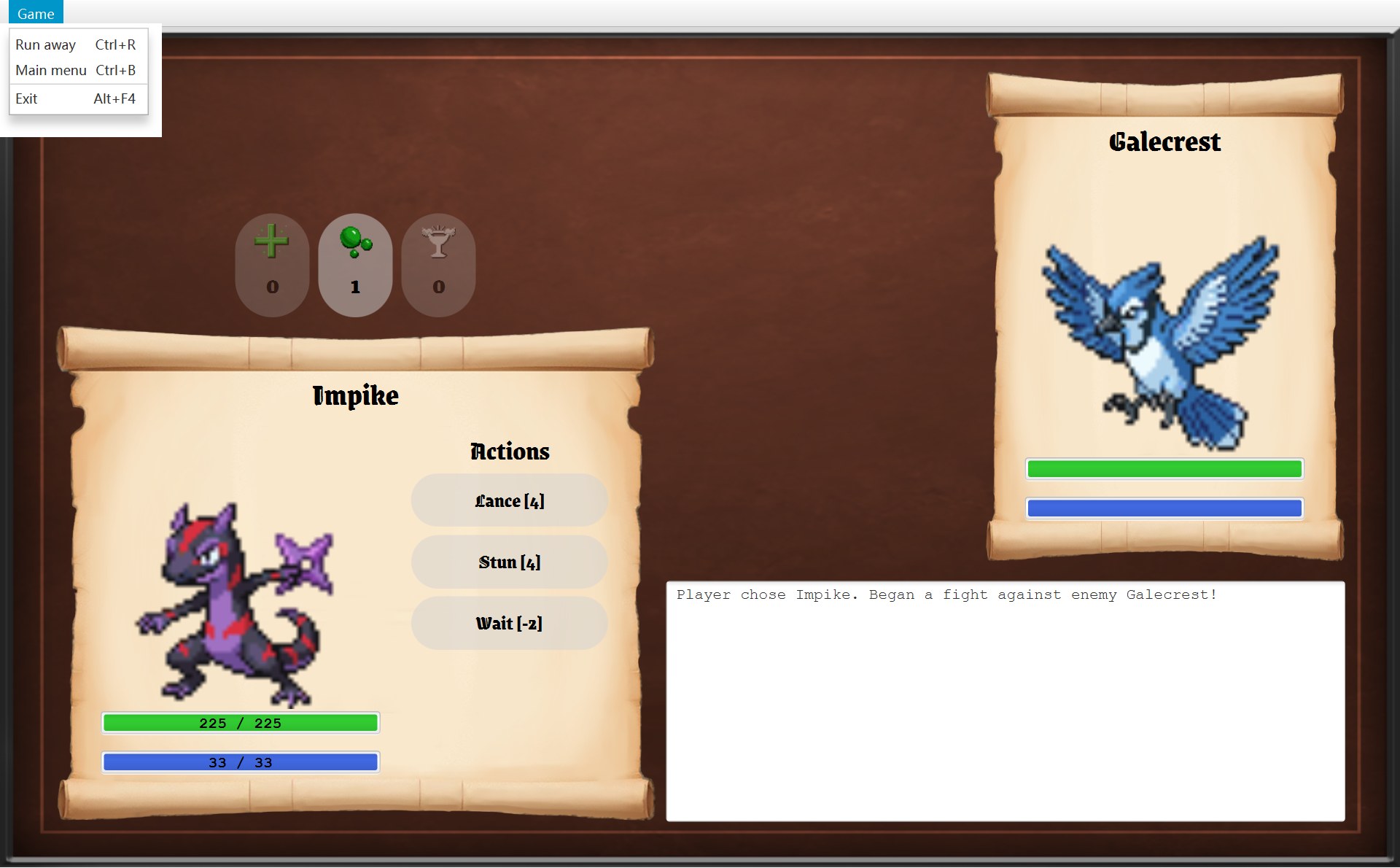
- 1Run away → 第 22 行
navigator.runAway() - 2Main menu → 第 26 行
navigator.returnToMainMenu() - 3Exit → 第 30 行
navigator.quit()
CGameWindow 在第 39 行 new GameMenu(this):交进去的是它自己,可 CGameMenu 只把它当一个 IGameNavigator。把整个项目搜一遍,“GameWindow” 这个名字只出现在 GameWindow.java 和造它的 CMain 里。
第二处:IOverworldListener。注意这个接口放在 world 包里,不在 ui 包里。是规则这一边说“我会发这 5 种通知”,界面那一边来实现它。所以依赖的箭头全部从 ui 指向 world,从来没有反方向的(上面图 ②)。
如果没有 GameNavigator
CSelectScreen、CBattleScreen、CGameMenu 的参数要写成 CGameWindow。可 CGameWindow 自己要 new 这些画面,于是“窗口认识画面,画面也认识窗口”,两边绑死(耦合高,循环依赖)。画面还能调用和换画面无关的 show()。
如果没有 OverworldListener
COverworld 要存一个 COverworldScreen 字段,world 包就要 import ...ui.OverworldScreen,规则代码依赖 JavaFX 画面。想测试“走一步”,就得先开一个窗口。
你的代码
两个接口夹在中间。画面和菜单 → IGameNavigator ← CGameWindow;COverworld → IOverworldListener ← COverworldScreen。谁都只认识一个很小的接口。
为什么在这里有用
- 因为 画面和菜单只依赖接口 IGameNavigator,不依赖具体类 CGameWindow,所以没有“窗口 new 画面、画面又认识窗口”的循环依赖(图 ① 的第一个圈)。
- 因为 它们手里的类型是接口,所以只能调用那 7 个方法;CGameWindow 另外的 public 方法
show()它们调用不到。(stage、root、showScreen是 private 的,有没有接口都碰不到,这不是接口的功劳。) - 因为 画面类里一次也没写 “GameWindow”,所以以后换掉或改写 CGameWindow(比如换一种换画面的方式),画面类一行不用改;写测试时也可以交一个假的 IGameNavigator,只记“被叫了哪个方法”。
- 因为 world 包不依赖 ui,所以规则和界面可以分开改、分开测(规则与界面分离,第 4 章第 4 节)。
6. 封装:private、复制、只读视图、包内可见
是什么。封装:一个类的数据只能由它自己改。字段写成 private,外面只能通过它给的方法来读、来请它改。英文:A class keeps its fields private and only lets other classes use them through its methods.
光写 private 还不够。如果一个字段是 List、Map、数组这种“可以改里面内容”的对象,把它的引用交出去(或者直接存下别人交进来的引用),外面的代码就能绕过你的方法去改它。这叫隐私泄露(privacy leak)。你的代码用了五种办法:
| 办法 | 你代码里的例子 |
|---|---|
| ① private 字段 + 只给 getter,不给 setter | CMokepon:5 个字段全是 private final,没有一个 setter(Project 1 的 Mokepon 有 9 个 setter,第 10 节) |
| ② 收进来时复制(防御性复制) | CMokepon 构造器 new EnumMap<>(stats)、List.copyOf(skills);CGameImages 四个 Map.copyOf;CGameMap 每一行 tiles[row].clone() 和 List.copyOf(objects);COverworld 构造器 List.copyOf(mokepons) 和 new ArrayList<>(map.getObjects()) |
| ③ 交出去时复制 | CInventory.getItems:List.copyOf(counts.keySet()) |
| ④ 交出去时只给只读视图 | CBattle.getLog、COverworld.getObjects:Collections.unmodifiableList(...) |
| ⑤ 方法写成包内可见(什么修饰符都不写) | CPlayer 的 moveTo、moveBack、addWin;AMapObject 的 interact;COverworld 的 startEncounter、collect、reachExit;CMarker 的 chooseEnemy |
18 /* Keep our own copies of the stats and skills, so no other class can change them. */19 public Mokepon(String name, String imagePath, MokeponType type,20 Map<Stat, Integer> stats, List<Skill> skills) {21 this.name = name;22 this.imagePath = imagePath;23 this.type = type;24 this.stats = new EnumMap<>(stats);25 this.skills = List.copyOf(skills);26 }15 public GameMap(Terrain[][] tiles, Position startPosition, List<MapObject> objects) {16 /* Copy every row, so no other class can change the tiles (no privacy leak). */17 this.tiles = new Terrain[tiles.length][];18 for (int row = 0; row < tiles.length; row++) {19 this.tiles[row] = tiles[row].clone();20 }21 this.startPosition = startPosition;22 this.objects = List.copyOf(objects);23 }为什么要复制?CMokeponParser 第 33 行先造一个 stats Map,再交给 CMokepon 的构造器。如果构造器直接写 this.stats = stats,解析器手里那个 Map 和 Mokepon 里的是同一个对象,解析器以后一改,Mokepon 的数值就跟着变。复制以后,两份互不相干:
CGameMap 的二维数组更要小心。二维数组其实是“一个外层数组,里面每一格放着一行(一个 Terrain[])”。如果只写 tiles.clone(),只复制了外层,里面每一行还是同一个数组(浅复制)。所以你的代码第 17 行先 new 一个新的外层数组,第 18–19 行再把每一行 clone() 一份放进去(注释写着 “no privacy leak”):
③ 和 ④ 都是“交出去”,区别很重要:
20 private final List<String> log = new ArrayList<>();⋯ 省略第 21–60 行61 /* Other classes can read the log but cannot change it. */62 public List<String> getLog() {63 return Collections.unmodifiableList(log);64 }140 /* Show all messages and scroll to the latest one. */141 private void showLog() {142 logArea.setText(String.join("\n", battle.getLog()));143 logArea.positionCaret(logArea.getLength());144 logArea.setScrollTop(Double.MAX_VALUE);145 }CBattleScreen 第 142 行 String.join("\n", battle.getLog()):把视图里的每一行用换行连成一整段文字,放进日志区。它每次 update() 都重新读一遍。因为拿到的是视图,读到的总是 CBattle 最新写进去的行。下面两帧是同一场战斗的日志区,中间只用了一个 Poison:
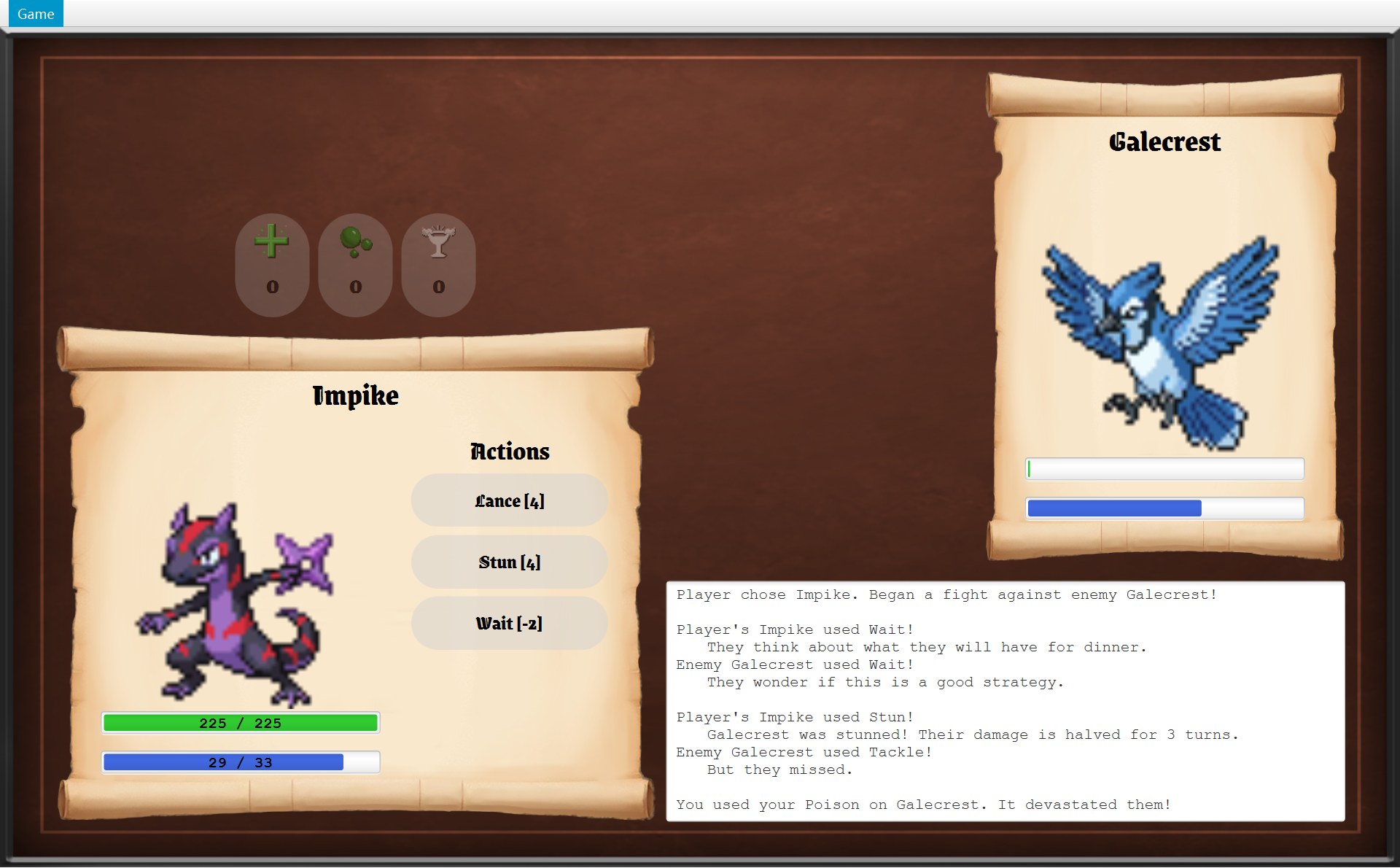
21 public List<Item> getItems() {221 return List.copyOf(counts.keySet());23 }621 for (Item item : player.getInventory().getItems()) {63 Label count = createLabel("", numberFont);64 itemValues.put(item, count);65 addRow(grid, row++, item.getName() + ":", count);66 }- 1三行道具:PlayerStatsScroll 第 62 行对
getItems()副本里的三个道具对象各造一行;数量用getCount(item)读
⑤ 包内可见最能说明问题。看 CPlayer:
32 public Position getPosition() {33 return position;34 }35 36 public int getFightsWon() {37 return fightsWon;38 }39 40 void moveTo(Position newPosition) {41 previousPosition = position;42 position = newPosition;43 }44 45 /* Go back to the tile the player stood on before the last move. */46 void moveBack() {47 position = previousPosition;48 }49 50 void addWin() {51 fightsWon++;52 }getPosition()、getFightsWon() 是 public 的,谁都能读;moveTo、moveBack、addWin 前面没有修饰符,只有 world 包里的类能调用。所以 ui 包里的 COverworldScreen 和 CMapView 能看到玩家在哪,却不能把玩家挪到一格不能走的地方,只能请 world.move(direction),让 COverworld 先检查再挪。AMapObject.interact 也一样:只有 COverworld.move 能触发一个物体,画面没法“假装”踩上了门。
为什么在这里有用
- 因为 CMokepon 永远不变,所以同一只 Mokepon 可以放心地被很多场战斗拿去造 CFighter,打完不用“恢复”(Project 1 要先用
copyMokepon复制一份才敢打)。 - 因为 日志和物体列表只能由规则类自己改,所以“谁能写日志、谁能拿掉感叹号”的答案只有一个地方,出了错只查一个类。
- 因为 改玩家位置的方法是包内可见的,所以“只有能走的格子才能站”这条规则不可能被界面绕过。
7. 继承和多态:同一句调用,不同的子类各做各的
是什么。继承(inheritance):子类 extends 父类,自动拥有父类的字段和方法,可以加新的,也可以改写。多态(polymorphism):变量写的是父类(或接口)类型,里面装的是某个子类的对象;调用方法时,运行的是那个子类的版本(动态绑定)。英文:The variable is declared with the superclass type; at run time the overriding method of the actual subclass object is called.
技能家族第 2 节已经看过。另外还有四家,每一家都有一个“只认识父类”的调用者:
| 调用(在哪一行) | 变量的类型 | 实际对象不同,结果就不同 |
|---|---|---|
CBattle.useItem 第 107 行 item.use(player, enemy) | AItem | CHealthTonic 回满 HP;CCoffee 回满能量;CPoison 让敌人只剩 1 HP |
COverworld.move 第 76 行 object.interact(this) | AMapObject | CMarker 开始遇敌;CMysteryBox 被捡起;CExit 结束游戏 |
| CFighter 第 134、148、171 行的三个循环 | AStatusEffect | CStunned 伤害 × 0.5;CBlinded 多 50% 落空;CBleeding 回合末掉血 |
CGameMenu.update 第 47–48 行 screen.canRunAway()、screen.canReturnToMainMenu() | AGameScreen | 只有 CBattleScreen 能逃跑(还没打完时);只有 CSelectScreen 不能回主菜单 |
CFighterPanel.update 第 77–78 行 hpBar.update(...) | CStatBar | CLabelledStatBar 还会改上面的数字;普通 CStatBar 只改长度 |
真实结果:同一行代码,两句不同的日志
98 /* Use one item from the inventory. An item always works,99 * and using it does not give the enemy a turn.100 */101 public void useItem(Item item) {102 if (finished || !inventory.has(item)) {103 return;104 }105 inventory.remove(item);106 log.add("");107 log.add(item.use(player, enemy));108 }11 @Override12 public String use(Fighter player, Fighter enemy) {131 player.restoreEnergy();14 return describeUse(player, "It restored all your energy!");15 }11 @Override12 public String use(Fighter player, Fighter enemy) {132 player.restoreHp();14 return describeUse(player, "It healed you to max hp!");15 }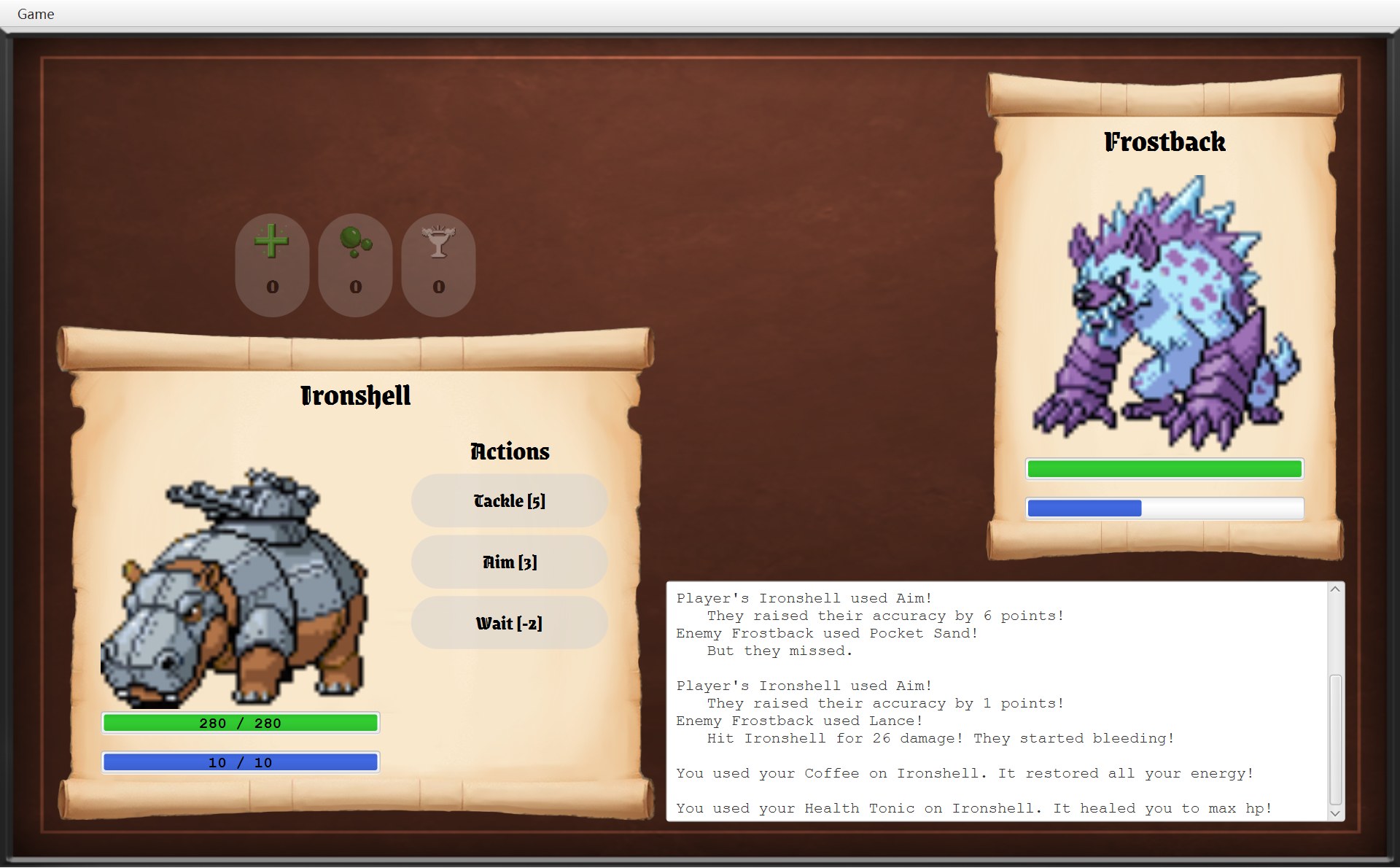
- 1
- 2
两句话的开头 “You used your … on Ironshell.” 一样,因为它们都调用父类 AItem 的 protected 方法 describeUse;后半句由子类自己写。
字段写的是父类,装的是子类:StatBar
30 private final StatBar hpBar;31 private final StatBar energyBar;⋯ 省略第 32–47 行48 double hpY = top + HP_BAR_OFFSET;49 double energyY = top + ENERGY_BAR_OFFSET;50 if (showNumbers) {511 hpBar = new LabelledStatBar(contentX, hpY, HP_COLOUR,52 fighter.getHp(), fighter.getMaxHp());53 energyBar = new LabelledStatBar(contentX, energyY, ENERGY_COLOUR,54 fighter.getEnergy(), fighter.getMaxEnergy());55 } else {562 hpBar = new StatBar(contentX, hpY, HP_COLOUR, fighter.getHp(), fighter.getMaxHp());57 energyBar = new StatBar(contentX, energyY, ENERGY_COLOUR,58 fighter.getEnergy(), fighter.getMaxEnergy());59 }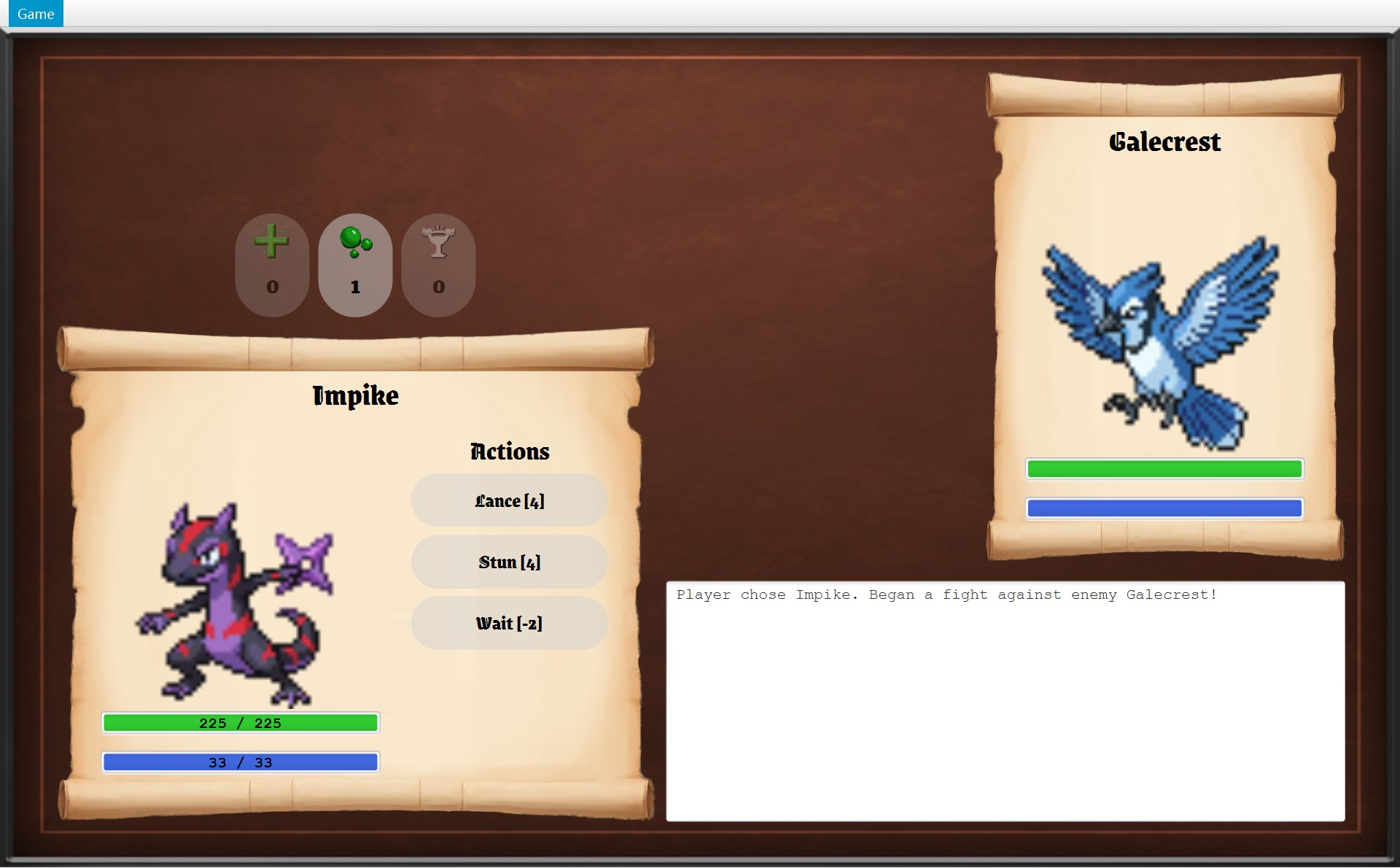
- 1玩家:
showNumbers是 true,new LabelledStatBar(...),条上有 “225 / 225”
- 2敌人:
new StatBar(...),只有颜色,没有数字
11public class LabelledStatBar extends StatBar {⋯ 省略第 12–26 行27 @Override28 public void update(int current, int max) {29 super.update(current, max);30 numbers.setText(current + SEPARATOR + max);31 }32 33 /* The numbers go after the bar so they are drawn on top of it. */34 @Override35 public List<Node> getNodes() {36 List<Node> nodes = new ArrayList<>(super.getNodes());37 nodes.add(numbers);38 return nodes;39 }- 第 11 行:
extends StatBar,所以一个 CLabelledStatBar 对象可以放进类型是 CStatBar 的字段里。 - 第 29 行:
super.update(current, max)先让父类做它那一份:改条的长度。 - 第 30 行:再做自己多出来的一份:把数字写成 “225 / 225” 这样。
- 第 36–38 行:
getNodes先拿父类的节点(那根条),复制成一个新列表,再在最后加上数字标签;后加的画在上面,所以数字盖在条上(第 33 行的注释)。
打印的 UML 只会写 hpBar: StatBar,看不出玩家那边装的是子类。考试时要说:hpBar is declared as StatBar; the player's panel stores a LabelledStatBar in it, so update() also changes the numbers.
为什么在这里有用
- 因为 调用者只认识父类,所以它们不需要
if (item 是 Coffee) … else if …这种一种一种分开写的代码(Project 1 的Skill.use就是这样按技能名字一个一个 if 的)。 - 因为 每个子类只写和别人不一样的那一点,所以类都很小:CCoffee 16 行,CExit 14 行,CStunned 16 行。
- 因为 AStatusEffect 给了默认值(倍率 1、落空 0、没有持续伤害),所以每个效果只改写自己那一项,CFighter 的循环可以对所有效果一视同仁(第 13 章第 2 节)。
8. SOLID 五条,一条一条找
SOLID 是五条设计原则的首字母。每一条都给出:一句话、你代码里做到的地方、没完全做到的地方。
S:单一职责(Single Responsibility)
一个类只负责一件事,只有一种理由需要改它。英文:A class should have only one reason to change.
- CBattle 只管规则,类注释第二句:“It knows nothing about the screen; it only updates the fighters, the items and the log.” CBattleScreen 只管显示:“All the battle rules live in the Battle class; this class only displays them.” 所以改伤害公式不碰界面,改按钮位置不碰规则。
- 读数据文件拆成 5 个类:CGameDataReader 打开文件,CGameData 把文字变成数字和坐标,三个解析器各读一部分:
11mokepon.0.name=Sealance2mokepon.0.image=assets/Sealance.png3mokepon.0.hp=1804mokepon.0.energy=105mokepon.0.strength=556mokepon.0.accuracy=707mokepon.0.defence=758mokepon.0.dodge=459mokepon.0.skills=Bite|Wait10mokepon.0.type=WATER⋯ 省略第 11–401 行4022map.tiles.0=RRRRRRPPRRRRRRRRRRRR403map.tiles.1=RRRRRRPPRRRRRRRRRRRR⋯ 省略第 404–438 行439map.mokeponRandom.0=3,3440map.mokeponRandom.1=14,6441map.mokeponRandom.2=12,12442map.mokeponRandom.3=4,10443map.mokeponRandom.image=assets/sprite_exclamation.png444map.mokeponRandom.colour=white⋯ 省略第 445–469 行4703items.coffee=assets/sprite_coffee.png471items.heal=assets/sprite_heal.png472items.poison=assets/sprite_poison.png红 1 是 CMokeponParser 读的(mokepon.N.xxx),红 2 是 CMapParser 读的(map.tiles.N、感叹号、问号箱、出口),红 3 是 CImageParser 读的(类型、地形、按钮、道具的图片)。数据文件里地图那一段格式变了,只改 CMapParser。
没完全做到:CGameWindow 既管窗口和换画面,又管“这一局”的生命周期(字段 world、startGame 里造规则对象);CBattleScreen 235 行、CSelectScreen 291 行,排版、造按钮、更新都在一个类里;CFighter 既存数值,又算伤害公式,又管效果列表。
O:开闭(Open/Closed)
对扩展开放,对修改关闭:加新功能时写新代码(新的子类),不改已经能用的旧代码。英文:Classes should be open for extension but closed for modification.
| 想加 | 要写的新东西 | 还要改的旧代码 | 完全不用碰 |
|---|---|---|---|
| 新技能 | 一个 AAttackSkill / ABoostSkill / ATargetedSkill 子类 | CSkillCatalogue 的列表加一个对象 | CBattle、CFighter、CBattleScreen、CRandomEnemyStrategy |
| 新道具 | 一个 AItem 子类 | CItemCatalogue 的两个列表;数据文件的图片键 | CBattle、CInventory、CBattleScreen、CPlayerStatsScroll |
| 新状态效果 | 一个 AStatusEffect 子类 | 造它的那个技能 | CFighter、CBattle |
| 新地图物体 | 一个 AMapObject 子类 | CMapParser 加一个读它的方法;可能还要 COverworld 加一个包内方法 | COverworld.move、CMapView |
| 新 Mokepon | 什么代码都不用写 | 只改数据文件 | 全部 Java 代码 |
没完全做到:目录类和解析器认识每一个子类,所以“加一个”总要改一两行旧代码。完全不改旧代码,需要按名字自动找类之类更复杂的办法,这个项目没有必要。加一个技能的完整对比在 第 12 章第 9 节。
L:里氏替换(Liskov Substitution)
子类对象放在任何需要父类对象的地方,程序照样正常。英文:Any subclass object can be used wherever its superclass is expected, without surprising the caller.
- 任何 ASkill 都遵守
use的约定:付能量,返回一行日志。所以 CBattle.playTurn 对 10 个技能写的是同一段代码。 - 任何 AItem、AMapObject、AGameScreen 都能放进它们父类的位置(上一节的表)。
- AStatusEffect 的默认值保证了可替换:CBlinded 没写
getDamageMultiplier,继承到 1,乘进伤害等于没乘;CStunned 没写applyLingeringDamage,继承到“返回空列表”,CFighter.applyLingeringDamage 的循环照样能跑(第 13 章第 2 节)。 - CLance 改写
applyHit时先super.applyHit(...),保住了“攻击会打出伤害”这个父类的约定。
要留心的地方:CWait 的能量消耗是 −2。这对“消耗”来说有点出人意料,但 ASkill 第 13 行的注释写明了 “A negative energy cost means the skill restores energy”,canUse 和 spendEnergy 也都处理了负数,所以没有破坏替换:
77 public boolean canUse(Skill skill) {78 return getEnergy() >= skill.getEnergyCost();79 }⋯ 省略第 80–88 行89 public void spendEnergy(int amount) {90 int energy = Math.min(getEnergy() - amount, getMaxEnergy());91 stats.put(Stat.ENERGY, Math.max(0, energy));92 }- 1Wait 按钮写着 [-2]。第 78 行:能量 ≥ −2 永远成立,所以只要战斗没结束,这个按钮永远能点。第 90 行:消耗 −2 就是能量 + 2,再用
Math.min压在上限以内(Impike 满能量 33 时用 Wait,还是 33)
真正违反 LSP 的写法,是子类改写方法后抛出 “不支持” 异常,或者偷偷不做父类答应的事,你的代码里没有。
I:接口隔离(Interface Segregation)
不要逼一个类依赖它用不到的方法;接口要小而专一。英文:Clients should not be forced to depend on methods they do not use.
做到的:IEnemyStrategy 和 IEnemyPicker 各只有 1 个方法;IOverworldListener 有 5 个,它唯一的实现者五个都用。没完全做到的是 IGameNavigator:
| 谁拿着 GameNavigator | 7 个方法里真正调用的 |
|---|---|
| CSelectScreen | startGame(1 个) |
| COverworldScreen | startBattle(1 个) |
| CBattleScreen | winBattle、updateMenu(2 个) |
| AGameScreen.createGameEndDialog(出口框、Game Over 框用它) | returnToMainMenu、quit(2 个) |
| CGameMenu | runAway、returnToMainMenu、quit(3 个) |
可以改进的写法:拆成两个小接口,比如菜单只要一个有 runAway、returnToMainMenu、quit 的接口,CGameWindow 两个都实现。现在的写法简单、只有一个实现者,代价是每个使用者都能看到它不需要的方法。
D:依赖倒置(Dependency Inversion)
高层和低层都依赖抽象:就是第 5 节的 IGameNavigator 和 IOverworldListener,还有第 3 节 CBattle 的字段类型 IEnemyStrategy、CMarker 的 IEnemyPicker。没完全做到的地方见第 5 节最后。
9. 课程用语:实例化、委托、包含关系;静态目录类
设计题常要求用课程里的词描述类之间的关系。每个词配一对你代码里的真实类:
| 用语 | 意思 | 你代码里的例子 | 英文说法 |
|---|---|---|---|
| 实例化 instantiation | 谁用 new 造出谁 | CEncounter.createBattle 第 54–56 行造两个 CFighter 和一个 CBattle;CGameWindow.startBattle 造 CBattleScreen;CLance.applyHit 每次打中 new Bleeding(user) | Encounter instantiates the two Fighters and the Battle. |
| 委托 delegation | 自己不做,调用别的对象去做 | CBattleScreen.useSkill → battle.playTurn(skill);CMarker.chooseEnemy → picker.pick(...);CFighter.getName → mokepon.getName();CGameWindow.updateMenu → menu.update(currentScreen) | BattleScreen delegates each turn to Battle.playTurn(). |
| 包含关系 containership | 一个类在字段里存着另一个类的对象(has-a) | 下面三种都是 | Battle contains two Fighters, an Inventory and an EnemyStrategy. |
| · 关联 association | 长期认识对方,能随时调用 | CBattleScreen 的 battle;CFighterPanel 的 fighter;COverworldScreen 的 world;AGameScreen 的 navigator;CBleeding 的 attacker;CGameWindow 的 stage | OverworldScreen is associated with Overworld through its field world. |
| · 聚合 aggregation | 整体—部分,但部分是别人造的、可以共用、比整体活得久 | CBattle 的 inventory(COverworld 造的,CPlayer 也拿着,打完还在);CFighter 的 mokepon;CMokepon 的 skills(技能对象大家共用) | Battle aggregates the Inventory: it is shared with Player and outlives the battle. |
| · 组合 composition | 部分由整体自己造、只属于它,整体没了它也没了 | CBattleScreen 在构造器里造的两个 CFighterPanel;CFighter 自己造的 stats、effects;CBattle 自己造的 log;CGameWindow 的 menu;CStatBar 的 bar(自己 new 的 ProgressBar) | BattleScreen is composed of two FighterPanels that it creates and nobody else holds. |
静态目录类:不是单例
CSkillCatalogue、CItemCatalogue、CUiStyle 的字段和方法全是 static 的,程序从不 new 它们,直接写“类名.方法名”用(静态目录类,第 4 章第 7 节)。CItemCatalogue 里两个列表的顺序,在两个画面上都看得见:
9public class ItemCatalogue {10 private static final Item HEALTH_TONIC = new HealthTonic();11 private static final Item COFFEE = new Coffee();12 private static final Item POISON = new Poison();13 14 /* All items, in the order of the overworld scroll. */151 private static final List<Item> ITEMS = List.of(HEALTH_TONIC, COFFEE, POISON);16 /* The battle screen shows its item buttons in another order, as in the sample screenshot. */172 private static final List<Item> BATTLE_ORDER = List.of(HEALTH_TONIC, POISON, COFFEE);18 19 public static List<Item> getAll() {20 return ITEMS;21 }22 23 public static List<Item> getBattleOrder() {24 return BATTLE_ORDER;- 1
- 2第 17 行
BATTLE_ORDER的顺序:Health Tonic(十字)、Poison(绿色药丸)、Coffee(杯子)
- 第 10–12 行:三个道具对象,每种只 new 一次,存在
private static final字段里。 - 第 15 行:
ITEMS = List.of(HEALTH_TONIC, COFFEE, POISON),地图卷轴用这个顺序。 - 第 17 行:
BATTLE_ORDER = List.of(HEALTH_TONIC, POISON, COFFEE),战斗画面的按钮用这个顺序。两个列表里放的是同样的三个对象,只是顺序不同。
单例模式(Singleton)是“这个类只能造一个对象”:构造器写成 private,再用一个静态方法交出那唯一的对象。你的目录类不是这样:
- 它们根本不造自己的对象,不存在“唯一的那一个 CSkillCatalogue”。
- “每种技能只有一个对象”是靠目录类的 static 列表做到的;CBite、CCoffee 这些类本身随时可以再
new一个。 - 它们没写 private 构造器,Java 给了一个看不见的默认构造器,所以技术上能
new SkillCatalogue(),只是没有意义。
好处
- 每种道具只有一个对象,所以 CInventory 能直接拿道具对象当 Map 的键。
- 技能对象不变(字段都是 final),36 只 Mokepon 共用 10 个对象,省事又安全。
- 查找写在一处:名字拼错马上抛 “Unknown skill”,不像 Project 1 返回 null。
- CUiStyle 把尺寸、字体、图片读取集中在一处,所有画面看起来一样。
坏处
- 全局的:谁都能调用,测试时换不掉(static 方法不能用接口替换,违反一点 DIP)。
- 目录要认识每一个子类,加新子类就要改它(OCP 不完美)。
- CItemCatalogue 的两个列表要手动保持一致,漏加一个就会少一个按钮。
- 没有 private 构造器,挡不住无意义的 new。
10. Project 1 和 Project 2:逐条对比
Project 1 只有 5 个类,全在一个包里。先看它们的关系:
| Project 1 | Project 2(你交的) | |
|---|---|---|
| 规模 | 5 个类,1 个包,1058 行 | 72 个类(55 个普通类、8 个抽象类、4 个接口、5 个枚举),9 个包,3730 行 |
| 接口 | 0 个 | 4 个:IEnemyStrategy、IEnemyPicker、IOverworldListener、IGameNavigator |
| 技能 | 一个 Skill 类,generateSkill 和 use 里两串 if / else 按名字分支,只认识 4 个技能 | 14 个类的继承树(4 个抽象 + 10 个具体),两层模板方法,CSkillCatalogue 按名字找对象 |
| Mokepon 的数值 | 一个 Mokepon 类:9 个 public setter;开打前 copyMokepon 复制一份,战斗里改副本;写了 reset() 却没有地方调用 | 只读的 CMokepon + 每场战斗新造的 CFighter,打完直接丢掉 |
| 敌人出招 | Battle.chooseEnemySkill() 一个方法 | 接口 IEnemyStrategy + CRandomEnemyStrategy(方法体几乎一模一样,只是搬进了一个能替换的类) |
| 窗口和画面 | GameWindow extends Stage,591 行,所有画面都在它的方法里拼出来;两套菜单由 getSelectMenu、getBattleMenu 分开造 | CGameWindow 106 行,主要管换画面(还管这一局的 world:startGame、returnToMainMenu);三个 AGameScreen 子类各画一个画面;一个 CGameMenu,靠 canRunAway() 多态开关 |
| 读数据 | Main 里读文件,static generateMokepon 一口气造 Mokepon | CGameDataReader + CGameData + 三个解析器,各管一段 |
| 封装 | 几乎每个字段都有 setter;getBattleLog() 直接交出列表,GameWindow 从外面往战斗日志里加第一行 | 没有 setter;日志只读;CBattle 在自己的构造器里写第一行 |
下面六组代码对照:大多数是左边 Project 1、右边 Project 2(窄屏上是上下排);“敌人出招”那一组的行太长,改成上下排,上面是 Project 1。
技能:if / else 按名字 vs 继承树
45 // Apply the skill effect and return its battle log message.46 // Attack skills must hit before they can deal damage.47 public String use(Mokepon attacker, Mokepon target, Random random) {48 // Pay the energy cost even if the attack misses.49 attacker.spendEnergy(energyCost);50 51 // Use accuracy and dodge to calculate the hit chance.52 double hitProbability = Math.pow(attacker.getAccuracy(), 2) / (Math.pow(attacker.getAccuracy(), 2) + Math.pow(target.getDodge(), 2));53 54 // Round damage down with integer division.55 int biteDamage = attacker.getStrength() * 50 / target.getDefence();56 int tackleDamage = 2 * attacker.getStrength() * 50 / target.getDefence();57 58 if (name.equals("Bite")) {59 if (random.nextDouble() < hitProbability) {60 target.takeDamage(biteDamage);61 return "\tHit " + target.getName() + " for " + biteDamage + " damage!";62 }63 return "\tBut they missed.";64 65 } else if (name.equals("Tackle")) {66 if (random.nextDouble() < hitProbability) {67 target.takeDamage(tackleDamage);68 return "\tHit " + target.getName() + " for " + tackleDamage + " damage!";69 }70 return "\tBut they missed.";9public abstract class AttackSkill extends TargetedSkill {10 private final double power;11 12 protected AttackSkill(String name, int energyCost, double power) {13 super(name, energyCost);14 this.power = power;15 }16 17 @Override18 protected String applyHit(Fighter user, Fighter target, Random random) {19 int damage = user.calculateDamage(target, power);20 target.takeDamage(damage);21 return "\tHit " + target.getName() + " for " + damage + " damage!";22 }Project 1 的 Bite 分支和 Tackle 分支几乎一样(第 58–64 行、第 65–70 行),只有伤害乘 1 还是乘 2。Project 2 把相同的部分写在 AAttackSkill 里,CBite、CTackle 各 11 行,只传 POWER 和 ENERGY_COST。加一个新技能的对比表在 第 12 章第 9 节。
数值:setter + 复制 vs 只读 Mokepon + Fighter
82 // Update defence without going above 100.83 public void setDefence(int defence) {84 if (defence > 100) {85 this.defence = 100;86 } else {87 this.defence = defence;88 }89 }⋯ 省略第 90–150 行151 // Restore HP, energy and defence to their starting values.152 public void reset() {153 this.hp = maxHP;154 this.energy = maxEnergy;155 this.defence = originDefence;156 }8/* A Mokepon as it is written in the data file. Its stats never change.9 * A battle uses a Fighter made from it, so the Mokepon itself stays the same.10 */11public class Mokepon {12 private final String name;13 private final String imagePath;14 private final MokeponType type;15 private final Map<Stat, Integer> stats;16 private final List<Skill> skills;17 18 /* Keep our own copies of the stats and skills, so no other class can change them. */19 public Mokepon(String name, String imagePath, MokeponType type,20 Map<Stat, Integer> stats, List<Skill> skills) {21 this.name = name;22 this.imagePath = imagePath;23 this.type = type;24 this.stats = new EnumMap<>(stats);25 this.skills = List.copyOf(skills);26 }Project 1 靠 GameWindow.copyMokepon(第 531–533 行)在开打前复制一份,战斗里 Bunker 调用的 setDefence 改的是副本。可是 Mokepon 有 9 个 public setter,任何类都能改原来那一份,要靠“大家都记得先复制”才安全;reset() 写好了,整个项目却没有一处调用它。Project 2 让 CMokepon 根本改不了,每场战斗新造一个 CFighter 来装会变的数,问题就没了(第 10 章)。
敌人出招:一个方法 vs 一个策略类
63 // Randomly choose a skill the enemy can afford.64 public Skill chooseEnemySkill() {65 List<Skill> availableSkills = new ArrayList<>();66 67 for (Skill s : enemy.getSkills()) {68 if (enemy.canUse(s)) {69 availableSkills.add(s);70 }71 }72 73 int index = random.nextInt(availableSkills.size());74 return availableSkills.get(index);75 }8/* Picks a random skill out of the ones the enemy has enough energy for. */9public class RandomEnemyStrategy implements EnemyStrategy {10 11 @Override12 public Skill chooseSkill(Fighter enemy, Random random) {13 List<Skill> affordableSkills = new ArrayList<>();14 for (Skill skill : enemy.getSkills()) {15 if (enemy.canUse(skill)) {16 affordableSkills.add(skill);17 }18 }19 return affordableSkills.get(random.nextInt(affordableSkills.size()));20 }21}两边的循环几乎一字不差。区别不在“怎么挑”,而在“放在哪”:Project 1 想换一种挑法,只能改 Battle;Project 2 写一个新的 implements EnemyStrategy 的类,再让 CEncounter.createBattle 用 5 个参数的构造器把它传进去,CBattle 一行不改(现在还没有人这样传,见第 3 节)。
窗口和菜单:extends Stage + 两套菜单 vs 实现接口 + 一个 GameMenu
24public class GameWindow extends Stage {⋯ 省略第 25–550 行551 // Create the menu with reset and restart disabled before battle.552 private MenuBar getSelectMenu() {553 MenuItem reset = new MenuItem("Reset");554 reset.setDisable(true);555 556 MenuItem restart = new MenuItem("Restart Battle");557 restart.setDisable(true);558 559 MenuItem exit = new MenuItem("Exit");560 exit.setOnAction(event -> Platform.exit());561 562 Menu gameMenu = new Menu("Game");563 gameMenu.getItems().addAll(reset, restart, exit);564 565 MenuBar menuBar = new MenuBar(gameMenu);566 menuBar.setPrefWidth(1280);567 return menuBar;568 }569 570 // Create the battle menu with reset, restart and exit actions.571 private MenuBar getBattleMenu(List<Mokepon> mokeponList, Mokepon playerTemplate, Mokepon enemyTemplate) {572 MenuItem reset = new MenuItem("Reset");573 reset.setAccelerator(new KeyCodeCombination(KeyCode.R, KeyCombination.CONTROL_DOWN));574 reset.setOnAction(event -> resetSelectScreen());575 576 MenuItem restart = new MenuItem("Restart Battle");577 restart.setAccelerator(new KeyCodeCombination(KeyCode.R));578 restart.setOnAction(event -> battleScreen(mokeponList, playerTemplate, enemyTemplate));579 580 MenuItem exit = new MenuItem("Exit");581 exit.setOnAction(event -> Platform.exit());582 583 Menu gameMenu = new Menu("Game");584 gameMenu.getItems().addAll(reset, restart, exit);585 586 MenuBar menuBar = new MenuBar(gameMenu);587 menuBar.setPrefWidth(1280);588 return menuBar;589 }14/* Owns the window and decides which screen it shows.15 * The menu bar stays at the top, and the current screen fills the space below it.16 */17public class GameWindow implements GameNavigator {18 private final Stage stage;19 private final List<Mokepon> mokepons;20 private final GameMap map;21 private final GameImages images;22 private final GameMenu menu;23 private final BorderPane root = new BorderPane();24 private final SelectScreen selectScreen;25 private GameScreen currentScreen;43 /* Turn the options on or off to match the screen being shown.44 * A disabled option also ignores its keyboard shortcut.45 */46 public void update(GameScreen screen) {47 runAway.setDisable(!screen.canRunAway());48 mainMenu.setDisable(!screen.canReturnToMainMenu());49 }Project 1 的 GameWindow extends Stage:它“就是”窗口,继承了 Stage 的全部方法;选择界面、战斗界面的每一个按钮和标签也都在这个类里造,光 battleScreen 一个方法就从第 232 行写到第 435 行。菜单靠两个方法各造一套:选择界面那套在第 554、557 行写死 setDisable(true),战斗那套每开一场战斗再造一次。Project 2 的 CGameWindow 不继承 Stage,而是用字段 stage 存着它:has-a 代替 is-a,这就是“组合优于继承”的思路。不过按第 9 节的分法,这个字段本身是关联,不是组合,因为 Stage 是 JavaFX 造好、经 CMain.start 第 38 行交进构造器的(真正的组合例子是 CStatBar 自己 new 的 ProgressBar)。菜单只造一次,换画面时 CGameMenu.update 问 screen.canRunAway(),由每个画面自己回答(多态)。一个什么都管的上帝类,就是这样被拆开的。
读数据:一个 static 方法 vs 每个类管一段
63 // Build the Mokepon list from the numbered data entries.64 public static List<Mokepon> generateMokepon(Properties gameData) {65 List<Mokepon> mokepons = new ArrayList<>();66 int index = 0;67 68 // Read entries in order until the next name is missing.69 while (gameData.containsKey("mokepon." + index + ".name")) {70 String prefix = "mokepon." + index + ".";71 72 String name = gameData.getProperty(prefix + "name");73 String image = gameData.getProperty(prefix + "image");74 int hp = Integer.parseInt(gameData.getProperty(prefix + "hp"));75 int energy = Integer.parseInt(gameData.getProperty(prefix + "energy"));76 int strength = Integer.parseInt(gameData.getProperty(prefix + "strength"));77 int accuracy = Integer.parseInt(gameData.getProperty(prefix + "accuracy"));78 int defence = Integer.parseInt(gameData.getProperty(prefix + "defence"));79 int dodge = Integer.parseInt(gameData.getProperty(prefix + "dodge"));80 81 // Convert the skill names into Skill objects.82 List<String> skills = List.of(gameData.getProperty(prefix + "skills").split("\\|"));83 84 List<Skill> skillList = new ArrayList<>();85 for (String s : skills) {86 skillList.add(Skill.generateSkill(s));87 }88 89 Mokepon m = new Mokepon(name, image, hp, energy, strength, accuracy, defence, dodge, skillList);90 91 mokepons.add(m);92 index++;93 }94 95 return mokepons;96 }17 /* Read mokepon.0, mokepon.1, ... in order until the next name is missing. */18 public List<Mokepon> parse(GameData data) {19 List<Mokepon> mokepons = new ArrayList<>();20 int count = data.countEntries(PREFIX, ".name");21 for (int index = 0; index < count; index++) {22 mokepons.add(parseMokepon(data, PREFIX + index + "."));23 }24 return mokepons;25 }26 27 private Mokepon parseMokepon(GameData data, String prefix) {28 String name = data.getText(prefix + "name");29 String imagePath = data.getText(prefix + "image");30 MokeponType type = MokeponType.valueOf(data.getText(prefix + "type"));31 32 /* Each stat key is the stat name in lower case, for example mokepon.0.hp. */33 Map<Stat, Integer> stats = new EnumMap<>(Stat.class);34 for (Stat stat : Stat.values()) {35 stats.put(stat, data.getNumber(prefix + stat.name().toLowerCase()));36 }37 38 List<Skill> skills = parseSkills(data.getText(prefix + "skills"));39 return new Mokepon(name, imagePath, type, stats, skills);40 }41 42 /* Skill names are separated by "|", for example Bite|Pocket Sand|Nimble|Wait. */43 private List<Skill> parseSkills(String skillNames) {44 List<Skill> skills = new ArrayList<>();45 for (String skillName : skillNames.split("\\|")) {46 skills.add(SkillCatalogue.find(skillName.trim()));47 }48 return skills;49 }两边做的事差不多。Project 1 读文件和造 Mokepon 都在 Main 里,六个数值一行一个 Integer.parseInt;技能名不认识时 generateSkill 返回 null,悄悄放进列表。Project 2 读文件交给 CGameDataReader,数字转换交给 CGameData.getNumber;第 34–36 行遍历 Stat.values(),以后多一种属性这里不用改;技能交给 SkillCatalogue.find,不认识就抛异常。地图和图片由 CMapParser、CImageParser 各管一段(Project 1 没有地图)。
战斗日志:交出列表 vs 只读视图
257 Mokepon player = copyMokepon(playerTemplate);258 Mokepon enemy = copyMokepon(enemyTemplate);259 260 Battle battle = new Battle(player, enemy);261 battle.getBattleLog().add("Player chose " + player.getName() + ". Began a fight against enemy " + enemy.getName() + "!");30 public Battle(Fighter player, Fighter enemy, Inventory inventory,31 EnemyStrategy enemyStrategy, Random random) {32 this.player = player;33 this.enemy = enemy;34 this.inventory = inventory;35 this.enemyStrategy = enemyStrategy;36 this.random = random;37 log.add("Player chose " + player.getName() + ". Began a fight against enemy "38 + enemy.getName() + "!");39 }⋯ 省略第 40–60 行61 /* Other classes can read the log but cannot change it. */62 public List<String> getLog() {63 return Collections.unmodifiableList(log);64 }Project 1 的 getBattleLog() 第 40 行直接 return battleLog;,还有 setBattleLog 能整个换掉。GameWindow 第 261 行就利用了这一点:从外面往 Battle 的列表里加东西。这是一个典型的隐私泄露。Project 2 的 CBattle 在构造器第 37–38 行自己写这一行,getLog() 只给只读视图。
菜单项也不一样:Project 1 是 Reset、Restart Battle、Exit;Project 2 是 Run away、Main menu、Exit(第 5 节的截图)。
考试怎样组织这些内容来答题,见下一章 第 17 章。
自测
你的代码里哪里用了模板方法?为什么 Skill.use 要写 final?
三处:ASkill.use(先 spendEnergy,再 applyEffect)、ATargetedSkill.applyEffect(先判断命中,中了才 applyHit)、AGameScreen.handleKeyPress(对话框开着或组合键就不理,否则 handleKey)。final 让子类改不了顺序:每个技能都一定先付能量,没打中也一样(Galecrest 的 Tackle 没中,能量 14 → 9)。applyEffect、applyHit 是子类必须写的抽象步骤(primitive operation),handleKey 有空的默认版本,是 hook method。
English: Skill.use() is a final Template Method: it always calls spendEnergy() first and then the abstract applyEffect(), so no subclass can change the order.
三种颜色的感叹号为什么不是三个子类?这用的是什么模式?颜色是从哪来的?
策略模式。它们都是 CMarker。挑哪只敌人由字段 picker(类型是接口 IEnemyPicker)里装的对象决定:白色 CRandomEnemyPicker,红色 new TerrainEnemyPicker(ADVANTAGE),绿色 new TerrainEnemyPicker(DISADVANTAGE),由 CMapParser 第 31–35 行配好。chooseEnemy 只是委托给 picker.pick(...)。颜色不是 picker 给的:每组有自己的 Sprite,颜色读自数据文件的 .colour 键(white、red、lime),CMapView 按它上色。这也是“组合优于继承”。
English: All markers are the same Marker class; each group gets its own Sprite (the colour) and its own EnemyPicker strategy (how the enemy is chosen), so no subclasses are needed.
观察者模式里,谁登记监听者?谁发通知?打赢以后状态栏的字是怎么来的?
CGameWindow.startGame 第 61 行 world.addListener(overworldScreen) 登记。COverworld 通过 notifyListeners 发通知。打赢后:Back to it! → navigator.winBattle() → CGameWindow.winBattle → world.winEncounter()(拿掉感叹号、加一场胜利)→ notifyListeners(listener -> listener.onEncounterWon(enemy)) → COverworldScreen.onEncounterWon 写 “You beat the enemy Galecrest!” 并 update() → 回到 winBattle,showScreen(overworldScreen)。
English: GameWindow registers OverworldScreen with world.addListener(); after winEncounter() the Overworld notifies all listeners with onEncounterWon(), and the screen updates its status bar.
“依赖倒置”在你的代码里“倒置”了什么?举两个例子。这样做的好处是什么?
本来会是“画面直接认识窗口”“规则直接认识画面”。现在中间各夹了一个接口:画面和 CGameMenu 只认识 IGameNavigator,CGameWindow implements 它;COverworld 只认识 IOverworldListener(放在 world 包里),COverworldScreen implements 它。好处:没有循环依赖(GameWindow new 画面,画面却不认识 GameWindow);world 包不 import ui,规则可以不开窗口单独测试;换掉 GameWindow 时画面类不用改。注意别说“接口让画面碰不到 stage”:stage 本来就是 private 的。
English: The screens and the menu depend on the GameNavigator interface, which GameWindow implements; Overworld depends on OverworldListener, which OverworldScreen implements, so the world package never depends on the ui package and there is no dependency cycle.
getLog() 和 getItems() 都防止了隐私泄露,它们有什么不同?你的代码里还剩下哪种泄露?
Battle.getLog() 返回只读视图:和原列表是同一份数据,CBattle 以后写的新行也看得见(用 Poison 前后日志从 11 行变 13 行),但改它会抛异常。Inventory.getItems() 返回 List.copyOf 的副本:复制那一刻的样子,和原来的不再相连。还剩下的:Battle.getPlayer() 交出真的 CFighter,它的 takeDamage、restoreHp 等都是 public;getInventory() 交出能改的 CInventory;CGameWindow 构造器直接存下解析器造的 Mokepon 列表,没有复制。
English: getLog() returns an unmodifiable view of the live list, while getItems() returns a copy; Battle.getPlayer() still exposes a mutable Fighter with public mutators, and GameWindow stores the parser's list without copying it.
CFighterPanel 的 hpBar 在 UML 里写的是 StatBar,为什么玩家的条上有数字?
多态。字段声明的类型是 CStatBar;构造器里 showNumbers 为 true(玩家),装进去的是子类 CLabelledStatBar;敌人装的是普通 CStatBar。hpBar.update(...) 运行的是实际对象的版本:CLabelledStatBar 先 super.update 改长度,再改数字。
English: hpBar is declared as StatBar; the player's panel stores a LabelledStatBar in it, and its overriding update() also changes the numbers.
IGameNavigator 符合接口隔离原则吗?
不完全符合。它有 7 个方法,可 CSelectScreen 只用 startGame,COverworldScreen 只用 startBattle,CGameMenu 只用 runAway、returnToMainMenu、quit。可以拆成几个小接口,由 CGameWindow 一起实现。反过来 IEnemyStrategy、IEnemyPicker 各只有 1 个方法,是做得好的例子。
English: GameNavigator is wider than its clients need; GameMenu only uses three of its seven methods, so it could be split into smaller interfaces.
CSkillCatalogue 是单例吗?说一个好处和一个坏处。
不是。单例是“类只造一个自己的对象”(private 构造器 + getInstance);CSkillCatalogue 根本不造自己的对象,只用一个 static 列表存 10 个技能对象,用 static 的 find 查。好处:每个技能只有一个不可变对象,所有 Mokepon 共用,名字拼错马上抛异常。坏处:全局的 static 调用,测试时换不掉;加新技能要改这个列表;没写 private 构造器,还是能被 new。
English: SkillCatalogue is a static catalogue, not a Singleton: it is never instantiated; it keeps one shared, immutable object per skill in a static list.