04项目地图:9 个包、72 个类
每个包管什么、包之间谁依赖谁、规则代码和界面代码为什么分开
- 说出 9 个包的名字、每个包管什么,以及 72 个类各在哪个包
- 指着截图上的任何一块说出两件事:画它的类(都在 ui 包),和它显示的内容来自哪个包
- 拿出证据说明:只有 ui 包和 CMain 用了 JavaFX,规则代码不认识画面
- 画出包之间谁 import 谁,并指出哪里是双向的(比如 battle ↔ skill)
- 认出 8 个继承家族、4 个接口,和 3 个只有 static 成员的类
- 跟着点一次 Stun,按顺序说出代码经过了哪几个包
- 看到画面上一个数字,一步一步找到写它的代码
前三章你玩过了游戏(第 1 章),学了项目里用到的 Java(第 2 章),也会读老师打印的 UML(第 3 章)。这一章不钻进任何一个方法的细节,而是先画一张地图:72 个类分在哪 9 个包(package)里,每个包管什么,包和包之间谁用谁。以后每一章讲一个类,你都能在这张地图上找到它的位置。
1. 先看画面:每一块属于哪个包
先说结论:画面上看得见的东西,全部是 ui 包的类画的。可是它们显示的内容——名字、数字、日志里的句子——几乎都来自别的包。下面三张真实截图,每一条说明都分两行写:画:是谁画的(都在 ui);内容:显示的东西从哪个包来。
选择界面
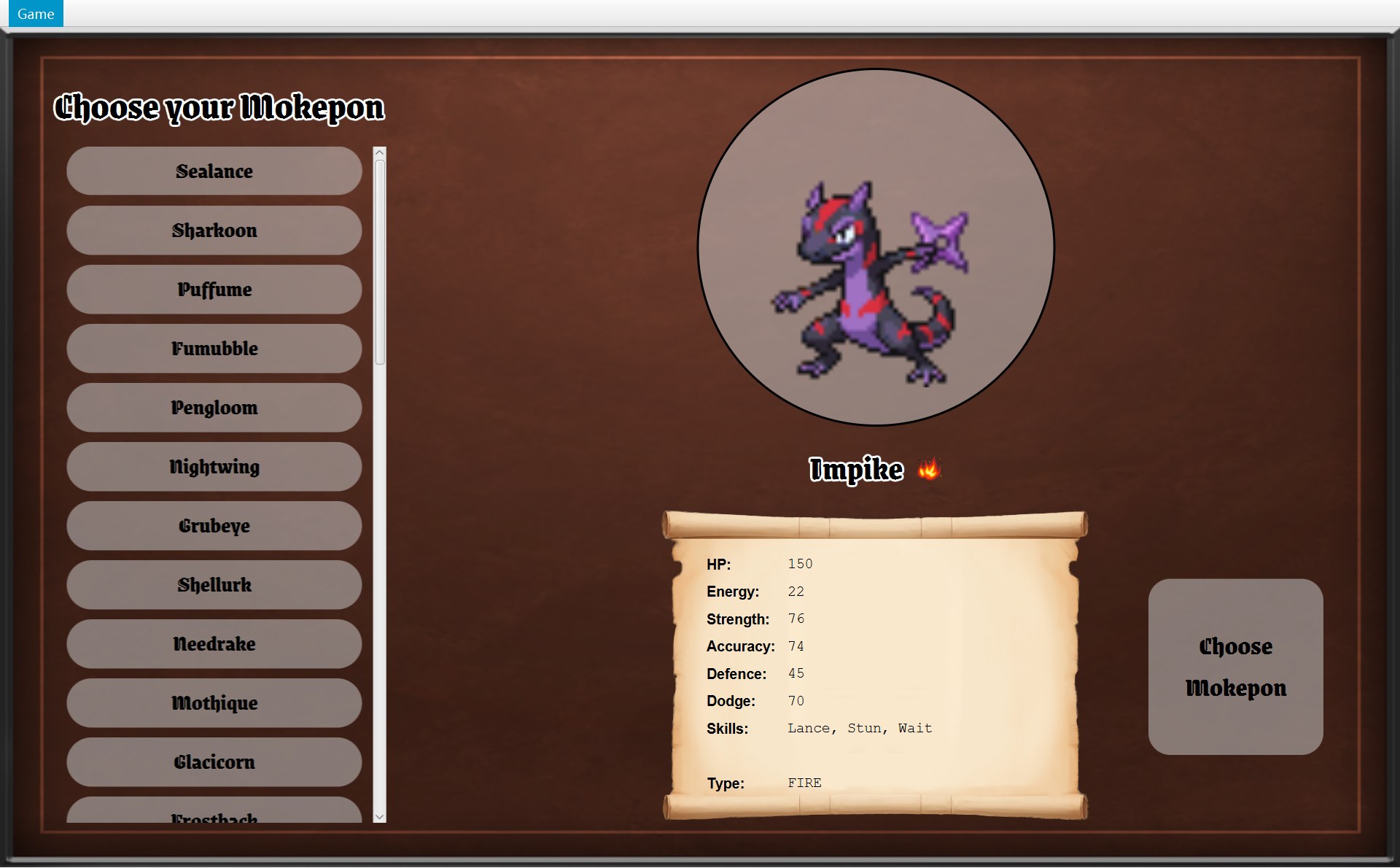 12345567
- 1
- 2
- 3
- 4名字 Impike
画:uinameLabel(一个Label)
内容:model 还是getName() - 5火焰图标和下面的 FIRE
画:ui CSelectScreen 的typeIcon和typeValue
内容:model 枚举 EMokeponType 的 FIRE;火焰图片的路径存在 data CGameImages - 6卷轴上的数值表
画:ui 一个个Label
内容:行名 HP: 是 model EStat 的getLabel(),数字是mokepon.getStat(stat);Skills 一行是 skill 三个技能对象的getName() - 7
这一屏没有任何“规则”:点一个名字不会改任何数据,CSelectScreen 只是把 CMokepon 对象里存好的值写进几个 Label(整个选择界面在 第 7 章)。
地图界面
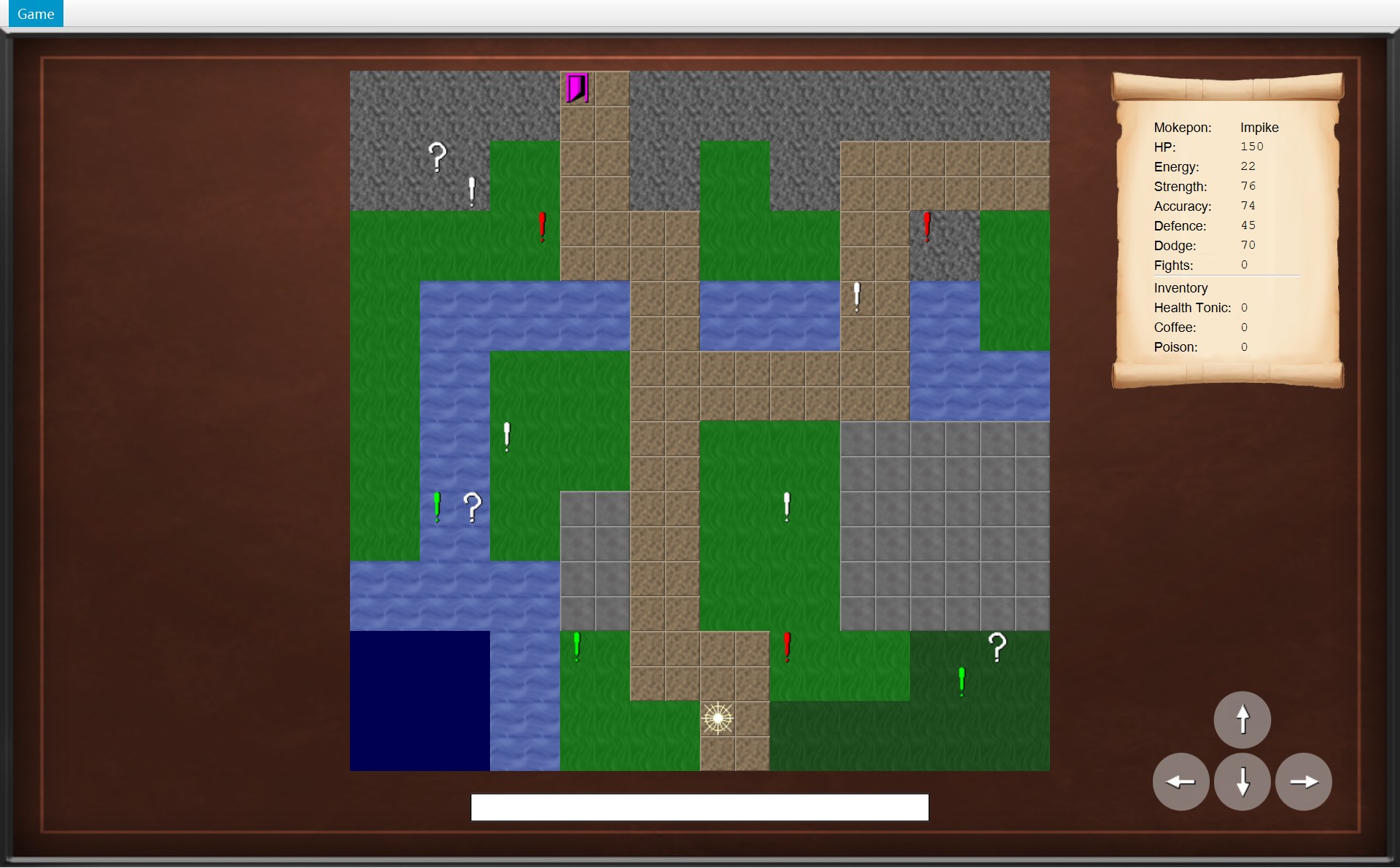 1222345678
- 1
- 2
- 3
- 4
- 5
- 6
- 7
- 8
战斗界面
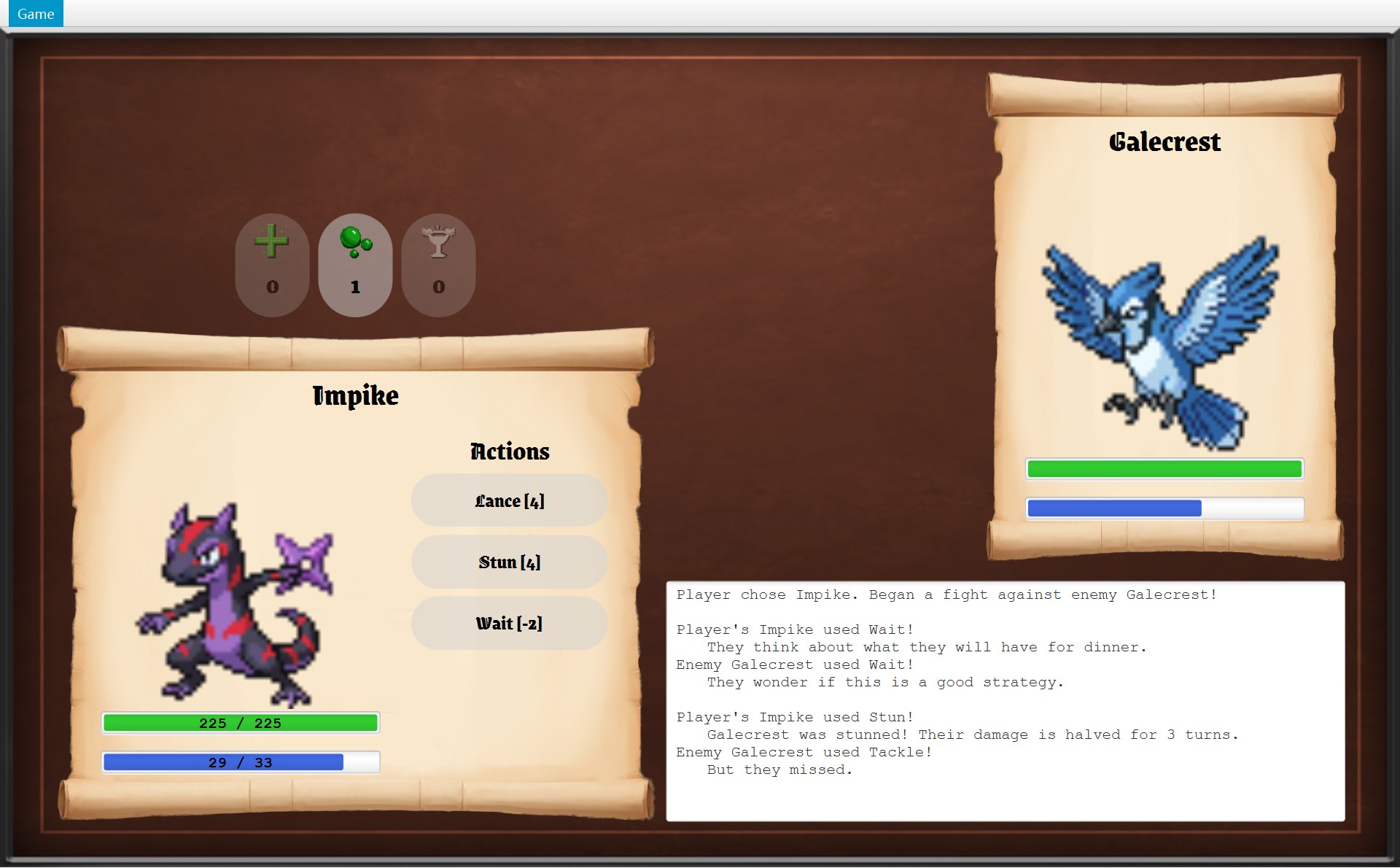 1234567
- 1
- 2225 / 225 和 29 / 33
画:ui 两个 CLabelledStatBar
内容:battle CFighter 的getHp()/getMaxHp()和getEnergy()/getMaxEnergy() - 3
- 4
- 5
- 6
- 7
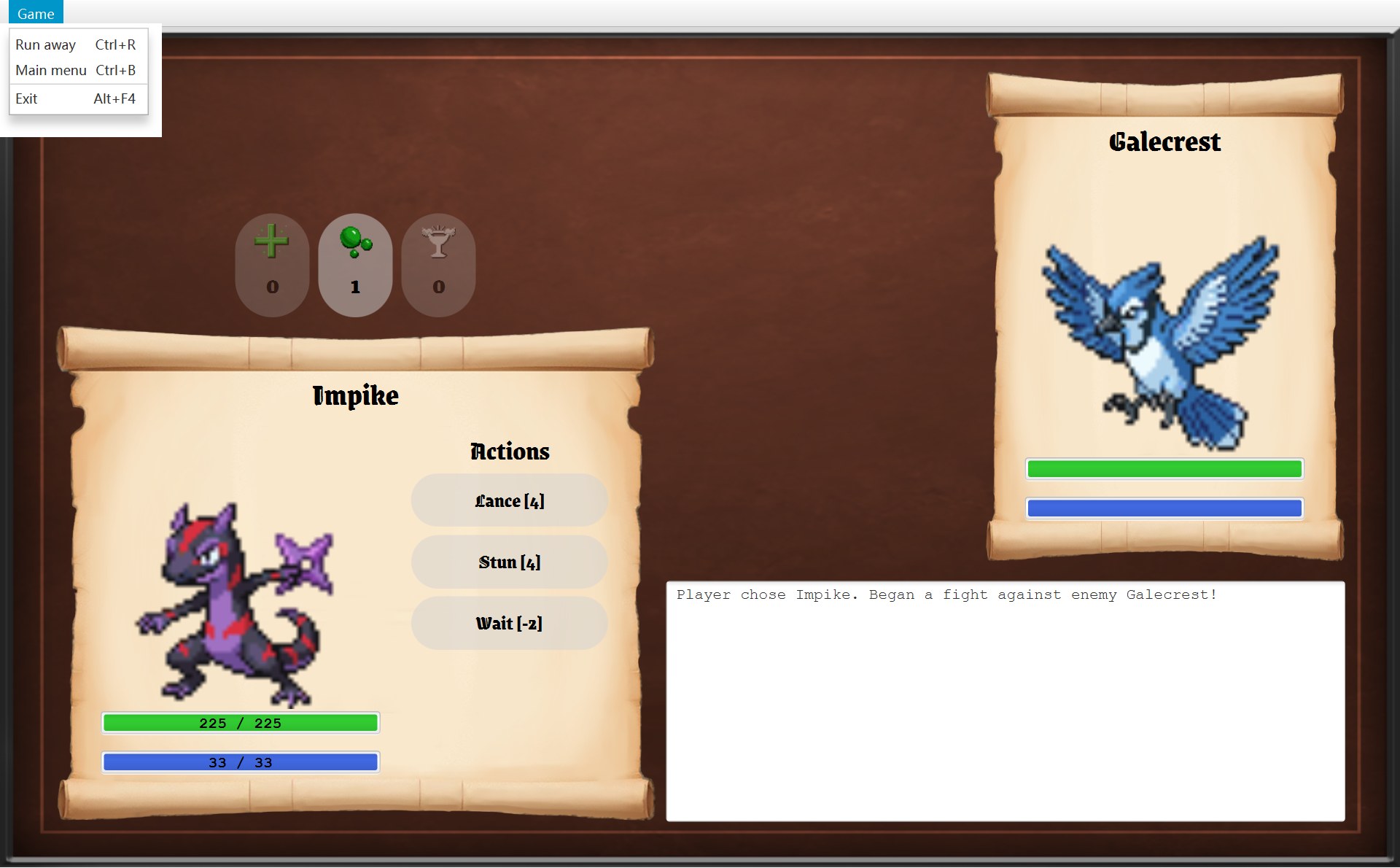
- 7标 7 放大(另一张截图,同一场战斗里打开 Game 菜单):Run away 可以点。逃跑的完整过程在 第 15 章
- 6标 6 放大:这一行是 CStun 返回的句子,里面的 3 就是
Stunned.TURNS
战斗界面最能看出分工。比如技能按钮上的字是怎么来的?看下面这段代码,它在 CBattleScreen 里。代码行左边的红色 1、2,就是截图上的红框 1、2:
181 /* One button per skill, showing its energy cost, e.g. "Bite [1]". */182 private VBox createSkillButtons(List<Skill> skills) {183 VBox buttonColumn = new VBox(SKILL_GAP);184 buttonColumn.setLayoutX(ACTIONS_X);185 buttonColumn.setLayoutY(SKILLS_Y);186 187 Font font = UiStyle.loadGameFont(SKILL_FONT_SIZE);1882 for (Skill skill : skills) {1891 GameButton button = new GameButton(skill.getName() + " [" + skill.getEnergyCost()190 + "]", font, BUTTON_RADIUS);191 button.setPrefSize(SKILL_WIDTH, SKILL_HEIGHT);192 button.addPressEffect();193 button.setOnAction(event -> useSkill(skill));194 skillButtons.add(button);195 buttonColumn.getChildren().add(button);196 }197 return buttonColumn;198 }- 1第 189 行造的一个按钮:
skill.getName()是 “Stun”,skill.getEnergyCost()是 4,拼成 Stun [4] - 2第 188 行的循环:Impike 有 3 个技能,所以循环 3 次,有 3 个按钮
一行一行看:
- 第 182–185 行:造一个竖着排东西的盒子
VBox(JavaFX 的类),放到画面上的位置。ACTIONS_X、SKILLS_Y是 CBattleScreen 里写好的常量。 - 第 187 行:载入按钮上用的字体。
- 第 188 行(标 2):
for (Skill skill : skills),把 Impike 的技能一个一个拿出来,每拿一个就做一遍下面的事。 - 第 189–190 行(标 1):
new GameButton(...)是 ui 的类,负责“画一个按钮”;括号里的文字问的是 skill 包的技能对象,负责“按钮上写什么”。一行代码里两个包各干各的。 - 第 191–192 行:设按钮大小,再调用
addPressEffect():鼠标按下去时按钮的浅灰背景变浓(看起来更亮),松开变回来(第 6 章)。这两行都是画面上的事。 - 第 193 行:
button.setOnAction(event -> useSkill(skill))登记“点了以后做什么”。第 8 节会跟着这一下点击一路走下去。 - 第 194–195 行:把按钮记进
skillButtons列表(以后好改它能不能点),再放进盒子里。
2. 包是什么:一个文件夹,加上第一行 package
打开任何一个 .java 文件,第一行都写着它属于哪个包。下面是 CBattle 文件的开头,旁边(手机上在下面)是项目的文件夹:
11package au.edu.unimelb.swen.oop.mokepon.battle;2 32import au.edu.unimelb.swen.oop.mokepon.item.Inventory;4import au.edu.unimelb.swen.oop.mokepon.item.Item;5import au.edu.unimelb.swen.oop.mokepon.skill.Skill;63import java.util.ArrayList;7import java.util.Collections;8import java.util.List;9import java.util.Random;10 11/* The rules of one fight between the player's Mokepon and the enemy's Mokepon.12 * It knows nothing about the screen; it only updates the fighters, the items and the log.13 */14public class Battle {154 private final Fighter player;16 private final Fighter enemy;17 private final Inventory inventory;src/main/java 下面的文件夹(9 个包)
module-info.java
au/edu/unimelb/swen/oop/mokepon/
├─ Main.java  根包,1 个
├─ data/      6 个
├─ model/     5 个
├─ world/     15 个
├─ battle/    4 个
│   ├─ Battle.java
│   ├─ EnemyStrategy.java
│   ├─ Fighter.java
│   └─ RandomEnemyStrategy.java
├─ skill/     15 个
├─ effect/    4 个
├─ item/      6 个
└─ ui/        16 个
一个类一个文件,文件名就是类名。包名的每一段就是一层文件夹。
- 第 1 行(标 1)
package au.edu.unimelb.swen.oop.mokepon.battle;:这个文件属于 battle 包,所以它必须放在.../mokepon/battle/文件夹里。类的全名是包名加类名:au.edu.unimelb.swen.oop.mokepon.battle.Battle。老师打印的 UML 方框里,类名下面那行小字就是包名。 - 第 3–5 行(标 2)是 import:要用别的包里的类,先写出它的全名。之后代码里只写短名,比如第 17 行的
Inventory。这 3 行说明:CBattle 用到了 item 包(CInventory、AItem)和 skill 包(ASkill)。 - 第 6–9 行(标 3)也是 import,但
java.util是 Java 自带的包(ArrayList、List、Random……),不是项目的。String、Math在java.lang包,Java 自动导入,所以哪里都看不到它们的 import。 - 第 11–13 行是这个类的说明注释,第 14 行
public class Battle {开始写类本身,下面是它的字段(第 10 章细讲)。 - 第 15 行(标 4)用了 CFighter,却没有 import 它:CFighter 和 CBattle 在同一个包,同一个包的类直接用。
所以,一个文件开头的 import 列表,就是“这个类用到了哪些别的包”的清单。第 5 节的依赖图,就是把 72 个文件的 import 一行一行数出来画的。
3. 九个包、72 个类
先看总数。表里“其中”一列用的是 UML 圆圈里的字母:
| 包 | 个数 | 其中 | 负责什么 |
|---|---|---|---|
| mokepon | 1 | 1 C | 根包,只有程序入口 CMain:读数据、开窗口 |
| data | 6 | 6 C | 启动时读 mokepon.game,把文字变成对象;还有存图片路径的 CGameImages |
| model | 5 | 1 C · 4 E | 不会变的基本数据:一只 Mokepon、属性、地形、类型 |
| world | 15 | 11 C · 1 A · 2 I · 1 E | 地图上的一局游戏:走路、地图上的物体、遇敌 |
| battle | 4 | 3 C · 1 I | 一场战斗的规则:回合、伤害、日志、输赢 |
| skill | 15 | 11 C · 4 A | 10 个技能、4 个抽象父类、技能目录 |
| effect | 4 | 3 C · 1 A | 流血、致盲、眩晕三种状态效果 |
| item | 6 | 5 C · 1 A | 三种道具、背包、道具目录 |
| ui | 16 | 14 C · 1 A · 1 I | 用 JavaFX 画出所有画面,接收点击和按键 |
| 合计 | 72 | 55 C · 8 A · 4 I · 5 E |
记住三个数就够应付考试:8 个抽象类、4 个接口、5 个枚举,其余 55 个是普通类。下面每个包一张卡片,列出全部类(鼠标放在彩色小块上能看到一句介绍,点一下进类百科)。顺序是从“读文件”到“画到屏幕”。
data · 6 个:读数据文件
- CGameDataReader:按命令行参数
data=mokepon.game打开文件 - CGameData:存文件里全部的“键=值”,还能把值变成数字、坐标
- CMokeponParser:造出 36 个 CMokepon
- CMapParser:造出 CGameMap 和地图上的物体
- CImageParser:造出 CGameImages
- CGameImages:存图片文件的路径(只存路径),整局游戏都在用
model · 5 个:基本数据
- CMokepon:一只 Mokepon:名字、图片、类型、六项属性、技能;造好就不变
- EStat:六项属性 HP、Energy… 和各自的上下限
- ETerrain:七种地块,每种一个字母
- ETerrainEffect:优势 ×1.5、中性 ×1、劣势 ×0.5
- EMokeponType:五种类型;除了 NORMAL,每种有一个强势地形和一个弱势地形
world · 15 个:地图上的一局
- COverworld:一局游戏的规则:移动、捡道具、遇敌、到出口
- CPlayer、CPosition、EDirection:玩家、格子坐标、四个方向
- CGameMap:每格的地形、起点、开局时的物体
- AMapObject 和它的 CMarker(感叹号)、CMysteryBox(问号箱)、CExit(门)
- CSprite:物体的图片路径和颜色文字
- CEncounter:一次遇敌,能造出 CBattle
- IEnemyPicker 接口和 CRandomEnemyPicker、CTerrainEnemyPicker:在感叹号上挑敌人
- IOverworldListener 接口:地图上发生了什么,通知谁
battle · 4 个:一场战斗
- CBattle:回合、用道具、日志、输赢
- CFighter:战斗中的一只 Mokepon:会变的 HP、能量、状态效果,伤害公式
- IEnemyStrategy 接口和 CRandomEnemyStrategy:敌人每回合用哪个技能
skill · 15 个:技能
- 抽象父类:ASkill、ATargetedSkill(要先命中)、AAttackSkill(造成伤害)、ABoostSkill(给自己加属性)
- 攻击:CBite、CTackle、CLance
- 不伤害但要命中:CStun、CPocketSand
- 加属性:CAim、CBunker、CSwole、CNimble
- 什么都不做、回能量:CWait
- CSkillCatalogue:按名字找技能对象
effect · 4 个:状态效果
- AStatusEffect:抽象父类,记还剩几回合
- CBleeding:流血,回合末扣血(Lance 造成)
- CBlinded:致盲,更容易打空(Pocket Sand 造成)
- CStunned:眩晕,伤害减半(Stun 造成)
item · 6 个:道具
- AItem:抽象父类,抽象方法
use - CHealthTonic、CCoffee、CPoison:回满血、回满能量、敌人 HP 变 1
- CInventory:背包,每种道具有几个
- CItemCatalogue:三种道具各一个对象,全游戏共用
ui · 16 个:画面
- 窗口和画面:CGameWindow、IGameNavigator 接口、AGameScreen(抽象)、CSelectScreen、COverworldScreen、CBattleScreen
- 菜单和对话框:CGameMenu、CModalDialog
- 画面里的部件:CGameButton、CMapView、CPlayerStatsScroll、CFighterPanel、CFighterScroll、CStatBar、CLabelledStatBar
- 共用的样式工具:CUiStyle
4. 分层:规则和界面分开
把 9 个包按“从数据文件到屏幕”的顺序摆开,就是下面这张分层图。读法:方框是包,箭头是“谁用谁”(主要的方向)。
- 最上面是你:你只和 ui 打交道——看它画的东西,点它的按钮。
- ui 和 CMain 是仅有的两处碰 JavaFX 的代码。
- 中间的规则层(world、battle、skill、effect、item)决定游戏怎么玩:能不能走、打中没有、扣多少血。
- 最下面的 model 是大家都用的基本数据。
- data 在旁边:它的解析器只在启动时被 CMain 用一次;造出来的 CGameImages 对象之后一直被 ui 拿来查图片路径。
图里为了清楚省掉了几根箭头:ui 也直接用 model(选择界面读 CMokepon)和 data(各个画面从 CGameImages 拿图片路径)。完整的 import 关系在第 5 节。
证据:只有 ui 和 Main import 了 JavaFX
说“规则不认识界面”要有证据。证据就在 import 里。下面第一段是规则类 CBattle 的全部 import(和第 2 节看到的是同一段),第二段是画面类 CBattleScreen 的:
1package au.edu.unimelb.swen.oop.mokepon.battle;2 3import au.edu.unimelb.swen.oop.mokepon.item.Inventory;4import au.edu.unimelb.swen.oop.mokepon.item.Item;5import au.edu.unimelb.swen.oop.mokepon.skill.Skill;6import java.util.ArrayList;7import java.util.Collections;8import java.util.List;9import java.util.Random;10 11/* The rules of one fight between the player's Mokepon and the enemy's Mokepon.12 * It knows nothing about the screen; it only updates the fighters, the items and the log.13 */14public class Battle {1package au.edu.unimelb.swen.oop.mokepon.ui;2 31import au.edu.unimelb.swen.oop.mokepon.battle.Battle;4import au.edu.unimelb.swen.oop.mokepon.data.GameImages;5import au.edu.unimelb.swen.oop.mokepon.item.Inventory;6import au.edu.unimelb.swen.oop.mokepon.item.Item;7import au.edu.unimelb.swen.oop.mokepon.item.ItemCatalogue;8import au.edu.unimelb.swen.oop.mokepon.skill.Skill;9import java.util.ArrayList;10import java.util.LinkedHashMap;11import java.util.List;12import java.util.Map;132import javafx.geometry.Pos;14import javafx.geometry.Rectangle2D;15import javafx.scene.control.ContentDisplay;16import javafx.scene.control.Label;17import javafx.scene.control.TextArea;18import javafx.scene.input.KeyCode;19import javafx.scene.input.KeyEvent;20import javafx.scene.layout.HBox;21import javafx.scene.layout.VBox;22import javafx.scene.text.Font;23import javafx.scene.text.FontWeight;24 25/* Shows a battle and turns button clicks and key presses into turns or item uses.26 * All the battle rules live in the Battle class; this class only displays them.27 */28public class BattleScreen extends GameScreen {CBattle 只 import 了项目的 item、skill 和 Java 自带的 java.util。它的注释(第 11–12 行)自己就说了:It knows nothing about the screen. 而 CBattleScreen 第 3 行(标 1)import 了 CBattle,第 13–23 行(从标 2 开始)全是 javafx;它的注释(第 25–26 行)说:All the battle rules live in the Battle class; this class only displays them.
把 72 个文件全部查一遍(在项目里搜 javafx),出现的文件正好是 16 个:CMain,加上 ui 包里除了 IGameNavigator 以外的 15 个类。IGameNavigator 是个接口,只说“画面可以请窗口做哪些事”,用不到任何 JavaFX 部件。另外,没有任何规则包 import ui,整个项目里 import ui 的只有 CMain(它要 new GameWindow)。
为了分开,代码特意做了什么
有些东西天生和画面有关,比如“感叹号是红色的”。看 world 包的 CSprite 怎么存颜色:
3/* How a map object looks: its image file, and the colour used to tint the image.4 * The colour is a JavaFX colour string, for example red or #ff0000.5 * It is only stored here, so this class does not need any JavaFX code.6 */7public class Sprite {8 /* An empty colour means the image is shown as it is. */9 private static final String NO_TINT = "";10 11 private final String imagePath;121 private final String colour;13 14 /* A sprite that is not tinted, such as a mystery box. */15 public Sprite(String imagePath) {162 this(imagePath, NO_TINT);17 }18 19 public Sprite(String imagePath, String colour) {20 this.imagePath = imagePath;21 this.colour = colour;22 }- 1第 12 行:有颜色的物体,白色感叹号、红色感叹号、品红色的门。
colour字段里存的只是数据文件里的文字white、red、magenta - 2第 16 行:问号箱没有颜色。它用的是只有一个参数的构造器,颜色是空字符串
NO_TINT,按原图显示
CSprite 的注释第 5 行写明:It is only stored here, so this class does not need any JavaFX code. 它存的是字符串 "red",不是 JavaFX 的 Color。第 9 行的常量 NO_TINT 是空字符串 "",表示“不染色”。
真正把图片染红的,是 ui 包 CMapView 第 79 行调用的 UiStyle.tint(objectView, sprite.getColour()):
73 /* Markers and the exit are tinted with their colour; mystery boxes are not. */74 private ImageView createObjectView(MapObject object) {75 Sprite sprite = object.getSprite();76 ImageView objectView = createTileView(getImage(sprite.getImagePath()),77 object.getPosition());78 if (sprite.hasTint()) {79 UiStyle.tint(objectView, sprite.getColour());80 }81 return objectView;82 }第 75 行先拿到物体的 CSprite;第 76–77 行用它的图片路径造一个 ImageView,放到物体所在的格子;第 78–80 行:hasTint() 说有颜色,才调用 CUiStyle.tint 染色,问号箱就跳过。颜色的文字从 world 来,染色这件事在 ui 做。
同样的做法还有两处:
- CGameImages(data)只存图片路径(
String),不存 JavaFX 的Image。把路径变成图片的,是 ui 的UiStyle.loadImage(path)。 - COverworld(world)没有 import 任何画面类(按这个设计也不应该 import),那它怎么让状态栏写出 “You picked up a Poison!”?它只认识一个接口 IOverworldListener,这个接口放在 world 包里,不在 ui。看下面这张图和接口的代码。
1package au.edu.unimelb.swen.oop.mokepon.world;2 3import au.edu.unimelb.swen.oop.mokepon.item.Item;4import au.edu.unimelb.swen.oop.mokepon.model.Mokepon;5 6/* Observer: the things that happen in the overworld which a listener (such as a screen)7 * may want to show. The overworld calls these methods; it does not know what they do.8 */9public interface OverworldListener {10 11 /* The player is now on a different tile. */12 void onPlayerMoved();⋯ 省略第 13–16 行17 /* The player picked up an item from a mystery box. */18 void onItemCollected(Item item);⋯ 省略第 19–23 行24 void onExitReached(int fightsWon);25}- 第 3–4 行:这个接口只 import 了 item 和 model,没有 ui,也没有 javafx。
- 第 9 行:
public interface OverworldListener。接口里只写方法的名字和参数,不写内容。注释(第 6–7 行)说:The overworld calls these methods; it does not know what they do. - 第 18 行:
void onItemCollected(Item item);捡到道具时,COverworld 调用的就是它。
连起来就是:COverworldScreen 写着 implements OverworldListener,实现了这几个方法;CGameWindow 开局时 world.addListener(overworldScreen),把画面放进 COverworld 的 listeners 列表;捡到箱子时,COverworld 只管调用 listener.onItemCollected(...),不知道对面是个画面。import 的方向是 ui → world,运行时的通知却是 world → ui,靠的就是中间这个接口。这就是观察者模式(Observer),也是依赖倒置(Dependency Inversion)的例子(第 8 章、第 16 章)。第 9 节的动画会一步一步走这条路。
分开有什么好处
- 规则可以不开窗口就运行和测试。看 CBattle 的两个构造器:
battle/Battle.java第 24–36 行 24 /* Start a battle against an enemy that picks random skills. */25 public Battle(Fighter player, Fighter enemy, Inventory inventory) {26 this(player, enemy, inventory, new RandomEnemyStrategy(), new Random());27 }2829 /* Start a battle with a chosen enemy strategy and random number generator. */30 public Battle(Fighter player, Fighter enemy, Inventory inventory,31 EnemyStrategy enemyStrategy, Random random) {32 this.player = player;33 this.enemy = enemy;34 this.inventory = inventory;35 this.enemyStrategy = enemyStrategy;36 this.random = random;this(...)调用下面那个构造器,补上new RandomEnemyStrategy()和new Random()。第 29–31 行那个能自己传入EnemyStrategy和Random(注释:with a chosen enemy strategy and random number generator)。测试时传一个带种子(seed)的new Random(42):种子一样,随机数的顺序就一样,每次打中没打中都一样,再检查getLog()就行。COverworld 也有一个能传Random的构造器。这份提交里没有写测试,但规则类已经可以这样测。 - 改画面不会碰坏规则。想换按钮的样子、换整个界面,只改 ui;伤害公式、命中率一行都不用动。反过来,改规则也不用动画面的布局。
- 每个类只有一个理由要改(单一职责原则 SRP):CBattle 只因为规则改而改,CBattleScreen 只因为显示改而改。
5. 包之间谁依赖谁
把每个文件的 import 数一遍(同一个包的不算,java.* 和 javafx.* 也不算),就得到这张表。“import 了”一列是这个包用到的项目包,“被谁 import”是反过来,谁用到了它:
| 包 | import 了 | 被谁 import | 例子(谁 import 谁) |
|---|---|---|---|
| mokepon | data、model、world、ui | 没有(JavaFX 启动它) | CMain → CMokeponParser、CGameMap、CGameWindow |
| data | model、skill、item、world | mokepon、ui | CMapParser → CMarker、CItemCatalogue;CMokeponParser → CSkillCatalogue |
| model | skill | mokepon、data、world、battle、skill、ui | CMokepon → ASkill(它存着技能列表) |
| world | battle、item、model | mokepon、data、ui | CEncounter → CBattle、CFighter;COverworld → CInventory |
| battle | skill、effect、item、model | world、skill、effect、item、ui | CBattle → ASkill、AItem;CFighter → AStatusEffect |
| skill | battle、effect、model | battle、model、data、ui | ASkill → CFighter;CLance → CBleeding;ABoostSkill → EStat |
| effect | battle | battle、skill | AStatusEffect、CBleeding → CFighter |
| item | battle | battle、world、data、ui | AItem 和三个道具 → CFighter |
| ui | battle、data、item、model、skill、world | 只有 mokepon | CBattleScreen → CBattle;CMapView → COverworld;CGameWindow → CGameImages |
先画里面六个包(规则包和 model)之间的 import。读法:虚线箭头 A ⇢ B 表示 A 包里有类 import 了 B 包的类,线上写的是被 import 的类。两个包之间有两根弯线,就是互相 import。
再把外面三个包(mokepon 根包、ui、data)加上。为了不乱,里面那六个包画成一个大框:
从表和两张图里读出四件事:
- 没有规则包 import ui。“被谁 import”那一列,ui 只写着 mokepon。这是整个项目最重要的一条线:依赖只从画面指向规则,不会反过来。
- data 只被 CMain 和 ui 用。CMain 在启动时调用解析器;ui 只用它的 CGameImages 拿图片路径。游戏开始以后,规则包再也不碰数据文件。
- battle 分别和 skill、effect、item 互相 import,中心是 CFighter。这是三对双向的;另外 skill → effect 只是单向(CLance、CPocketSand、CStun 要 new 出效果对象),item 和 skill、effect 之间没有 import。为什么是双向?技能的
use(Fighter user, Fighter target, Random random)、道具的use(Fighter player, Fighter enemy)、效果的applyLingeringDamage(Fighter owner)都要一个 CFighter;反过来 CFighter 要存 AStatusEffect 列表、回答canUse(Skill skill),CBattle 要用 ASkill 和 AItem。四个包就通过 battle 的 CFighter 绕成一团。这叫双向依赖。 - model 也不是最底层。几乎所有包都用 model,可 model 自己也 import 了 skill:CMokepon 存着
List<Skill>。
6. 继承家族总览
72 个类里,很多是“一个父类带几个子类”。一共 8 个家族:ASkill(14 个类);AStatusEffect、AItem、AMapObject、AGameScreen(各带 3 个子类);CStatBar → CLabelledStatBar;JavaFX 的 Button → CGameButton;JavaFX 的 Application → CMain。8 个抽象类全是前 5 个家族里的父类。认出这些家族,打印的 UML 就好读了:家族里的子类往往只有一两个方法,因为大部分代码写在父类里。图里空心三角箭头指向父类(extends),虚线 + 空心三角指向接口(implements)。
技能家族:14 个类,最多 4 层
一句话记三层父类:ASkill 管“先扣能量再生效”;ATargetedSkill 管“先命中检查”;AAttackSkill 管“打中就扣血”。所以 CBite 和 CTackle 只剩一个构造器,只写了名字、能量和威力。这是模板方法(Template Method),第 12 章细讲。
另外三个“抽象父类 + 三个子类”
ui 包和 JavaFX 的父类
AGameScreen 家族和窗口怎么换画面,在 第 6 章。打印稿上也能看到这种“继承外面的类”:CMain 的 UML 图里,父类方框就是 JavaFX 的 Application。
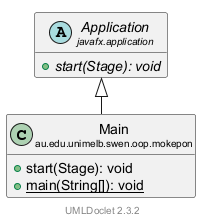
注意 CStatBar 不是抽象类:敌人的血条就是普通的 CStatBar 对象,你的血条是子类 CLabelledStatBar 的对象(多了数字)。CFighterPanel 的字段 hpBar 声明成 CStatBar,两种都能放(第 14 章)。
4 个接口和实现它们的类
CBattle 只认识 IEnemyStrategy 接口,CMarker 只认识 IEnemyPicker 接口;换一种挑法只要换一个实现类。数据文件里每一组感叹号有自己的颜色和自己的 picker,三组的区别在 第 9 章。
IOverworldListener 第 4 节已经见过(第 8 章细讲)。IGameNavigator 是画面请窗口“换画面、开新游戏”的接口:画面只认识这个接口,真正干活的是 CGameWindow(第 6 章)。
每个家族、每个接口,都有一个“只认识父类型”的地方。先用第一行说清楚这是什么意思:CBattle 的 playTurn 方法,参数写的是 Skill playerSkill,变量的类型是父类 ASkill。你点 Stun 时,传进来的其实是一个 CStun 对象,playerSkill.use(...) 运行的是这个对象自己那一套代码:ASkill 的 use,接着是 ATargetedSkill 的命中检查和 CStun 的 applyHit。点 Lance 时还是同一行代码,运行的却是 Lance 的版本。CBattle 不用知道是哪一个技能,这就是多态(polymorphism)(第 12 章)。考试问多态时,这张表就是证据:
| 父类 / 接口 | 子类 / 实现 | 只认识父类型的那行代码 |
|---|---|---|
| ASkill | 10 个技能 | CBattle.playTurn:playerSkill.use(player, enemy, random) |
| AStatusEffect | 3 个效果 | CFighter:effect.getDamageMultiplier() 等 |
| AItem | 3 个道具 | CBattle.useItem:item.use(player, enemy) |
| AMapObject | 3 种物体 | COverworld.move:object.interact(this) |
| AGameScreen | 3 个画面 | CGameWindow:currentScreen.handleKeyPress(event);CGameMenu.update(screen) |
| CStatBar | CLabelledStatBar | CFighterPanel.update:hpBar.update(...) |
| IEnemyStrategy | CRandomEnemyStrategy | CBattle:enemyStrategy.chooseSkill(enemy, random) |
| IEnemyPicker | 2 个 picker | CMarker:picker.pick(...) |
| IOverworldListener | COverworldScreen | COverworld:listener.onItemCollected(...) 等 |
| IGameNavigator | CGameWindow | CSelectScreen:getNavigator().startGame(...);CGameMenu:navigator.runAway() 等 |
7. 只有 static 成员的类,和解析器
有三个类和别的都不一样:它们的字段和方法全是 static 的,程序从来不 new 它们,直接写“类名.方法名”来用。这种类叫静态目录类或工具类。
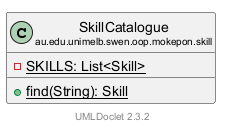
SkillCatalogue:按名字找技能
5/* Every skill in the game. The data file only gives skill names, and this class6 * finds the skill object with that name. Skills never change after they are made,7 * so all Mokepon can share the same skill objects.8 * To add a new skill, write a new subclass and add one object of it to this list.9 */10public class SkillCatalogue {11 private static final List<Skill> SKILLS = List.of(12 new Bite(), new Tackle(), new Lance(), new Stun(), new PocketSand(),13 new Bunker(), new Aim(), new Swole(), new Nimble(), new Wait());14 15 /* Find a skill by its exact, case-sensitive name. */16 public static Skill find(String name) {17 for (Skill skill : SKILLS) {18 if (skill.getName().equals(name)) {19 return skill;20 }21 }22 throw new IllegalArgumentException("Unknown skill: " + name);23 }24}- 第 5–9 行是注释:数据文件里只写技能的名字,这个类负责找出名字对应的技能对象;技能造好就不变,所以所有 Mokepon 可以共用同一批对象。
- 第 11–13 行:
SKILLS里存着 10 个技能对象,每种一个。 - 第 16–22 行:
find("Stun")一个一个比名字(第 17–18 行),名字一样就返回那个对象;比完都不对,第 22 行抛出异常,说明数据文件里写了一个不存在的技能名。
只有 CMokeponParser 调用它:数据文件里写的是 Lance|Stun|Wait 这样的名字,要换成技能对象。所有会 Wait 的 Mokepon 共用同一个 CWait 对象——这没问题,因为技能对象的字段都是 final,造好就不变。
ItemCatalogue:同样三个道具,两种顺序
CItemCatalogue(item)里三个道具各一个对象。它有两个列表,屏幕上真的能看出两种顺序:
9public class ItemCatalogue {10 private static final Item HEALTH_TONIC = new HealthTonic();11 private static final Item COFFEE = new Coffee();12 private static final Item POISON = new Poison();13 14 /* All items, in the order of the overworld scroll. */151 private static final List<Item> ITEMS = List.of(HEALTH_TONIC, COFFEE, POISON);16 /* The battle screen shows its item buttons in another order, as in the sample screenshot. */172 private static final List<Item> BATTLE_ORDER = List.of(HEALTH_TONIC, POISON, COFFEE);18 19 public static List<Item> getAll() {20 return ITEMS;21 }22 23 public static List<Item> getBattleOrder() {24 return BATTLE_ORDER;25 }- 1
- 2第 17 行
BATTLE_ORDER:按钮从左到右是 Health Tonic、Poison、Coffee(数量 0、1、0)。CBattleScreen 按getBattleOrder()造按钮
另外还有 find("POISON")(第 28–35 行),CMapParser 用它给问号箱放道具。因为每种道具只有一个对象,CInventory 可以直接拿道具对象当 Map 的键。
UiStyle:画面共用的样式
CUiStyle(ui)有 3 个公开常量 GAME_WIDTH(1280)、GAME_HEIGHT(768)、SCROLL_FILE,和 11 个 static 方法,比如 loadImage、loadGameFont、createLabel、tint。所有画面共用,样式只写一处。
解析器:只在启动时用一次
data 包里四个干活的类各读数据文件的一部分:CGameDataReader 打开文件得到 CGameData,CMokeponParser、CMapParser、CImageParser 各有一个 parse(GameData data) 方法。它们不是 static 类,但也没有会变的字段(只有 static 的常量,比如 PREFIX = "mokepon."),CMain 每个 new 一次、调用一次就不再用了。代码行的 1、2、3 对应下面三张图:
21 @Override22 public void start(Stage stage) {23 GameData data;24 try {25 data = new GameDataReader().read(getParameters().getRaw());26 } catch (IOException | IllegalArgumentException e) {27 /* Stop before opening the game if the data cannot be loaded,28 * for example "Error loading mokepon.game".29 */30 System.out.println("Error loading " + e.getMessage());31 Platform.exit();32 return;33 }34 351 List<Mokepon> mokepons = new MokeponParser().parse(data);362 GameMap map = new MapParser().parse(data);373 GameImages images = new ImageParser().parse(data);38 GameWindow gameWindow = new GameWindow(stage, mokepons, map, images);39 gameWindow.show();40 }- 1第 35 行:CMokeponParser 造的 36 个 CMokepon 对象。这里的数值、技能,还有选择界面左边的名字,都来自它们
- 2第 36 行:CMapParser 造的 CGameMap 里有每一格的地形、起点、感叹号和问号箱
- 3第 37 行:CImageParser 造的 CGameImages 里存着这个火焰图标的路径
- 第 21–22 行:
@Override说明start是改写父类Application的方法。JavaFX 准备好窗口以后,会自动调用它。 - 第 23–33 行:先用 CGameDataReader 读文件(第 25 行)。读不了(找不到文件、内容不对),就跳进
catch:打印Error loading …,第 31 行Platform.exit()让 JavaFX 结束,第 32 行return让start马上停下,根本走不到下面开窗口的代码。 - 第 35–37 行(标 1–3):
new MokeponParser().parse(data)的意思是“造一个解析器对象,马上用它解析”。用完以后没有变量再指着这个解析器,它就不再被用了。 - 第 38–39 行:把三样东西交给 ui 的 CGameWindow,打开窗口。
images之后一直存在 CGameWindow 里,各个画面用它查图片路径。
每个解析器只管一部分文件,这也是单一职责:数据文件里 Mokepon 那一段的格式变了,只改 CMokeponParser。启动的全过程在 第 5 章。
8. 跟着一次点击穿过各层
现在把前面几节连起来:在战斗里点一下 Stun [4],代码按什么顺序经过哪些包?用的是真实的一回合:你的 Impike 对敌人 Galecrest 用了 Stun。截图 battle-wait 是点之前(上一回合双方都用了 Wait),battle-stun 是点之后。
怎么看下面这个动画:最上面的图和第 4 节的分层图一样,上面是你和 ui,中间是规则包,最下面是 model。每个方框是一个包,亮起来的包 = 这一步正在运行的代码所在的包,变红的虚线 = 这一步跨包的调用。中间是那一步的代码(正在运行的行标成红底),下面是截图。截图上的编号:1 Stun 按钮,2 你的能量,3 日志里你的两行,4 日志里敌人的两行,5 敌人的能量条。
117 private void useSkill(Skill skill) {118 battle.playTurn(skill);119 update();120 }⋯ 省略第 121–187 行188 for (Skill skill : skills) {189 GameButton button = new GameButton(skill.getName() + " [" + skill.getEnergyCost()190 + "]", font, BUTTON_RADIUS);191 button.setPrefSize(SKILL_WIDTH, SKILL_HEIGHT);192 button.addPressEffect();193 button.setOnAction(event -> useSkill(skill));194 skillButtons.add(button);69 public void playTurn(Skill playerSkill) {70 if (finished) {71 return;72 }73 74 if (!player.canUse(playerSkill)) {75 log.add("Not enough energy.");76 return;77 }78 79 log.add("");80 log.add("Player's " + player.getName() + " used " + playerSkill.getName() + "!");81 log.add(playerSkill.use(player, enemy, random));27 /* Template Method: pay the energy cost first (even if an attack then misses),28 * then apply the effect. Returns the message for the battle log.29 */30 public final String use(Fighter user, Fighter target, Random random) {31 user.spendEnergy(energyCost);32 return applyEffect(user, target, random);33 }34 35 /* Each subclass decides what the skill actually does. */36 protected abstract String applyEffect(Fighter user, Fighter target, Random random);18 protected final String applyEffect(Fighter user, Fighter target, Random random) {19 if (!hits(user, target, random)) {20 return MISS_MESSAGE;21 }22 return applyHit(user, target, random);⋯ 省略第 23–30 行31 private boolean hits(Fighter user, Fighter target, Random random) {32 if (random.nextDouble() >= calculateHitChance(user, target)) {33 return false;34 }35 return random.nextDouble() >= user.getMissChance();⋯ 省略第 36–37 行38 private double calculateHitChance(Fighter user, Fighter target) {39 int accuracy = user.getStat(Stat.ACCURACY);40 int dodge = target.getStat(Stat.DODGE);41 double accuracySquared = accuracy * accuracy;42 double dodgeSquared = dodge * dodge;43 return accuracySquared / (accuracySquared + dodgeSquared);16 protected String applyHit(Fighter user, Fighter target, Random random) {17 target.addEffect(new Stunned());18 return "\t" + target.getName() + " was stunned! Their damage is halved for "19 + Stunned.TURNS + " turns.";3/* A stunned fighter only does half of its normal damage. */4public class Stunned extends StatusEffect {5 public static final int TURNS = 3;6 private static final double DAMAGE_MULTIPLIER = 0.5;7 8 public Stunned() {9 super(TURNS);10 }82 if (!enemy.isAlive()) {83 finish(true);84 return;85 }86 87 Skill enemySkill = enemyStrategy.chooseSkill(enemy, random);88 log.add("Enemy " + enemy.getName() + " used " + enemySkill.getName() + "!");89 log.add(enemySkill.use(enemy, player, random));90 if (!player.isAlive()) {91 finish(false);92 return;93 }94 95 endTurn();116 private void endTurn() {117 log.addAll(enemy.applyLingeringDamage());118 if (!enemy.isAlive()) {119 finish(true);120 return;121 }122 123 log.addAll(player.applyLingeringDamage());124 if (!player.isAlive()) {125 finish(false);126 return;127 }128 129 enemy.countDownEffects();130 player.countDownEffects();131 }128 private void update() {129 playerPanel.update();130 enemyPanel.update();131 showLog();132 updateSkillButtons();133 updateItemButtons();⋯ 省略第 134–139 行140 /* Show all messages and scroll to the latest one. */141 private void showLog() {142 logArea.setText(String.join("\n", battle.getLog()));143 logArea.positionCaret(logArea.getLength());144 logArea.setScrollTop(Double.MAX_VALUE);145 }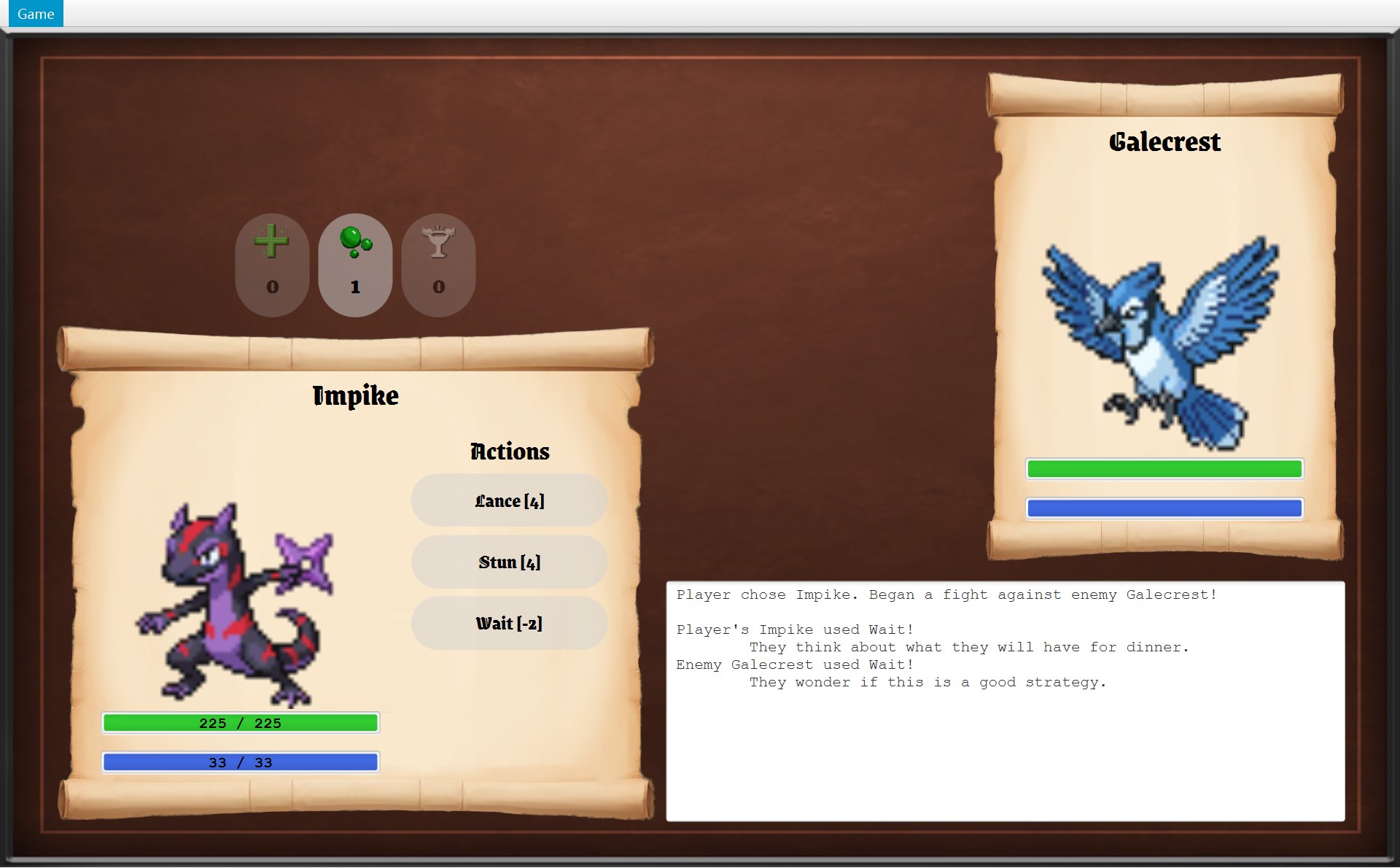
- 1Stun [4] 按钮:你点的就是它
- 2点之前:能量 33 / 33。上一回合的 Wait 会回 2 点能量,可能量本来就是满的,最多只到 33
- 3
- 4敌人的两行:CBattle 写的 Enemy Galecrest used Tackle!,和 ATargetedSkill 返回的 But they missed.
- 2点之后:能量 29 / 33
- 5点之后:敌人的蓝条只剩 9/14 ≈ 64%。敌人的条不写数字
- 你点 Stun [4](红框 1)。这个按钮是 ui 包的 CGameButton,父类是 JavaFX 的
Button。造按钮时(第 193 行)给它登记了一段 lambda:event -> useSkill(skill),意思是“被点的时候,运行useSkill(skill)”。发现点击的是 JavaFX,它就运行这段代码;这里的skill是造按钮时记住的那个 CStun 对象(skill 包)。 - 运行
useSkill,它只有两行。第 118 行battle.playTurn(skill):从 ui 跨进 battle。CBattleScreen 自己不判断能量够不够、打没打中,这些全是 CBattle 的事。 - CBattle.
playTurn:第 70 行,战斗没结束。第 74 行!player.canUse(playerSkill)问你的 CFighter 能量够不够(!是“不”):33 ≥ 4,够,所以不进 if。第 79–80 行往log加一个空行和Player's Impike used Stun!。第 81 行log.add(playerSkill.use(player, enemy, random)):use(...)会返回一句话(String),外面的log.add(...)把这句话存进日志,第 6 步 Stun 返回的那句就是这样进日志的。 - 进入 skill 包。
use写在父类 ASkill 里,而且是final(子类不能改写)。第 31 行user.spendEnergy(energyCost)回头调用 battle 的 CFighter:能量 33 − 4 = 29。第 32 行调用applyEffect,它返回的句子就是use返回的句子。注意红框 2 还是 33 / 33:数据已经变了,画面要等第 10 步才更新。 - CStun 是对准对手的技能,
applyEffect由中间那层 ATargetedSkill 写好:先命中检查(第 19 行)。calculateHitChance用 model 包的Stat.ACCURACY和Stat.DODGE取出两个数:战斗里 Impike 的 Accuracy 是 100,Galecrest 的 Dodge 是 40(为什么不是选择界面上的原始值:Impike 的 74、Galecrest 的 79?看动画下面的说明)。100² ÷ (100² + 40²) = 10000 ÷ 11600 ≈ 0.86;第 32 行的随机小数小于 0.86 就算中。Impike 没被致盲,第 35 行的getMissChance()是 0,第二道检查一定过。这次中了,第 22 行调用applyHit。 - CStun.
applyHit第 17 行:new Stunned()造出一个 effect 包的对象,它的构造器第 9 行super(TURNS)把TURNS = 3交给父类 AStatusEffect,记下还剩 3 回合。target.addEffect(...)把它放进 Galecrest 那个 CFighter 的effects列表(battle)。第 18–19 行返回日志句子Galecrest was stunned! Their damage is halved for 3 turns.,句子里的 3 就是Stunned.TURNS。 - 回到
playTurn。第 82 行:敌人还活着,轮到它。第 87 行enemyStrategy.chooseSkill(enemy, random),CRandomEnemyStrategy(也在 battle)从能量够用的技能里随便挑,这次挑了 Tackle,第 88 行记下Enemy Galecrest used Tackle!。第 89 行enemySkill.use(...)又进 skill:先扣 5 点能量(14 → 9),再命中检查:Galecrest 的 Accuracy 43,Impike 的 Dodge 100,43² ÷ (43² + 100²) = 1849 ÷ 11849 ≈ 0.16。没中,返回But they missed.。 - 两边都还站着,
playTurn第 95 行调用endTurn()。第 117、123 行先让效果造成持续伤害:CStunned 没改写applyLingeringDamage,用父类 AStatusEffect 的版本,什么都不做。第 129–130 行countDownEffects():CFighter 对每个效果调用countDown(),眩晕 3 → 2 回合。 playTurn结束,回到 CBattleScreen.useSkill第 119 行。到现在为止,battle、skill、effect 里没有一行代码碰过屏幕——它们根本没有 import ui 或 javafx。屏幕上还是旧样子。- 第 119 行调用
update():CBattleScreen 回头问 CBattle 现在的样子,再交给 JavaFX 画。playerPanel.update()把你的能量改成 29 / 33(红框 2);enemyPanel.update()把敌人的蓝条缩短到 9/14 ≈ 64%(红框 5,敌人的条不写数字);showLog()把battle.getLog()的全部句子用换行连起来,放进logArea(红框 3、4);第 132–133 行再更新按钮能不能点。规则包从来不去“推”画面,是 ui 自己回头“拉”数据。
整条路是:ui → battle → skill(在这里又用到 model 的 EStat、造出 effect 的 CStunned、回头调用 battle 的 CFighter)→ 回到 battle(敌人回合、endTurn)→ 回到 ui。调用从 ui 出发,最后也是 ui 自己去读结果。每一步的细节在 第 11 章(回合)、第 12 章(技能)、第 13 章(效果)。
9. 看到一个东西,怎么找到它的代码
考试时你手上只有 UML,复习时你有代码。看到画面上一个东西,想知道“哪段代码管它”,按这几步找:
- 认画面:选择 / 地图 / 战斗,分别是 CSelectScreen / COverworldScreen / CBattleScreen(都在 ui)。
- 在画面类的字段里找它。小部件可能在下一层(地图卷轴是
statsScroll,类型 CPlayerStatsScroll)。本站截图标注的名字,比如OverworldScreen.statsScroll.itemValues[Poison],就是字段一层一层的路径。 - 找把值写上去的方法:通常叫
update,里面有setText/setProgress。 - 看值从哪个对象读来:那个对象的类就是规则或数据所在的包。
- 再找谁改了这个值、谁通知了画面:在项目里搜方法名,一层一层往回找。
下面用真实截图走一遍:你在地图上按 ↑,踩上 (18,16) 的问号箱,卷轴里的 Poison 从 0 变成 1。最上面的顺序图(sequence diagram)是真正的调用顺序(从上往下);动画从最下面那条开始,一条一条往上找。截图两张一组:前一张是走上箱子之前(walk-09),后一张是之后(box-collected)。编号:1 卷轴里 Poison 那一行,2 状态栏。
49 private final Overworld world;50 private final MapView mapView;51 private final PlayerStatsScroll statsScroll;52 private final Label statusBar;53 private final Map<Direction, GameButton> moveButtons = new EnumMap<>(Direction.class);⋯ 省略第 54–95 行96 @Override97 public void onItemCollected(Item item) {98 statusBar.setText("You picked up a " + item.getName() + "!");99 update();100 }⋯ 省略第 101–133 行134 private void update() {135 mapView.update();136 statsScroll.update();34 private final Label fightsValue;35 private final Map<Item, Label> itemValues = new LinkedHashMap<>();⋯ 省略第 36–61 行62 for (Item item : player.getInventory().getItems()) {63 Label count = createLabel("", numberFont);64 itemValues.put(item, count);65 addRow(grid, row++, item.getName() + ":", count);66 }⋯ 省略第 67–80 行81 public void update() {82 fightsValue.setText(String.valueOf(player.getFightsWon()));83 for (Map.Entry<Item, Label> entry : itemValues.entrySet()) {84 int count = player.getInventory().getCount(entry.getKey());85 entry.getValue().setText(String.valueOf(count));86 }87 }44 public void addListener(OverworldListener listener) {45 listeners.add(listener);46 }⋯ 省略第 47–110 行111 void collect(MysteryBox box) {112 objects.remove(box);113 player.getInventory().add(box.getItem());114 notifyListeners(listener -> listener.onItemCollected(box.getItem()));115 }⋯ 省略第 116–124 行125 private void notifyListeners(Consumer<OverworldListener> message) {126 for (OverworldListener listener : listeners) {127 message.accept(listener);128 }129 }5/* A box holding one item. The player picks it up by stepping onto it. */6public class MysteryBox extends MapObject {7 private final Item item;⋯ 省略第 8–17 行18 @Override19 void interact(Overworld world) {20 world.collect(this);21 }65 /* Move the player one tile, then let every object on the new tile react. */66 public void move(Direction direction) {67 if (!canMove(direction)) {68 return;69 }70 player.moveTo(player.getPosition().move(direction));71 notifyListeners(listener -> listener.onPlayerMoved());72 73 /* Loop over a copy, because a mystery box removes itself from the list. */74 for (MapObject object : new ArrayList<>(objects)) {75 if (object.isAt(player.getPosition())) {76 object.interact(this);77 }78 }79 }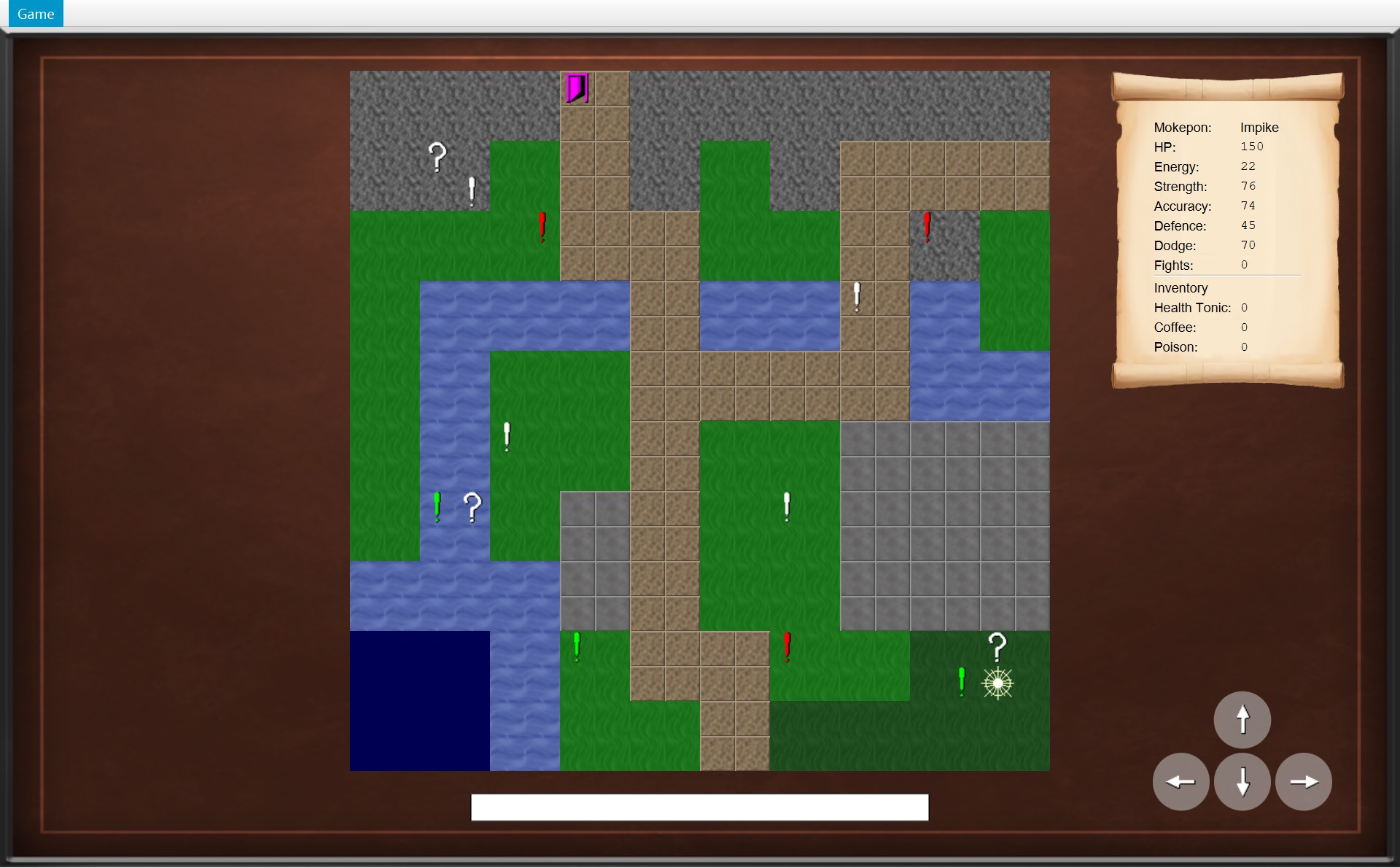
- 1之前:Poison: 0
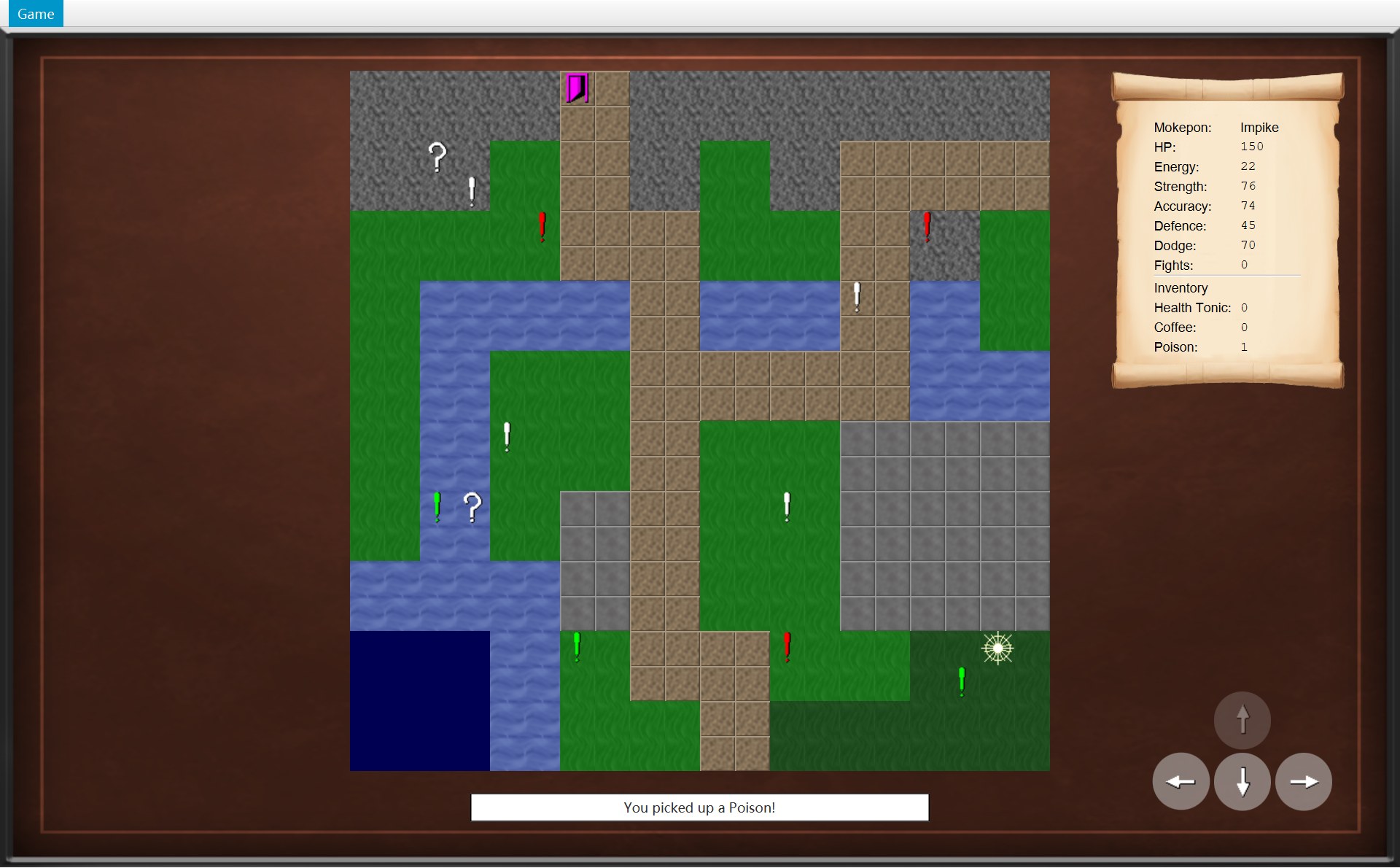
- 1之后:Poison: 1
- 2之前:状态栏是空的
- 2之后:
statusBar写着 You picked up a Poison!
- 第 1 步,认画面。这是地图画面,打开 COverworldScreen,先看字段(第 49–53 行):右上卷轴是
statsScroll,类型是 CPlayerStatsScroll;下面的白条是statusBar,一个Label。 - 第 2 步,往下一层找字段。打开 CPlayerStatsScroll:第 35 行
itemValues是一个Map<Item, Label>,每种道具对应一个Label。构造器第 62–66 行按背包里的道具顺序,一种道具造一行:左边写上 Poison: 这样的名字,右边放这个Label。 - 第 3 步,找写数字的方法。还是这个类的
update():第 84 行player.getInventory().getCount(entry.getKey())问 CPlayer(world)的 CInventory(item)这种道具有几个;第 85 行setText把数字写进Label。所以这个 1 是 CInventory 里存的数。顺序图最下面那条箭头,就是“有人调用了这个update()”。 - 第 4 步,谁调用了 update?在 COverworldScreen 里搜
statsScroll.update():在它自己的update()第 136 行。再搜谁调用这个update():有好几处(第 69、76、99、105 行),和捡道具有关的是onItemCollected第 99 行。第 98 行还先在状态栏写了You picked up a Poison!(红框 2)。 - 第 5 步,谁改了数字、谁通知了画面?
onItemCollected是 IOverworldListener 接口的方法,调用它的是 COverworld.collect:第 113 行add让背包里的 Poison 0 → 1(之前、之后两个红框 1);第 114 行notifyListeners(...)对listeners列表里的每个监听者调用onItemCollected(第 126–127 行)。列表里只有一个监听者:CGameWindow 开局时用addListener(第 44–46 行)登记的 COverworldScreen。 - 第 6 步,谁调用了 collect?搜
collect(:在 CMysteryBox.interact第 20 行,world.collect(this)。这里的this就是这个箱子自己,所以collect拿到的box正是 (18,16) 的那个箱子,box.getItem()是它装着的 Poison。 - 第 7 步,谁调用了 interact?COverworld.
move:第 70 行把玩家移到 (18,16)(第 71 行先通知画面“走了一步”,那时背包里还是 0),第 74–76 行看这一格上有没有物体,有就调用object.interact(this)。变量object的类型是父类 AMapObject,这次真正的对象是 CMysteryBox,所以运行的是箱子的interact(多态)。而move是你按 ↑ 时 COverworldScreen 调用的。从屏幕上的一个数字,一路找到了规则。
常见的东西,按这张表直接去找:
| 你看到的 | 画它的(ui) | 内容来自 |
|---|---|---|
| 日志里的一句话 | CBattleScreen 的 logArea | CBattle 的 log;句子写在 CBattle 和各个技能、道具类里 |
| 血条、能量条 | CFighterPanel → CStatBar | CFighter.getHp() / getMaxHp()、getEnergy() / getMaxEnergy() |
| 技能按钮上的字 | CBattleScreen 的 skillButtons | ASkill.getName()、getEnergyCost() |
| 地图格子 | CMapView | CGameMap.getTerrain() → ETerrain |
| 感叹号的颜色 | CMapView + CUiStyle.tint | CSprite.getColour() |
| 遇敌框里的地形提示(0–2 句,中性的一方不写) | COverworldScreen 的 onEncounter + CModalDialog | CEncounter.getTerrainMessages() |
| 菜单项变灰(第 6 章) | CGameMenu.update | 当前画面的 canRunAway()、canReturnToMainMenu() |
| 卷轴里的 Fights | CPlayerStatsScroll 的 fightsValue | CPlayer.getFightsWon() |
有了这张地图,下一章 第 5 章从 main 开始,看程序启动时 CMain 怎么一个包一个包地把对象造出来。
自测
72 个类分在几个包?抽象类、接口、枚举各有几个?
9 个包:根包 mokepon(1)、data(6)、model(5)、world(15)、battle(4)、skill(15)、effect(4)、item(6)、ui(16)。8 个抽象类(Skill、TargetedSkill、AttackSkill、BoostSkill、StatusEffect、Item、MapObject、GameScreen),4 个接口(EnemyStrategy、EnemyPicker、OverworldListener、GameNavigator),5 个枚举(Stat、Terrain、TerrainEffect、MokeponType、Direction),其余 55 个是普通类。
The 72 classes are in 9 packages; 8 of them are abstract classes, 4 are interfaces and 5 are enums.
怎么证明 Battle 和 Overworld 不认识画面?
看 import:CBattle 只 import 了 item、skill 和 java.util;COverworld 只 import 了 battle、item、model 和 java.util。整个项目里 import javafx 的只有 CMain 和 ui 包的 15 个类,import ui 包的只有 CMain。CBattle 的注释也写着 “It knows nothing about the screen”。
Only Main and the ui package import JavaFX, and no rule class imports the ui package.
Overworld 没有 import 任何画面类(按设计也不应该),那状态栏里的 “You picked up a Poison!” 是怎么出现的?
COverworld.collect 调用 notifyListeners(listener -> listener.onItemCollected(...))。IOverworldListener 是 world 包自己的接口,COverworldScreen 实现了它,CGameWindow 在 startGame 里用 world.addListener(overworldScreen) 登记。于是 onItemCollected 运行,在状态栏写字。这是观察者模式。注意这是设计上守住的:Java 并不禁止 world 包 import ui 包,是代码选择不这样做。
Overworld only knows the OverworldListener interface, which is in the world package; OverworldScreen implements it and is registered by GameWindow, so the world can notify the screen without depending on it.
Sprite 为什么存颜色字符串 "red",而不是 JavaFX 的 Color?
因为 CSprite 在 world 包,用了 Color 就得 import javafx,规则包就和界面库绑在一起了。它只存数据文件里的文字,真正染色在 ui 包的 CMapView 里,调用 UiStyle.tint(objectView, sprite.getColour())。CGameImages 只存图片路径也是同一个道理。
battle 包和 skill 包,谁依赖谁?这算不算设计问题?
互相依赖:ASkill.use(Fighter user, Fighter target, Random random) 用到 battle 的 CFighter,而 CFighter.canUse(Skill skill)、CBattle.playTurn(Skill playerSkill) 用到 skill 的 ASkill。battle 和 effect、battle 和 item 也是这样互相 import,中心都是 CFighter(skill → effect 只是单向,item 和 skill、effect 之间没有 import)。这是一个可以诚实承认的缺点:这四个包只能一起改、一起拿去用。但它们本来就是同一件事(战斗规则),而且没有一个依赖 ui。
The battle package depends on skill, effect and item, and each of them depends back on battle through Fighter, so they are tightly coupled, but none of them depends on the user interface.
地图卷轴里道具的顺序是 Health Tonic、Coffee、Poison,战斗里的道具按钮却是 Health Tonic、Poison、Coffee。为什么?
两处用的是 CItemCatalogue(item 包)里的两个不同的 static 列表。COverworld 用 getAll()(列表 ITEMS)造背包,地图卷轴按背包的顺序列出;CBattleScreen 用 getBattleOrder()(列表 BATTLE_ORDER)造按钮。两个列表里是同样三个道具对象,只是顺序不同。(CSkillCatalogue、CItemCatalogue 不是单例,见 第 16 章第 9 节。)
ItemCatalogue has only static members: one list of the three shared item objects for the inventory, and another list in the order of the battle buttons.
点一次 Stun [4],代码按顺序经过哪些包?画面什么时候变?
ui(CGameButton 的 lambda → CBattleScreen.useSkill)→ battle(CBattle.playTurn,CFighter.canUse)→ skill(ASkill.use 扣能量,ATargetedSkill 命中检查用到 model 的 EStat,CStun.applyHit)→ effect(new Stunned())→ battle(addEffect、敌人回合、endTurn)→ 回到 ui。画面要等 CBattleScreen 调用 update() 时才变:它回头读 CFighter 的数和 getLog()。
地图卷轴里的 “Fights: 1”,你会去哪个类、哪个方法找写它的代码?
地图画面 COverworldScreen → 字段 statsScroll(CPlayerStatsScroll)→ 字段 fightsValue → update() 里的 fightsValue.setText(String.valueOf(player.getFightsWon())) → 数字存在 CPlayer 的 fightsWon,由 COverworld.winEncounter 里的 player.addWin() 加 1,然后 notifyListeners 调用 onEncounterWon,它再调用 update()。