17考试准备:用这份代码答题
三类题怎么答、样题参考答案(中英)、被问到什么就看哪里
- 认出三类设计题(Interaction / Design Principle / Extension),知道每一类阅卷人要看到什么
- 用你的代码答样题 Q1:一个回合里,玩家和敌人两边的数据由哪些类、哪些字段、哪些方法处理(中文能讲,英文能写)
- 答样题 Q2:说出接口隔离原则(ISP)的定义,指出 IOverworldListener 这个位置,并老实说出 IGameNavigator 的不足和改法
- 答样题 Q3:从 Project 1 到 Project 2,为了 Run away 加了哪些类和方法,Project 1 的哪些设计帮了忙、哪些拖了后腿
- 对 projectinfo.md 里列出的 8 种“以后可能的扩展”,各说出要加哪个类、改哪个方法,以及现在的设计让它容易还是难
- 用一套固定的英文句型写清楚:谁创建谁、谁存着谁、谁调用谁,以及 because 后面的理由
前面 16 章讲的是代码本身。这一章只做一件事:把这些代码变成考试答案。卷子上印着你的 UML,题目是英文,答案也要用英文写。下面用三道样题做例子,每道题都按同一个顺序来:先看真实截图上发生了什么,再找到做这件事的类和方法,然后一句一句把答案搭起来,最后给出可以直接背的英文参考答案。
截图来自两局真实的游戏。A 局:你选 Impike,在 (17,17) 森林里的感叹号上遇到 Galecrest,最后打赢了(第 11 章一回合一回合讲过这一局)。B 局:你选 Shellurk,在 (12,12) 草地上的感叹号遇到 Nightwing,打到一半用菜单逃跑(第 15 章)。
这一章不再重新解释代码。用到的词都在前面讲过:实例化(instantiation)、包含关系(containership)、委托(delegation)的定义和代码例子在 第 16 章第 9 节;谁 new 了谁、谁存着谁的全图在 第 10 章第 7 节;一个回合的每一行在 第 11 章;逃跑的完整流程在 第 15 章;设计模式和 SOLID 的位置在 第 16 章。本章出现的 Java 写法,在出现的地方都有一句话解释;想看完整的,查 第 2 章。
1. 三类题:阅卷人想看到什么
样题有三道,正好是三种题型。不管哪一种,好答案都走同样的四步:
- 找到位置:在卷子印的 UML 上找到题目说的那几个类。
- 点名:写出字段名和方法名(
battle、playTurn(skill)),不要只写类名。 - 串起来:按“谁创建谁 → 谁存着谁 → 谁调用谁”的顺序说一遍。
- 说理由:每个“好”或“不好”后面都跟一个 because。
交互题(Interaction)
怎么认:题目问“某个功能里哪些类参与、它们怎样配合”,常写着 instantiation, delegation, containership。
阅卷要看:三件事都要有,而且具体到名字:谁在哪个方法里 new 了谁;谁用哪个字段存着谁;谁调用了谁的哪个方法。最后一句说这样设计的好处(because …)。
样题:Q1,一个回合怎样同时处理玩家和敌人的数据(第 2 节)。
原则题(Design Principle)
怎么认:题目给一个原则的名字(Delegation、ISP……),要你下定义并找一个位置。
阅卷要看:① 一句准确的定义;② 你的代码里一个具体的位置(类名 + 方法名或字段名);③ 为什么这里符合它(because …)。如果代码里没做到,就说清楚应该改哪个类、哪个方法。
样题:Q2,接口隔离原则(第 3 节)。
扩展题(Extension)
怎么认:题目给一个新需求,问要改什么、设计好不好扩展。
阅卷要看:改动要说到类和方法这一层:新加哪个类(继承谁、实现哪个接口)、哪个类加什么字段或方法、哪个方法里多一个什么调用;再说现在的设计哪里让它容易、哪里难,都要带 because。
样题:Q3,加上 Run away(第 4 节)。
三个课程用语在答案里出现得最多。下面每一个都配一句你代码里真实的例子,答题时就照这个格式写:
| 用语 | 意思,和你代码里的一句 |
|---|---|
| instantiation (谁创建谁) | 谁用 new 创建了谁,在哪个方法里。 Encounter.createBattle creates two Fighter objects and the Battle. |
| containership (谁存着谁) | 谁用哪个字段存着谁(has-a)。 Battle holds the two fighters in its fields player and enemy. |
| delegation (委托) | 自己不做,调用别的对象的方法让它做。 BattleScreen delegates the turn to Battle by calling battle.playTurn(skill). |
三个词常常落在同一对类上。下面这张小图上的三条线,在你的代码里都真实存在:
2. 样题 Q1(交互题):同一个回合里处理两边的数据
样题大意:找到你的 Project 2 里,在同一个战斗回合的操作中处理和玩家、敌人两边数值有关的数据的位置。哪些类参与?它们在 instantiation、delegation、containership 上怎样配合?这样设计有什么好处?
2.1 先看屏幕:一个回合改了两个人的数据
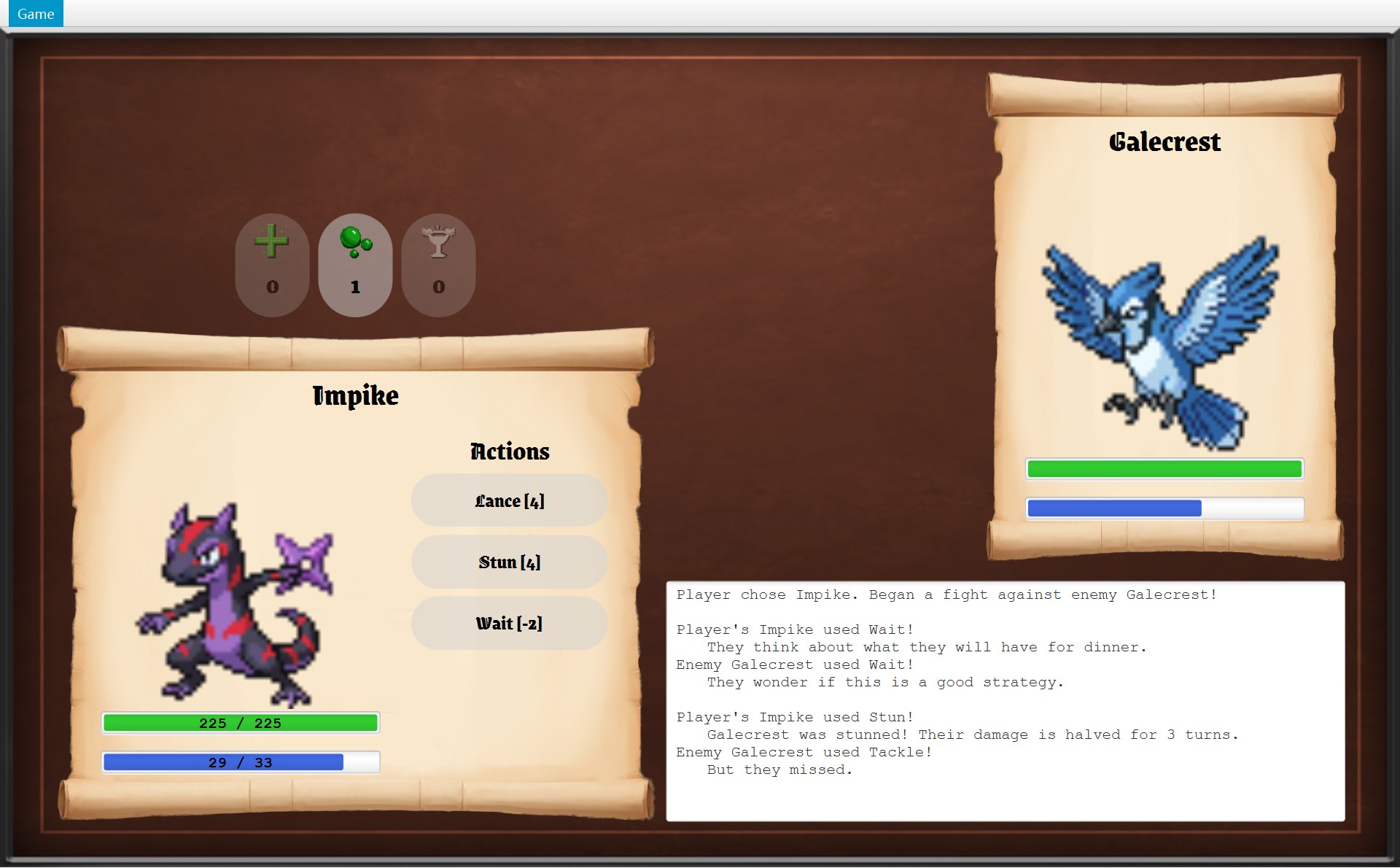
A 局第 2 回合:你点了 Stun [4],敌人随后用了 Tackle。只点了一下,屏幕上两个人的数据都变了:
 1234
1234- 1你的能量 33 → 29:你的 Stun 花了 4
- 2敌人的能量 14 → 9:敌人的 Tackle 花了 5
- 3日志区(下面放大)
- 4你的 HP 还是 225 / 225(为什么,看下面的框 6)
- 5日志第 9 行:你的 Stun 打中了。敌人的 Fighter 身上多了一个 Stunned 效果,屏幕上只有这句话看得到它
- 6日志第 11 行:敌人的 Tackle 没打中,所以你的 HP 没变
把这一回合前后(battle-wait → battle-stun)的两根能量条并排放。同一个数字代表同一样东西:
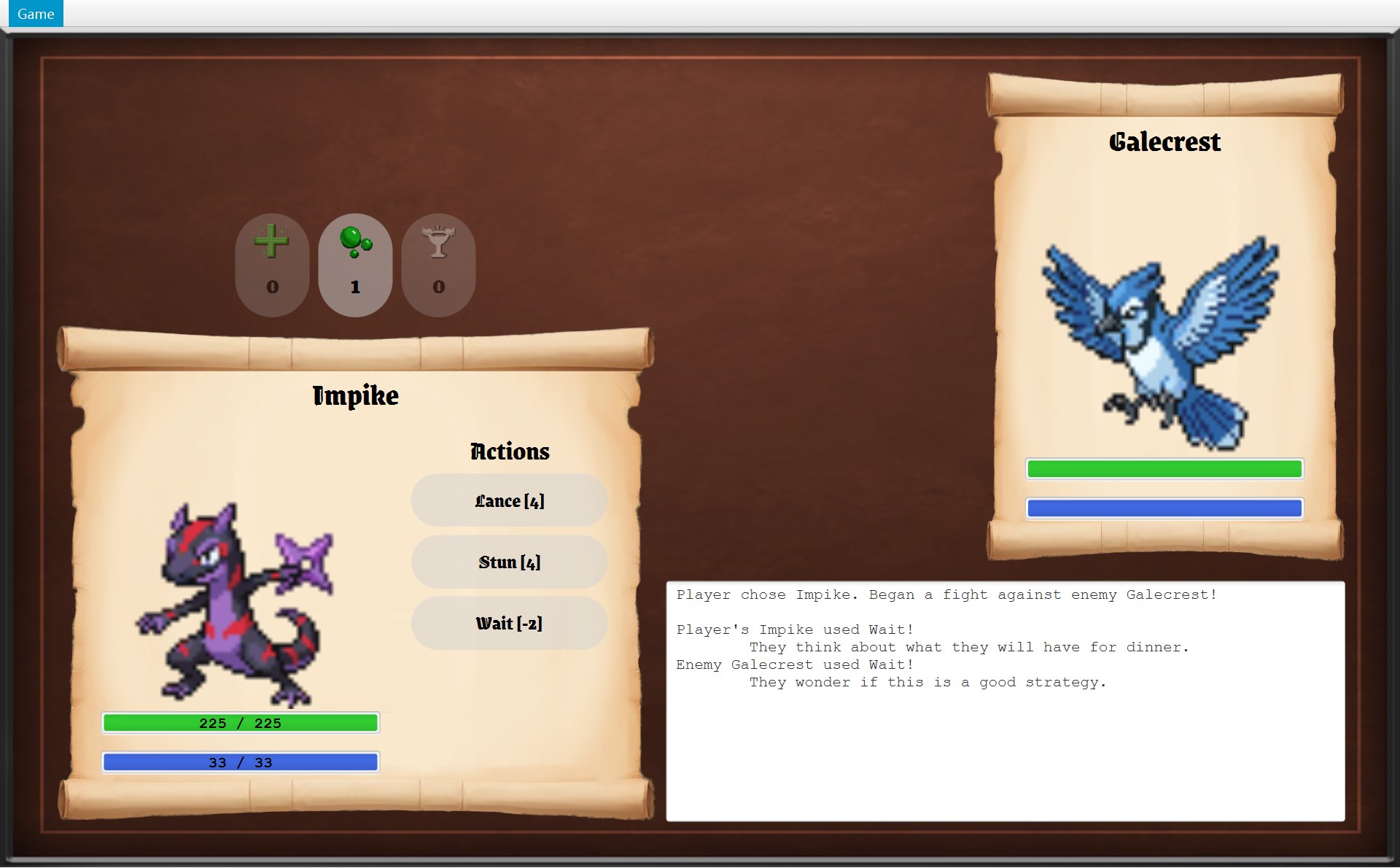
- 1点 Stun 之前:你的能量 33 / 33
Fighter.spendEnergy 用 Math.min(…, getMaxEnergy()) 把它限制在开局的 33真实运行截图 · 用 Wait:日志里是一句随机的发呆台词,然后敌人行动(能量本来就是满的 33 / 33,所以没有变化)- 1之后:29 / 33(33 − 4)
- 2之前:敌人的能量条是满的(14 / 14)
- 2之后:9 / 14(14 − 5),条短了一截
敌人的条上不写数字(只有你的面板用 CLabelledStatBar),14 和 9 是程序运行时 CFighter 里的真实值。这道题要你讲的,就是“这些数字存在哪、谁改的、谁画出来的”。
2.2 谁创建了这些对象(instantiation)
回合开始之前,对象就已经造好了。你在遇敌对话框里点 Fight! 的时候,按下图箭头上 1 到 8 的顺序发生:
- 箭头 1:Fight! 按钮的 lambda 在 COverworldScreen.onEncounter 里(第 85–88 行):先
closeDialog(),再getNavigator().startBattle()。它只认识接口 IGameNavigator,背后的对象是 CGameWindow。 - 箭头 2、3:CGameWindow.startBattle 第 67 行先算括号里的
world.createBattle();COverworld 再把player.getInventory()交给encounter.createBattle(…)。 - 箭头 4、5、6:CEncounter.createBattle new 两个 CFighter 和一个 CBattle;CBattle 的构造器顺手 new 一个 CRandomEnemyStrategy(下面的代码)。
- 箭头 7、8:回到第 67 行:拿着这个 CBattle new CBattleScreen,它的构造器第 78、81 行 new 两个 CFighterPanel。
为什么是 Encounter 来 new?造 CFighter 需要三样东西:你的 Mokepon、敌人的 Mokepon、这一格的地形。它们正好都是 CEncounter 的字段 playerMokepon、enemy、terrain(第 17–19 行)。谁有数据,就由谁来造。英文:Encounter creates the fighters because it already has everything they need: both Mokepon and the terrain of the marker's tile.
中间那一步的代码只有 3 行。先看代码,再看它造出来的东西刚出现在屏幕上的样子,红色数字一一对应(鼠标移到图下的说明上,代码里同一个数字会亮):
52 /* Start a battle where the terrain changes the stats of both fighters. */53 public Battle createBattle(Inventory inventory) {541 Fighter player = new Fighter(playerMokepon, getPlayerEffect());552 Fighter enemyFighter = new Fighter(enemy, getEnemyEffect());563 return new Battle(player, enemyFighter, inventory);57 }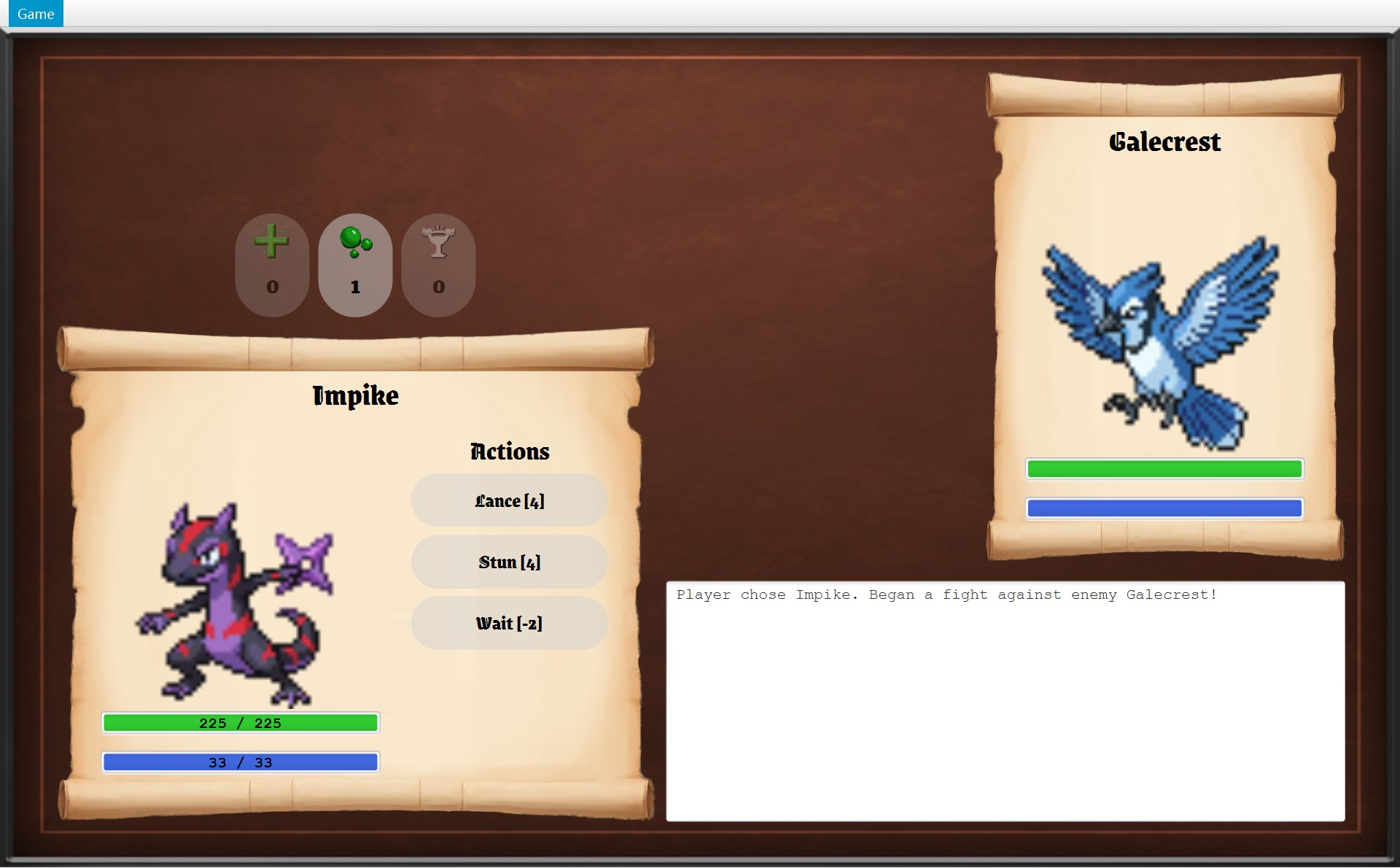 12
12- 1player:用你的 Impike 造的 Fighter,HP 225
- 2enemy:用 Galecrest 造的 Fighter
- 3Battle 的构造器写下的日志第一行
- 第 54 行(标 1):
new Fighter(playerMokepon, getPlayerEffect())。Impike 是 FIRE,这个感叹号在 FOREST 上,getEffectOn返回 ADVANTAGE(×1.5)。CFighter 构造器把每个数值乘一遍再limit:HP 150(Impike 原来的 HP)× 1.5 = 225。 - 第 55 行(标 2):敌人也一样,只是参数换成敌人的。Galecrest 是 LIGHTNING,在 FOREST 上是 DISADVANTAGE(×0.5):HP 185 × 0.5 = 92.5,
Math.round四舍五入成 93。 - 第 56 行(标 3):
new Battle(player, enemyFighter, inventory)。这是 3 个参数的构造器,它用this(...)转给 5 个参数的构造器,顺手new RandomEnemyStrategy()和new Random(),最后写下日志第一行。
inventory 不是新造的:它是 COverworld 构造器里 new Inventory(ItemCatalogue.getAll()) 造好、交给 CPlayer 存着的那一个。COverworld.createBattle 把 player.getInventory() 传进来,所以战斗里用掉的道具,回到地图上也少了。造对象的细节见 第 10 章。
2.3 一句一句搭答案
参考答案一共 10 句,用两个动画来搭。第一个讲第 1–4 句:位置、谁创建、谁存着、谁委托。图里:空心菱形 = 用字段存着(边上是字段名),实线箭头 = 调用,虚线箭头 = 用 new 创建;两个 CFighter 方框是同一个类的两个对象,CFighterPanel 方框代表 playerPanel、enemyPanel 两个对象。左下是这一句说的代码,右下是它在屏幕上的结果。斜体是可以照写的英文句子。动画里亮起来的线会变成红色的流动虚线,那只表示“这一步讲的是它”,和“虚线 = new”无关。
188 for (Skill skill : skills) {189 GameButton button = new GameButton(skill.getName() + " [" + skill.getEnergyCost()190 + "]", font, BUTTON_RADIUS);191 button.setPrefSize(SKILL_WIDTH, SKILL_HEIGHT);192 button.addPressEffect();193 button.setOnAction(event -> useSkill(skill));194 skillButtons.add(button);195 buttonColumn.getChildren().add(button);196 }52 /* Start a battle where the terrain changes the stats of both fighters. */53 public Battle createBattle(Inventory inventory) {54 Fighter player = new Fighter(playerMokepon, getPlayerEffect());55 Fighter enemyFighter = new Fighter(enemy, getEnemyEffect());56 return new Battle(player, enemyFighter, inventory);57 }15 private final Fighter player;16 private final Fighter enemy;17 private final Inventory inventory;18 private final EnemyStrategy enemyStrategy;19 private final Random random;20 private final List<String> log = new ArrayList<>();117 private void useSkill(Skill skill) {118 battle.playTurn(skill);119 update();120 }- 1你点的 Stun [4](一个 GameButton)
- 1HP:150 × 1.5 = 225
- 2Energy:22 × 1.5 = 33
- 1player 的数据
- 2enemy 的数据
- 第 1 句:说位置。The data of both fighters is handled in Battle.playTurn(Skill), which BattleScreen starts when a skill button is pressed. 亮的是这两个类。CBattleScreen.createSkillButtons 给每个技能做一个 CGameButton,第 193 行用 lambda
event -> useSkill(skill)登记“点了以后做什么”,它记住了这一次循环的skill(Stun 对象)。按数字键 2 也是“按下”同一个按钮(fire()),走同一个 lambda。 - 第 2 句:instantiation。When the player clicks Fight!, the dialog button in OverworldScreen calls getNavigator().startBattle(); GameWindow.startBattle() calls world.createBattle(), which passes the player's inventory to encounter.createBattle(inventory). Encounter.createBattle creates two Fighter objects, one from each Mokepon with its terrain effect, and a new Battle(player, enemyFighter, inventory). GameWindow then creates a new BattleScreen for this Battle. 亮的是三条虚线(new),就是第 54–56 行。Impike 在 FOREST 上 ×1.5:HP 150 → 225(框 1),Energy 22 → 33(框 2)。前面那段调用链(Fight! → startBattle → createBattle)是 2.2 节图上的箭头 1–3。
- 第 3 句:containership。Battle holds the two fighters in its private final fields player and enemy, together with the player's Inventory, the EnemyStrategy in enemyStrategy and the log; each Fighter keeps its own stats and status effects and a reference to its read-only Mokepon. 亮的是 5 个空心菱形。第 17、19、20 行还存着
inventory、random、log(图里没画);CFighter 的mokepon、stats、effects在 Fighter.java 第 21、25、26 行。两边的数值分开存,所以左边卷轴只画 player(框 1),右边只画 enemy(框 2)。 - 第 4 句:delegation。The skill button's lambda calls BattleScreen.useSkill(skill), which delegates the whole turn to battle.playTurn(skill). 亮的是“存着”(CBattleScreen 的字段
battle)和下面那条弯的“调用”(playTurn)。CBattleScreen 自己不算任何规则:第 118 行交给 CBattle,第 119 行update()重画。
第二个动画讲第 5–10 句:一个回合里谁调用谁。图里只有实线箭头(调用),箭头上是这一回合真实调用的方法。skill 方框前半回合是你的 Stun 对象,后半回合是敌人挑出来的 Tackle 对象。
79 log.add("");80 log.add("Player's " + player.getName() + " used " + playerSkill.getName() + "!");81 log.add(playerSkill.use(player, enemy, random));⋯ 省略第 82–86 行87 Skill enemySkill = enemyStrategy.chooseSkill(enemy, random);88 log.add("Enemy " + enemy.getName() + " used " + enemySkill.getName() + "!");89 log.add(enemySkill.use(enemy, player, random));27 /* Template Method: pay the energy cost first (even if an attack then misses),28 * then apply the effect. Returns the message for the battle log.29 */30 public final String use(Fighter user, Fighter target, Random random) {31 user.spendEnergy(energyCost);32 return applyEffect(user, target, random);33 }18 protected final String applyEffect(Fighter user, Fighter target, Random random) {19 if (!hits(user, target, random)) {20 return MISS_MESSAGE;21 }22 return applyHit(user, target, random);16 protected String applyHit(Fighter user, Fighter target, Random random) {17 target.addEffect(new Stunned());95 endTurn();⋯ 省略第 96–115 行116 private void endTurn() {117 log.addAll(enemy.applyLingeringDamage());⋯ 省略第 118–122 行123 log.addAll(player.applyLingeringDamage());⋯ 省略第 124–128 行129 enemy.countDownEffects();130 player.countDownEffects();81 log.add(playerSkill.use(player, enemy, random));82 if (!enemy.isAlive()) {83 finish(true);84 return;85 }⋯ 省略第 86–138 行139 if (playerWon) {140 log.add("Enemy's " + enemy.getName() + " fainted!");141 log.add("You win");128 private void update() {129 playerPanel.update();130 enemyPanel.update();131 showLog();132 updateSkillButtons();133 updateItemButtons();- 1第 9 行:Stun 返回的话
- 2第 11 行:Tackle 返回的话
- 1你的能量 33 → 29
- 1敌人的能量 14 → 9
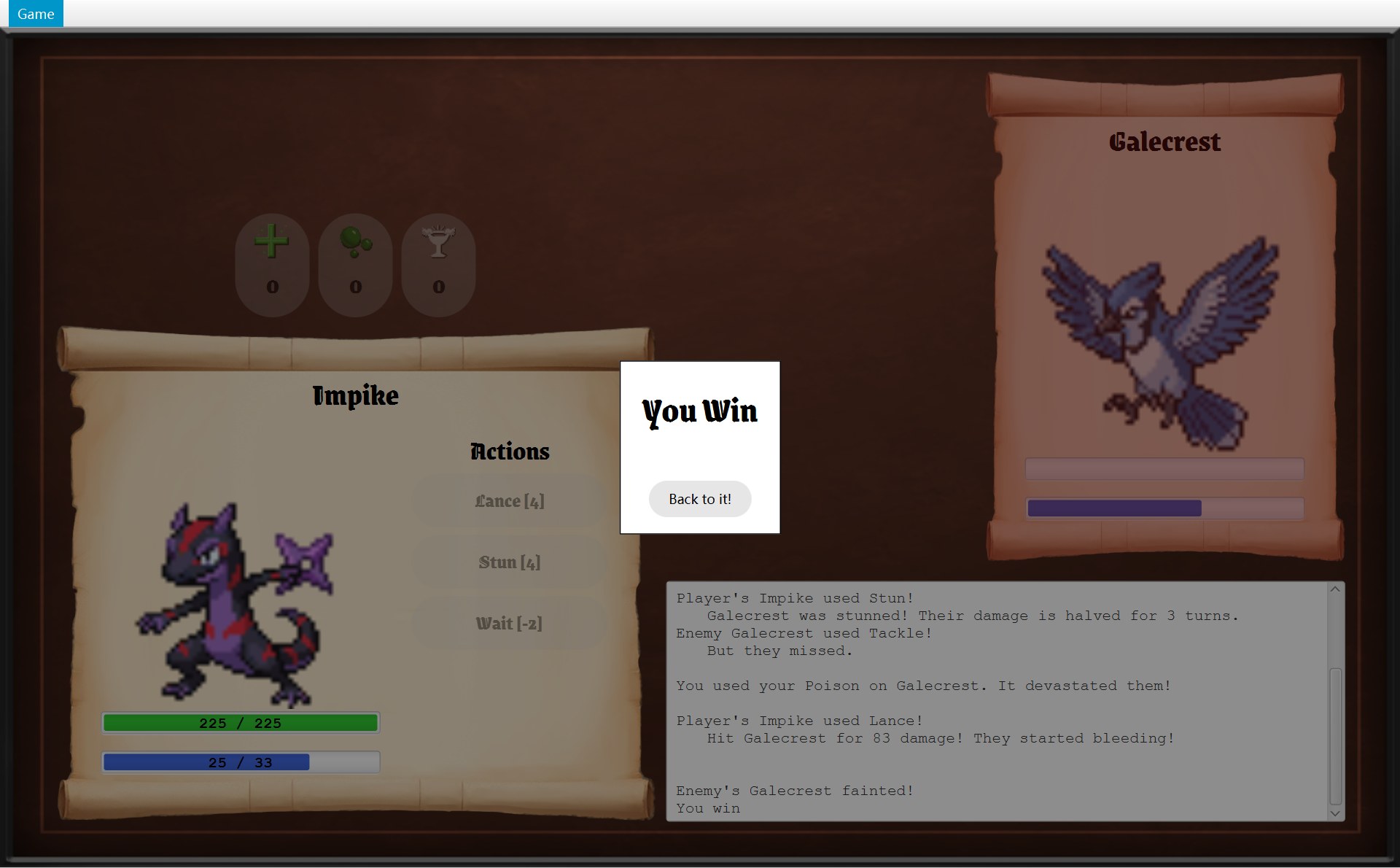
- 1第 13 行:Poison
- 2第 16 行:Lance 83 伤害
- 3第 19–20 行:finish(true)
- 1第 9 行的后半句:Stunned 管 3 回合(Stunned.TURNS = 3)
- 1playerPanel
- 2enemyPanel
- 3logArea
- 第 5 句:同一个方法给两边用。playTurn uses the same method for both sides: playerSkill.use(player, enemy, random) and then enemySkill.use(enemy, player, random), so one piece of code changes both fighters' data. 第 81 行和第 89 行只是把两个 CFighter 换了位置。框 1、框 2 是这两次调用各自返回、被
log.add写进日志的话。规则只写一份,这就是 DRY。 - 第 6 句(前半):先付能量。Skill.use is a final template method that calls user.spendEnergy(cost) and then applyEffect; … 第 31 行的
energyCost就是句子里的 cost。你出手时 user 是你:33 − 4 = 29(框 1)。顺序写死在 final 方法里,子类改不了,所以能量总是先扣,打没打中都一样(第 27 行的注释也这么说)。 - 第 6 句(后半):打中了才改对方。… for targeted skills TargetedSkill.applyEffect first does the hit check and only then calls applyHit, which changes the target only through Fighter methods such as takeDamage() and addEffect(). Stun 和 Tackle 都是 ATargetedSkill。你的 Stun 判定命中,走到第 22 行,CStun.applyHit 第 17 行
target.addEffect(new Stunned())(框 1)。敌人的 Tackle 没中,第 20 行直接返回MISS_MESSAGE,就是 "But they missed."(框 2)。命中怎么算见 第 12 章。 - 第 7 句:敌人的技能谁来挑。The enemy's skill is chosen by enemyStrategy.chooseSkill(enemy, random); the field's type is the EnemyStrategy interface, and the default object is a RandomEnemyStrategy. 这是策略模式(Strategy):CBattle 的 3 个参数的构造器往这个字段里放了一个 CRandomEnemyStrategy。这次挑到 Tackle。第 89 行 user 换成敌人:14 − 5 = 9(框 1)。Tackle 没打中,能量照样扣了,因为
spendEnergy在命中判定之前。 - 第 8 句(前半):有人倒下就结束。After each action Battle checks isAlive() and calls finish() if someone fainted; … 点 Stun 那一回合没人倒下,所以这里借 A 局最后一回合来看。先用道具 Poison,敌人 HP 变成 1(框 1,道具不占回合)。再点 Lance,打出 83(框 2):
takeDamage里Math.max(0, 1 − 83) = 0,isAlive()为 false,第 83 行finish(true)写下框 3 的两行,第 84 行return,敌人没机会出手。 - 第 8 句(后半):没人倒下就 endTurn。… otherwise endTurn() applies the enemy's lingering damage, then the player's, and counts down both fighters' effects. 回到点 Stun 那一回合:两人都站着,走到第 95 行
endTurn():先 enemy 的、再 player 的applyLingeringDamage(),最后两边countDownEffects()。Stun 那句日志说眩晕 3 回合(框 1),这里倒数一次后,Galecrest 的 Stunned 还剩 2 回合(屏幕上看不到这个数,见 第 13 章)。 - 第 9 句:屏幕怎么跟上。Finally BattleScreen.update() reads the new state through getters and calls playerPanel.update() and enemyPanel.update() to redraw both fighters. 每个 CFighterPanel 用字段
fighter存着一个 CFighter,只读不改(框 1、2);第 131 行showLog()把battle.getLog()返回的只读列表显示在日志区(框 3)。 - 第 10 句:好处(because)。This design is good because the turn rules are written once for both fighters, Battle has a single responsibility and no JavaFX code, and a new skill or enemy strategy can be added without changing playTurn. 三个理由分别对应:DRY(规则只写一份)、SRP(CBattle 只管规则)、OCP(加新东西不改 playTurn)。
2.4 如果要你画:一个回合的顺序图
考试可能让你画图说明。读法见 第 1 章第 3 节:每根竖虚线是一个对象,从上往下是时间,实线箭头 = 调用,虚线箭头 = 返回,绕回自己 = 调用自己的方法。一个回合太长,分成两张画:先是你出手,然后是敌人出手和回合末。
① 的第 5 个箭头就是 CStun.applyHit 里的 target.addEffect(new Stunned())。② 里 Tackle 没打中(第 5 个箭头),所以没有箭头碰 player 的 HP;如果打中了,AAttackSkill.applyHit 会多一个 target.takeDamage(damage),target 是 player。playTurn 返回以后,CBattleScreen.useSkill 再调用自己的 update()。每一行的细节见 第 11 章。
2.5 参考答案
每一条先是中文要点,下面一行斜体是对应的英文句子;编号和上面两个动画的“第几句”一样,英文也一字不差(第 11 章第 8 节引用的也是这一份)。考试时按顺序写下这 10 句斜体,就是完整的答案。
- 位置:CBattle.playTurn(Skill),由 CBattleScreen 的技能按钮启动
The data of both fighters is handled in Battle.playTurn(Skill), which BattleScreen starts when a skill button is pressed. - instantiation:点 Fight! → COverworldScreen 的按钮调用
startBattle()→ CGameWindow 调用world.createBattle()→ COverworld 把背包交给encounter.createBattle(…)→ CEncounter new 两个 CFighter 和 CBattle → CGameWindow new CBattleScreen
When the player clicks Fight!, the dialog button in OverworldScreen calls getNavigator().startBattle(); GameWindow.startBattle() calls world.createBattle(), which passes the player's inventory to encounter.createBattle(inventory). Encounter.createBattle creates two Fighter objects, one from each Mokepon with its terrain effect, and a new Battle(player, enemyFighter, inventory). GameWindow then creates a new BattleScreen for this Battle. - containership:CBattle 的 private final 字段
player、enemy、inventory、enemyStrategy、log;每个 CFighter 有自己的stats、effects,并存着只读的 CMokepon
Battle holds the two fighters in its private final fields player and enemy, together with the player's Inventory, the EnemyStrategy in enemyStrategy and the log; each Fighter keeps its own stats and status effects and a reference to its read-only Mokepon. - delegation:按钮的 lambda →
useSkill→battle.playTurn(skill)
The skill button's lambda calls BattleScreen.useSkill(skill), which delegates the whole turn to battle.playTurn(skill). - 两边共用:同一个
Skill.use(user, target, random),参数位置一换就从你变成敌人
playTurn uses the same method for both sides: playerSkill.use(player, enemy, random) and then enemySkill.use(enemy, player, random), so one piece of code changes both fighters' data. - 改数据只走 Fighter 的方法:
Skill.use(final)先spendEnergy;ATargetedSkill 先判定命中,中了才applyHit;改对方只用takeDamage、addEffect
Skill.use is a final template method that calls user.spendEnergy(cost) and then applyEffect; for targeted skills TargetedSkill.applyEffect first does the hit check and only then calls applyHit, which changes the target only through Fighter methods such as takeDamage() and addEffect(). - 敌人的技能:
enemyStrategy.chooseSkill(策略模式),默认是 CRandomEnemyStrategy
The enemy's skill is chosen by enemyStrategy.chooseSkill(enemy, random); the field's type is the EnemyStrategy interface, and the default object is a RandomEnemyStrategy. - 收尾:每次出手后
isAlive()→finish();否则endTurn():先算敌人的持续伤害,再算你的,最后两边countDownEffects()倒数
After each action Battle checks isAlive() and calls finish() if someone fainted; otherwise endTurn() applies the enemy's lingering damage, then the player's, and counts down both fighters' effects. - 显示:
update()通过 getter 读,两个 CFighterPanel 重画,showLog()显示getLog()
Finally BattleScreen.update() reads the new state through getters and calls playerPanel.update() and enemyPanel.update() to redraw both fighters. - because:规则只写一份(DRY);CBattle 只管规则、没有 JavaFX(SRP);加新技能、新策略不用改 playTurn(OCP)
This design is good because the turn rules are written once for both fighters, Battle has a single responsibility and no JavaFX code, and a new skill or enemy strategy can be added without changing playTurn.
3. 样题 Q2(原则题):接口隔离原则 ISP
样题大意:我们学过的一个 OOP 原则是接口隔离原则(Interface Segregation Principle)。给出它的定义,并在你的 Project 2 里指出一个它被用到或者本该用到的位置或交互。如果哪里都没用到,说明要怎样改结构才能用上。
3.1 定义
接口隔离原则(ISP):不要逼一个使用者依赖它用不到的方法。与其做一个什么都有的大接口,不如做几个小的、专门的接口,每个使用者只看到自己要用的那几个方法。这里的“使用者(client)”是指调用这个接口的类。
英文定义,一句就够:The Interface Segregation Principle says that no client should be forced to depend on methods it does not use, so several small, focused interfaces are better than one large one.
3.2 选哪个位置:三个候选
- (a) IGameNavigator:菜单和三个画面在用;7 个方法,每个使用者只用 1–3 个。它是反例,适合写“本该用到 ISP 的地方”(3.4)。
- (b) IEnemyStrategy、IEnemyPicker:CBattle、CMarker 在用;各 1 个方法。可以写,作为补充例子。
- (c) IOverworldListener:COverworld 在用;5 个方法,全是地图世界的事件。推荐:有一个大类(COverworldScreen)可以对比,交互两边都能讲具体。
为什么推荐 (c)?题目要的是“位置或交互”。IOverworldListener 有清楚的两边:一边是只调用 5 个方法的 COverworld,另一边是方法多得多的 COverworldScreen。你能说出 COverworld “看不到”哪些方法,这就是 ISP 的核心。(b) 也对,但一个方法的接口很难说出“隔离”了什么。
3.3 推荐答案的位置:OverworldListener
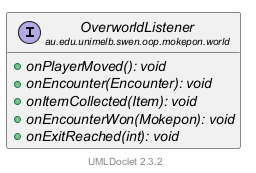
再看谁用它、谁实现它,以及 COverworld 看不到的是哪些方法:
- 使用者是 COverworld。它的字段
listeners的类型是List<OverworldListener>(第 23 行)。它只通过notifyListeners(listener -> listener.onXxx(...))调用这 5 个方法,别的什么都不调用。 - 实现者是 COverworldScreen(
extends GameScreen implements OverworldListener)。它自己写的 public 方法只有构造器和这 5 个接口方法;另外它从 AGameScreen 继承了getView()、handleKeyPress()、canRunAway()、canReturnToMainMenu()这些 public 方法(GameScreen.java 第 24–49 行)。因为字段类型是接口,COverworld 根本看不到它们。 - 登记:CGameWindow.startGame 第 61 行
world.addListener(overworldScreen)。
用一个真实的交互说明:A 局赢了 Galecrest,点 Back to it! 以后,CGameWindow.winBattle 调用 world.winEncounter()。先看前后两张截图(左边是遇敌前一步,右边是赢了回到地图),再看做这件事的两段代码。编号前后一样,鼠标移到说明上,代码里同一个数字会亮:
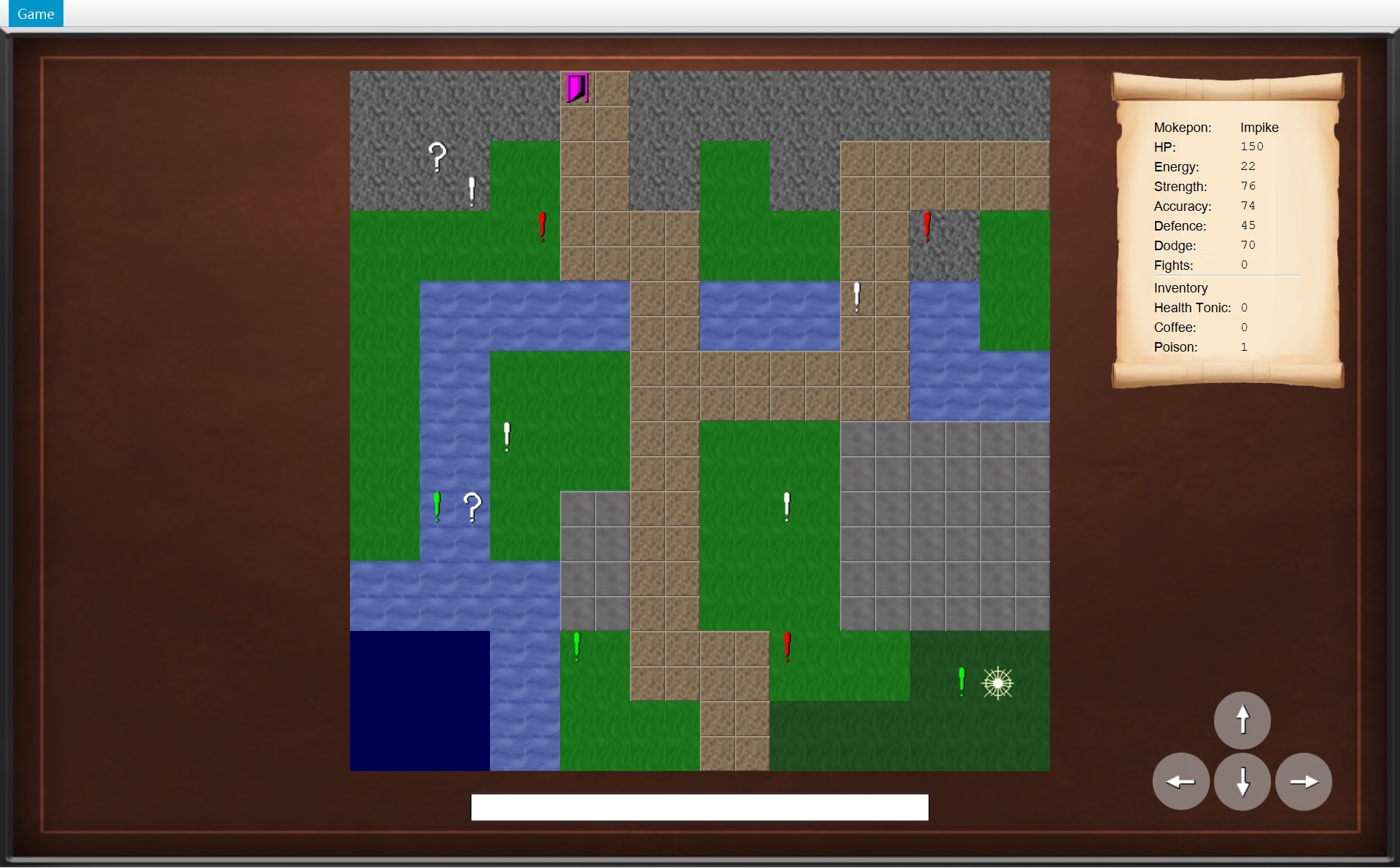
- 1(17,17) 的绿色感叹号。它右边的白色星形就是你(MapView.playerView),在 (18,17)
- 3状态栏是空的
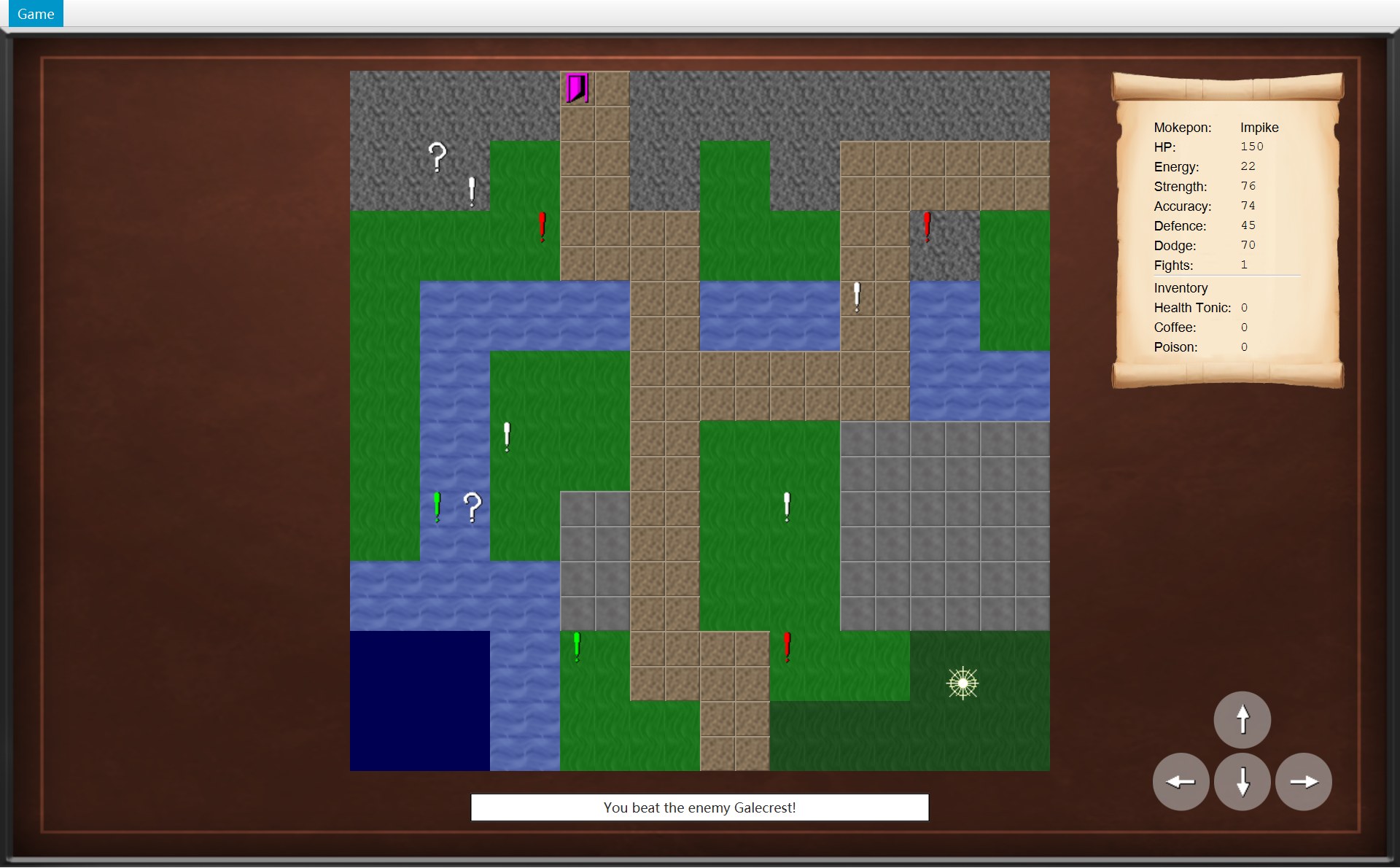
- 1(17,17):感叹号没了,你站在这里
- 3状态栏:You beat the enemy Galecrest!
- 2Fights: 0
- 2Fights: 1
93 /* The battle was won, so remove the marker and count the win. */94 public void winEncounter() {95 Mokepon enemy = encounter.getEnemy();961 objects.remove(encounter.getMarker());972 player.addWin();98 encounter = null;993 notifyListeners(listener -> listener.onEncounterWon(enemy));100 }102 @Override103 public void onEncounterWon(Mokepon enemy) {1043 statusBar.setText("You beat the enemy " + enemy.getName() + "!");1052 update();106 }- 标 1:第 96 行
objects.remove(encounter.getMarker())把这个感叹号从地图的物体列表里拿掉。 - 标 2:第 97 行
player.addWin()改数据;第 105 行update()让卷轴重新读 CPlayer,屏幕上才变成 1。 - 标 3:第 99 行只知道“通知所有监听者:赢了这个敌人”。真正收到的是 COverworldScreen,它的第 104 行改状态栏。
COverworld 不知道监听者会改状态栏、刷新卷轴,也不用 import 任何 JavaFX 类(第 8 章讲过整个通知过程)。
3.4 本该用到 ISP 的地方:GameNavigator
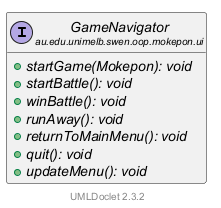
7 个方法,每个使用者只用其中几个:
最明显的是 CGameMenu:它的构造器参数是 IGameNavigator,只用了 runAway()、returnToMainMenu()、quit() 三个(第 22、26、30 行),却依赖着全部 7 个。startGame(Mokepon) 一改参数,CGameMenu 也跟着要重新编译。
15 private final MenuBar menuBar;16 private final MenuItem runAway;17 private final MenuItem mainMenu;18 19 public GameMenu(GameNavigator navigator) {20 runAway = new MenuItem("Run away");21 runAway.setAccelerator(new KeyCodeCombination(KeyCode.R, KeyCombination.CONTROL_DOWN));221 runAway.setOnAction(event -> navigator.runAway());23 24 mainMenu = new MenuItem("Main menu");25 mainMenu.setAccelerator(new KeyCodeCombination(KeyCode.B, KeyCombination.CONTROL_DOWN));262 mainMenu.setOnAction(event -> navigator.returnToMainMenu());27 28 MenuItem exit = new MenuItem("Exit");29 exit.setAccelerator(new KeyCodeCombination(KeyCode.F4, KeyCombination.ALT_DOWN));303 exit.setOnAction(event -> navigator.quit());改法要写到类和方法这一层:
- 新建
interface MenuActions,把runAway()、returnToMainMenu()、quit()从 IGameNavigator 移过去。 - IGameNavigator 改成
interface GameNavigator extends MenuActions,只留startGame、startBattle、winBattle、updateMenu。 - CGameMenu 的构造器改成
GameMenu(MenuActions actions)。 - CGameWindow 一行不用改:它实现 IGameNavigator,也就自动实现了
MenuActions;第 39 行new GameMenu(this)照样能编译。
3.5 参考答案
和 2.5 一样:中文要点,下面是英文句子。按顺序写下 7 句斜体就是完整的答案。
- 定义:不要逼使用者依赖它不用的方法,接口要小而专一
The Interface Segregation Principle says that no client should be forced to depend on methods it does not use, so several small, focused interfaces are better than one large one. - 位置:IOverworldListener;使用者 COverworld 用字段
listeners存着它,只调用 5 个通知方法
In my Project 2 it is applied in the OverworldListener interface. Overworld is the client: it keeps its observers in the field listeners, a List of OverworldListener, and only ever calls the five notification methods onPlayerMoved, onEncounter, onItemCollected, onEncounterWon and onExitReached through notifyListeners(). - 实现者和登记:COverworldScreen 实现它,CGameWindow.startGame 用
addListener登记
OverworldScreen implements this interface, and GameWindow.startGame() registers it with world.addListener(overworldScreen). - because:COverworld 看不到画面的其他方法,也不依赖 JavaFX
Because Overworld depends only on this small interface, it cannot see OverworldScreen's other public methods such as getView(), handleKeyPress() or canRunAway(), and the world package does not need any JavaFX class. - 例子:
winEncounter→onEncounterWon→ 状态栏文字
For example, when a battle is won, Overworld.winEncounter() removes the marker, counts the win and calls onEncounterWon(enemy), and the screen shows "You beat the enemy Galecrest!". - 补充:IEnemyStrategy、IEnemyPicker 各一个方法
EnemyStrategy, used by Battle, and EnemyPicker, used by Marker, are two more interfaces with only one method each. - 不足和改法:IGameNavigator 7 个方法,CGameMenu 只用 3 个 → 拆出
MenuActions
A place where the principle should have been applied is GameNavigator: it has seven methods, but GameMenu only uses runAway(), returnToMainMenu() and quit(). I would move these three methods into a new interface MenuActions, make GameNavigator extend it, and change the GameMenu constructor to take a MenuActions, so the menu no longer depends on methods like startGame() or startBattle().
4. 样题 Q3(扩展题):加上 Run away
样题大意:Project 2 要求玩家能在战斗中逃跑(Game 菜单里的 Run away)。描述为了做到这一点,你在 Project 1 的结构上加了或改了哪些类和方法;Project 1 的设计哪里帮了忙、哪里让它更难;现在的做法好不好继续扩展。
4.1 先看屏幕
B 局:你的 Shellurk 走到 (12,12) 的感叹号上,遇到 Nightwing,点了 Fight!。战斗里连用 4 次 Aim,能量用光,然后打开 Game 菜单选 Run away。先看位置:同一块地图,左边是刚踩上感叹号的时候,右边是逃跑以后:
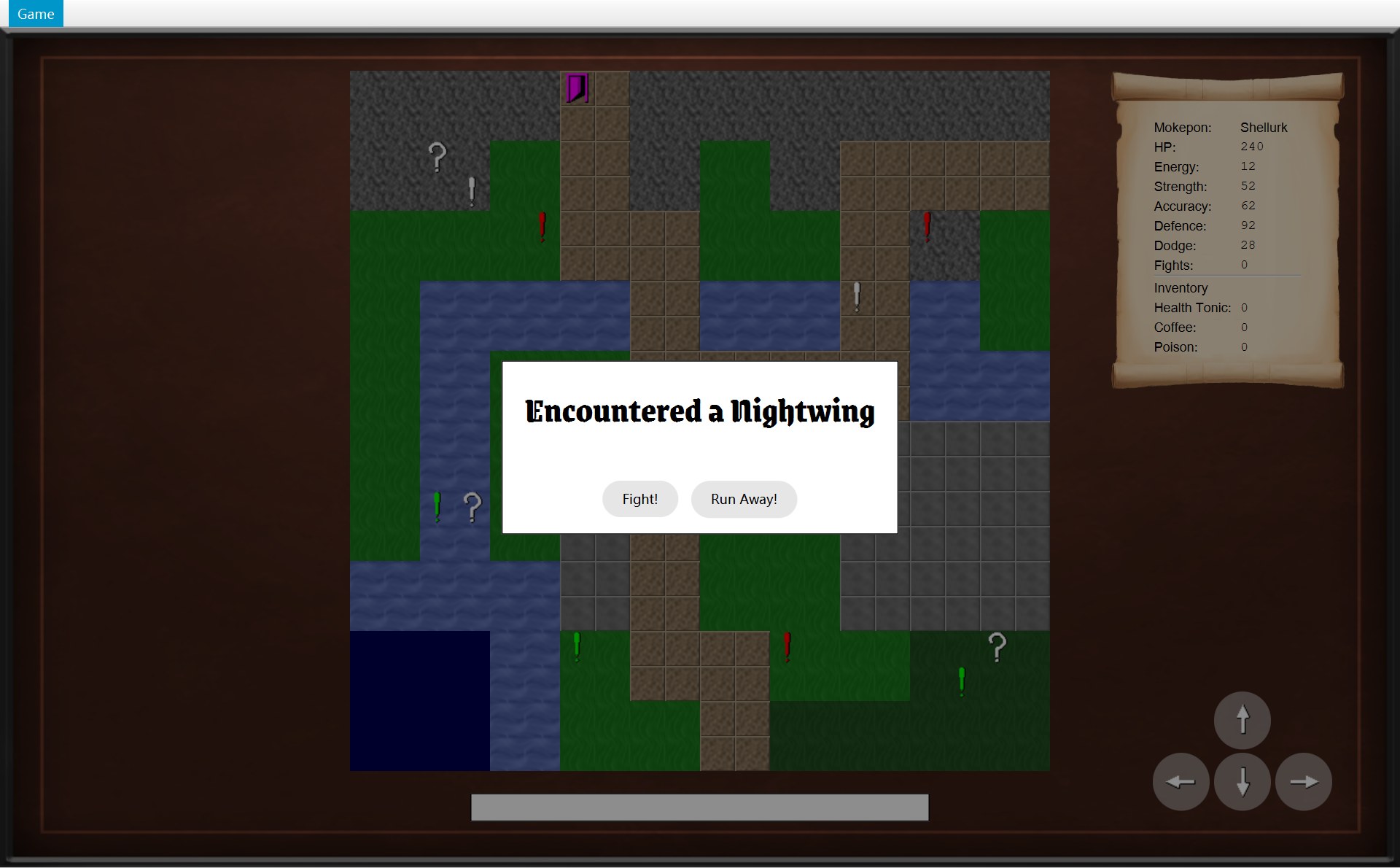
- 1遇敌框:你踩上了 (12,12),这一格正好被框盖住。这时 Player 的 previousPosition 记着上一格 (11,12)
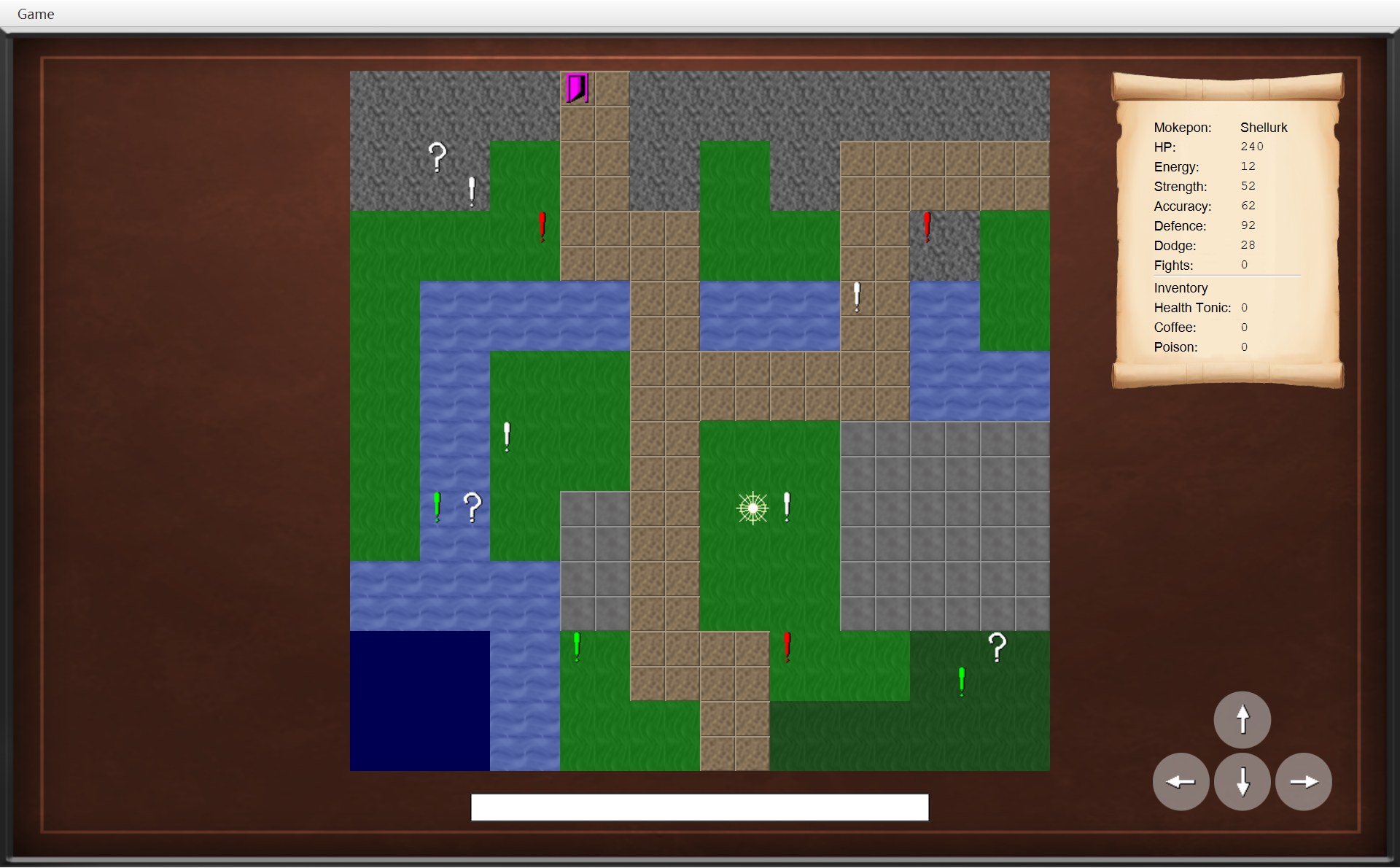
- 1(12,12) 的感叹号还在
- 2白色星形就是你(MapView.playerView):退回了感叹号左边那一格,也就是 (11,12)
中间发生的事:战斗里打开 Game 菜单,Run away 是黑字(框 3)。还有一个不显眼但最重要的变化:战斗里的数值全部消失了(框 4、5):
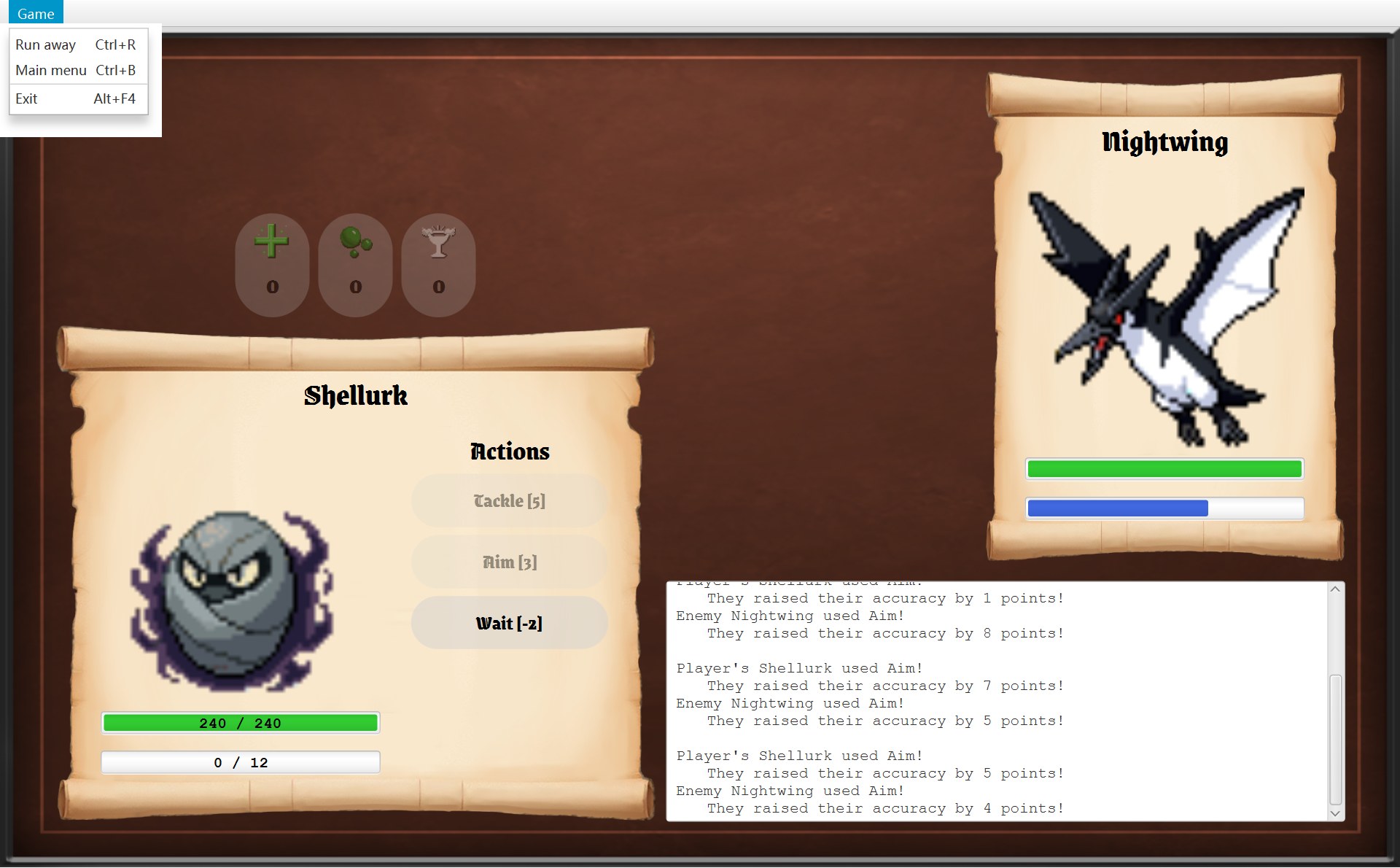
- 3Run away:黑字,可以点,快捷键 Ctrl+R
- 4战斗里,Shellurk 的 Fighter:能量 0 / 12
- 4回到地图:Mokepon 的 Energy 还是 12
- 5Accuracy 还是 62:Aim 加的 16 点只加在 Fighter 上
Aim 4 次分别加了 3、1、7、5 点(日志里写着),Fighter 的 Accuracy 从 62 变成 62 + 16 = 78。可是卷轴(CPlayerStatsScroll)读的是 player.getMokepon(),CMokepon 一个数字都没变。这正是 Q3 要讲的设计。
4.2 Project 1 原来什么样
Project 1 没有地图,也没有逃跑。它的代码在 第 15 章第 9 节已经一段一段看过(逐条对比在 第 16 章第 10 节)。答这道题只要记住 4 点:
- 菜单写在窗口类里:
GameWindow extends Stage,一个类 591 行。菜单不是一个对象,而是两个现做菜单栏的方法getSelectMenu()和getBattleMenu(...);同样的 Exit(调用Platform.exit())写了两遍。 - 菜单项直接调用窗口的 private 方法:战斗菜单里 Reset(Ctrl+R)和 Restart Battle 的 lambda 调用的是
GameWindow自己的resetSelectScreen()和battleScreen(...)。 - Mokepon 会被战斗改掉:字段
hp、energy不是 final,有setHp这样的 setter,takeDamage直接改hp。所以battleScreen开打前先用copyMokepon把两只各复制一份。 - Battle 已经是单独的类:Project 1 的
Battle.java没有一行 JavaFX,已经有字段finished和方法isFinished()。
第 1–3 点在 4.5 节里是“拖后腿”的,第 4 点是“帮了忙”的。
4.3 Project 2 为 Run away 加了哪些类和方法
下面列出新加的 6 处:前 5 处按点下 Run away 以后的调用顺序排,第 6 处管的是 Run away 什么时候能点。每一处的代码、截图和一步一步的动画都在 第 15 章第 3 节(遇敌框里的 Run Away! 按钮在 第 2 节),这里只列名字和行号:答题时要写的就是这些名字。每条最后的“第几句”是 4.6 参考答案里对应的英文句子。
- CGameMenu(新类):菜单单独成了一个类。构造器第 20–22 行造 Run away 菜单项,快捷键 Ctrl+R,lambda
event -> navigator.runAway()。navigator只是构造器参数,不是字段(3.4 节的考试陷阱)。→ 第 2 句 - IGameNavigator.runAway()(接口里新加的方法):菜单只认识这个接口,不认识 CGameWindow。和 Project 1 不同,菜单不再调用窗口的 private 方法。→ 第 2 句
- CGameWindow.runAway():第 78 行
world.runAway()把规则交给地图世界(委托),第 79 行showScreen(overworldScreen)换回原来的地图画面。→ 第 3 句 - COverworld.runAway():第 88 行
encounter = null,这次遇敌作废;第 89 行player.moveBack();第 90 行通知监听者onPlayerMoved(),COverworldScreen 收到后重画地图(观察者模式)。感叹号没有被 remove,所以还在 (12,12)(4.1 “后”那张图的框 1)。→ 第 4 句 - CPlayer 的字段
previousPosition和方法moveBack():moveTo第 41 行每走一步之前先记下旧格子,moveBack第 47 行position = previousPosition。B 局里记下的是 (11,12)(4.1 “后”那张图的框 2)。→ 第 4 句 - AGameScreen.canRunAway() 和 CBattleScreen 的改写:AGameScreen 第 42–44 行默认
return false;CBattleScreen 第 103–105 行改写成return !battle.isFinished()。CGameMenu.update 第 47 行runAway.setDisable(!screen.canRunAway())去问当前画面(每次换画面问一次,战斗结束时再问一次)。同一句screen.canRunAway(),运行的是当前画面那个类的版本,这就是多态。仗没打完 → true →setDisable(false)→ 黑字(4.1 菜单那张图的框 3)。!和setDisable一步一步怎么代进去,见 第 15 章第 4 节。→ 第 5 句
还有一件不用做的事,它是这道题最值得说的一点:逃跑以后,CBattle 和两个 CFighter 没有任何东西再指着它们,直接被丢掉;CMokepon 从来没被改过,所以没有什么要还原(4.1 卷轴那张图的框 4、5)。这靠的是 Project 2 把战斗数值放进 CFighter、让 CMokepon 只读的设计,取代了 Project 1 的 copyMokepon。→ 第 6 句
4.4 一个菜单、三种状态:为什么好扩展
同一个 CGameMenu 对象从头用到尾。三个画面打开它,结果不同,全靠每个画面自己回答 canRunAway() 和 canReturnToMainMenu():
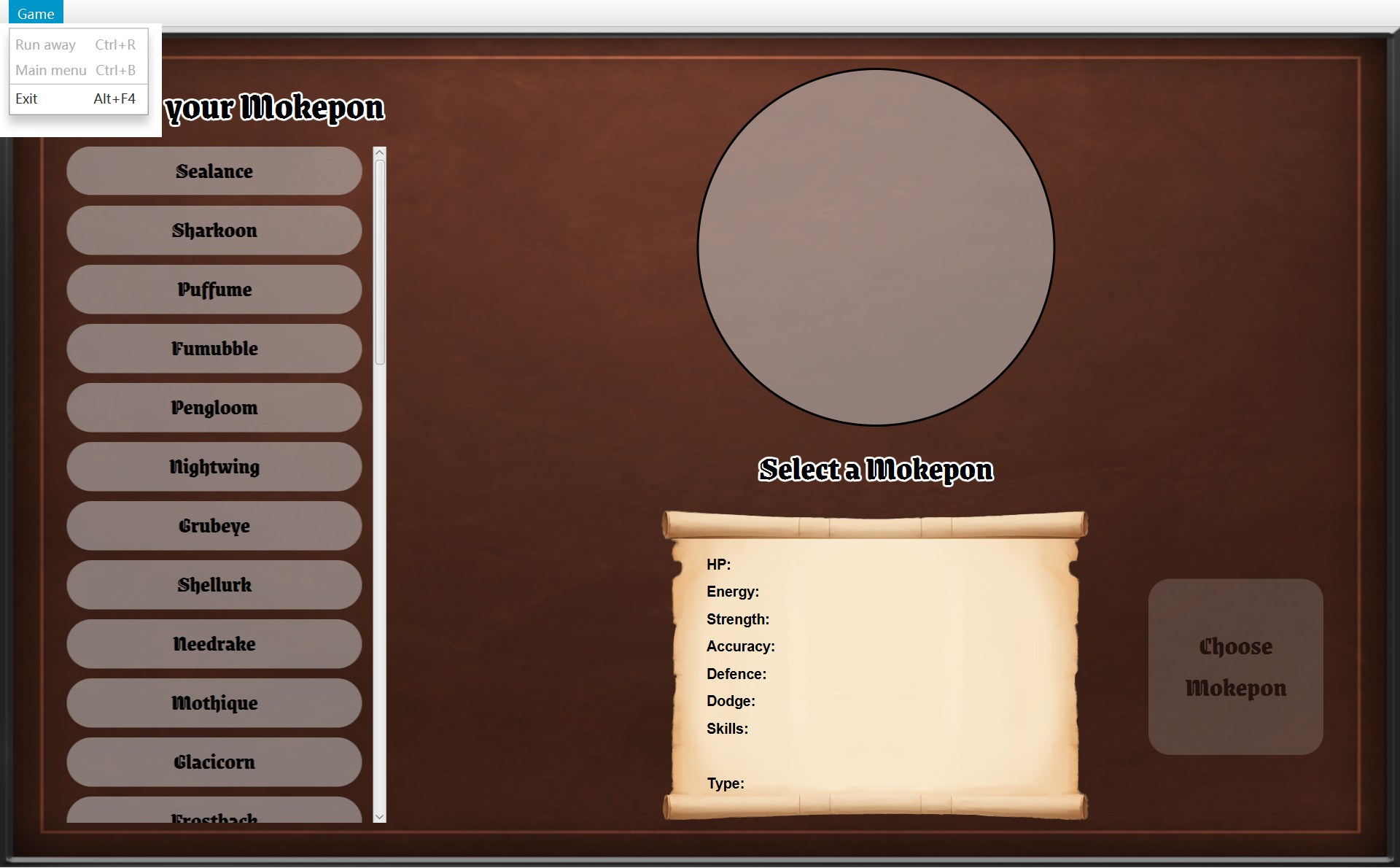
- 1Run away 灰:SelectScreen 没改写,用默认 false
- 2Main menu 也灰:SelectScreen 改写成 false
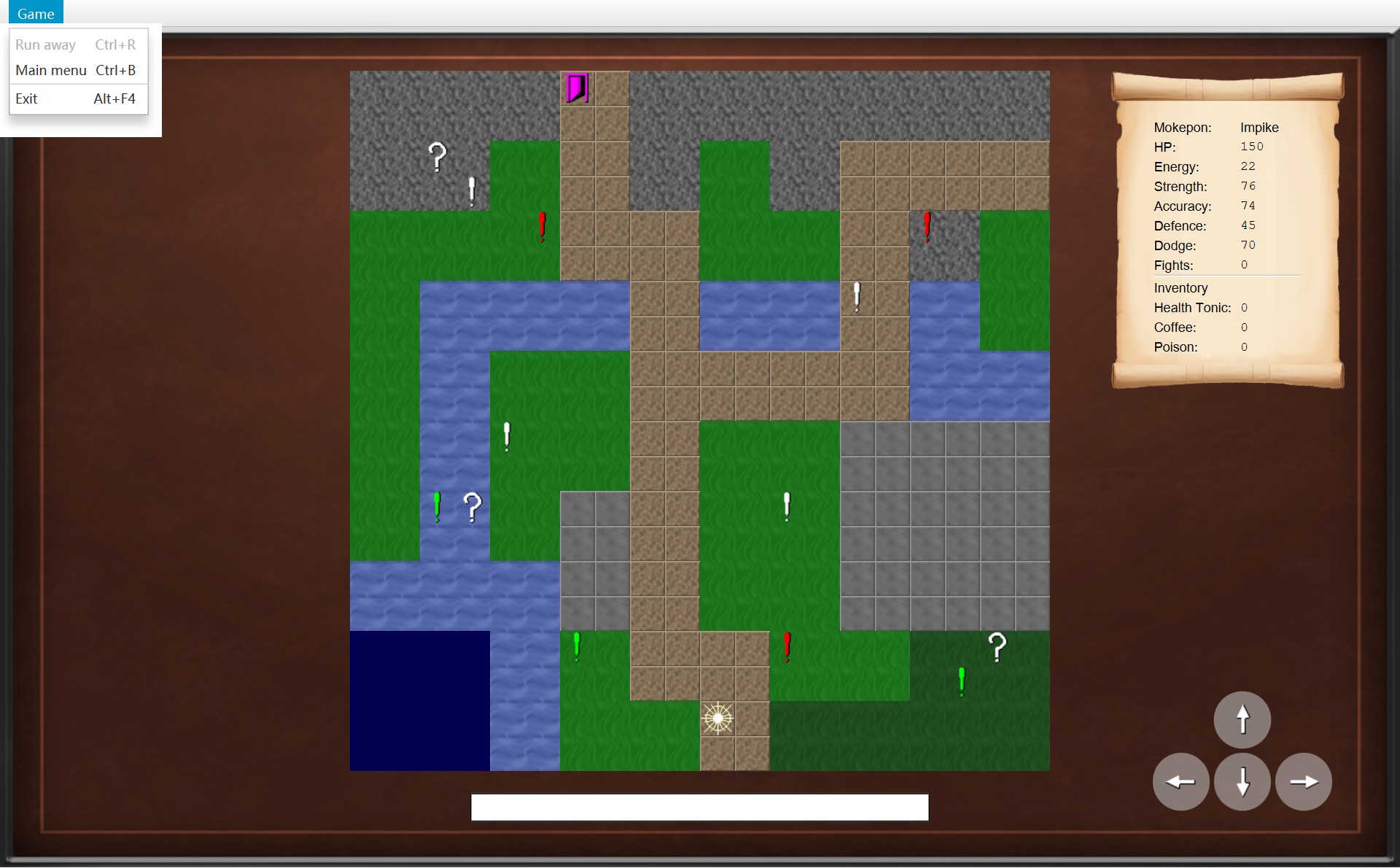
- 1Run away 灰:默认 false
- 2Main menu 可点:默认 true
- 1Run away 可点:BattleScreen 改写成 !battle.isFinished()
- 2Main menu 可点:默认 true
CGameMenu.update 里没有一句“如果是战斗画面……”。以后加一个新画面(比如锦标赛画面)也想允许逃跑,只要在新类里改写 canRunAway(),CGameMenu 不用改。这是多态加上开闭原则。
4.5 帮了忙、拖后腿、好不好扩展
Project 1 里帮了忙的
Project 1 里拖后腿的
- 战斗菜单的菜单项直接调用
GameWindow的 private 方法,选择界面和战斗界面各有一个菜单方法;加一个选项就要改两处,还要知道窗口内部的细节(4.2 第 1、2 点)。 Mokepon可以被改(有 setter,hp、energy不是 final,4.2 第 3 点)。直接拿原来的 Mokepon 打的话,逃跑时就得把数值改回去,所以只能靠复制。- 所有界面都塞在一个 591 行的
GameWindow里,必须先拆成 CGameWindow + AGameScreen 的子类 + CGameMenu + IGameNavigator,才有地方放“现在是哪个画面”。
现在好不好扩展
- 好:新画面只改写
canRunAway();Overworld.runAway()已经被两个地方复用(菜单和对话框按钮)。 - 限制 1:CBattle 不知道“逃跑”这件事。要是新规则是“逃跑可能失败、失败算一回合”,就要给 CBattle 加方法(见自测“逃跑有 50% 会失败”那一题)。
- 限制 2:CPlayer 只记一格
previousPosition,够用是因为只能在刚踩上感叹号时逃跑。 - 限制 3:每加一个菜单选项,AGameScreen 要加一个
canXxx(),IGameNavigator 要加一个方法,接口越来越宽(回到第 3.4 节)。
4.6 参考答案
中文要点,下面是英文句子。第 1 句讲 Project 1,第 2–6 句讲加了什么,第 7–10 句是帮忙、拖后腿和扩展性(各带 because)。
- Project 1:菜单在
GameWindow(extends Stage)的getSelectMenu()、getBattleMenu(...)里;战斗菜单的 Reset、Restart 直接调用 private 方法;Mokepon可变,靠copyMokepon()复制
In Project 1 the game menu was built inside GameWindow, which extended Stage, by getSelectMenu() and getBattleMenu(...). In the battle menu, the Reset and Restart Battle items' lambdas called the private GameWindow methods resetSelectScreen() and battleScreen(...), and Mokepon was mutable, so every battle worked on copies made by copyMokepon(). - 新类 GameMenu:Run away 菜单项(Ctrl+R)调用
navigator.runAway()
To support running away in Project 2, I moved the menu into its own class GameMenu, whose Run away MenuItem (Ctrl+R) calls navigator.runAway() through the GameNavigator interface. - GameWindow.runAway:
world.runAway(),再showScreen(overworldScreen)
GameWindow implements runAway() by calling world.runAway() and then showScreen(overworldScreen). - Overworld.runAway:
encounter = null、player.moveBack()、通知onPlayerMoved()
Overworld.runAway() sets encounter to null, calls player.moveBack(), which restores the previousPosition field saved by moveTo(), and notifies onPlayerMoved() so that OverworldScreen redraws the map. - 能不能点:CGameMenu.update 问
screen.canRunAway(),只有 CBattleScreen 改写
The item is only enabled when the current screen allows it: GameMenu.update(GameScreen) calls screen.canRunAway(), which returns false in GameScreen and is overridden in BattleScreen to return !battle.isFinished(). - 不用还原:CFighter 和 CMokepon 分开,逃跑时直接丢掉 CBattle
Because the battle state lives in two Fighter objects made for this battle only, running away simply drops the Battle and its Fighters; the Mokepon never changed, so nothing has to be reset. - 帮了忙:
Battle本来就独立,有日志和finished;菜单已用 MenuItem 快捷键
Project 1 helped because Battle was already a separate class with its own log and finished flag, and the menu already used MenuItem accelerators. - 拖后腿:菜单焊死在一个大
GameWindow的 private 方法上;Mokepon可变
It made the change harder because the menus were hard-wired to private methods of one large GameWindow and because Mokepon was mutable. - 好扩展:新画面只改写
canRunAway();Overworld.runAway()已被对话框按钮复用
The result is easy to extend: a new screen that allows running away only overrides canRunAway(), and the same Overworld.runAway() is already reused by the Run Away! button of the encounter dialog. - 限制:CBattle 不知道逃跑;每个新菜单项要在 AGameScreen 和 IGameNavigator 各加一个方法
One limitation is that Battle does not know about running away, so a rule such as "running away can fail" would need a new method in Battle, and every new menu option adds a method to both GameScreen and GameNavigator.
5. 以后可能的扩展:每一条改哪里
项目说明 projectinfo.md 里列了 8 种“以后可能会要求”的功能。扩展题很可能从这里出。先看总表,考试时找到题目说的那一行,再看下面对应的卡片:
| 扩展(难不难) | 新加的类、要改的地方 |
|---|---|
| ① 玩家多只 Mokepon (难) | 改:CPlayer 的字段、startGame、CBattle 加换人 |
| ② 敌人多只 (难) | 加:新的 picker(可选) 改:CEncounter、CBattle.enemy、CFighterPanel |
| ③ 新数值、类型相克 (数值容易,相克中等) | 改:EStat 加值;EMokeponType、calculateDamage |
| ④ 临时效果 (容易) | 加:AStatusEffect 子类 + 技能子类 改:CSkillCatalogue 加一项 |
| ⑤ 一次性道具 (容易) | 加:AItem 子类 改:CItemCatalogue 两个列表、数据文件 |
| ⑥ 选对手 / 锦标赛 (中等) | 加:新画面类、Tournament改:IGameNavigator、CGameWindow.winBattle |
| ⑦ 存档 (中等到难) | 加:SaveFile改:COverworld、CPlayer 加构造器;菜单 |
| ⑧ 作弊 (容易到中等) | 改:CGameMenu、IGameNavigator、CGameWindow |
有三个地方“已经会自己长出来”:这些界面是用循环画出来的,循环的是枚举或目录类里的列表,所以加一个新数值、新道具,界面自动多一行或多一个按钮:
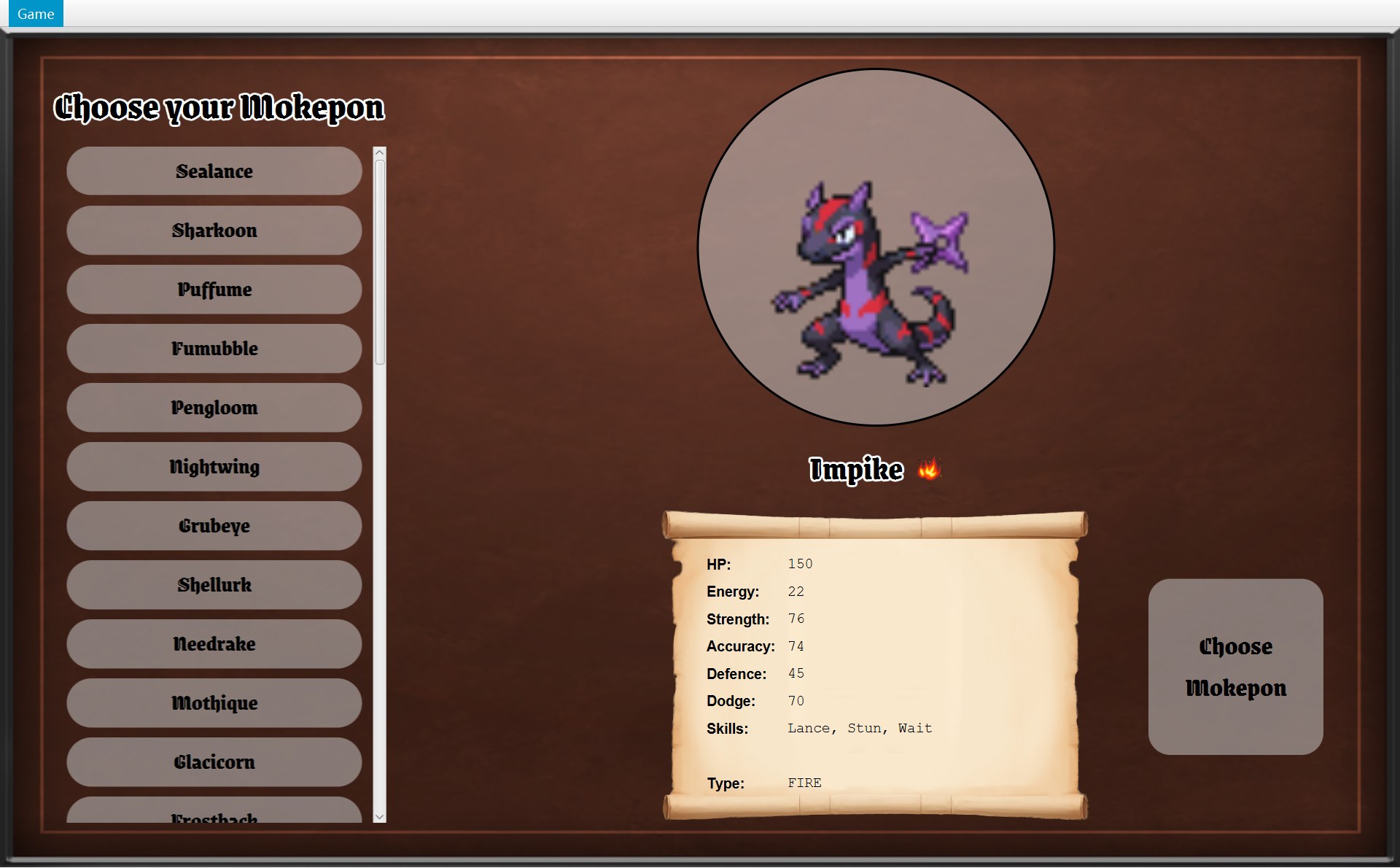
- 16 行数值:SelectScreen.createStatsGrid 里 for (Stat stat : Stat.values())
- 23 个道具按钮:BattleScreen.createItemButtons 里 for (Item item : ItemCatalogue.getBattleOrder())
- 3只有一行 Mokepon:Player 只有一个 mokepon 字段
- 4道具行:PlayerStatsScroll 里 for (Item item : player.getInventory().getItems())
最可能考、也最难的是 ①。在卷子的 UML 上,它的改动就是一条 containership 线变了:字段名从 mokepon 变成 team,线上的数量(multiplicity)从 1 变成 1..*:
下面 8 张卡片,每张都按“改哪里 → 容易在哪 → 难在哪”写。考试时挑题目问的那一条,照这个格式展开成 5–8 句。
① 玩家有多只 Mokepon(multiple Mokepon)
改哪里:CPlayer 的 mokepon 字段改成 List<Mokepon> team(上图);CSelectScreen 能选多只,GameNavigator.startGame(Mokepon) 改成收一个列表;COverworld 构造器、CEncounter 的 playerMokepon 跟着改;CBattle 加“换人”的方法,CBattleScreen 加换人按钮。
容易:CMokepon 只读,同一只可以随时再 new 一个新的 CFighter。难:现在从 startGame 到 CBattle 全都假定“只有一只”(单个字段),方法签名要一路改;要是 HP 要在两场战斗之间保留,CFighter 就不能每场丢掉,要存在 CPlayer 里。
② 敌人有多只 Mokepon(enemy team)
改哪里:IEnemyPicker 要能挑出一组(新方法或新的 picker 类);CEncounter 的 enemy 改成列表,createBattle new 多个 CFighter;CBattle 的 enemy 改成列表加“当前是第几只”,敌人倒下时换下一只而不是 finish(true);CFighterPanel 要能换它显示的 CFighter。
容易:playTurn 本来就只认 CFighter 对象,换成哪一只,use(...) 照样能用。难:CBattle.enemy 和 CFighterPanel.fighter 都是 final 的单个字段,倒下就结束的逻辑写在 playTurn 和 endTurn 里好几处。
③ 更多数值、类型和技能相互影响
改哪里:加数值:枚举 EStat 加一个值(例如 SPEED("Speed", 1, 100)),数据文件里每只 Mokepon 加一行 mokepon.N.speed。类型影响伤害:CFighter 加 getType()(交给 mokepon.getType()),EMokeponType 加一个“对另一种类型的倍数”的方法,在 CFighter.calculateDamage 或 AAttackSkill.applyHit 里乘上。
容易:CFighter 构造器、CMokeponParser、选择界面、卷轴都用 Stat.values() 循环,自动包括新数值(上面框 1);伤害只在 calculateDamage 一个地方算,改一处所有攻击技能都生效。难:新数值要真正起作用(比如 SPEED 决定谁先出手),就要改 playTurn 里“你先、敌人后”的固定顺序。
④ 技能带临时效果(temporary effects)
现在已经有:AStatusEffect 和子类 CBleeding、CBlinded、CStunned。加一个新效果 = 新子类,改写 getDamageMultiplier、getMissChance 或 applyLingeringDamage 中需要的那个;再写一个技能,在 applyHit 里 target.addEffect(new 新效果()),加进 CSkillCatalogue。
容易:倒数和删除(countDownEffects)是共用的。难:效果只能影响这三件事。像“跳过一回合”这种新影响,要给 AStatusEffect 加一个新的方法,并在 CBattle.playTurn 里问它。
⑤ 一次性道具(single use items)
现在已经有:AItem 抽象类、三个子类、CInventory、CItemCatalogue、CMysteryBox、CBattle.useItem。加一个新道具 = AItem 的子类(写 use(player, enemy))+ CItemCatalogue 的两个列表各加一项 + 数据文件里 items.图片名 一行。
容易:按钮和卷轴的行自动出现(上面框 2、框 4)。难:use(Fighter player, Fighter enemy) 只能在战斗里用;要在地图上用的道具,需要另一个方法或另一个小接口(这正好又是 ISP)。
⑥ 选对手 / 锦标赛(battle select、tournament)
改哪里:新画面类(例如 TournamentScreen extends GameScreen);IGameNavigator 和 CGameWindow 加对应方法;一个新类(例如 Tournament)用列表存着对手和当前第几场,像 CEncounter.createBattle 那样 new CFighter 和 CBattle。
容易:CBattle 只依赖两个 CFighter 和一个 CInventory,和地图无关,可以直接复用;挑对手可以复用 IEnemyPicker。难:CGameWindow.winBattle 和 runAway 写死了回到 world 和 overworldScreen;赢了以后去哪里,要改成可以换的。
⑦ 存档(save game)
存什么:选的 Mokepon 名字、CPlayer 的位置和 fightsWon、CInventory 的数量、地图上还剩哪些物体(COverworld 的 objects)。改哪里:新类(例如 SaveFile,放在 data 包)用和数据文件一样的 Properties 格式写出、读回;COverworld 和 CPlayer 加用存档恢复的构造器;CGameMenu 加 Save / Load 菜单项,IGameNavigator 加方法。
容易:要存的状态很少,而且都在没有 JavaFX 的规则类里;CMokepon 只读,存名字就够。难:字段都是 private、没有 setter(这本来是好的封装),读档只能靠新的构造器;战斗中途存档更难,因为 CBleeding 存着另一个 CFighter 的引用。
⑧ 作弊(cheats)
改哪里:CGameMenu 加菜单项(带快捷键),IGameNavigator 和 CGameWindow 加方法;比如“道具全满”调用 CInventory.add,“回满血”调用 CFighter.restoreHp,“直接赢”要给 CBattle 加一个 public 方法。
容易:add、restoreHp 这些方法已经有了;“这个画面能不能用”可以照 canRunAway() 的办法做。难:CBattle.finish 是 private;AGameScreen.handleKeyPress 故意不把带 Ctrl、Alt、Shift 或 Meta 的按键交给画面的 handleKey(第 33–34 行),所以带 Ctrl 的作弊键最简单是做成菜单快捷键(setAccelerator),否则就要改这个 final 方法。
6. 被问到什么,就看哪里
考试时卷子上只有 UML。下面这张表把每个功能对应到类和章节,复习时按题目里的关键词查。
7. 英文答题句型
下面的句型都换成了你代码里的真实名字。考试时把类名和方法名替换掉就能用。
- 谁创建谁:X creates Y in X.m().
例:Encounter creates both Fighter objects and the Battle in createBattle(inventory). - 谁存着谁:X holds a reference to Y in its private field f.
例:BattleScreen holds the Battle in its private final field battle. - 只是用到,没有存:X depends on Y through a parameter of m().
例:GameMenu depends on GameNavigator through its constructor parameter; it does not keep it in a field. - 谁把事交给谁:X delegates Z to Y by calling y.m().
例:GameWindow delegates running away to Overworld by calling world.runAway(). - 登记监听者:X registers Y as a listener with x.addListener(y).
例:GameWindow.startGame() registers the OverworldScreen with world.addListener(overworldScreen). - 多态:The parameter is declared as T, so the call runs the version of the actual subclass.
例:GameMenu.update(GameScreen screen) calls screen.canRunAway(); only BattleScreen overrides it. - 说顺序:First …, then …, finally ….
例:First the player's skill is used, then the enemy's, and finally endTurn() applies lingering damage. - 说符合某原则:This follows P because ….
例:This follows the Open/Closed Principle because a new skill is a new subclass of Skill plus one entry in SkillCatalogue, and Battle.playTurn does not change. - 说不足:One weakness is that …; to fix it I would ….
例:One weakness is that GameNavigator has seven methods while GameMenu uses only three; to fix it I would split out a MenuActions interface. - 扩展题的改动:I would add a new class X that extends Y, add a field f to Z, and change Z.m() to call ….
例:I would add a class Antidote that extends Item, add a method clearEffects() to Fighter, and add Antidote to both lists in ItemCatalogue.
原则和模式的一句话定义,每条配一个你代码里的位置:
| 名字 | 一句话英文定义 → 你代码里的位置 |
|---|---|
| Delegation | An object hands a task to another object by calling its method. 位置:CBattleScreen.useSkill → playTurn |
| Encapsulation | Data is kept in private fields and changed only through methods that keep it valid. 位置:CFighter.takeDamage(HP 不会小于 0) |
| Polymorphism | A variable of a parent type can refer to different subclasses, and the call runs the subclass's version. 位置:CBattle.useItem 里的 item.use |
| SRP | A class should have only one reason to change. 位置:CBattle 管规则,CBattleScreen 管显示 |
| OCP | Classes should be open for extension but closed for modification. 位置:新技能 = ASkill 新子类 |
| LSP | An object of a subclass can be used wherever its parent type is expected. 位置:任何 AMapObject 都能放进 Overworld.move 的循环 |
| ISP | No client should be forced to depend on methods it does not use. 位置:IOverworldListener;反例 IGameNavigator |
| DIP | High-level classes depend on abstractions, not on concrete classes. 位置:画面依赖 IGameNavigator,不依赖 CGameWindow |
| Template Method | A final method fixes the order of the steps and lets subclasses fill in some steps. 位置:ASkill.use、AGameScreen.handleKeyPress |
| Strategy | A family of interchangeable behaviours behind one interface; the object that holds it only calls the interface and does not know which concrete strategy it has, so a new one can be plugged in without changing that object. 位置:CBattle 的 enemyStrategy(从构造器传进来,默认 CRandomEnemyStrategy);CMarker 的 picker(CMapParser 造 Marker 时给它) |
| Observer | A subject keeps a list of listeners and notifies them when something happens. 位置:COverworld → IOverworldListener |
8. 常见失分,以及怎么改
Project 1 测验里,两道原则题都写出了定义(Delegation 那题还写了 playTurn()、use() 这样的方法名),丢分集中在交互题和扩展题。原因都差不多:说了“有”,没说“是谁、在哪、为什么”。每张卡片上面是丢分的写法(来自你 Project 1 的答卷,或者常见的错),下面是用这份代码能拿分的写法。
1. 太笼统
丢分(你 Project 1 交互题的第一句):“All classes in my program has its own duty.”(没有一个类名,阅卷人没法核对。)
拿分:Battle only contains the battle rules and has no JavaFX code, while BattleScreen only displays the battle and turns clicks into calls to playTurn() and useItem().
2. 三件事缺了两件
丢分:那道题问的是 game menu,答卷讲的是选择界面的 setupChooseButton()、createMokeponList(),没有讲窗口顶上 Game 菜单的 getSelectMenu() / getBattleMenu(...),也没说菜单栏和菜单项是谁 new 的、存在哪里。先确认题目说的是哪个功能。
拿分:GameWindow's constructor creates the GameMenu with new GameMenu(this) and stores it in its field menu; GameMenu creates the MenuItems in its constructor and keeps runAway and mainMenu as fields; each item's lambda calls a GameNavigator method.
3. 说了原则,没有 because
丢分(同一道题的后半):“encapsulation to hide sensitive datas. All variables was set to private and use getter/setter to modify.”(没有具体的类和字段,也没说好在哪。)
拿分:Fighter keeps its stats in a private map, so they can only change through methods like takeDamage(), which never lets HP go below 0 because it uses Math.max(0, …).
4. 扩展题只说“改某某类”
丢分(你 Project 1 扩展题的一句):“I need to implement Battle class, specifically the playTurn() method …”(改成什么?加了哪个方法、哪个字段?)
拿分(Project 1 那题的 Potion 能力,用 Project 2 的类回答):I would add an abstract class Ability with a method use(Fighter), and a subclass Potion that heals 100 HP through a new Fighter method heal(int). Battle gets a new field to remember whether an ability was already used and a method useAbility(Ability) that checks it, and BattleScreen gets one more button whose lambda calls battle.useAbility(potion). Because a new Battle is created for every fight, the "once per battle" rule resets by itself.
5. 名字说错
丢分:把 ISP 说成“依赖接口”(那是 DIP);说 “GameWindow creates the Battle”(是 CEncounter);把两个“逃跑”混为一谈。菜单里的 Run away 是 MenuItem(CGameMenu 第 20 行);遇敌框里的 Run Away! 才是按钮(CModalDialog 里的 Button,在 COverworldScreen 第 89 行加上去)。两条路最后都调用 world.runAway()。
拿分:写之前在 UML 上核对一次类名、字段名、方法名;不确定谁创建谁,就写调用链:GameWindow.startBattle() calls world.createBattle(), which calls encounter.createBattle(…).
6. 用了“always / never”却不对
丢分:“The enemy always attacks.”(错:CRandomEnemyStrategy 在付得起的技能里随机挑,也可能挑 Wait。)
拿分:只在代码保证的时候说 always / never:Both Mokepon can never faint in the same turn, because Battle checks isAlive() right after each action and returns, and endTurn() skips the player's lingering damage once the enemy has fainted.
自测
Q1 的三件事各用一句话:两个 CFighter 是谁创建的?谁存着它们?谁调用了改它们数据的方法?
创建:CEncounter.createBattle 第 54–55 行 new Fighter(...) ×2。存着:CBattle 的字段 player、enemy(private final);CFighterPanel 的字段 fighter 也各存着一个,用来显示。调用:CBattle.playTurn 把它们传给 Skill.use,技能再调用 spendEnergy、takeDamage、addEffect。
English: Encounter.createBattle creates both Fighters, Battle holds them in its fields player and enemy, and playTurn passes them to Skill.use, which changes them through Fighter methods.
CBattle 里的 inventory 是谁 new 的?战斗里用掉 Poison,地图卷轴上的 Poison 为什么也变成 0?
COverworld 构造器 new Inventory(ItemCatalogue.getAll()),交给 CPlayer 存着。COverworld.createBattle 把 player.getInventory() 传给 CEncounter,再传进 CBattle。所以 CBattle 和 CPlayer 存的是同一个 CInventory 对象:useItem 里 inventory.remove(item),卷轴读到的也就少了一个。
English: Overworld creates the Inventory and gives it to Player; Overworld.createBattle passes player.getInventory() on to the Battle, so Battle and Player share the same Inventory object.
说出 ISP 的定义,并说出你会写的位置和 because。
No client should be forced to depend on methods it does not use. 位置:IOverworldListener。COverworld 用 List<OverworldListener> listeners 存着监听者,只调用 5 个通知方法;because 它看不到 COverworldScreen 从 AGameScreen 继承的 getView()、handleKeyPress() 等方法,也不需要 JavaFX。
English: Overworld only depends on the five methods of OverworldListener, so it cannot see the other public methods of OverworldScreen.
IOverworldListener 既算 ISP 也算 DIP。两个原则说的分别是它的哪一方面?
DIP:规则类 COverworld 依赖的是接口,而不是具体的画面类 COverworldScreen,所以 world 包不 import ui 包。ISP:这个接口小,只有地图世界的 5 个事件,COverworld 用不到的方法一个都不在里面。答 ISP 题时,理由要说方法数量,不要只说“依赖接口”。
English: It follows DIP because Overworld depends on an interface instead of OverworldScreen, and it follows ISP because the interface only has the five methods Overworld actually calls.
IGameNavigator 哪里不符合 ISP?说出改法,要到类和方法这一层。
它有 7 个方法,CGameMenu 只用 runAway()、returnToMainMenu()、quit(),CSelectScreen 只用 startGame()。改法:新建接口 MenuActions 放这 3 个方法;IGameNavigator 改成 extends MenuActions,只留另外 4 个;CGameMenu 构造器参数改成 MenuActions。CGameWindow 不用改。
English: GameMenu depends on all seven methods of GameNavigator but only uses three, so I would move runAway(), returnToMainMenu() and quit() into a MenuActions interface that GameNavigator extends, and the GameMenu constructor would take a MenuActions.
逃跑以后,地图卷轴上 Shellurk 的 Energy 为什么还是 12,Accuracy 还是 62?Project 1 是怎么做到“不改坏原来的 Mokepon”的?
Project 2:战斗里改的是 CFighter 的 stats(能量 0、Accuracy 78),卷轴读的是 player.getMokepon();CMokepon 的字段全是 final,没有 setter,从来没变。逃跑时 CBattle 和两个 CFighter 直接被丢掉。Project 1:Mokepon 可以改,所以 battleScreen 先用 copyMokepon(template) 复制一份再打。
English: The battle only changed the Fighter objects, which are thrown away, and the scroll reads the Mokepon, which never changes; in Project 1 the Mokepon itself was mutable, so GameWindow copied it with copyMokepon() before every battle.
新需求:逃跑有 50% 会失败,失败算你这一回合,敌人照常出手。要改哪些类、哪些方法?
参考做法:① 给 CBattle 加 public 方法,例如 boolean tryRunAway():用字段 random 抽一次;失败时写一行日志,让敌人用 enemyStrategy.chooseSkill 和 use 出手,再 endTurn()(可以从 playTurn 里抽出一个 private 方法 enemyAction() 共用);成功返回 true。② CGameWindow.runAway 不能直接逃了,要先问战斗:可以给 AGameScreen 加一个方法(例如 tryRunAway(),默认 true),CBattleScreen 改写它去调用 battle.tryRunAway(),失败时 update() 重画;成功才 world.runAway() 和 showScreen。because:规则留在 CBattle,画面只负责显示(SRP)。
English: I would add Battle.tryRunAway(), which uses random to decide; on failure it logs a message, lets the enemy act and calls endTurn(). BattleScreen would override a new GameScreen method that calls it, so GameWindow.runAway() only leaves the battle when it succeeds.
新道具 Antidote:清除自己身上的所有状态效果。要改哪些类?
① 新类 Antidote extends Item,构造器 super("ANTIDOTE", "Antidote", "antidote"),use(player, enemy) 调用 player.clearEffects() 并 return describeUse(player, "...")。② CFighter 加 public 方法 clearEffects(),因为 effects 是 private 字段,只有 CFighter 自己能清(封装)。③ CItemCatalogue 的 ITEMS 和 BATTLE_ORDER 各加一项。④ 数据文件加图片 items.antidote=...;要放进问号箱,再加 map.items.N.type=ANTIDOTE 和 map.items.N.location=x,y 两行。CBattle.useItem、按钮、卷轴都不用改(OCP)。
English: I would add a class Antidote that extends Item and calls a new Fighter method clearEffects(), and add it to both lists in ItemCatalogue; Battle.useItem does not change.
新的敌人策略:总是挑付得起的技能里最贵的那个。要改哪些类?这体现了什么?
新类 GreedyEnemyStrategy implements EnemyStrategy,在 chooseSkill 里从 enemy.canUse(skill) 为 true 的技能中挑 getEnergyCost() 最大的。然后在 CEncounter.createBattle 里改用 5 个参数的构造器 new Battle(player, enemyFighter, inventory, new GreedyEnemyStrategy(), new Random())。CBattle.playTurn 一行不改:策略模式 + 开闭原则 + 依赖倒置(CBattle 只认接口)。
English: I would add GreedyEnemyStrategy implementing EnemyStrategy and pass it to Battle's five-argument constructor in Encounter.createBattle; playTurn does not change.
老师问:Where do you use the Template Method pattern? 说两个位置。
① ASkill.use 是 public final:先 user.spendEnergy(energyCost),再调用抽象方法 applyEffect,每个子类写自己的效果;ATargetedSkill 的 final applyEffect 又定好“先命中判定、再 applyHit”。② AGameScreen.handleKeyPress 是 final:对话框打开或按着组合键时直接返回,否则调用子类改写的 handleKey。
English: Skill.use() is a final template method that always pays the energy cost before calling the subclass's applyEffect().