06窗口、界面切换和菜单
GameWindow 怎么换画面、GameScreen 家族、GameNavigator 接口、菜单为什么有时变灰
- 说出 CGameWindow 的 10 个字段:哪些是
final,为什么world和overworldScreen在选择界面是null - 读懂
showScreen的三行:换画面 = 换BorderPane中间那一块,再让菜单重新问一遍 - 说出接口 IGameNavigator 的 7 个方法分别由哪个按钮、哪个菜单项调用,并用英语说清楚 Dependency Inversion
- 说出父类 AGameScreen 给三个画面准备了什么,三个子类各改写了哪个方法
- 跟着一次按键走完:Scene 上的事件过滤器 →
handleKeyPress(模板方法)→handleKey→movePlayer→Overworld.move→onPlayerMoved - 只看代码就能说出 Game 菜单里哪一项什么时候变灰(CGameMenu 的
update和多态) - 跟着动画看一个对话框怎么造出来、盖上去、点了按钮以后怎么拿掉
- 说出 CModalDialog 为什么能挡住后面的东西,CGameButton 的 0.5、0.75、0.4 分别是什么
第 1 章只看了截图:三个画面 CSelectScreen、COverworldScreen、CBattleScreen,顶上一个 Game 菜单,有时候上面盖一个对话框。这一章打开它们背后的“框架”代码。这几个类自己不画地图,也不画血条。它们管的是:窗口里现在放哪个画面、怎么换、按键交给谁、菜单哪一项能点、对话框怎么盖上去、按钮长什么样。一共 7 个类,都在 ui 包里:
| 类 | 是什么,管什么 |
|---|---|
| CGameWindow | 类,implements IGameNavigator。整个窗口:上面放菜单,中间放一个画面。换画面的事全在这里做 |
| IGameNavigator | 接口(圆圈里是 I)。画面和菜单能请窗口做的 7 件事 |
| AGameScreen | 抽象类(A)。三个画面的父类:画面区、背景、对话框、按键、菜单的两个问题 |
| CGameMenu | 类。顶上的 Game 菜单:Run away、Main menu、Exit |
| CModalDialog | 类。盖在画面上的对话框(遇敌、You Win、Game Over、出口) |
| CUiStyle | 类,里面全是 static。游戏区大小、字体、图片这些大家共用的小工具 |
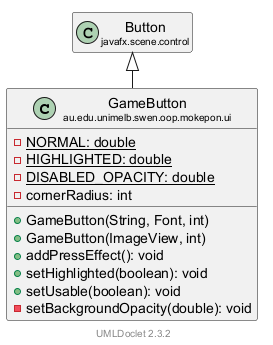
| CGameButton | 类,extends Button。游戏里那种半透明灰色的圆角按钮 |
几个第 1 章讲过的词,这里只提醒一句(语法细节在 第 2 章):字段 = 类里面存东西的变量;构造器 = new 的时候自动运行的那段代码;父类 / 子类 = extends 的两边;抽象类 = 不能直接 new、只当父类用的类;null = 这个字段现在什么都没指着。新出现的词,第一次出现时会写中文和英文。
1. GameWindow:上面一个菜单,下面一个画面
窗口分成两块
先看程序刚打开时的窗口,再看造出它的代码。图上的红色编号和代码行左边的编号是对应的(鼠标放在编号上,两边会一起亮):
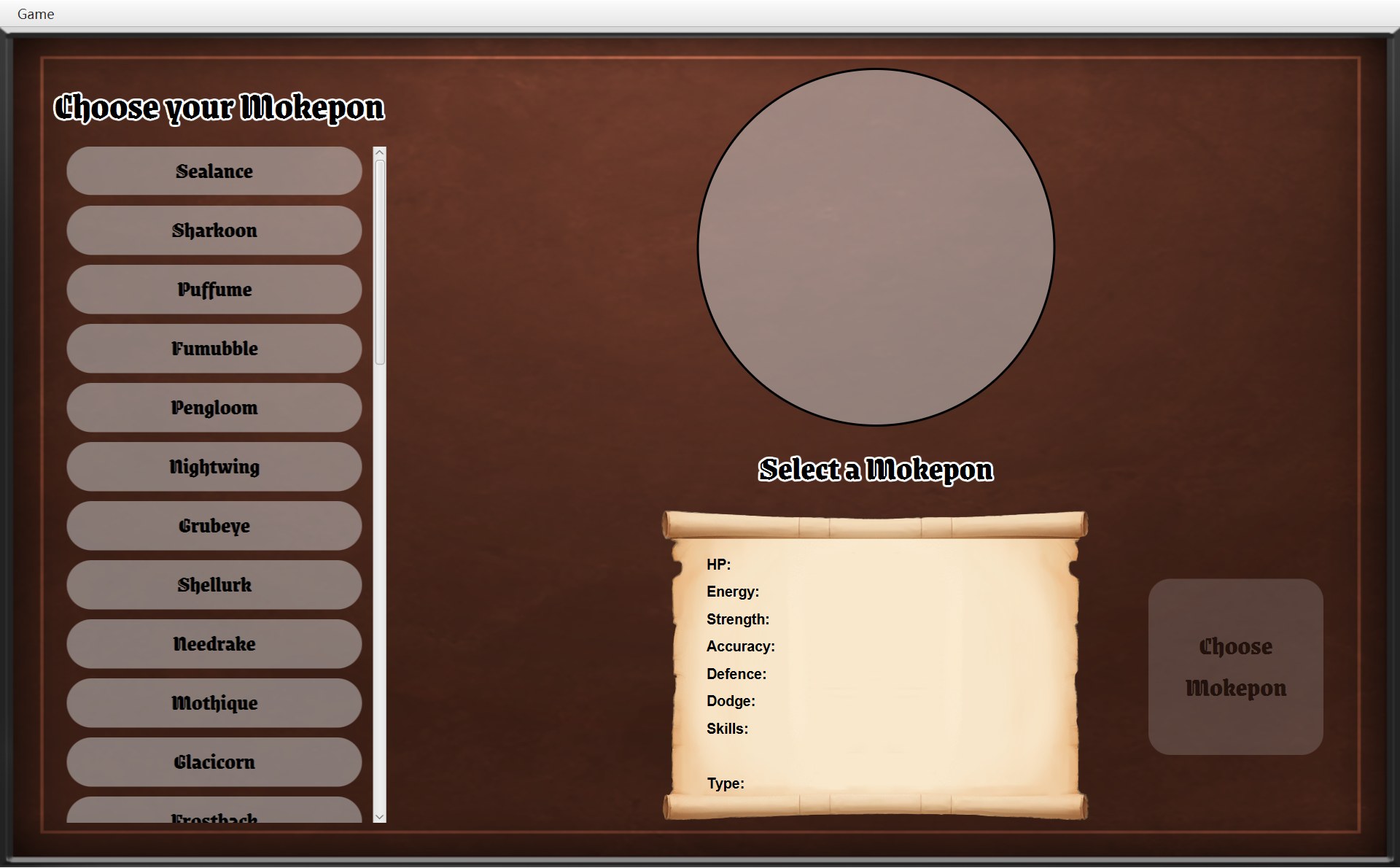
- 1上面:菜单栏
MenuBar,就是最上面这一整条白色。最左边的 Game 是它里面唯一的菜单(红框从 Game 右边画起,免得挡住这个字)。第 40 行root.setTop(menu.getMenuBar())把 CGameMenu 造的MenuBar放在root的上边
2- 2下面这一大块:1280×768 的游戏区。第 42 行
showScreen(selectScreen)把选择界面的view放在root的中间
30 /* Set up the window and start on the select screen. */31 public GameWindow(Stage stage, List<Mokepon> mokepons, GameMap map, GameImages images) {32 this.stage = stage;33 this.mokepons = mokepons;34 this.map = map;35 this.images = images;36 stage.setTitle("Mokepon");37 stage.setResizable(false);38 39 menu = new GameMenu(this);401 root.setTop(menu.getMenuBar());41 selectScreen = new SelectScreen(mokepons, images, this);422 showScreen(selectScreen);43 44 Scene scene = new Scene(root);45 /* Use a filter so the screen gets the keys before any button or text box does. */46 scene.addEventFilter(KeyEvent.KEY_PRESSED,47 event -> currentScreen.handleKeyPress(event));48 stage.setScene(scene);49 stage.sizeToScene();50 }窗口最外层的布局是字段 root。它的类型是 BorderPane(BorderPane:JavaFX 的一种布局,分上、下、左、右、中五块,用 setTop、setCenter 往里放东西)。这个项目只用了上和中两块。构造器里和它有关的是这 4 行:
- 第 39 行
menu = new GameMenu(this):造菜单。括号里的 this 就是“我自己”,也就是正在造的这个 CGameWindow 对象。为什么要把自己交给菜单,第 2 节讲。 - 第 40 行:菜单栏放在上面(标注 1)。以后再也不动它。
- 第 41 行
selectScreen = new SelectScreen(mokepons, images, this):造选择界面,存进字段selectScreen。这里又交了一次this。 - 第 42 行
showScreen(selectScreen):把选择界面放在中间(标注 2)。
顺序很重要:showScreen 最后会调用 updateMenu(),它再调用 menu.update(...)(第 104、98 行),所以 menu 必须先造好。如果把第 39–40 行一起挪到第 42 行后面,程序一启动就会在 menu.update 那里抛出 NullPointerException(对 null 调用方法)。如果只挪第 39 行,错得更早:第 40 行用到了还没赋值的 final 字段 menu,javac 直接报编译错误“variable menu might not have been initialized”,程序根本造不出来。
后面几行(第 44–49 行)造 Scene、给 Scene 装一个事件过滤器、把 Scene 放进窗口。先分清两个词:Stage = 窗口本身(CMain 交来的,存在字段 stage 里);Scene = 窗口里装着的整棵内容,它的根就是 root。按键事件先到 Scene,所以这个事件过滤器(第 4 节细讲)就装在 Scene 上。构造器的其他部分在 第 5 章。最后一行 stage.sizeToScene() 让窗口正好包住里面的内容:菜单栏高 25,画面高 768,宽都是 1280,所以窗口内容是 1280 × 793。每张截图正好就是这么大。
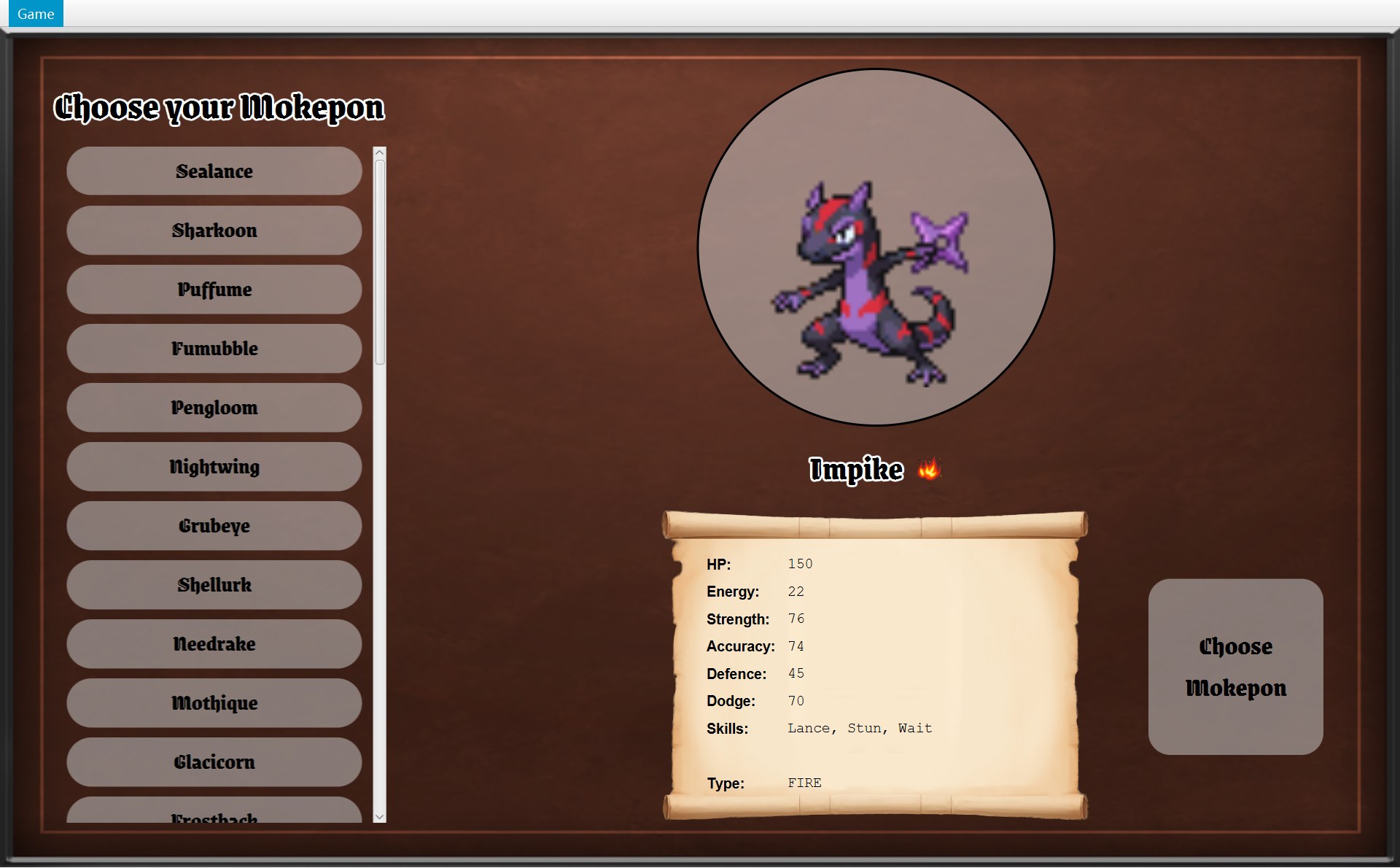
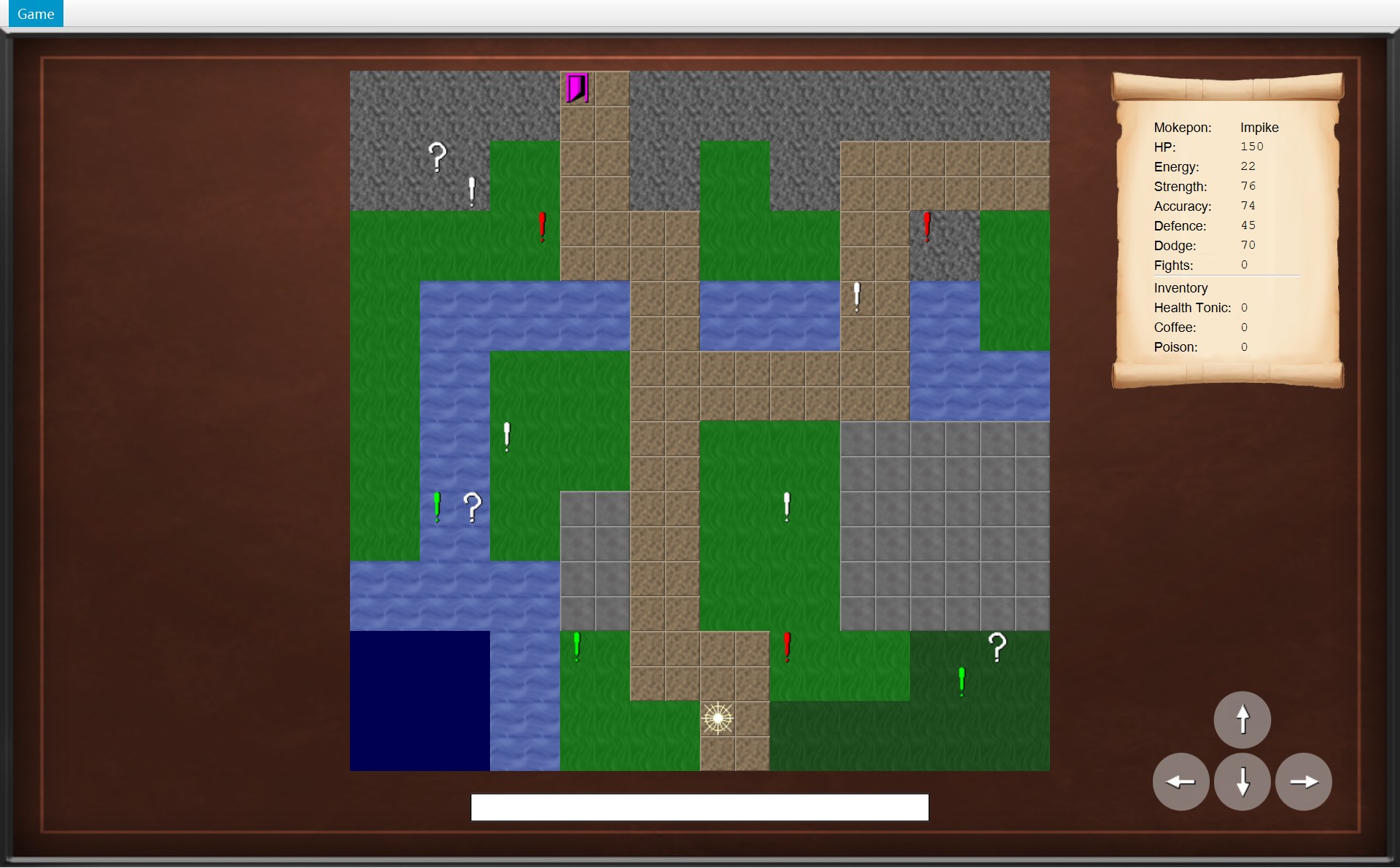
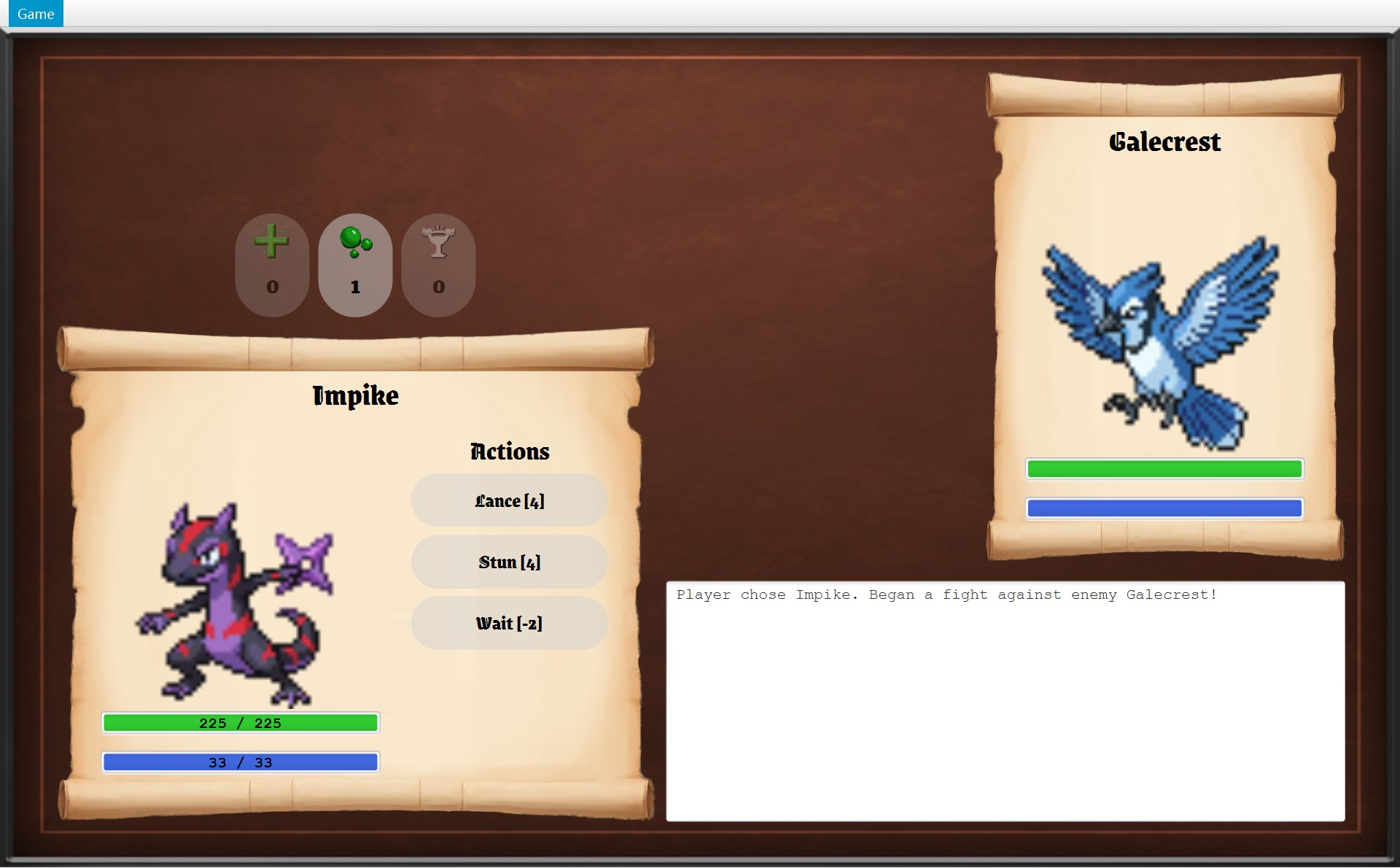
换画面时,窗口、Scene、root、菜单栏都不换,只换 root 中间那一块。下面的动画轮流放三张真实截图(都只截了上半部分):最上面那条白色的菜单栏一动不动,变的只是下面这一大块。
GameWindow 的 10 个字段
14/* Owns the window and decides which screen it shows.15 * The menu bar stays at the top, and the current screen fills the space below it.16 */17public class GameWindow implements GameNavigator {18 private final Stage stage;19 private final List<Mokepon> mokepons;20 private final GameMap map;21 private final GameImages images;22 private final GameMenu menu;23 private final BorderPane root = new BorderPane();24 private final SelectScreen selectScreen;25 private GameScreen currentScreen;26 /* The game being played and its screen. Both are null on the select screen. */27 private Overworld world;28 private OverworldScreen overworldScreen;| 字段 : 类型 | final | 什么时候有值,用来干什么 |
|---|---|---|
stage : Stage | 是 | 构造器里存下 CMain 交来的窗口。设标题、show() 都用它 |
mokepons : List<Mokepon> | 是 | 构造器里存下。读进来的 36 只。交给 CSelectScreen;每开一局,也交给新的 COverworld |
map : CGameMap | 是 | 构造器里存下。每开一局,新的 COverworld 都用这张地图 |
images : CGameImages | 是 | 构造器里存下。交给每个画面(类型图标、按钮图片……) |
menu : CGameMenu | 是 | 第 39 行造。顶上的菜单 |
root : BorderPane | 是 | 第 23 行声明时就 new 好了。上面菜单栏,中间当前画面 |
selectScreen : CSelectScreen | 是 | 第 41 行造。整个程序只造这一次,回主菜单时只是被清空 |
currentScreen : AGameScreen | 否 | 每次 showScreen 都改。现在放在中间的那个画面 |
world : COverworld | 否 | startGame 时造,回主菜单时设成 null。这一局的规则 |
overworldScreen : COverworldScreen | 否 | 和 world 同时造、同时设成 null。这一局的地图画面 |
showScreen:换画面只有 3 行
101 private void showScreen(GameScreen screen) {102 currentScreen = screen;103 root.setCenter(screen.getView());104 updateMenu();105 }- 第 102 行
currentScreen = screen:记住新画面。从这一刻起,按键交给它(第 4 节),菜单也去问它(第 5 节)。 - 第 103 行
root.setCenter(screen.getView()):每个画面都有一个view(一个 1280×768 的Pane,第 3 节),getView()把它交出来,放进 root 的中间。原来中间那个 view 就被换下来了。 - 第 104 行
updateMenu():让菜单问一问新画面:“你允许逃跑吗?你允许回主菜单吗?”(第 5 节)。
两个细节:
- 参数类型写的是父类 AGameScreen,所以三个子类的对象都能传进来。
showScreen不用管到底是哪个画面,三行对谁都一样。这就是多态(polymorphism):父类类型的变量可以指着任何一个子类的对象。 - 它是 private 的,只有 CGameWindow 自己能调用。画面想换画面,不能直接调用它,只能请窗口帮忙:调用 IGameNavigator 里的方法(第 2 节)。
为什么 world 和 overworldScreen 有时是 null
26 /* The game being played and its screen. Both are null on the select screen. */27 private Overworld world;28 private OverworldScreen overworldScreen;⋯ 省略第 29–55 行56 /* Every new game starts with a fresh map, an empty inventory and no fights won. */57 @Override58 public void startGame(Mokepon playerChoice) {59 world = new Overworld(map, mokepons, playerChoice);60 overworldScreen = new OverworldScreen(world, images, this);61 world.addListener(overworldScreen);62 showScreen(overworldScreen);63 }⋯ 省略第 64–81 行82 /* The game being played is thrown away. */83 @Override84 public void returnToMainMenu() {85 world = null;86 overworldScreen = null;87 selectScreen.clearSelection();88 showScreen(selectScreen);89 }第 26 行的注释写得很清楚:“The game being played and its screen. Both are null on the select screen.” 意思是:这两个字段存的是“正在玩的这一局”和“这一局的地图画面”,在选择界面时它们都是 null。原因很简单:在选择界面还没有开始玩,没有一局可以存。
| 时刻 | currentScreen 指着 | world 和 overworldScreen |
|---|---|---|
| 程序刚打开 | selectScreen | 都是 null |
| 点了 Choose Mokepon(第 59、60 行) | 这一局的地图画面 | 都是新造的 |
| 正在打仗 | 新 new 的 CBattleScreen | 还是同一个(地图画面没显示,但留着) |
| 回主菜单(第 85、86 行) | selectScreen | 都设回 null |
从这张表能看出三件事:
- 每开一局都是新的。第 56 行注释:“Every new game starts with a fresh map, an empty inventory and no fights won.” 回主菜单时把两个字段设成 null,旧的那一局就没有人指着了,Java 的垃圾回收(garbage collection)会自动把它收走。下次点 Choose Mokepon 再造新的。
- 打仗时
overworldScreen和world都留着。打完仗(winBattle)或者逃跑(runAway),窗口把原来那个地图画面放回来:showScreen(overworldScreen)。地图画面自己的部件(mapView、卷轴、状态栏、方向按钮)都还在它里面。玩家的位置不在画面里,在world的 CPlayer 对象里;“overworldScreen 是监听者”这条登记也不在画面里,在world的listeners列表里(COverworld 第 21、23 行)。world也没换,所以这些都还在。如果新造一个 COverworldScreen,还得重新addListener一次。 - 没有
BattleScreen字段。每打一场就new一个新的 CBattleScreen,只放在currentScreen里。CBattleScreen 的字段battle是 final 的,一个战斗画面从生到死只显示一场战斗,所以不值得留着。
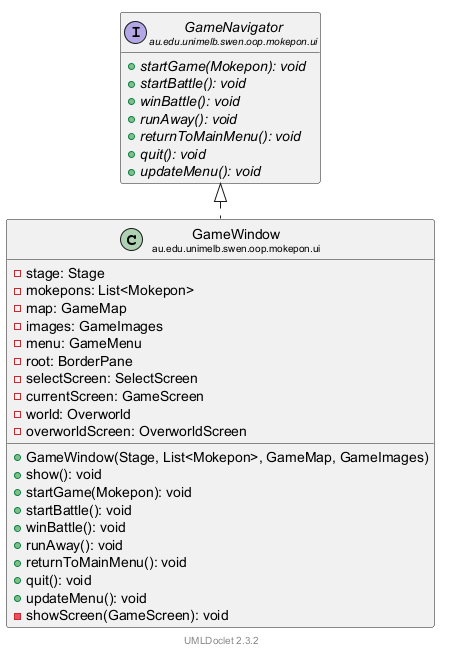
2. GameNavigator:画面能请窗口做的 7 件事
游戏里哪些按钮会“请窗口做事”
先看截图。下面这些按钮和菜单项,点了以后都要窗口做点什么(大多是换画面)。红色编号就是下面接口里方法的编号:
- 1Choose Mokepon →
startGame(...)
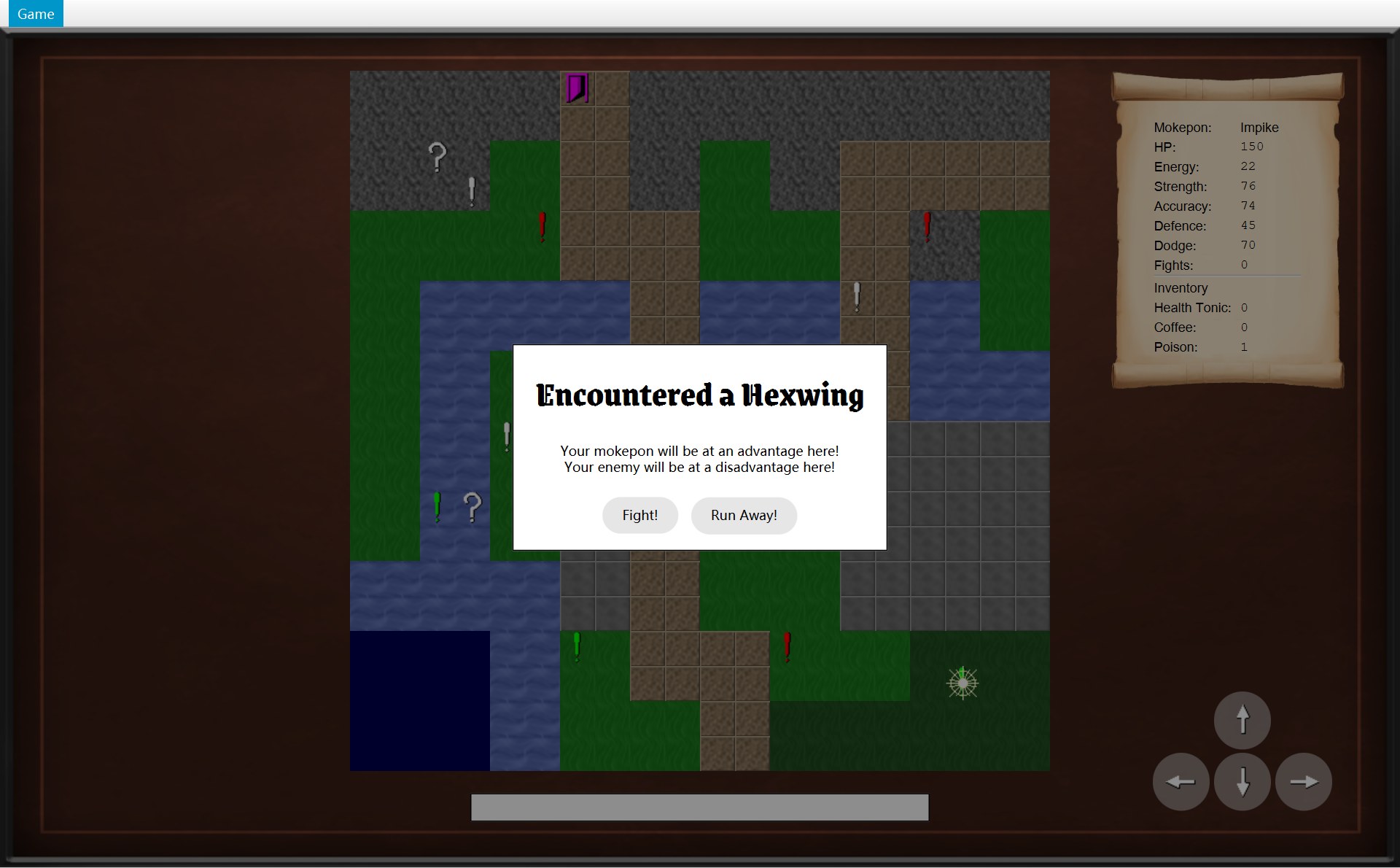
- 2Fight! →
startBattle()。旁边的 Run Away! 不找窗口:它的点击动作(lambda)先closeDialog(),再直接调用world.runAway()(第 6 节、第 15 章)
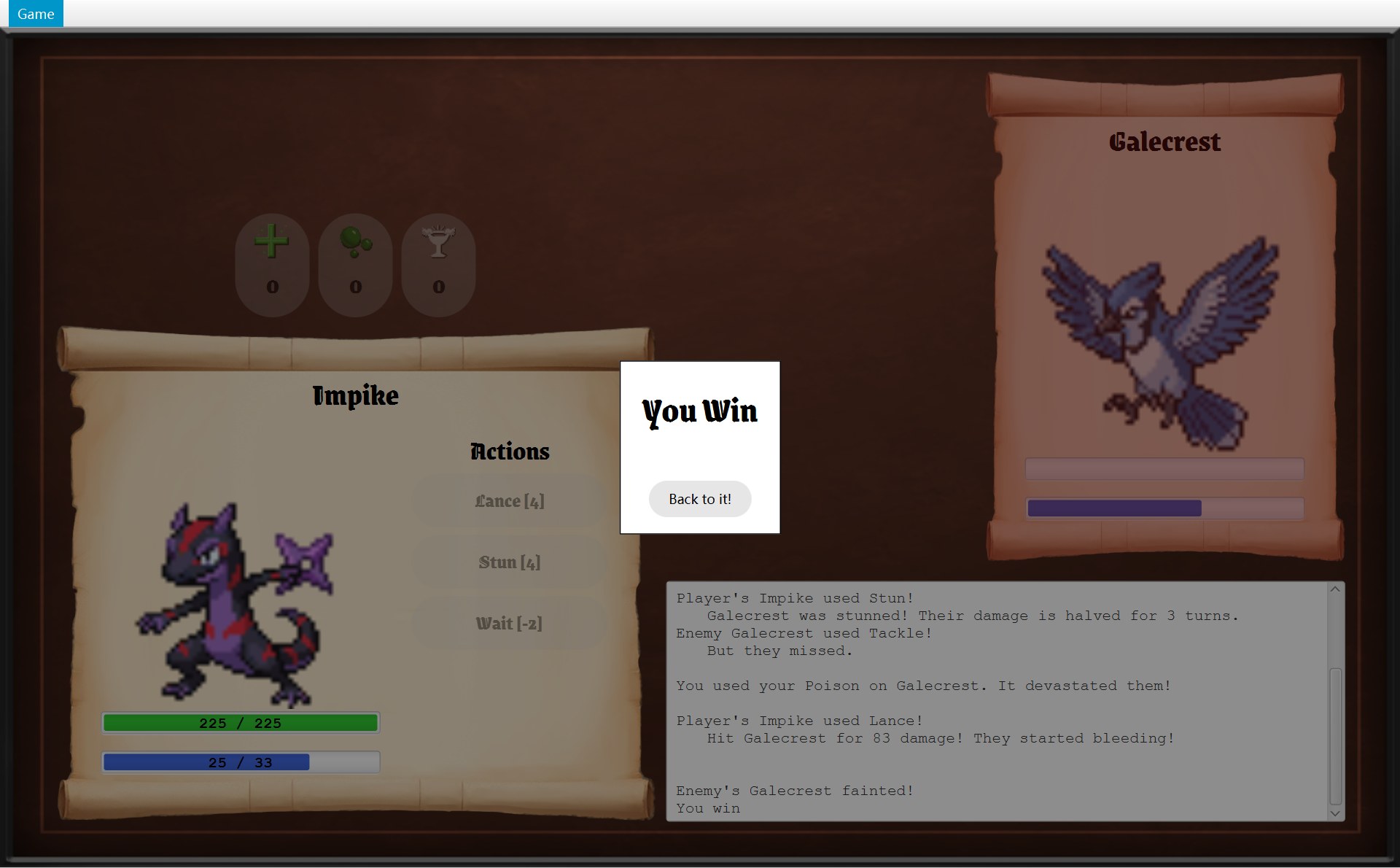
- 3Back to it! →
winBattle()
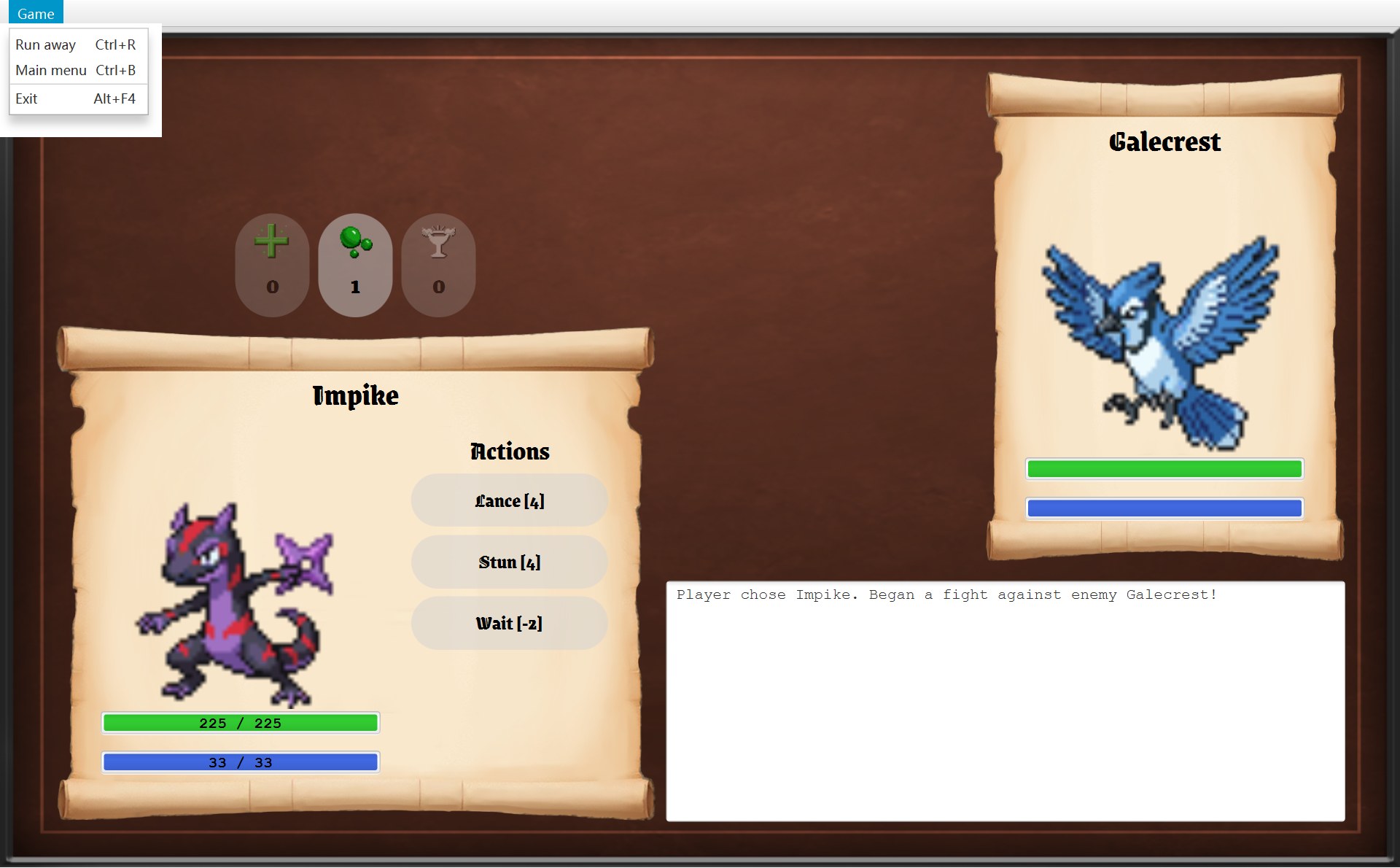
- 4Run away(Ctrl+R)→
runAway() - 5Main menu(Ctrl+B)→
returnToMainMenu() - 6Exit(Alt+F4)→
quit()
- 5Return to Main Menu →
returnToMainMenu() - 6Quit →
quit()
第 7 个方法 updateMenu() 没有按钮可点:战斗一结束,CBattleScreen.showResult 第 171 行自己调用它(第 5 节的动画第 6–7 步)。
这些按钮和菜单项写在不同的类里:Choose Mokepon 在 CSelectScreen.createChooseButton 里造;Fight! 的文字和点击动作(lambda)写在 COverworldScreen.onEncounter 里,Back to it! 的写在 CBattleScreen.showResult 里(这两个按钮对象本身是 CModalDialog.addButton 用 new Button(text) 造的,第 6 节);菜单项在 CGameMenu 里。可它们要做的事(换画面、结束程序)只有 CGameWindow 能做。它们怎么找到窗口?它们手里拿的不是 CGameWindow,而是一个接口(interface):IGameNavigator。
接口里写了什么,窗口里怎么做
上面是接口:只写“有哪 7 件事”,不写怎么做。下面是 CGameWindow 里的同样 7 件事,写了真正怎么做。编号和上面截图的编号一样;鼠标放在一个编号上,两段代码里同号的那一行会一起亮:
5/* What a screen or the menu can ask the window to do, mostly moving the game6 * to another screen. They only know this interface, not the window that implements it7 * (Dependency Inversion).8 */9public interface GameNavigator {10 11 /* Start a new game on the overworld with the chosen Mokepon. */121 void startGame(Mokepon playerChoice);13 14 /* Fight the Mokepon of the current encounter. */152 void startBattle();16 17 /* Go back to the overworld after winning the battle. */183 void winBattle();19 20 /* Cancel the battle and go back to the tile before the encounter. */214 void runAway();22 23 /* Go back to the select screen with nothing selected. */245 void returnToMainMenu();25 26 /* End the whole program. Used by the Exit menu item and the Quit buttons. */276 void quit();28 29 /* Turn the menu options on or off again when the current screen changes what it30 * allows, for example when a battle ends.31 */327 void updateMenu();33}56 /* Every new game starts with a fresh map, an empty inventory and no fights won. */57 @Override581 public void startGame(Mokepon playerChoice) {59 world = new Overworld(map, mokepons, playerChoice);60 overworldScreen = new OverworldScreen(world, images, this);61 world.addListener(overworldScreen);62 showScreen(overworldScreen);63 }64 65 @Override662 public void startBattle() {67 showScreen(new BattleScreen(world.createBattle(), images, this));68 }69 70 @Override713 public void winBattle() {72 world.winEncounter();73 showScreen(overworldScreen);74 }75 76 @Override774 public void runAway() {78 world.runAway();79 showScreen(overworldScreen);80 }81 82 /* The game being played is thrown away. */83 @Override845 public void returnToMainMenu() {85 world = null;86 overworldScreen = null;87 selectScreen.clearSelection();88 showScreen(selectScreen);89 }90 91 @Override926 public void quit() {93 Platform.exit();94 }95 96 @Override977 public void updateMenu() {98 menu.update(currentScreen);99 }CGameWindow 的 7 个方法体都很短,最挤的是第 67 行 showScreen(new BattleScreen(world.createBattle(), images, this)):一行里套了三层,要从里往外读:
world.createBattle():先请这一局的 COverworld 用这次遇到的敌人造一场 CBattle(第 9 章)。new BattleScreen(那一场 Battle, images, this):用它造一个新的战斗画面,又一次把this(窗口自己)交进去。showScreen(...):把这个新画面放到 root 中间。
其他几个方法做的事,在第 8 节的表里一个一个对照。
接口里每个方法上面都有一行英文注释,意思是:
startGame(playerChoice):用选好的 Mokepon 开一局新游戏,进地图。startBattle():和这次遇到的 Mokepon 开打。winBattle():打赢以后回地图。runAway():取消这场战斗,回到遇敌之前的那一格。returnToMainMenu():回选择界面,什么都没选。quit():结束整个程序。注释说 Exit 菜单项和 Quit 按钮用它。updateMenu():当前画面允许的事情变了(比如战斗结束),让菜单重新开关一遍。
谁在调用它们?把整个项目搜一遍,就是这张表(行号是调用的那一行):
| 方法 | 谁调用(你做了什么) |
|---|---|
1 startGame | CSelectScreen 第 246 行,Choose 按钮的 lambda(你点 Choose Mokepon) |
2 startBattle | COverworldScreen 第 87 行,遇敌框 Fight! 的 lambda(你点 Fight!) |
3 winBattle | CBattleScreen 第 174 行,You Win 框的 lambda(你点 Back to it!) |
4 runAway | CGameMenu 第 22 行(菜单 Run away 或 Ctrl+R,只有战斗中能用) |
5 returnToMainMenu | CGameMenu 第 26 行(菜单 Main menu / Ctrl+B);AGameScreen 第 90 行(Game Over 框、出口框里的 Return to Main Menu) |
6 quit | CGameMenu 第 30 行(菜单 Exit / Alt+F4);AGameScreen 第 91 行(Quit 按钮) |
7 updateMenu | CBattleScreen 第 171 行,showResult 里(不用点:战斗一结束就调用) |
第 7 个方法 updateMenu 窗口自己也用:showScreen 的最后一行(第 104 行)。第 5、6 个在 AGameScreen 里的那两处是同一个方法 createGameEndDialog(第 3 节),Game Over 框和出口框都是它造的。“lambda”是什么,第 5 节讲菜单时细讲。
为什么画面手里拿的是接口,不是 GameWindow
回到第 1 节:CGameWindow 造画面和菜单时,交出去的是 this。可接收的一方,参数类型写的都是 IGameNavigator:GameMenu(GameNavigator navigator)、SelectScreen(..., GameNavigator navigator)。画面把它存进父类 AGameScreen 的字段 navigator(类型也是 IGameNavigator)。所以整个关系是这样的:
把整个项目搜一遍,GameWindow 这个名字只出现在两个文件里:它自己的 GameWindow.java,和造它的 CMain。三个画面和 CGameMenu 一次都没提到它。它们只认识 IGameNavigator 的 7 个方法。程序运行时,navigator 里装的其实就是那个 CGameWindow 对象;调用 navigator.startGame(...),运行的是 CGameWindow 写的 startGame。所以后面的顺序图里,画面的箭头会指向 CGameWindow 那根线:代码里写的是 getNavigator().startGame(...)(类型是 IGameNavigator),运行时真正被调用的是 CGameWindow 对象的方法。
为什么要多绕这一下?接口的类注释(第 5–8 行)自己说了:“They only know this interface, not the window that implements it (Dependency Inversion).” 这叫依赖倒置(Dependency Inversion):
- 画面看不到窗口的其他东西。CGameWindow 有
stage、root、showScreen……画面一样都碰不到,只能请它做那 7 件事。想换画面,只能走正门。 - 不会“你认识我、我认识你”。CGameWindow 要 new 画面,所以它必须认识画面类。如果画面也直接认识 CGameWindow,两边就紧紧绑在一起(耦合(coupling)高),改一边常常要改另一边。现在画面只认识一个很小的接口。
- 可以换一个实现。只要另一个类也 implements IGameNavigator,画面一行不用改就能交给它,比如写测试时用一个只记录“被叫了哪个方法”的假导航(项目里没有写这样的测试,这只是这个设计允许你做的事)。
3. GameScreen:三个画面共同的父类
每个画面都有一个 view,最底下是背景
12- 1字段
view:一个Pane,第 20 行设成 1280×768,就是整个游戏区(菜单栏下面的全部)。画面上所有东西都放在它里面 - 2棕色背景:第 21 行
UiStyle.createBackground(),view里第一个放进去的东西,所以在最底下。整张 1280×768 都是这张背景图,这里只框出左边一块没被别的东西盖住的地方
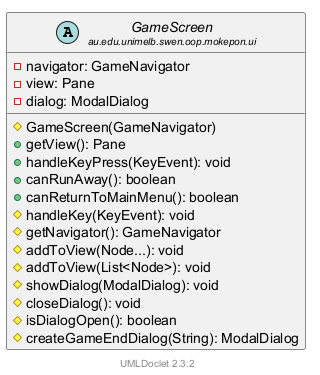
8/* The parts shared by every screen: the game area with its background, the dialogs,9 * the key presses and the menu options. The window shows one screen at a time,10 * and the screen being shown decides how the keys and the menu behave.11 */12public abstract class GameScreen {13 private final GameNavigator navigator;141 private final Pane view = new Pane();15 /* The dialog on top of the screen, or null when there is none. */16 private ModalDialog dialog;17 18 protected GameScreen(GameNavigator navigator) {19 this.navigator = navigator;20 view.setPrefSize(UiStyle.GAME_WIDTH, UiStyle.GAME_HEIGHT);212 view.getChildren().add(UiStyle.createBackground());22 }23 24 public Pane getView() {25 return view;26 }三个画面类都写着 extends GameScreen。它们每个的构造器第一行都是 super(navigator):先运行父类的这个构造器(第 18–22 行)。它做三件事:
- 第 19 行:把交来的
navigator存进字段(第 2 节那个接口)。 - 第 20 行:把
view设成 1280 × 768(CUiStyle 的两个常量,第 7 节)。view在第 14 行声明时就new Pane()了。 - 第 21 行:把背景图片放进
view。它是第一个,所以在最底层;子类后来放进去的东西都画在它上面(绘制顺序:后放的盖住先放的)。三个画面的棕色背景一模一样,就是因为都来自这一行。
| 字段 : 类型 | 说明 |
|---|---|
navigator : IGameNavigator(final) | 请窗口做事用。它是 private,子类要用 getNavigator() 拿 |
view : Pane(final) | 整个游戏区。CGameWindow 用 getView() 拿去放在中间 |
dialog : CModalDialog | 现在盖在画面上的对话框;没有对话框时是 null(第 15 行注释) |
GameScreen 准备好的方法
| 方法(写法) | 干什么 | 谁用 |
|---|---|---|
getView()(public) | 交出 view | CGameWindow.showScreen |
handleKeyPress(event)(public final) | 处理按键的固定步骤 | CGameWindow 的事件过滤器 |
handleKey(event)(protected,默认空) | 子类自己填的那一步 | handleKeyPress |
canRunAway()(public,默认 false) | 菜单问:能逃跑吗? | CGameMenu.update |
canReturnToMainMenu()(public,默认 true) | 菜单问:能回主菜单吗? | CGameMenu.update |
getNavigator()(protected) | 拿到 navigator | 三个子类 |
addToView(...) 两个(protected) | 把东西放进 view | 三个子类的构造器 |
showDialog / closeDialog / isDialogOpen(protected) | 盖上、拿掉、问有没有对话框 | COverworldScreen、CBattleScreen |
createGameEndDialog(heading)(protected) | 造一个带两个按钮的结束框 | Game Over 框、出口框 |
public 的四个是给“外面”(窗口和菜单)用的,protected 的是只给子类用的工具。下面一组一组看。
模板方法:handleKeyPress 和 handleKey
28 /* Template Method: key presses are ignored while a dialog is open, and key combinations29 * are left for the menu shortcuts (Ctrl+R, Ctrl+B and Alt+F4).30 * Any other key is passed to the screen.31 */32 public final void handleKeyPress(KeyEvent event) {33 boolean isCombination = event.isControlDown() || event.isAltDown()34 || event.isMetaDown() || event.isShiftDown();35 if (isDialogOpen() || isCombination) {36 return;37 }38 handleKey(event);39 }⋯ 省略第 40–50 行51 /* Screens with keyboard controls override this. Other screens ignore the keys. */52 protected void handleKey(KeyEvent event) {53 }按键进来,窗口调用的是 handleKeyPress。它一行一行做:
- 第 33–34 行:是不是组合键?
event.isControlDown()问“按着 Ctrl 吗”,后面依次是 Alt、Meta(Mac 上的 Command 键)、Shift。四个用||(或)连起来:有一个是 true,isCombination就是 true。 - 第 35–37 行:如果对话框开着,或者是组合键,直接
return(提前返回),后面什么都不做。注释说了原因:组合键留给菜单的快捷键 Ctrl+R、Ctrl+B、Alt+F4。 - 第 38 行:都不是,才调用
handleKey(event)。
第 52–53 行的 handleKey 是空的:父类的默认做法就是“什么都不做”。注释(第 51 行)说:有键盘操作的画面改写它,别的画面不管按键。
这就是模板方法(Template Method),注释第 28 行就写着这个名字:
- 父类定步骤,而且锁死。
handleKeyPress是final的(final 方法:子类不能改写)。所以不管哪个画面,“对话框开着不理按键、组合键不理”这两条规矩一定会先执行,没有子类能跳过。 - 子类只填一步。那一步就是
handleKey,叫钩子方法(hook method)。COverworldScreen 填“方向键走路”,CBattleScreen 填“数字键放技能”,CSelectScreen 不填,就用空的默认版本。 - 好处:“对话框开着时不能动”这条规矩只写了一次,写在父类里。三个画面都不用自己再检查,也不会有谁忘了检查。
项目里还有一处同样的模式:第 12 章的 ASkill.use 也是 final 的模板方法,先扣能量,再调用子类写的 applyEffect。区别是 applyEffect 是 abstract 的(子类必须写),而这里的 handleKey 有一个空的默认版本(子类想改才改)。
三个子类各改写了什么
| 子类 | 改写了(override) | 没改写,用父类的默认 |
|---|---|---|
| CSelectScreen | canReturnToMainMenu() → false | canRunAway() → false;handleKey 什么都不做 |
| COverworldScreen | handleKey:方向键走路 | canRunAway() → false;canReturnToMainMenu() → true |
| CBattleScreen | canRunAway():战斗没结束才 true;handleKey:1–4 键 | canReturnToMainMenu() → true |
handleKeyPress 是 final,三个子类谁都不能改写。
这几个改写的效果,第 4 节(按键)和第 5 节(菜单)会一个一个看它们运行。
addToView:同一个名字,两个版本
59 /* Add nodes in drawing order: later nodes are drawn on top. */60 protected void addToView(Node... nodes) {61 view.getChildren().addAll(nodes);62 }63 64 protected void addToView(List<Node> nodes) {65 view.getChildren().addAll(nodes);66 }两个方法名字一样,参数不一样,这叫重载(overload)。调用时 Java 看你传的是什么,自动挑一个:
addToView(Node... nodes):Node...是可变参数(varargs),可以一次传任意多个 Node(JavaFX 里能画出来的东西都是 Node),逗号隔开。CSelectScreen 一次传了 8 个,COverworldScreen 传了 4 个。addToView(List<Node> nodes):传一整个 List。List<Node>= 一个只装 Node 的列表(尖括号是泛型,第 2 章)。CBattleScreen 用它放两个 CFighterPanel,因为getNodes()返回的就是一个 List:
91 /* Add nodes in drawing order: later nodes are drawn on top. */92 addToView(playerPanel.getNodes());93 addToView(enemyPanel.getNodes());94 addToView(skillButtonColumn, itemButtonRow, actionLabel, logArea,95 playerPanel.getFaintMask(), enemyPanel.getFaintMask());两个版本里面都是 view.getChildren().addAll(...):按顺序加到 view 的最后面。第 59 行注释:“later nodes are drawn on top”,后加的画在上面。所以 CBattleScreen 第 95 行最后加的两个倒下时的红色遮罩,会盖在卷轴和卷轴上的技能按钮上面。真实截图里就是这样:
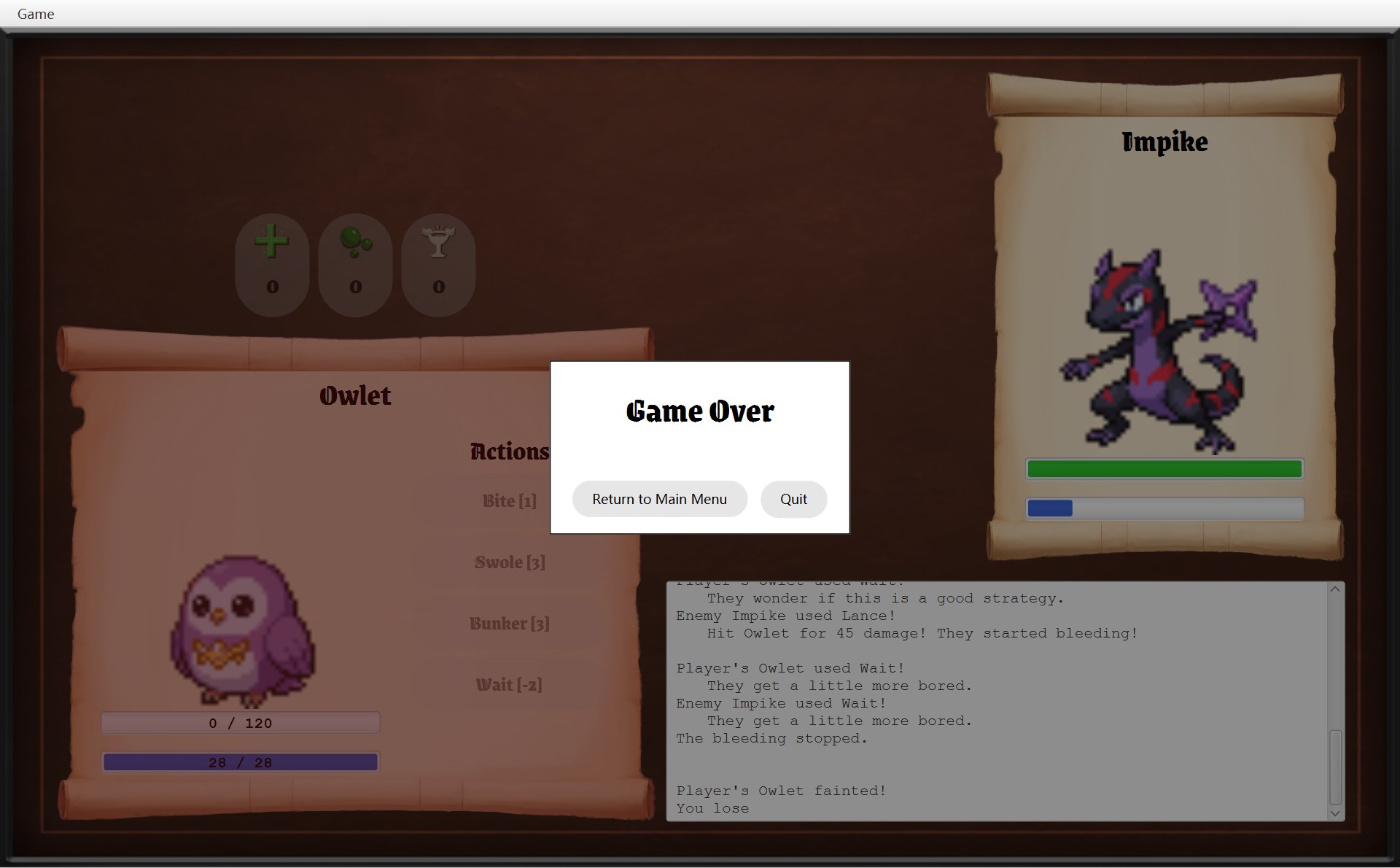
- 1红色半透明遮罩:第 95 行最后才加进 view 的
playerPanel.getFaintMask()。平时它是隐藏的,玩家的 Mokepon 倒下时才显示(CFighterPanel 的遮罩,第 14 章) - 2技能按钮(这里框的是 Swole、Bunker、Wait)是第 94 行先加进去的,所以被遮罩盖住,字也透着红色。最上面的 Bite 也一样,只是它右边一截又被 Game Over 框盖住了,所以没框它
对话框的小工具和 createGameEndDialog
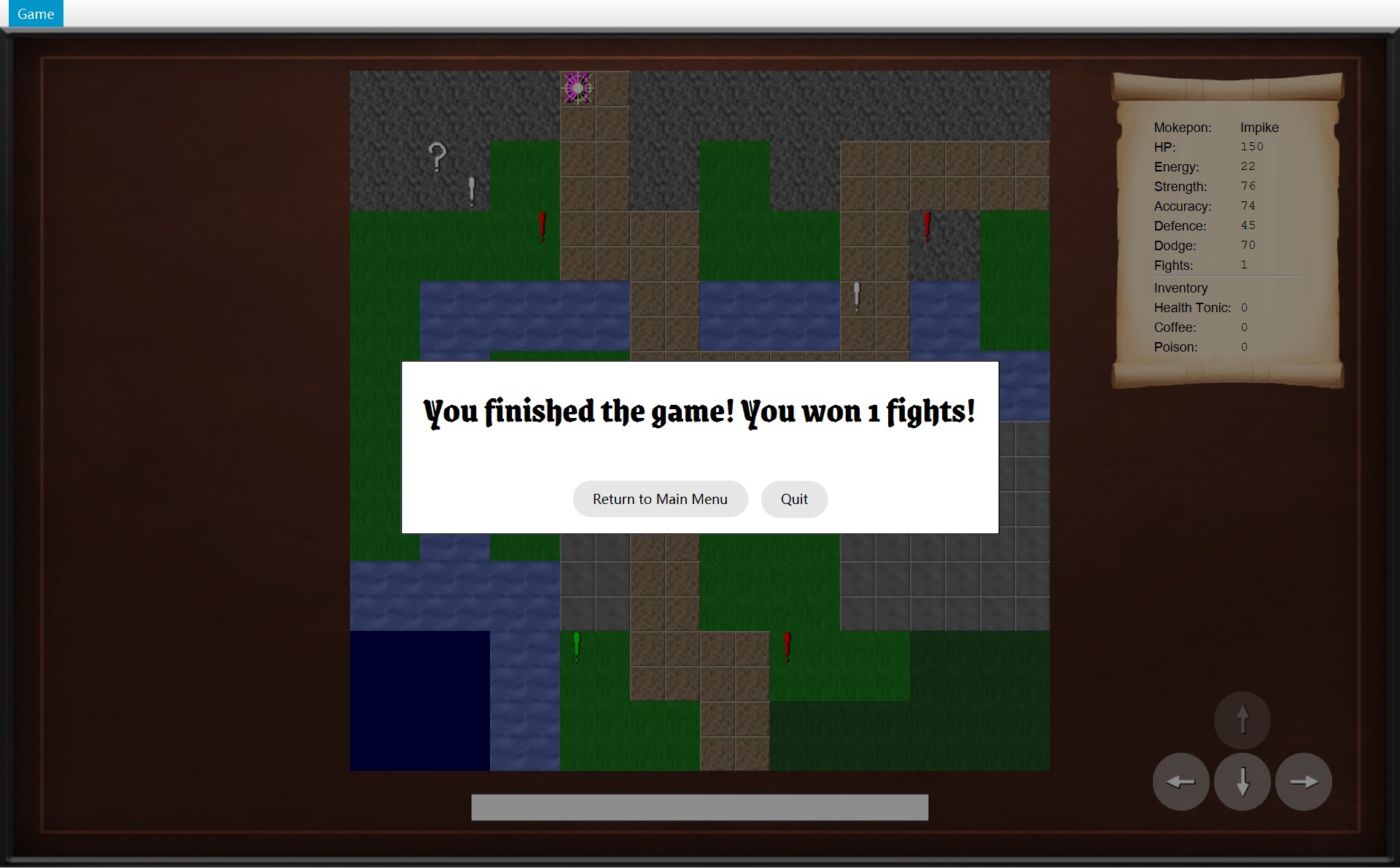
68 /* Show a dialog on top of everything else on the screen. */69 protected void showDialog(ModalDialog newDialog) {70 closeDialog();71 dialog = newDialog;72 view.getChildren().add(dialog.getLayer());73 dialog.focusFirstButton();74 }75 76 protected void closeDialog() {77 if (dialog != null) {78 view.getChildren().remove(dialog.getLayer());79 dialog = null;80 }81 }82 83 protected boolean isDialogOpen() {84 return dialog != null;85 }86 87 /* A dialog for the end of a game, with buttons to go back to the menu or to quit. */88 protected ModalDialog createGameEndDialog(String heading) {89 ModalDialog endDialog = new ModalDialog(heading);901 endDialog.addButton("Return to Main Menu", event -> navigator.returnToMainMenu());912 endDialog.addButton("Quit", event -> navigator.quit());92 return endDialog;93 }showDialog(newDialog):先closeDialog()(同一时间只能有一个框),记进字段dialog,把对话框的那一层加到view的最后(所以盖在所有东西上面),再让它的第一个按钮拿到键盘焦点。closeDialog():如果有框,把它那一层从view拿掉,dialog设回 null。isDialogOpen():就一句return dialog != null;。handleKeyPress用的就是它。createGameEndDialog(heading):造一个标题由你定、带两个按钮的框:第 90 行 Return to Main Menu 调用navigator.returnToMainMenu()(标注 1),第 91 行 Quit 调用navigator.quit()(标注 2)。它在父类里,所以能直接用 private 字段navigator。CBattleScreen 输了时用它(“Game Over”),COverworldScreen 走到出口时也用它(“You finished the game! …”)。下面两个框的按钮一模一样,就是因为是同一个方法造的:
- 1第 90 行加的 Return to Main Menu
- 2第 91 行加的 Quit
createGameEndDialog("Game Over")真实运行截图 · 玩家的 Mokepon 倒下:玩家卷轴变红,弹出 Game Over 对话框- 1还是第 90 行
- 2还是第 91 行
对话框本身(CModalDialog)长什么样、怎么挡住后面,在第 6 节。
4. 按一个键:从 Scene 一路到 handleKey
现在跟着一次真的按键走一遍。起点在 CGameWindow 构造器的第 46–47 行:
44 Scene scene = new Scene(root);45 /* Use a filter so the screen gets the keys before any button or text box does. */46 scene.addEventFilter(KeyEvent.KEY_PRESSED,47 event -> currentScreen.handleKeyPress(event));48 stage.setScene(scene);49 stage.sizeToScene();KeyEvent.KEY_PRESSED:“一个键被按下去”这种事件。每按一下,JavaFX 就造一个 KeyEvent 对象,里面记着按的是哪个键、有没有同时按着 Ctrl 之类。addEventFilter:给 Scene 登记一个事件过滤器(event filter)。因为第一个参数是KEY_PRESSED,这里它只过滤按键,鼠标点击不归它管。过滤器比按钮、文字框更早拿到按键。第 45 行注释说的就是这个:“so the screen gets the keys before any button or text box does”。event -> currentScreen.handleKeyPress(event):一个 lambda,就是“等事件来了再运行”的一小段代码。注意它读的是字段currentScreen,而且是在每次按键的那一刻才读。所以换了画面以后,按键自动交给新画面,过滤器不用重新装。
地图画面还要知道“哪个键往哪走”。它用一个 static 的 Map 存着这张对照表:
25 private static final Map<KeyCode, Direction> ARROW_KEYS = Map.of(26 KeyCode.UP, Direction.UP,27 KeyCode.DOWN, Direction.DOWN,28 KeyCode.LEFT, Direction.LEFT,29 KeyCode.RIGHT, Direction.RIGHT);下面是你在地图上按一下 → 键时,真正发生的调用顺序。顺序图的读法见 第 1 章第 3 节:每根竖虚线是一个对象,从上往下是时间,实线箭头 = 调用,虚线箭头 = 返回,绕回自己 = 调用自己的方法。动画里还有两点要注意:
- 正在发生的那一步会变成红色、会流动的虚线。这只是“高亮”,不是“返回”。
- 带
new的虚线箭头(后面的动画里会出现)表示“造出这个对象”。
图分成两段,每段 5 个箭头。图里 overworldScreen 那根线,就是这一刻 currentScreen 指着的地图画面对象;handleKeyPress 是它从父类 AGameScreen 继承来的方法,所以也画在它身上。
44 Scene scene = new Scene(root);45 /* Use a filter so the screen gets the keys before any button or text box does. */46 scene.addEventFilter(KeyEvent.KEY_PRESSED,47 event -> currentScreen.handleKeyPress(event));48 stage.setScene(scene);49 stage.sizeToScene();32 public final void handleKeyPress(KeyEvent event) {33 boolean isCombination = event.isControlDown() || event.isAltDown()34 || event.isMetaDown() || event.isShiftDown();35 if (isDialogOpen() || isCombination) {36 return;37 }38 handleKey(event);39 }116 protected void handleKey(KeyEvent event) {117 Direction direction = ARROW_KEYS.get(event.getCode());118 if (direction != null) {119 movePlayer(direction);120 event.consume();121 }127 private void movePlayer(Direction direction) {128 if (!isDialogOpen()) {129 world.move(direction);130 }131 }66 public void move(Direction direction) {67 if (!canMove(direction)) {68 return;69 }70 player.moveTo(player.getPosition().move(direction));71 notifyListeners(listener -> listener.onPlayerMoved());- 1按键之前:玩家在 (10,18)
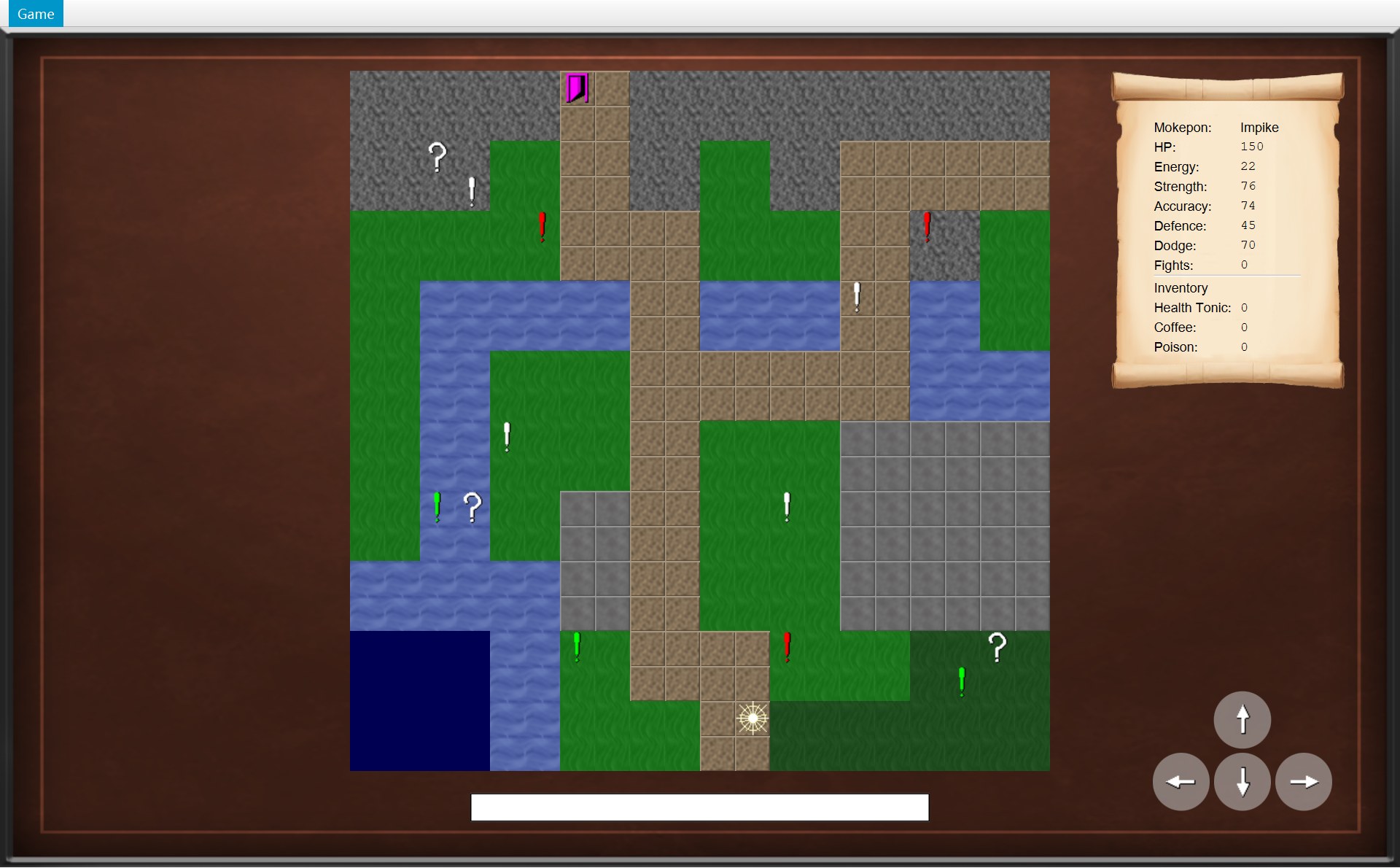
- 1按键之后:玩家在 (11,18),往右挪了一格(32 像素)
72 @Override73 public void onPlayerMoved() {74 /* A successful move clears the old message. */75 statusBar.setText("");76 update();77 }118 if (direction != null) {119 movePlayer(direction);120 event.consume();121 }- 你在地图上按了 → 键(下面是按之前:玩家在 (10,18))。JavaFX 造一个
KeyEvent对象,记着“按的是 RIGHT、没按 Ctrl”这些,先交给 Scene(第 1 个箭头)。Scene 上装着 CGameWindow 的事件过滤器,所以它最先拿到这个按键,比任何按钮都早。 - 过滤器是 CGameWindow 构造器第 46–47 行登记的。它的 lambda 只有一句:
currentScreen.handleKeyPress(event)(第 2 个箭头)。这一刻currentScreen指着地图画面,所以按键交给了它。handleKeyPress写在父类 AGameScreen 里,地图画面继承了它。 - 第一关,第 33–34 行:是不是组合键?问
event四个问题:isControlDown()(按着 Ctrl 吗)、isAltDown()、isMetaDown()、isShiftDown()。你只按了 →,四个都是 false,所以isCombination是 false。 - 第二关,第 35 行:有没有对话框开着?字段
dialog是 null,isDialogOpen()返回 false。两个条件都不成立,不return,继续往下。如果这时遇敌框开着,方法就在第 36 行结束了,玩家走不动。 - 第 38 行调用
handleKey(event)。这个对象真正的类是 COverworldScreen,它改写了handleKey,所以运行的是 COverworldScreen 的版本,不是父类那个空的版本。这叫动态绑定(dynamic dispatch):运行时看对象真正是哪个类。第 1 段到这里结束。 - 第 2 段。来到 COverworldScreen.handleKey 第 117 行:先问
event.getCode(),得到KeyCode.RIGHT(“哪个键”)。再拿它去查上面那个 MapARROW_KEYS(第 25–29 行):RIGHT 对应Direction.RIGHT。如果按的不是方向键(比如字母 A),get查不到,得到 null,第 118 行的 if 不成立,什么都不做。 - 第 118–119 行:
direction不是 null,调用movePlayer(RIGHT)(下面就是它的代码)。movePlayer第 128 行又查了一次对话框。按键这条路刚才已经查过,为什么还要查?因为右下角的四个方向按钮也调用movePlayer(第 173 行),按钮那条路不经过handleKeyPress。 - 第 129 行
world.move(direction):画面自己不管规则,交给 COverworld。move第 67 行先问canMove(RIGHT):右边那格能走;第 70 行player.moveTo(...):CPlayer 对象里的位置变成 (11,18)。注意:到这里只是对象里的数变了,屏幕上还什么都没变。 - COverworld 第 71 行
notifyListeners(listener -> listener.onPlayerMoved()):通知登记过的监听者(startGame时登记的,本章第 8 节)。于是onPlayerMoved()运行(第 4 个箭头):清空状态栏,再update(),地图照着新位置重画,左下就是结果。这是观察者模式(第 8 章)。 move后面还会看新格子上有没有东西(这一格没有,第 8 章)。都返回以后,回到 handleKey 第 120 行event.consume():告诉 JavaFX “这个键我用掉了”。事件到此为止,不会再交给正拿着键盘焦点的按钮去处理。一次按键就走完了。
这一路上,CGameWindow 只管把按键交给 currentScreen,AGameScreen 只管两条规矩,COverworldScreen 只管“方向键 = 走一格”和“收到通知就重画”,COverworld 只管规则。每个类只做自己那一小段。
战斗画面:数字键 1–4
CBattleScreen 也改写了 handleKey,前面几步完全一样(过滤器 → handleKeyPress → 两关),只是最后填的那一步不同。上面是代码;下面左边是这一刻真实的战斗画面(玩家是 Shellurk,能量 0),右边一行一行解释,编号是对应的:
29 /* Keys 1 to 4 use the matching skill. */30 private static final List<KeyCode> SKILL_KEYS =31 List.of(KeyCode.DIGIT1, KeyCode.DIGIT2, KeyCode.DIGIT3, KeyCode.DIGIT4);⋯ 省略第 32–106 行107 /* Keys 1 to 4 press the matching skill button. A disabled button ignores the key. */108 @Override109 protected void handleKey(KeyEvent event) {110 int index = SKILL_KEYS.indexOf(event.getCode());1114 if (index >= 0 && index < skillButtons.size()) {1123 skillButtons.get(index).fire();113 event.consume();114 }115 }116 117 private void useSkill(Skill skill) {118 battle.playTurn(skill);119 update();120 }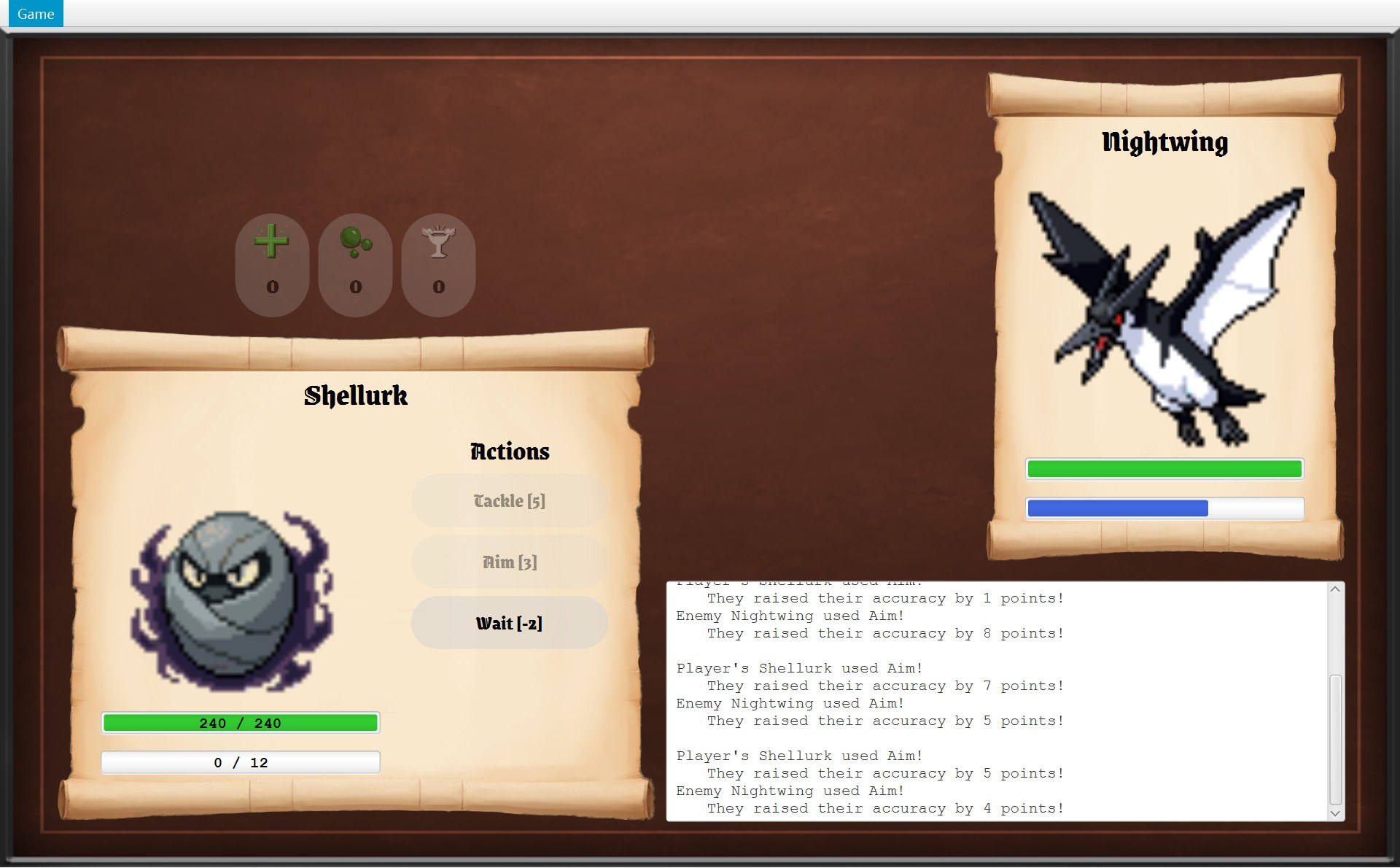
- 1按 1 → index 0 → Tackle:能量不够,按钮是灰的,第 112 行的
fire()没有反应 - 2按 2 → index 1 → Aim:也是灰的,同样没反应
- 3按 3 → index 2 → Wait:能用,第 112 行
fire()就等于用鼠标点了它。现在只有按 3 有用 - 4这里没有第 4 个按钮:Shellurk 只有 3 个技能。按 4 → index 是 3,第 111 行要求
index < skillButtons.size()(3),不成立,什么都不做
- 第 30–31 行
SKILL_KEYS:一个 static 的 List,装着 4 个键 [DIGIT1, DIGIT2, DIGIT3, DIGIT4](DIGIT1 = 键盘上面那一排的 1)。 - 第 110 行
SKILL_KEYS.indexOf(event.getCode()):找按的键在这个 List 里排第几,从 0 开始数:按 1 → 0,按 2 → 1,按 3 → 2,按 4 → 3。不在里面(别的键)→ -1。 - 第 111 行
index >= 0 && index < skillButtons.size():&&是“并且”(逻辑运算符),两个条件都成立才往下:不是 -1,而且这个位置上真有一个按钮(标注 4)。 - 第 112 行
skillButtons.get(index).fire():拿出那个按钮,在代码里按它一下(标注 1–3);第 113 行consume(),和地图上一样。
fire() 是 JavaFX 按钮自带的方法:在代码里“按一下”这个按钮,会运行它登记的点击动作。技能按钮的点击动作是 useSkill(skill),所以按数字键和用鼠标点完全一样,走的是同一段代码(第 11 章)。第 107 行的注释也写了:“A disabled button ignores the key.” 不用再写一遍“能量够不够”的判断,按钮变灰就已经挡住了。
CSelectScreen 没有改写 handleKey,用的是父类那个空版本,所以选择界面这个画面自己不处理任何键。Tab、空格这些键也没有人 consume,就照常交给拿着焦点的按钮。
5. Game 菜单:GameMenu
菜单是怎么造出来的
19 public GameMenu(GameNavigator navigator) {202 runAway = new MenuItem("Run away");21 runAway.setAccelerator(new KeyCodeCombination(KeyCode.R, KeyCombination.CONTROL_DOWN));22 runAway.setOnAction(event -> navigator.runAway());23 243 mainMenu = new MenuItem("Main menu");25 mainMenu.setAccelerator(new KeyCodeCombination(KeyCode.B, KeyCombination.CONTROL_DOWN));26 mainMenu.setOnAction(event -> navigator.returnToMainMenu());27 284 MenuItem exit = new MenuItem("Exit");29 exit.setAccelerator(new KeyCodeCombination(KeyCode.F4, KeyCombination.ALT_DOWN));30 exit.setOnAction(event -> navigator.quit());31 321 Menu gameMenu = new Menu("Game");33 gameMenu.getItems().addAll(runAway, mainMenu, new SeparatorMenuItem(), exit);34 35 menuBar = new MenuBar(gameMenu);36 menuBar.setPrefWidth(UiStyle.GAME_WIDTH);37 }- 1第 32 行
new Menu("Game"):菜单栏上的 Game 这一个菜单 - 2第 20 行 Run away,第 21 行给它快捷键 Ctrl+R(右边的灰字)
- 3第 24 行 Main menu,第 25 行快捷键 Ctrl+B
- 4第 28 行 Exit,第 29 行快捷键 Alt+F4。它上面那条细线是第 33 行的
new SeparatorMenuItem()(分隔线)
一行一行看:
new MenuItem("Run away"):一个菜单项(MenuItem)。注意它是菜单项,不是按钮。setAccelerator(new KeyCodeCombination(KeyCode.R, KeyCombination.CONTROL_DOWN)):快捷键(accelerator),“R 键 + 按着 Ctrl”。不打开菜单,直接按 Ctrl+R 也能执行这一项。菜单右边的灰字 Ctrl+R 是 JavaFX 自动写上去的。setOnAction(event -> navigator.runAway()):登记“被选中时做什么”(setOnAction)。括号里是一个 lambda,下面细讲。- 第 33 行把四样按顺序放进 Game 菜单:Run away、Main menu、分隔线、Exit。第 35 行用它造菜单栏,第 36 行让菜单栏和游戏一样宽(1280)。
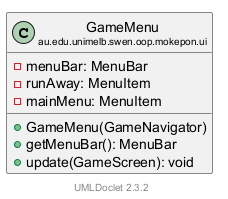
哪些是字段、哪些不是?CGameMenu 只有 3 个字段:menuBar、runAway、mainMenu(第 15–17 行,打印的 UML 上也只有这 3 个)。menuBar 要交给窗口(getMenuBar()),runAway 和 mainMenu 以后要变灰变亮(update),所以要存着。exit 和 gameMenu 只是构造器里的局部变量:Exit 永远能点,造好以后再也不用碰它。
三个画面里的菜单
同一个菜单,在三个画面里打开,样子不一样(左、中、右三张):
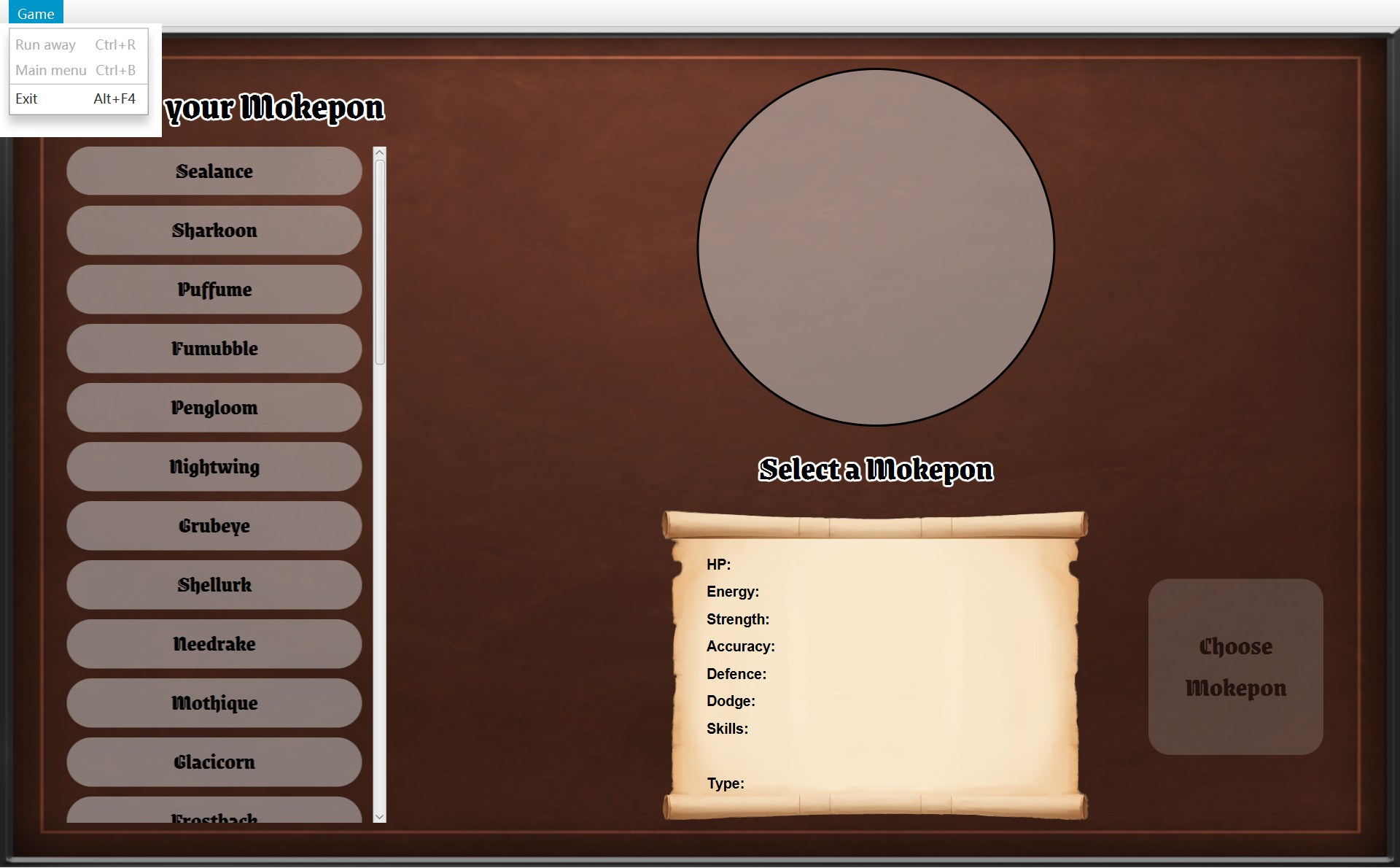
- 1Run away:灰
- 2Main menu:灰
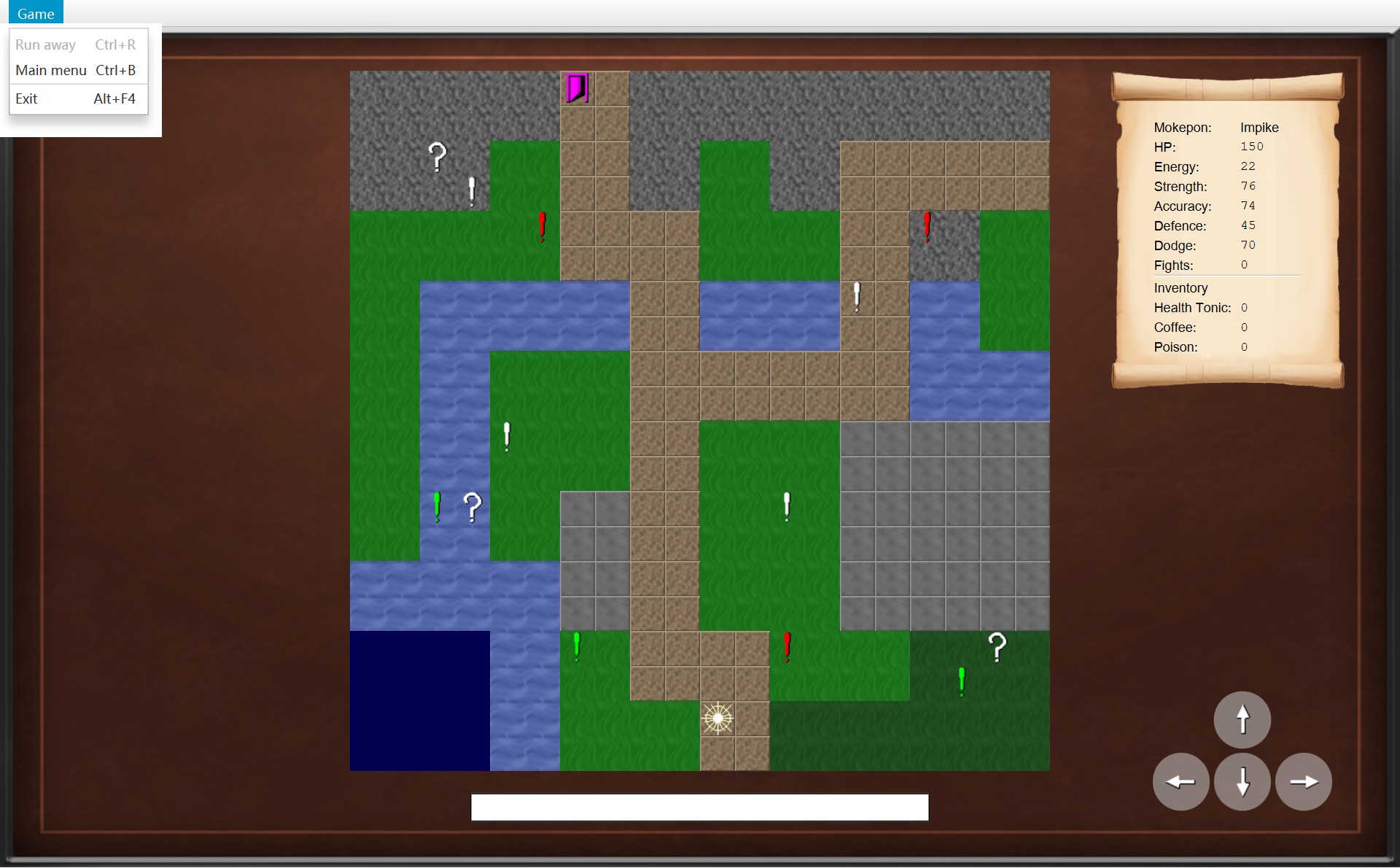
- 1Run away:灰
- 2Main menu:能点
- 1Run away:能点
- 2Main menu:能点
菜单问每个画面两个问题:问题 1 是 canRunAway()(能逃跑吗?),问题 2 是 canReturnToMainMenu()(能回主菜单吗?)。三个画面的答案:
| 画面 | Run away(问题 1 的答案) | Main menu(问题 2 的答案) |
|---|---|---|
| CSelectScreen(上图左) | 灰(false,父类默认) | 灰(false,自己改写的) |
| COverworldScreen(上图中) | 灰(false,父类默认) | 能点(true,父类默认) |
| CBattleScreen 还在打(上图右) | 能点(true,自己改写的) | 能点(true,父类默认) |
| CBattleScreen 打完了(没有菜单打开的截图,见下面动画最后一步) | 灰(false:同一个改写,答案变了) | 能点(true,父类默认) |
Exit 不在表里:update 根本不碰它,它永远能点。下面的动画一步一步看 update 怎么从代码得出这张表。上面的 update 一直显示;左下换成那一刻真正运行的那个方法;右下是那一刻的画面(前 5 步是打开的菜单)。
43 /* Turn the options on or off to match the screen being shown.44 * A disabled option also ignores its keyboard shortcut.45 */46 public void update(GameScreen screen) {47 runAway.setDisable(!screen.canRunAway());48 mainMenu.setDisable(!screen.canReturnToMainMenu());49 }42 public boolean canRunAway() {43 return false;44 }⋯ 省略第 45–46 行47 public boolean canReturnToMainMenu() {48 return true;49 }119 @Override120 public boolean canReturnToMainMenu() {121 return false;122 }102 @Override103 public boolean canRunAway() {104 return !battle.isFinished();105 }117 private void useSkill(Skill skill) {118 battle.playTurn(skill);119 update();⋯ 省略第 120–127 行128 private void update() {⋯ 省略第 129–134 行135 if (battle.isFinished() && !isDialogOpen()) {136 showResult();137 }⋯ 省略第 138–169 行170 private void showResult() {171 getNavigator().updateMenu();- 1Run away 灰
- 2Main menu 灰
- 1Run away 灰
- 2Main menu 能点
- 1Run away 能点
- 2Main menu 能点
- 1战斗结束:
showResult先updateMenu(),再弹出 You Win
- 程序刚打开:
showScreen(selectScreen)的最后一行updateMenu()调用menu.update(currentScreen)。参数screen的类型是 AGameScreen,这一次它指着 CSelectScreen 对象。update只有两行:每行问画面一个问题,把答案用!反过来,交给setDisable(禁用:true = 变灰、点不了)。 - 第 47 行问
screen.canRunAway()。CSelectScreen 没有改写这个方法,所以运行父类 AGameScreen 的版本,返回 false。!false是 true,setDisable(true):Run away 变灰。 - 第 48 行问
screen.canReturnToMainMenu()。这一个 CSelectScreen 改写了,返回 false。它上面的注释(第 118 行)说:“There is no game to leave yet”,还没有一局可以离开,用不着这一项。!false= true:Main menu 也变灰。 - 点了 Choose Mokepon:
showScreen(overworldScreen)又调用一次update。COverworldScreen 两个方法都没改写,都用父类的:canRunAway()是 false → Run away 灰;canReturnToMainMenu()是 true →!true= false →setDisable(false):Main menu 能点了。 - 点了 Fight!:
showScreen(new BattleScreen(...)),第三次update。CBattleScreen 改写了canRunAway():return !battle.isFinished();。刚开打,isFinished()是 false,所以返回 true,!true= false:Run away 能点了。Main menu 用父类的 true,也能点。 - 打赢了。CBattleScreen 怎么知道?你每放一次技能,
useSkill都会在第 119 行调用update()。update的第 135 行问:battle.isFinished()是 true,并且还没有对话框吗?这一次两个都成立,就调用showResult()。 showResult的第一句就是第 171 行getNavigator().updateMenu(),然后才弹出 You Win(右边)。为什么要它?因为这一刻画面没有换,showScreen不会运行,菜单不会自己去问。第 168 行注释:“The battle is over, so the menu is updated to turn off "Run away".”updateMenu()→menu.update(currentScreen),currentScreen还是这个 CBattleScreen。再问canRunAway():同一个方法,可现在isFinished()是 true,返回 false:Run away 变灰,Ctrl+R 也不起作用了。Main menu 还能点。截图里菜单没有打开,看不到灰字;但拍这张截图时程序记下的菜单状态就是 runAway disabled、mainMenu enabled。
这就是又一次多态:update(GameScreen screen) 只认识父类 AGameScreen,从来不问“你是哪个画面”。真正运行哪个版本的 canRunAway(),由 screen 那一刻指着的对象决定。好处是:以后加一个新画面,只要它改写这两个方法(或者用默认答案),CGameMenu 一行都不用改。
update 上面的注释还说了一句:“A disabled option also ignores its keyboard shortcut.” 变灰的菜单项,快捷键也一起失效。所以在选择界面按 Ctrl+R 什么都不会发生,第 1 节说的 null 危险碰不到。在地图上按 Ctrl+R 也没有反应;要是这时 Run away 能用,world.runAway() 会把玩家无缘无故退回上一格(COverworld.runAway 里的 player.moveBack())。
6. 对话框:ModalDialog
一个对话框由哪几块组成
先比一比同一块地图,踩上感叹号之前和之后:
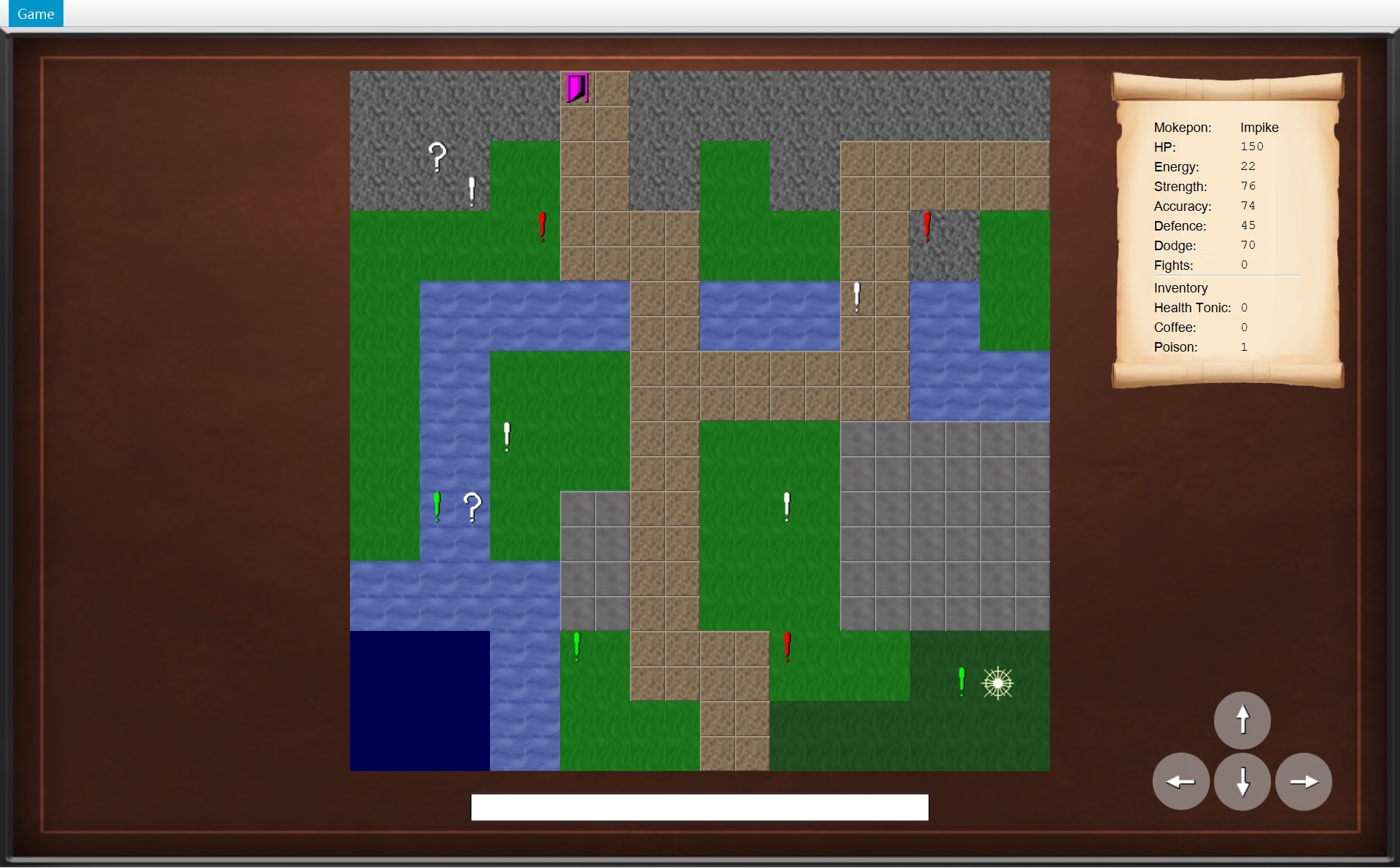 1
1- 1之前:玩家在 (18,17),左边就是感叹号,下一步往左
234- 2黑色半透明的一层:字段
layer(一个StackPane),1280×768,盖住整个画面。和前一张(之前)比,地图、卷轴、方向按钮全都暗了,也都点不到了 - 3白色的框:构造器里的局部变量
box(一个VBox),放在 layer 的正中间 - 4菜单栏没有变暗:layer 只盖住画面的
view(菜单栏下面那一块),菜单还能用
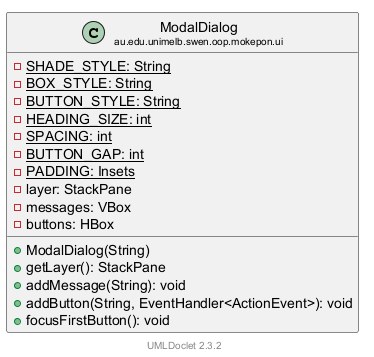
模态对话框(modal dialog)的意思是:它开着的时候,你只能先处理它,后面的东西都用不了。CModalDialog 的类注释(第 15–18 行)说:一个白框,里面有标题、几行字、几个按钮;后面有一层深色盖住整个画面,选一个按钮之前,后面什么都点不了。放大看白框:
- 4标题:第 38 行的局部变量
headingLabel,哥特字体 32 号(HEADING_SIZE) - 5字段
messages(VBox):提示一行一行竖着排 - 6字段
buttons(HBox):按钮横着排,间隔 12(BUTTON_GAP) - 7第 42 行的
box:把 4、5、6 竖着装在一起,间隔 20(SPACING)
33 private final StackPane layer = new StackPane();345 private final VBox messages = new VBox();356 private final HBox buttons = new HBox(BUTTON_GAP);36 37 public ModalDialog(String heading) {384 Label headingLabel = UiStyle.createLabel(heading, UiStyle.loadGameFont(HEADING_SIZE));39 messages.setAlignment(Pos.CENTER);40 buttons.setAlignment(Pos.CENTER);41 427 VBox box = new VBox(SPACING, headingLabel, messages, buttons);43 box.setAlignment(Pos.CENTER);44 box.setPadding(PADDING);45 box.setStyle(BOX_STYLE);46 /* Keep the box only as big as its contents, instead of filling the screen. */47 box.setMaxSize(Region.USE_PREF_SIZE, Region.USE_PREF_SIZE);48 49 /* The layer covers the whole screen and keeps the box in its centre. */50 layer.setPrefSize(UiStyle.GAME_WIDTH, UiStyle.GAME_HEIGHT);51 layer.setStyle(SHADE_STYLE);52 layer.getChildren().add(box);53 }构造器(第 37–53 行)一步一步搭出这个框:
- 第 38 行:造标题(标注 4)。
UiStyle.createLabel和UiStyle.loadGameFont是第 7 节的小工具。 - 第 39–40 行:提示和按钮两排都居中。这时两排还是空的,后面用
addMessage、addButton往里加。 - 第 42 行:
new VBox(SPACING, headingLabel, messages, buttons):一个竖着排的框(VBox),从上到下放标题、提示、按钮,每层之间隔 20 像素(标注 7)。 - 第 43–45 行:内容居中,四周留白(
PADDING:上 20、右 20、下 15、左 20),白底黑边(BOX_STYLE)。 - 第 47 行:
setMaxSize(USE_PREF_SIZE, ...):框只要内容那么大,不要被撑满整个屏幕(第 46 行注释)。 - 第 50–52 行:
layer设成 1280 × 768,背景是SHADE_STYLE(第 20 行:rgba(0, 0, 0, 0.45),45% 不透明的黑色),再把box放进去。layer是一个 StackPane,它默认把里面的东西放在正中间,所以框总是居中的。
验证一下“正中间”:截图里白框在 x = 468.5、宽 343,中心 x = 468.5 + 343 ÷ 2 = 640,正好是 1280 的一半;y = 314.5、高 189,中心 y = 314.5 + 94.5 = 409,减去菜单栏 25 是 384,正好是 768 的一半。
55 /* The part to add on top of the screen. */56 public StackPane getLayer() {57 return layer;58 }59 60 /* Add one line of text under the heading. */61 public void addMessage(String text) {62 Label message = new Label(text);63 message.setTextFill(Color.BLACK);64 messages.getChildren().add(message);65 }66 67 /* Add a button at the bottom, which runs the action when it is chosen. */68 public void addButton(String text, EventHandler<ActionEvent> action) {69 Button button = new Button(text);70 button.setStyle(BUTTON_STYLE);71 button.setOnAction(action);72 buttons.getChildren().add(button);73 }74 75 /* A modal dialog takes the keyboard focus from the screen behind it,76 * so the keys go to its first button.77 */78 public void focusFirstButton() {79 if (!buttons.getChildren().isEmpty()) {80 buttons.getChildren().getFirst().requestFocus();81 }82 }getLayer():交出整个 layer,画面把它加进自己的 view。addMessage(text):造一个黑字Label,加进messages。addButton(text, action):用new Button(text)造一个按钮,样式是BUTTON_STYLE(浅灰#e6e6e6、圆角 20),点它时运行action,加进buttons。注意这里用的是 JavaFX 普通的Button,不是 CGameButton,所以对话框的按钮和画面上的按钮长得不一样。参数类型EventHandler<ActionEvent>就是“点击时要做的事”,调用时传一个 lambda 进来。focusFirstButton():如果有按钮,让第一个按钮requestFocus(),拿到键盘焦点。第 75–77 行注释:模态对话框要把键盘焦点从后面的画面抢过来。
谁造对话框,怎么盖上去
以遇敌框为例。COverworld 发现玩家踩上了感叹号,就通知画面 onEncounter(观察者,第 8 章)。下面的动画从这一刻开始,到你点 Fight!、画面换成战斗为止。这里用的是第二次踩上 (17,17) 的截图:第一次遇到的是 Hexwing,点了 Run Away!;这一次遇到的是 Galecrest(敌人是随机挑的)。图分成三段:造框、盖上、点按钮。
79 @Override80 public void onEncounter(Encounter encounter) {81 ModalDialog dialog = new ModalDialog("Encountered a " + encounter.getEnemy().getName());82 for (String message : encounter.getTerrainMessages()) {83 dialog.addMessage(message);84 }85 dialog.addButton("Fight!", event -> {86 closeDialog();87 getNavigator().startBattle();88 });89 dialog.addButton("Run Away!", event -> {90 closeDialog();91 world.runAway();92 });93 showDialog(dialog);68 /* Show a dialog on top of everything else on the screen. */69 protected void showDialog(ModalDialog newDialog) {70 closeDialog();71 dialog = newDialog;72 view.getChildren().add(dialog.getLayer());73 dialog.focusFirstButton();74 }76 protected void closeDialog() {77 if (dialog != null) {78 view.getChildren().remove(dialog.getLayer());79 dialog = null;80 }81 }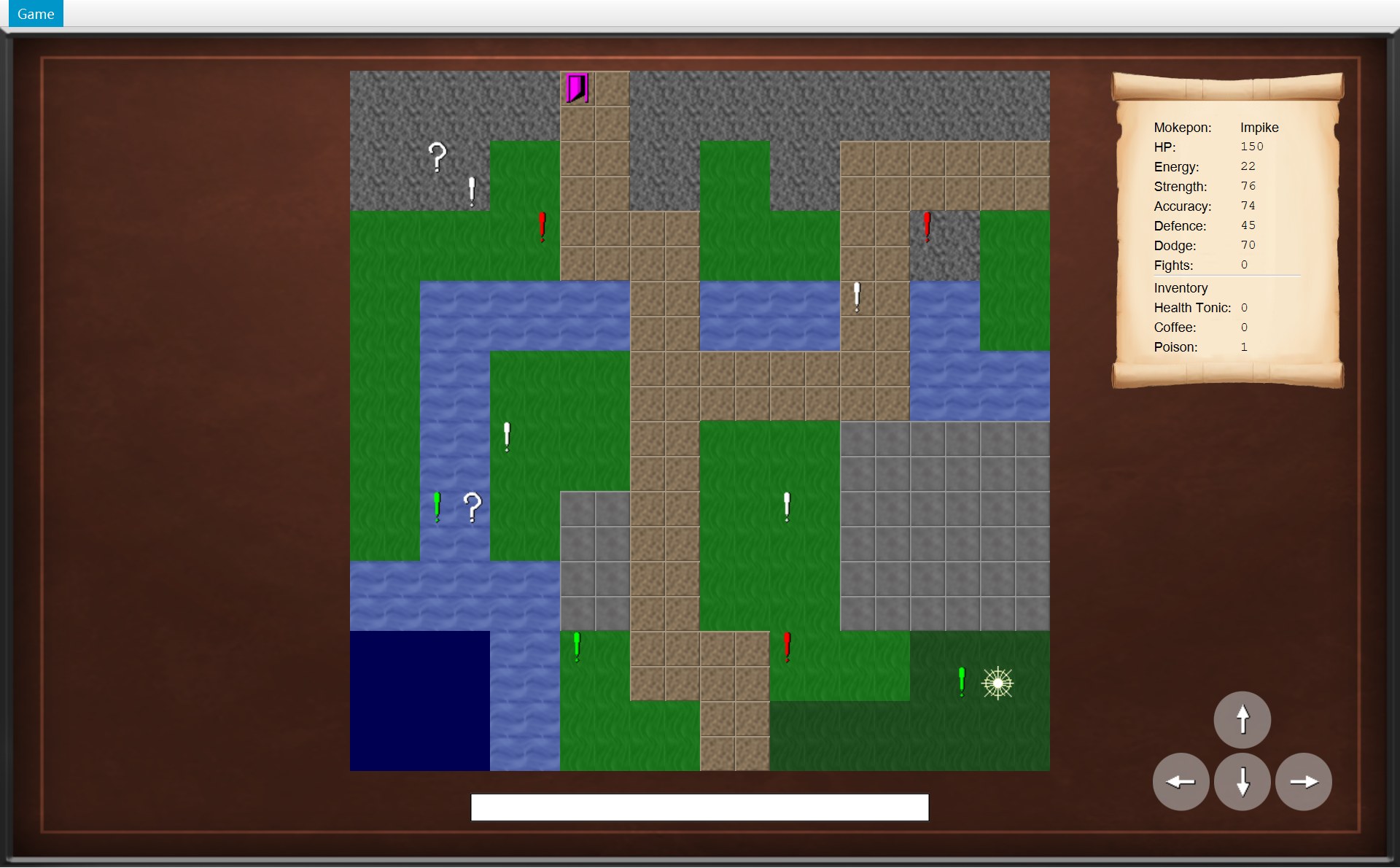
- 1玩家在 (18,17),左边就是感叹号
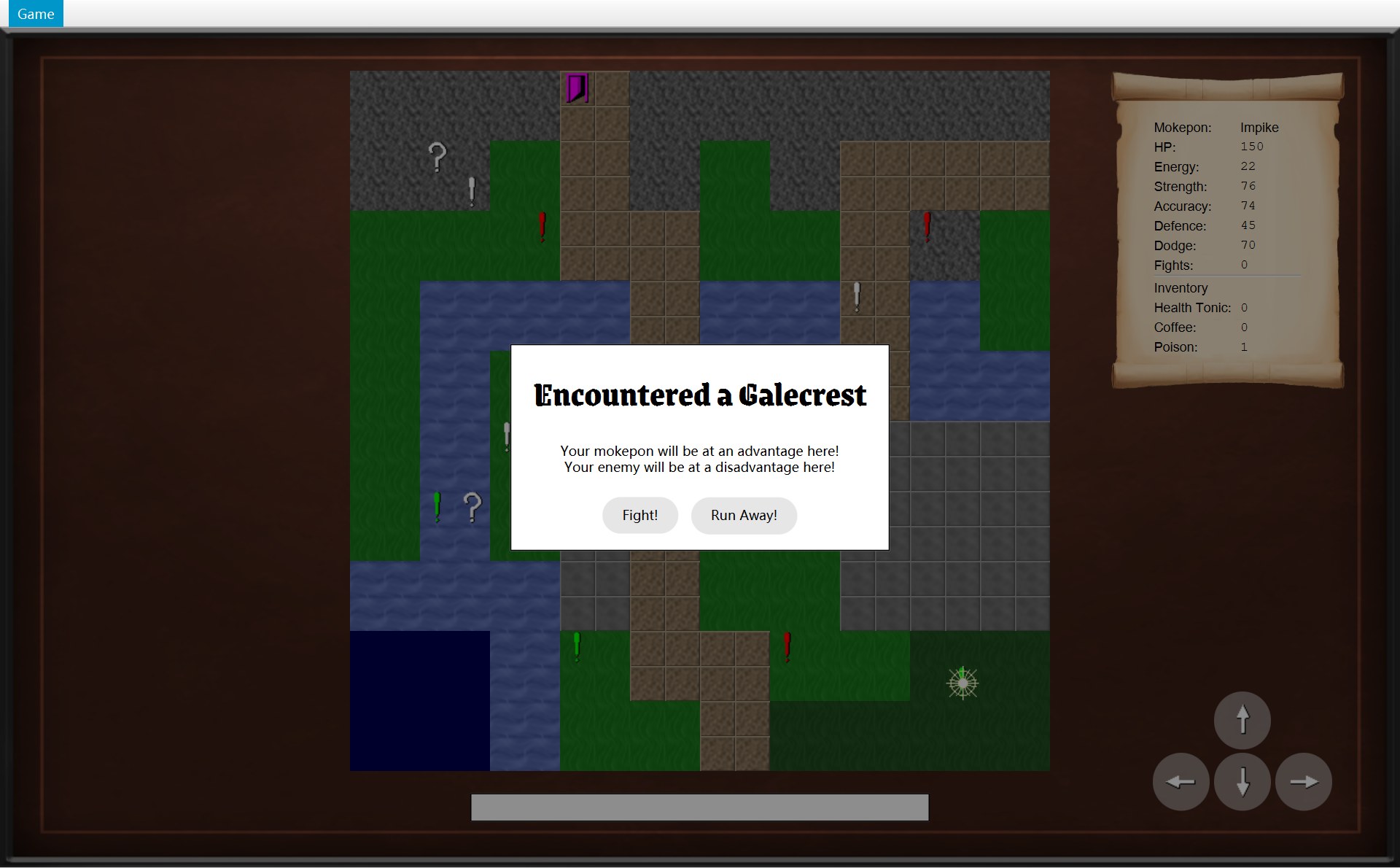
- 1盖上来的框(Galecrest)
- 2Fight! 拿着键盘焦点
- 1新的 BattleScreen:敌人就是 Galecrest
- 玩家从 (18,17)(下面)往左走一格,踩上感叹号。COverworld 造好一个 CEncounter(这一次的敌人和地形),通知监听者
onEncounter(encounter)(第 1 个箭头,第 9 章)。下面看地图画面收到通知以后做什么。 - 第 81 行:
new ModalDialog("Encountered a " + encounter.getEnemy().getName())。标题是一句英文加上敌人的名字,这一次是 Galecrest。构造器把白框、空的提示行、空的按钮行都搭好(上面讲过的第 37–53 行)。 - 第 82–84 行是一个 for-each 循环:
for (String message : 列表)= 把列表里的每一句依次放进变量message,每一句运行一次dialog.addMessage(message)。这一次地形提示有 2 句,所以加了 2 行(也可能是 0 或 1 句,第 9 章)。 - 第 85–92 行加两个按钮,各带一个 lambda。两个 lambda 都有两句,所以都用了大括号,而且第一句都是
closeDialog()。Fight! 的第二句是getNavigator().startBattle()(请窗口换画面);Run Away! 的第二句是world.runAway()(不找窗口,画面不换,玩家退回上一格,第 15 章)。现在只是登记,都不运行。 - 第 93 行
showDialog(dialog),进到父类 AGameScreen 的代码:第 70 行先closeDialog()(同一时间只能有一个框,这时本来就没有);第 71 行记进字段dialog;第 72 行getLayer()拿到那一层,加到view的最后,所以它盖在地图、卷轴、方向按钮的上面。 - 第 73 行
dialog.focusFirstButton():第一个按钮 Fight! 拿到键盘焦点。框盖上了,下面就是这一刻:画面变暗,中间一个白框。现在isDialogOpen()是 true,方向键都不管用(第 4 节)。程序停下来,等你点。 - 你点了 Fight!(或者按空格,因为焦点在 Fight! 上)。按钮运行第 4 步登记的那个 lambda。lambda 的代码是写在 COverworldScreen 里的,所以箭头指回
overworldScreen。 - lambda 第一句(第 86 行)
closeDialog():第 77 行有框,第 78 行把 layer 从view拿掉,第 79 行dialog变回 null。 - lambda 第二句(第 87 行)
getNavigator().startBattle():请窗口换画面。代码里的类型是 IGameNavigator,接到调用的是 CGameWindow 对象,所以箭头指向它。它运行第 67 行:showScreen(new BattleScreen(world.createBattle(), images, this))。 - 结果:root 中间换成了一个新的战斗画面,敌人就是框里的 Galecrest。地图画面(连同它已经拿掉框的 view)还留在字段
overworldScreen里,打完仗再放回来。
它是怎么把后面“挡住”的
- 鼠标:layer 是 1280×768、有背景颜色的一整块,而且是 view 里最上面的一层。你在画面任何地方点,点到的都是 layer,点不到下面的方向按钮。
- 键盘:父类的
handleKeyPress一看isDialogOpen()是 true 就return(第 4 节),方向键、数字键都没用。按键会去拿着焦点的对话框按钮。 - 再保险一次:COverworldScreen.movePlayer 自己也检查
isDialogOpen()。 - 挡不住的:菜单栏(上面对比图的标注 4)。layer 在画面的 view 里,菜单栏在 root 的上面,不归它管。所以遇敌框开着时,你照样可以打开 Game 菜单选 Main menu(这时 Run away 是灰的,因为画面还是地图)。
游戏里的 4 种对话框
- 1两条地形提示:
addMessage加了两次 - 2两个按钮:
addButton加了两次
- 3只有一个按钮,没有提示行(
messages是空的)
- 4
createGameEndDialog的两个按钮
- 5还是
createGameEndDialog的两个按钮
| 对话框(谁造) | 标题;提示行 | 按钮 → 调用 |
|---|---|---|
| 遇敌框(COverworldScreen.onEncounter) | "Encountered a " + 敌人名;再加 0–2 行地形提示 | Fight! → closeDialog(),startBattle();Run Away! → closeDialog(),world.runAway() |
| You Win(CBattleScreen.showResult) | "You Win";没有提示行 | Back to it! → winBattle() |
Game Over(CBattleScreen.showResult 调用 createGameEndDialog) | "Game Over";没有提示行 | Return to Main Menu → returnToMainMenu();Quit → quit() |
出口框(COverworldScreen.onExitReached 调用 createGameEndDialog) | "You finished the game! You won " + fightsWon + " fights!"(第 110–111 行):整句都是标题,这一局 fightsWon = 1;没有提示行 | 同上 |
四个框是同一个类 CModalDialog 的四个对象,只是标题、提示和按钮不同。画面类不用知道框是怎么排版的,只要会 new、addMessage、addButton、showDialog。框也不知道按钮点了以后要干什么,这件事由画面用 lambda 交给它。
7. 统一的样子:UiStyle 和 GameButton
UiStyle:大家共用的尺寸和小工具
123456- 1背景:
UiStyle.createBackground(),只有 AGameScreen 的构造器调用它。整张 1280×768 都是这张图,这里只框出一块空地方让你看清 - 2标题:
createLabel+loadGameFont(34)(哥特字体)+createWhiteOutline()(白色描边) - 3名字:同样的字体(30 号)和白色描边
- 4火焰图标:
createIcon(..., 24),缩到 24 像素、保持比例 - 5卷轴图片:
createImageView(loadImage(SCROLL_FILE), ...) - 6数值表的字:左列
createSansSerifFont(粗体),右列createMonospaceFont(等宽)
14/* Shared look of the game: sizes, asset files and helpers used by every screen. */15public class UiStyle {16 public static final int GAME_WIDTH = 1280;17 public static final int GAME_HEIGHT = 768;18 public static final String SCROLL_FILE = "assets/scroll.png";19 20 private static final String BACKGROUND_FILE = "assets/bg.png";21 private static final String FONT_FILE = "assets/GrenzeGotisch-Black.ttf";22 /* JavaFX logical fonts, so the game looks the same on every computer. */23 private static final String SANS_SERIF = "SansSerif";24 private static final String MONOSPACE = "Monospaced";25 /* The light shines straight down, so the image is lit evenly. */26 private static final double STRAIGHT_DOWN = 90;27 28 /* Load the game's gothic font at the given size. */29 public static Font loadGameFont(int size) {30 return Font.loadFont("file:" + FONT_FILE, size);31 }⋯ 省略第 32–65 行66 public static ImageView createBackground() {67 return createImageView(loadImage(BACKGROUND_FILE), 0, 0, GAME_WIDTH, GAME_HEIGHT);68 }CUiStyle 里所有的成员都是 static 的(static:属于类本身,不属于某个对象)。用的时候直接写 UiStyle.loadGameFont(30),不用先 new UiStyle()。但不是全都 public:
- public:
GAME_WIDTH、GAME_HEIGHT、SCROLL_FILE(第 16–18 行)和全部 11 个方法。别的类要用它们。 - private:
BACKGROUND_FILE、FONT_FILE、SANS_SERIF、MONOSPACE、STRAIGHT_DOWN(第 20–26 行)。这些文件名、字体名只在 CUiStyle 自己的方法里用,别的类调用方法就行,不用知道文件在哪。打印的 UML 上它们前面是红色方块。
这种只装常量和工具方法的类叫工具类(utility class)。它的作用是:大家用同一个数字、同一个做法。一个小毛病:CUiStyle 没有写构造器,Java 会自动给它一个 public 的默认构造器,所以 new UiStyle() 其实能编译(只是没有任何意义)。考试问“可以怎么改进”时,可以说加一个 private UiStyle() {},让别人没法 new 它。
| UiStyle 的成员 | 做什么 | 谁用(举例) |
|---|---|---|
GAME_WIDTH = 1280,GAME_HEIGHT = 768 | 游戏区大小 | AGameScreen 的 view、CModalDialog 的 layer、CGameMenu 菜单栏宽、COverworldScreen 让地图居中 |
createBackground() | bg.png 铺满 1280×768 | 只有 AGameScreen 构造器 |
loadGameFont(size) | 游戏的哥特字体 | 标题、按钮、对话框标题 |
createLabel / createCenteredLabel | 黑字 | 对话框标题、战斗画面的 Actions |
loadImage / createImageView / createIcon | 读图片、放图片 | 背景、卷轴、头像、方向键图标 |
tint(imageView, colour) | 给图片染色 | CMapView:白、红、绿感叹号和洋红色的门 |
createWhiteOutline() | 白色描边 | 选择界面的标题和名字 |
好处:如果游戏区要改成别的大小,只改 GAME_WIDTH、GAME_HEIGHT 两行,画面、对话框、菜单栏一起变,不会有谁漏改。
GameButton:半透明的灰按钮
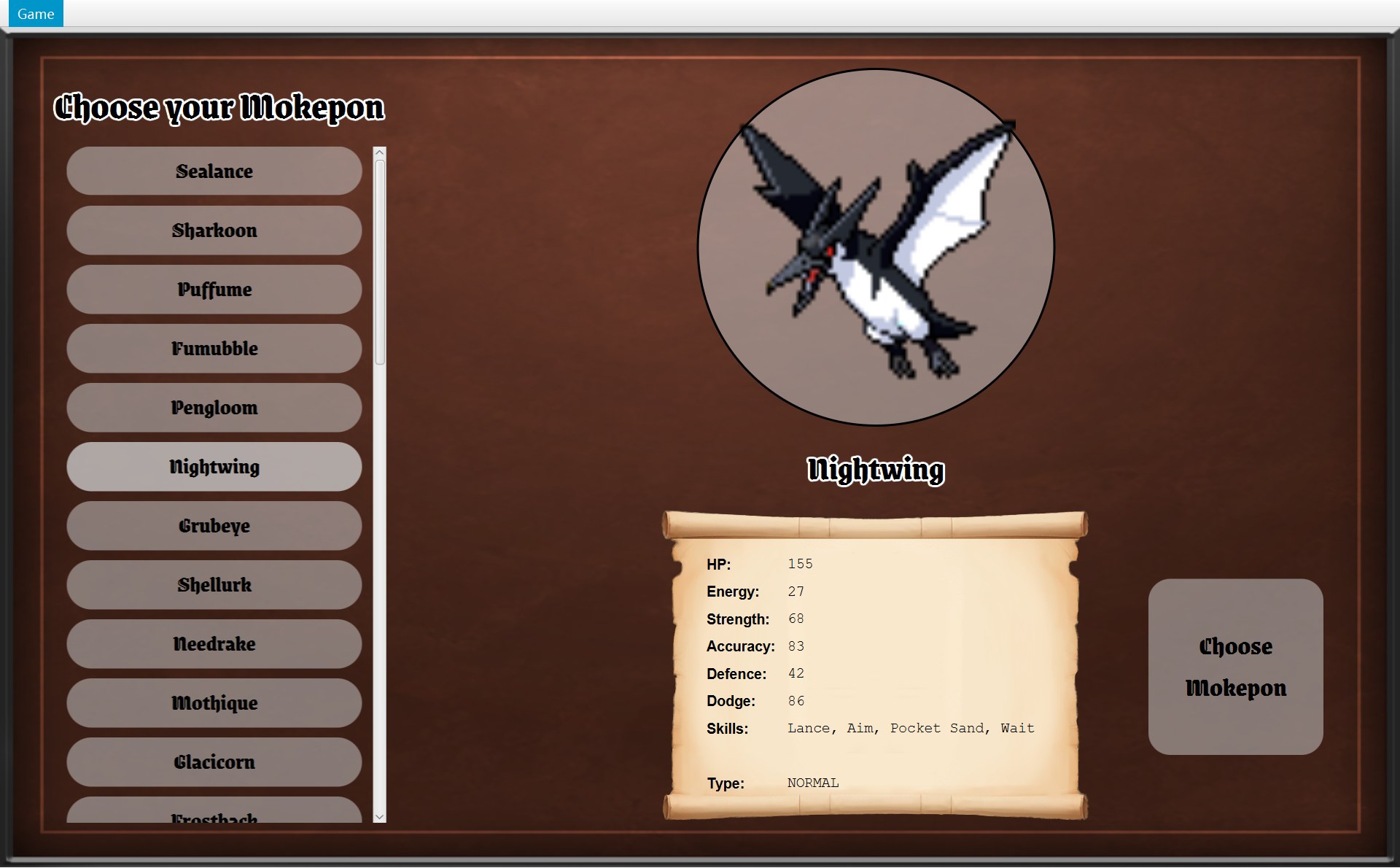
- 1普通按钮:背景
rgba(211,211,211,0.5),50% 不透明的浅灰(NORMAL)。浅灰只盖住一半,下面的棕色透上来,所以看起来是灰棕色 - 2被选中的 Nightwing:
setHighlighted(true),背景的浅灰从 50% 不透明变成 75%(HIGHLIGHTED)。浅灰盖得更多,在棕色背景上看起来更亮、更实。(代码第 45 行的注释写的是 “Darken”,但截图里其实是变亮)
7/* A button with the game's rounded, see-through grey background. */8public class GameButton extends Button {91 private static final double NORMAL = 0.5;102 private static final double HIGHLIGHTED = 0.75;11 /* A disabled button is drawn at 40% opacity, so its 50% grey background looks12 * 20% grey, as the spec asks. Its text and image fade too, as in the sample screenshots.13 */14 private static final double DISABLED_OPACITY = 0.4;15 16 private final int cornerRadius;17 18 public GameButton(String text, Font font, int cornerRadius) {19 super(text);20 this.cornerRadius = cornerRadius;21 setFont(font);22 setBackgroundOpacity(NORMAL);23 }⋯ 省略第 24–44 行45 /* Darken the background to show this button is the current choice. */46 public void setHighlighted(boolean highlighted) {47 setBackgroundOpacity(highlighted ? HIGHLIGHTED : NORMAL);48 }49 50 /* A disabled button fades out as a whole, including its text and image. */51 public void setUsable(boolean usable) {52 setDisable(!usable);53 setBackgroundOpacity(NORMAL);54 setOpacity(usable ? 1 : DISABLED_OPACITY);55 }56 57 private void setBackgroundOpacity(double opacity) {58 setStyle("-fx-background-color: rgba(211,211,211," + opacity + ");"59 + "-fx-background-radius: " + cornerRadius + ";"60 + "-fx-text-fill: black;");61 }CGameButton 是 extends Button:它是一个 JavaFX 按钮,只是多了几种样子。背景的样子都是 private 方法 setBackgroundOpacity(第 57–61 行)设的:它拼出一段 JavaFX 样式字符串,背景颜色是 rgba(211,211,211, 透明度)(211,211,211 是浅灰),圆角是 cornerRadius,字是黑的。禁用时整个按钮变淡,则是另一个方法 setOpacity 做的(下面 setUsable)。
setHighlighted(highlighted)(第 46–48 行):highlighted ? HIGHLIGHTED : NORMAL是三元运算符:“是 true 就用 0.75,否则用 0.5”。CSelectScreen 选中一个名字时用它(第 7 章)。setUsable(usable)(第 51–55 行):做三件事:setDisable(!usable)(能不能点);setBackgroundOpacity(NORMAL):背景回到 0.5(免得一个被选中、背景是 0.75 的按钮变灰以后还和别的灰按钮不一样);setOpacity(usable ? 1 : DISABLED_OPACITY):整个按钮(连字和图片)的不透明度,能用是 1,不能用是 0.4(下面两张图的标注 3)。
- 3
setUsable(false):点不了,整个按钮只剩 40%
- 3
setUsable(true):能点,不透明度回到 1
灰按钮为什么看起来是“20% 的灰”?第 11–13 行注释算给你看了:背景本来是 50% 的灰,整个按钮再乘 0.4,0.5 × 0.4 = 0.2,就是 20%(作业说明要求的样子)。字也一起变淡,和样例截图一样。
- 4三个道具按钮:数量都是 0,
setUsable(false),整个按钮变淡 - 5Tackle [5] 和 Aim [3]:能量 0 用不起,
setUsable(false) - 6Wait [-2]:
setUsable(true),字是实的
- 7战斗结束:
!battle.isFinished()是 false,所有道具按钮和技能按钮都setUsable(false),连 Wait 也灰了
谁在调用 setUsable?CSelectScreen(Choose 按钮)、COverworldScreen(四个方向按钮:setUsable(world.canMove(方向)))、CBattleScreen(技能和道具按钮)。三个画面都只说“能用 / 不能用”,至于“不能用长什么样”,只写在 CGameButton 这一个地方。
18 public GameButton(String text, Font font, int cornerRadius) {19 super(text);20 this.cornerRadius = cornerRadius;21 setFont(font);22 setBackgroundOpacity(NORMAL);23 }24 25 /* A button that only shows an image, such as a movement arrow. */26 public GameButton(ImageView icon, int cornerRadius) {27 this("", Font.getDefault(), cornerRadius);28 setGraphic(icon);29 }30 31 /* Darken the background while the mouse button is held down. */32 public void addPressEffect() {33 setOnMousePressed(event -> {34 if (!isDisabled()) {35 setBackgroundOpacity(HIGHLIGHTED);36 }37 });38 setOnMouseReleased(event -> {39 if (!isDisabled()) {40 setBackgroundOpacity(NORMAL);41 }42 });43 }- 两个构造器(重载)。第一个要文字、字体、圆角:名字按钮、技能按钮、道具按钮用它。第二个只要一张图和圆角:地图上的四个方向按钮用它(圆角是按钮大小的一半,所以是圆的)。第二个的第一行
this("", Font.getDefault(), cornerRadius)是调用第一个构造器(构造器链 this(...)),文字留空,然后再setGraphic(icon)放图。第一个构造器的super(text)是调用父类Button的构造器。 addPressEffect():鼠标按下去时背景变成 0.75(浅灰更实,看起来更亮),松开变回 0.5,让你看出“按下去了”。(第 31 行注释写的也是 “Darken”,效果和上面选中的名字一样,其实是变亮。)两个 lambda 都先检查!isDisabled():灰按钮按了不变色。只有 Choose 按钮、方向按钮、技能和道具按钮调用了它;选择界面的名字按钮没有(它们用setHighlighted表示“选中了”)。按住鼠标时的样子没有截图,看代码就行。
8. 所有的画面切换,和一次完整的“点 Choose Mokepon”
把前面的东西拼起来。整个游戏里,画面只会这样换:
| 从 → 到(你做了什么) | 方法 | CGameWindow 里做的事 |
|---|---|---|
| 选择 → 地图(Choose Mokepon) | startGame | new COverworld、new COverworldScreen、addListener、showScreen |
| 地图 → 战斗(遇敌框的 Fight!) | startBattle | 请 world 造一场 CBattle,new 一个 CBattleScreen,showScreen |
| 战斗 → 地图(You Win 的 Back to it!) | winBattle | world.winEncounter(),再 showScreen(overworldScreen) |
| 战斗 → 地图(菜单 Run away / Ctrl+R) | runAway | world.runAway(),再 showScreen(overworldScreen) |
| 地图或战斗 → 选择(菜单 Main menu / Ctrl+B,或 Return to Main Menu) | returnToMainMenu | 两个字段设 null,clearSelection(),showScreen(selectScreen) |
| → 结束(菜单 Exit / Alt+F4,或 Quit) | quit | Platform.exit()(结束程序) |
每一种切换做完以后,你看到的真实画面(点的是哪个按钮,见第 2 节开头的截图):
12- 1玩家在起点 (10,18):新的 COverworld 里新的 CPlayer
- 2Fights 是 0:每一局都从头开始
startGame 之后:地图画面真实运行截图 · 点 Choose Mokepon 后进入地图,玩家站在起点 (10,18)1- 1这次遇到的 Galecrest:
world.createBattle()造的那一场
startBattle 之后:一个新 new 的 BattleScreen真实运行截图 · 点 Fight! 进入战斗界面,战斗刚开始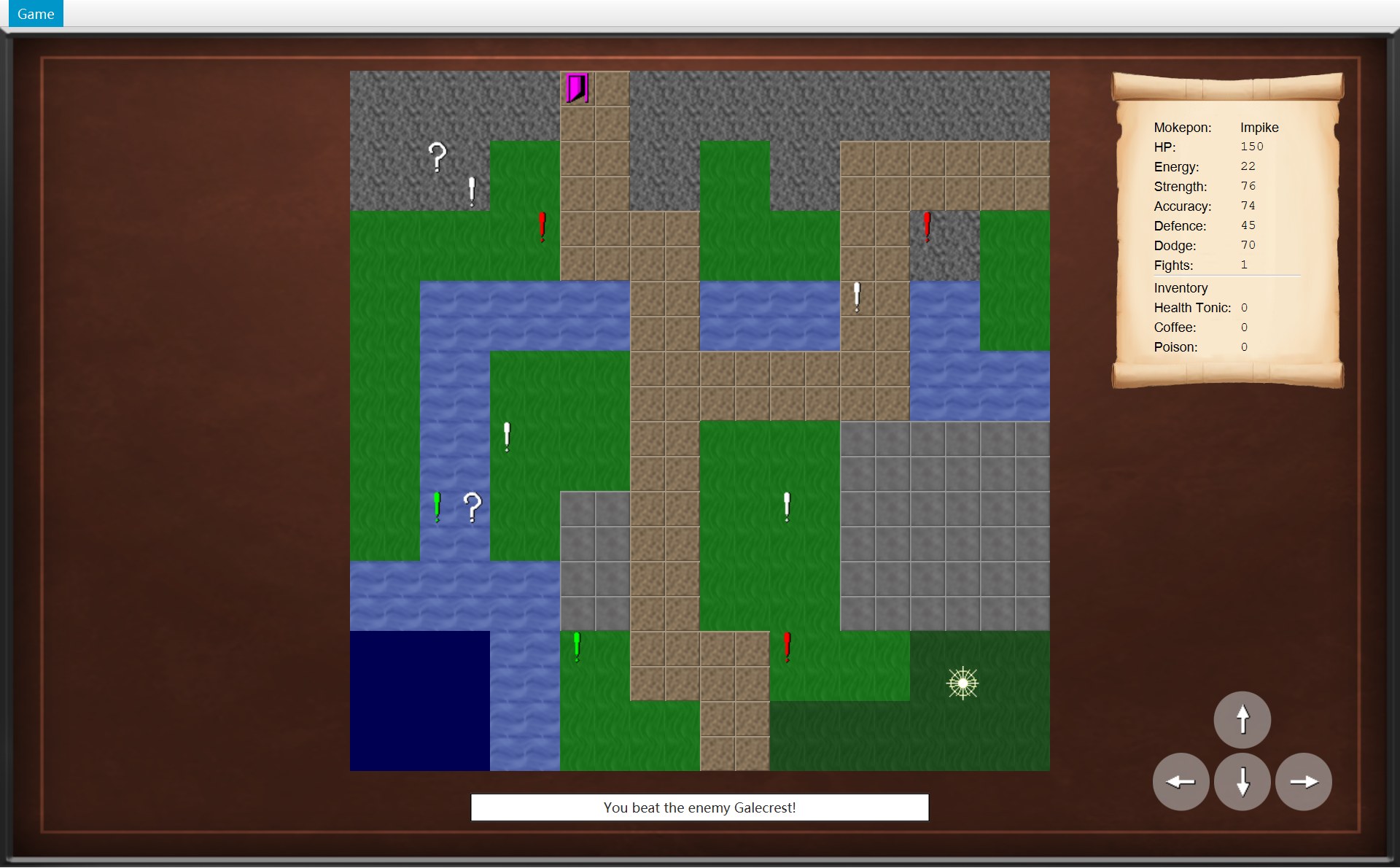 12
12- 1Fights 变成 1:
world.winEncounter()里的player.addWin() - 2状态栏 You beat the enemy Galecrest!:
onEncounterWon写的;感叹号也被拿掉了
winBattle 之后:放回原来那个 overworldScreen真实运行截图 · 点 Back to it! 回到地图:感叹号消失,Fights 变成 1,状态栏提示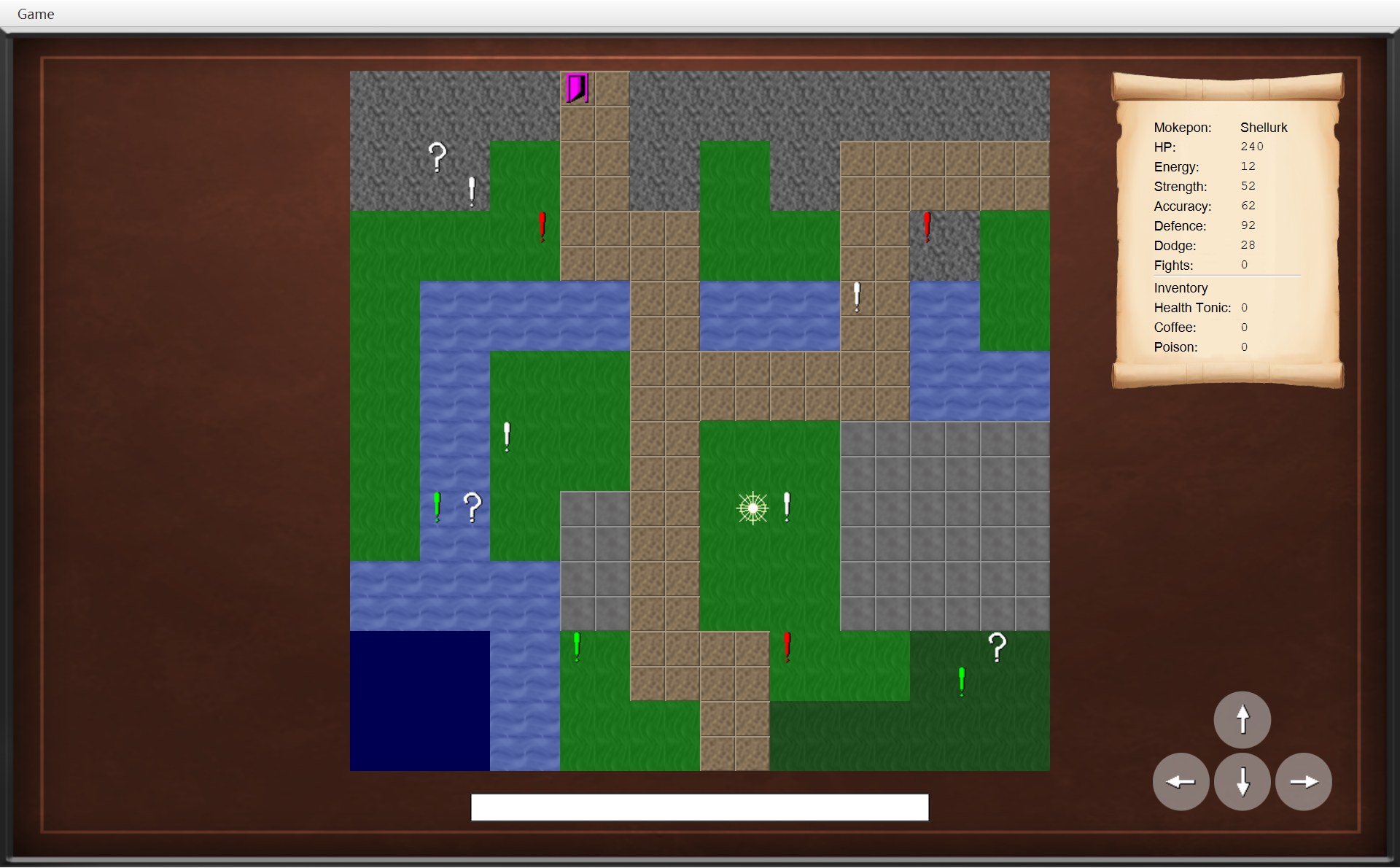
- 1玩家退回踩感叹号之前的那一格,就在感叹号左边 (11,12):
world.runAway()里的player.moveBack()(截图下面自动写的 (12,13) 不对,程序记录的位置是 (11,12)) - 2感叹号 (12,12) 还在
runAway(菜单 Run away)之后:也是原来那个 overworldScreen(另一局,Shellurk;放大了玩家附近)真实运行截图 · 选 Run away:战斗取消,回到踩感叹号之前的那一格 (11,12),感叹号还在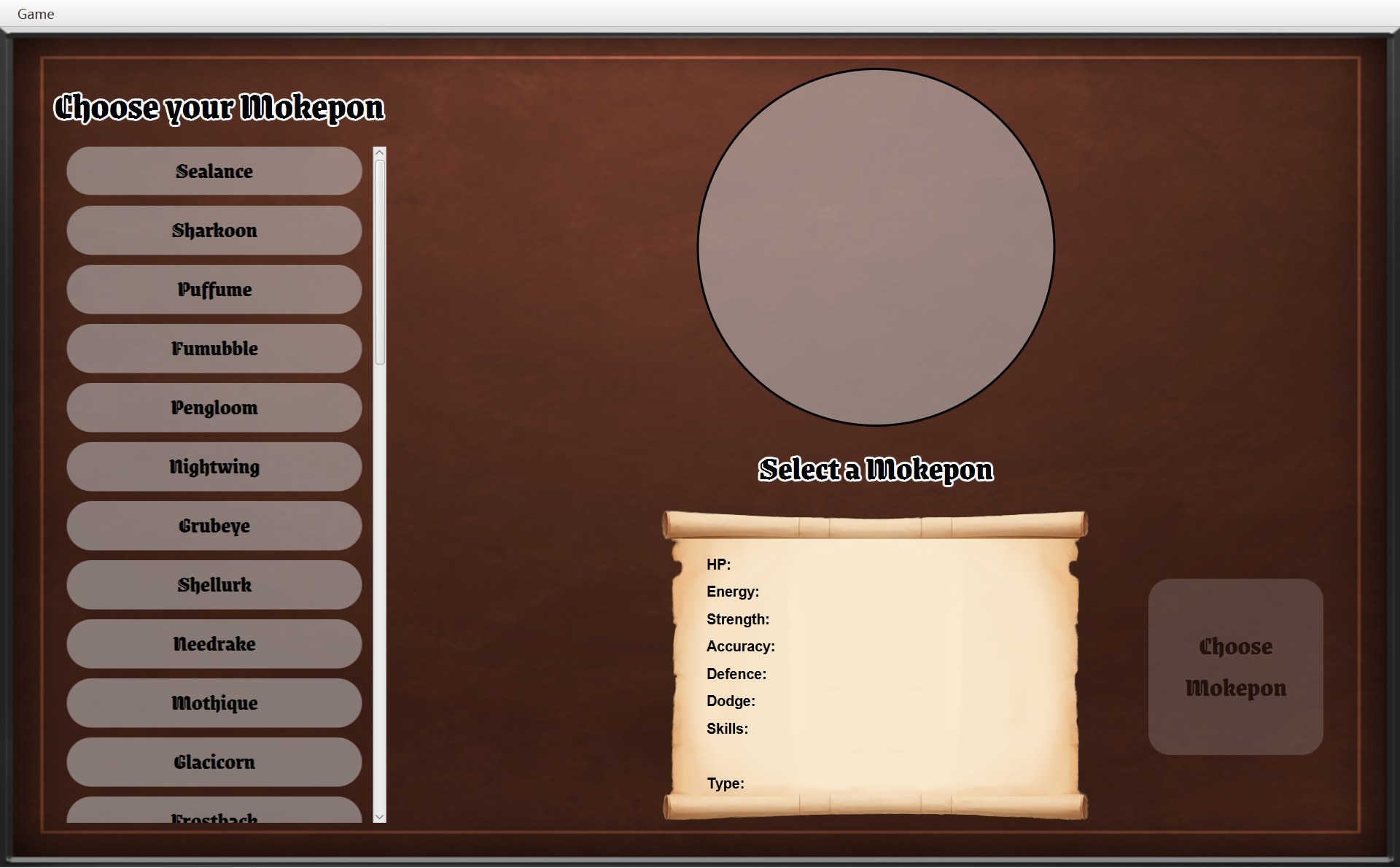 12
12- 1Select a Mokepon:
clearSelection()清空了上一局的选择 - 2Choose 又灰了
returnToMainMenu 之后:还是那一个 selectScreen真实运行截图 · 选 Main menu:这一局被丢弃,回到选择界面,选择被清空1- 1遇敌框里点 Run Away!:框关掉,玩家退回 (18,17),感叹号还在
closeDialog() + world.runAway(),画面一直是地图真实运行截图 · 在对话框里点 Run Away!:回到上一格 (18,17),感叹号还在注意:所有“换画面”最后都落到同一个 showScreen。对话框(遇敌、You Win、Game Over、出口)都不是换画面,只是盖在当前画面上;遇敌框里的 Run Away! 也不换画面(上面最后一张)。逃跑、赢了、回主菜单、出口的完整流程在 第 15 章。
最后,把第一种切换从头到尾慢放一遍:你点 Choose Mokepon,到地图出现、菜单变好,中间每一步是哪一行代码。顺序图的第 2 根线是 CGameWindow 对象:selectScreen 手里的 navigator 指着的就是它(代码里写的类型是 IGameNavigator)。
244 button.setUsable(false);245 button.addPressEffect();246 button.setOnAction(event -> getNavigator().startGame(selectedMokepon));58 public void startGame(Mokepon playerChoice) {59 world = new Overworld(map, mokepons, playerChoice);60 overworldScreen = new OverworldScreen(world, images, this);61 world.addListener(overworldScreen);62 showScreen(overworldScreen);63 }46 public void update(GameScreen screen) {47 runAway.setDisable(!screen.canRunAway());48 mainMenu.setDisable(!screen.canReturnToMainMenu());49 }- 1Choose Mokepon:已经能点(选的是 Impike)
- 1root 中间换成了地图画面的 view
- 1Run away 灰
- 2Main menu 能点
101 private void showScreen(GameScreen screen) {102 currentScreen = screen;103 root.setCenter(screen.getView());104 updateMenu();105 }97 public void updateMenu() {98 menu.update(currentScreen);99 }100 101 private void showScreen(GameScreen screen) {102 currentScreen = screen;103 root.setCenter(screen.getView());104 updateMenu();105 }- 你在选择界面选好 Impike,点了 Choose Mokepon(下面就是那个按钮,选了以后它才亮)。这一下点击引起的所有事情,就是这个动画。
- 按钮是
createChooseButton造的:第 244 行一开始setUsable(false);第 246 行登记了点它时要做的事,lambdagetNavigator().startGame(selectedMokepon)。getNavigator()交出父类字段navigator里的对象,它其实就是 CGameWindow,但 CSelectScreen 只知道它是一个 IGameNavigator。selectedMokepon是刚才点名字时记下的 Impike。 - 来到 CGameWindow.startGame。第 59 行
new Overworld(map, mokepons, playerChoice):造这一局的规则对象,里面有一个新的玩家(站在起点)、一个空背包、地图物体的副本。存进字段world,它不再是 null。 - 第 60 行
new OverworldScreen(world, images, this):造地图画面。它的构造器先super(navigator)(棕色背景),再造地图、卷轴、状态栏、方向按钮,放进自己的 view(第 8 章)。这时它还没出现在窗口里,你看到的还是选择界面。 - 第 61 行
world.addListener(overworldScreen):把地图画面登记成 COverworld 的监听者。以后玩家走路、遇敌、捡到东西,COverworld 就会通知它(第 4 节动画第 9 步就是这样)。是 CGameWindow 登记的,不是画面自己。少了这一行,规则照样运行,画面却永远不会动。 - 第 2 段。第 62 行
showScreen(overworldScreen):第 102 行currentScreen = screen,按键从此交给地图画面;第 103 行root.setCenter(screen.getView()),中间换成地图画面的 view(左下)。选择界面只是被换下来,没有扔掉。 - 第 104 行
updateMenu()→ 第 98 行menu.update(currentScreen):让菜单去问刚换上来的地图画面。 - CGameMenu.update 问两个问题。COverworldScreen 都用父类的默认答案:
canRunAway()是 false →setDisable(true);canReturnToMainMenu()是 true →setDisable(false)。 - 结果:打开 Game 菜单就是下面这样,Run away 灰,Main menu 能点。到这里,点一下 Choose Mokepon 引起的事情就全部做完了,程序停下来,等你的下一次按键或点击。
这一章的 7 个类合在一起,就是整个游戏的“骨架”:CGameWindow 一次只放一个画面,所有换画面都走 showScreen;画面和菜单只通过接口 IGameNavigator 请窗口做事;三个画面共用父类 AGameScreen 的背景、对话框、按键规矩和菜单的默认答案;CModalDialog 和 CGameButton 让各处的框和按钮长得一样。下一章开始一个一个看具体的画面,先从 第 7 章 选择界面 SelectScreen 开始。
自测
从选择界面换到地图时,窗口里哪些东西换了,哪些没换?
只换了 root(一个 BorderPane)中间那一块:root.setCenter(overworldScreen.getView())。窗口 stage、Scene、root 本身、顶上的菜单栏都是同一个,从程序开始到结束都不换。currentScreen 字段也改指新画面。英语:Switching screens only replaces the centre of the BorderPane; the stage, the scene and the menu bar stay the same.
在选择界面时,CGameWindow 的 world 是什么?如果这时 Run away 菜单项能点,会发生什么?
world 和 overworldScreen 都是 null(第 26 行注释),因为还没开始一局。runAway() 第一句是 world.runAway(),对 null 调用方法会抛出 NullPointerException。实际上不会发生:CSelectScreen 用的是父类的 canRunAway()(false),CGameMenu.update 把 Run away 设成 disabled,快捷键 Ctrl+R 也一起失效。world and overworldScreen are null on the select screen; startGame creates them and returnToMainMenu sets them back to null.
打完仗回到地图,玩家还站在原来的位置。这个位置存在哪个对象里?为什么 CGameWindow 不用重新 addListener?
位置存在 world(COverworld)的 CPlayer 对象里,不在画面里。监听者登记在 world 的 listeners 列表里。打仗时 CGameWindow 的 world 和 overworldScreen 两个字段都没变,winBattle / runAway 只是 showScreen(overworldScreen) 把同一个画面放回来,所以位置和登记都还在。The player's position lives in the Overworld's Player, and the listener stays registered in the Overworld, so the same OverworldScreen can simply be shown again.
CSelectScreen 的代码里有没有 GameWindow 这个词?那它是怎么让窗口换到地图的?这样设计有什么好处?
没有。它调用 getNavigator().startGame(selectedMokepon),navigator 的类型是接口 IGameNavigator。运行时里面装的是 CGameWindow(它 implements 这个接口),所以运行的是 CGameWindow.startGame。好处:画面碰不到窗口的其他部分(stage、root、showScreen),两边不会互相依赖,换一个实现画面也不用改。The screens only depend on the GameNavigator interface, not on the concrete GameWindow class (Dependency Inversion).
为什么 handleKeyPress 是 final 的,handleKey 却是 protected,而且默认什么都不做?
这是模板方法。handleKeyPress 定好固定步骤:对话框开着、或者按着 Ctrl/Alt/Meta/Shift 时直接 return,否则调用 handleKey。写成 final,子类就不能改写它、跳过这两条规矩。handleKey 是留给子类填的钩子:COverworldScreen 填方向键,CBattleScreen 填 1–4 键;CSelectScreen 不需要按键,就用空的默认版本,不用写任何代码。handleKeyPress is a final template method that ignores keys while a dialog is open or a modifier is held, then calls the protected hook handleKey.
打赢一场仗以后,画面没有换,为什么 Run away 会变灰?是哪一行做的?
放完最后一个技能,useSkill 调用 update(),第 135 行发现战斗结束了、又没有对话框,就调用 showResult()。CBattleScreen.showResult 第 171 行 getNavigator().updateMenu() → CGameWindow.updateMenu → menu.update(currentScreen) → 问 canRunAway()。CBattleScreen 改写的版本是 return !battle.isFinished();,战斗结束后是 false,所以 Run away 被 setDisable(true)。平时菜单只在 showScreen 时更新,这里画面没换,所以要自己叫一次。BattleScreen calls updateMenu() in showResult because the screen does not change when the battle ends.
遇敌框开着的时候,按方向键会怎样?用鼠标点右下角的方向按钮呢?点 Game 菜单呢?
方向键:handleKeyPress 看到 isDialogOpen() 是 true 就 return,玩家不动。方向按钮:点不到,因为对话框的 layer(1280×768 的半透明 StackPane)是 view 里最上面的一层,挡住了所有点击;就算点到了,movePlayer 也会再查一次对话框。Game 菜单:能点,因为菜单栏在 root 的上面,不在画面的 view 里,layer 盖不到它(这时 Main menu 能用,Run away 是灰的)。
第 4 节截图里的 Shellurk 只有 3 个技能(Tackle、Aim、Wait)。按数字键 4 会怎样?能量不够时按 1 呢?
按 4:SKILL_KEYS.indexOf(DIGIT4) 是 3,第 111 行要求 index < skillButtons.size(),3 不小于 3,什么都不做。能量不够时按 1:会执行 skillButtons.get(0).fire(),但这个按钮已经被 setUsable(false) 禁用,禁用的按钮 fire() 没有反应。所以不用另外判断能量。
CGameButton 的 0.5、0.75、0.4 分别是什么?灰按钮为什么看起来是 20% 的灰?
0.5(NORMAL)是普通按钮浅灰背景的不透明度,0.75(HIGHLIGHTED)是被选中或按住时的背景(浅灰盖得更多,在棕色背景上看起来更亮),0.4(DISABLED_OPACITY)是禁用时整个按钮的不透明度。禁用时背景回到 0.5,再整体乘 0.4:0.5 × 0.4 = 0.2,所以是 20% 的灰,字也一起变淡。这些都写在 CGameButton 一个地方,三个画面只调用 setUsable / setHighlighted。