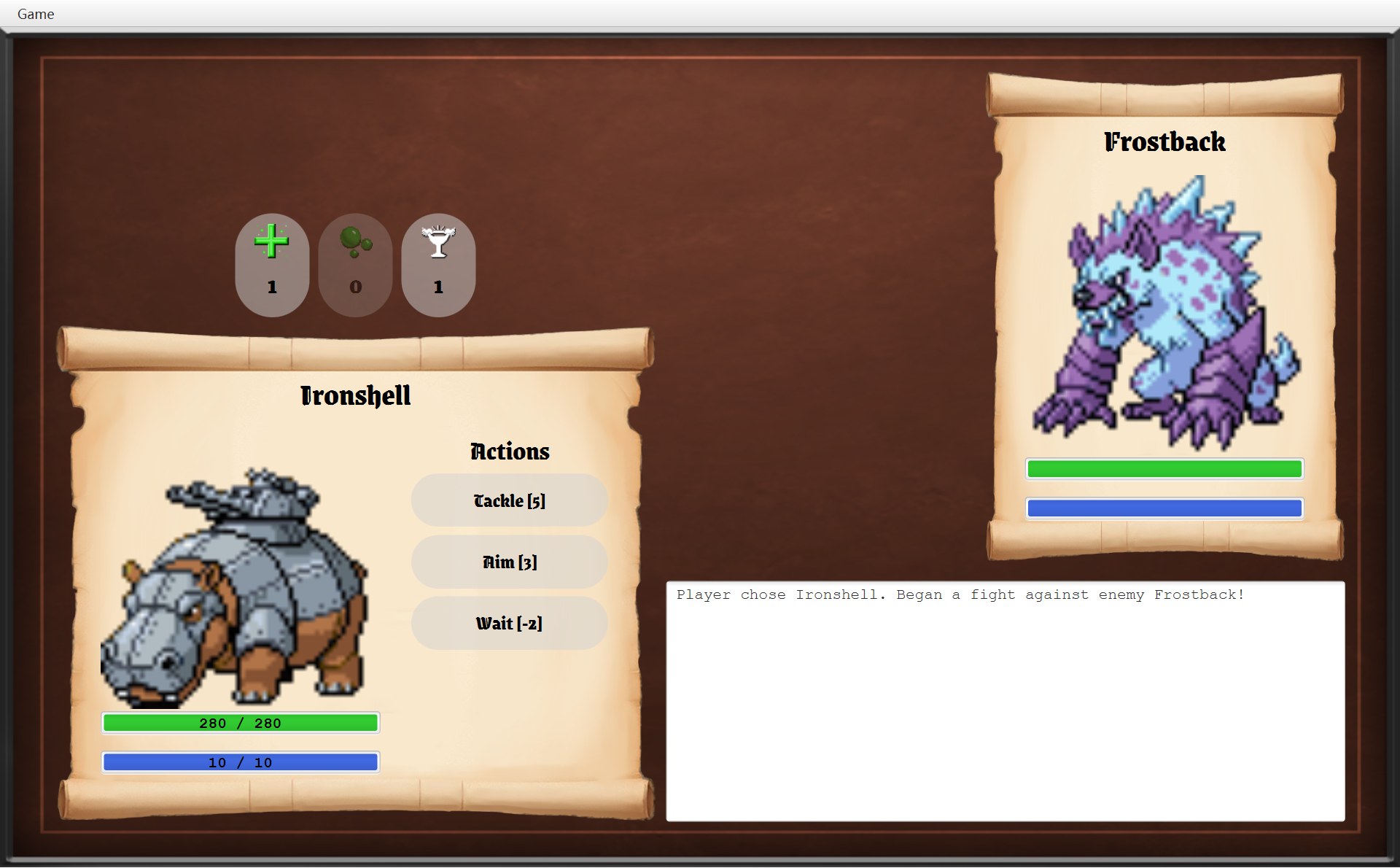
14战斗界面是怎么画出来的
BattleScreen 的布局常量、FighterPanel、血条、红色倒下遮罩、输赢对话框
- 指着战斗截图上的每一块,说出是哪个常量、哪一行代码把它放在那里(截图里的 y 总比代码里多 25)
- 讲清 CBattleScreen 构造器的三段:先造零件,再按顺序放进 view,最后
update()填上数字;为什么红色遮罩最后才放 - 说明 CFighterPanel 为什么一个类用两次,CStatBar 和 CLabelledStatBar 怎么分工(继承 + 多态)
- 算出血条的比例(
MIN_VISIBLE_RATIO = 0.03),说出红色遮罩怎么只盖住卷轴(clip) - 说出每次点按钮以后
update()依次改了屏幕上的哪些东西,结果对话框和菜单怎么跟着变 - 用课程用语(composition、association、delegation)和英语回答 “How is the battle screen drawn? Why is FighterPanel used twice?” 这类题
第 11 章讲了点技能按钮以后 CBattle 里的数据怎么变。这一章只看画:那些数据是怎么变成你在屏幕上看到的卷轴、条、按钮和日志的。CBattleScreen 的类注释(第 25–26 行)说得很清楚:All the battle rules live in the Battle class; this class only displays them.(规则全在 Battle 里,这个类只负责显示。)
这一章会用到 5 个界面类:CBattleScreen、CFighterPanel、CFighterScroll、CStatBar、CLabelledStatBar,外加第 6 章讲过的 CGameButton、CModalDialog 和 CUiStyle。提醒一下第 1 章的约定:彩色小方块是你项目里的类(UML 上有);灰色代码字 Label、ImageView、ProgressBar、TextArea、VBox、HBox、Pane 是 JavaFX 自带的部件(UML 上没有)。画面上能画出来的东西,JavaFX 统称 Node(节点)。
1. 先认一遍:战斗画面上的每一块
先只看图。下面是 A 局刚进战斗的那一刻:你的 Impike 对 Galecrest。每个框写着它在代码里叫什么。
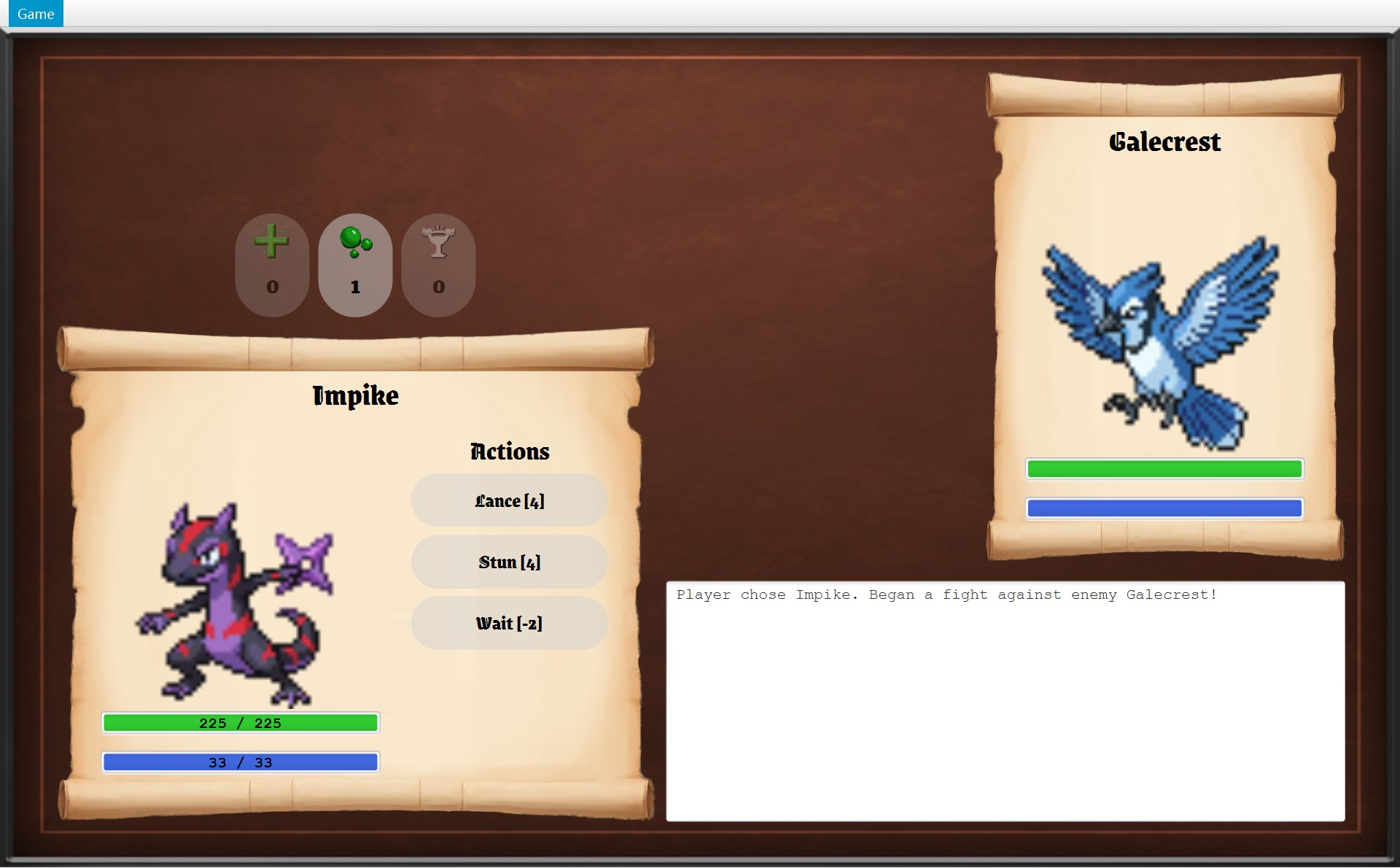 1234567
- 1字段
playerPanel(一个 CFighterPanel):卷轴、名字、头像、两根条都归它 - 2字段
enemyPanel:同一个类 CFighterPanel 的第二个对象 - 3“Actions” 这几个字:构造器里的局部变量
actionLabel(一个Label) - 4技能按钮:装在局部变量
skillButtonColumn(VBox)里;每个按钮还存进字段skillButtons - 5道具按钮:装在局部变量
itemButtonRow(HBox)里;每个按钮还存进字段itemButtons - 6字段
logArea(一个TextArea):战斗日志 - 7背景:一整张 1280 × 768 的底图
assets/bg.png,铺满整个画面(框往里缩了一点)。它是 view 里的第 0 个节点,别的东西都画在它上面。放它的是父类 AGameScreen 的构造器,CBattleScreen 自己没有这个字段
注意框 3、4、5 写的是“局部变量”,框 1、2、6 写的是“字段”。这个区别很重要(UML 上只画字段)。CBattleScreen 自己一共只有 6 个实例字段(instance field:没有 static,每个 CBattleScreen 对象各有一份;第 2 节那 29 个 static 常量不算):
| 字段 : 类型 | 为什么要存成字段 |
|---|---|
battle : CBattle | 所有数字都从它读,按钮也要调用它 |
playerPanel、enemyPanel : CFighterPanel | 每回合要 update() |
logArea : TextArea | 每回合要重新写字 |
skillButtons : List<GameButton> | 每回合要决定亮还是灰;数字键要找第几个 |
itemButtons : Map<Item, GameButton> | 每回合要写数量、决定亮还是灰 |
“Actions” 那个 Label、装按钮的 VBox 和 HBox 造好放进画面以后就再也不用碰,所以只是构造器里的局部变量,下面的图里也没有它们。规则和第 6 章的 CModalDialog 一样:构造器之后还要用到的,才存成字段。
下面一节一节拆:第 2 节讲每一块放在哪,第 3 节讲按什么顺序造、按什么顺序放,第 4–7 节拆开每种零件,第 8 节讲每回合怎么重画。标着“(选读)”的小节只讲细节,赶时间可以先跳过。
2. 布局常量:截图上的每个位置都是算出来的
先记住:截图里的 y 总比代码里的 y 多 25
代码里的坐标是 layoutX / layoutY,意思是“离父容器左边、上边多少像素”。这些部件(按钮是装着它们的 VBox、HBox)的父容器是画面的 view(一个 1280 × 768 的 Pane),而 CGameWindow 把 view 放在菜单栏下面(第 6 章)。截图拍的是整个窗口,菜单栏占了最上面 25 像素:
- 1
- 2菜单栏下面这条线就是
view的顶边:代码里 y = 0 的地方,截图里是 y = 25 - 3你的卷轴顶边:代码里
PLAYER_Y = 272,截图里 272 + 25 = 297
所以下面表里“截图里”那一列,y 都比代码多 25,x 一样。
29 个常量,5 块地方
CBattleScreen 的第 29–64 行全是 private static final 的常量(constant)。其中大部分是坐标和尺寸。截图上每个红色编号,对应下面代码里同号的那一行(鼠标放在编号上,两边会一起亮):
- 1PLAYER_X/Y、WIDTH × HEIGHT:你的卷轴
- 2ENEMY_X/Y、WIDTH × HEIGHT:敌人卷轴
- 3ACTIONS_*、SKILLS_Y、SKILL_*:Actions 和技能按钮
- 4ITEM_*:道具按钮
- 5LOG_X、LOG_Y、LOG_HEIGHT:日志框
33 /* The player's scroll in the lower left. */341 private static final int PLAYER_X = 50;35 private static final int PLAYER_Y = 272;36 private static final int PLAYER_WIDTH = 550;37 private static final int PLAYER_HEIGHT = 455;38 private static final int PLAYER_CONTENT_X = PLAYER_X + 42;39 /* The enemy's scroll in the upper right. */402 private static final int ENEMY_X = 900;41 private static final int ENEMY_Y = 40;42 private static final int ENEMY_WIDTH = 330;43 private static final int ENEMY_HEIGHT = 450;44 private static final int ENEMY_CONTENT_X = ENEMY_X + 37;45 /* The skill buttons on the right side of the player's scroll. */463 private static final int ACTIONS_X = PLAYER_X + 326;47 private static final int ACTIONS_LABEL_Y = PLAYER_Y + 96;48 private static final int ACTIONS_FONT_SIZE = 24;49 private static final int SKILLS_Y = PLAYER_Y + 136;50 private static final int SKILL_WIDTH = 180;51 private static final int SKILL_HEIGHT = 48;52 private static final int SKILL_GAP = 8;53 private static final int SKILL_FONT_SIZE = 18;54 /* The item buttons above the player's scroll. */554 private static final int ITEM_WIDTH = 68;56 private static final int ITEM_HEIGHT = 94;57 private static final int ITEM_ICON_SIZE = 32;58 private static final int ITEM_GAP = 8;59 private static final int ITEM_FONT_SIZE = 24;60 /* The log fills the space between the player's scroll and the right edge. */615 private static final int LOG_X = PLAYER_X + PLAYER_WIDTH + 9;62 private static final int LOG_Y = 506;63 private static final int LOG_HEIGHT = 220;64 private static final int LOG_FONT_SIZE = 14;| 部件 | 代码里的算式 | 代码里 → 截图里(y + 25) |
|---|---|---|
| 你的卷轴 | PLAYER_X、PLAYER_Y,PLAYER_WIDTH × PLAYER_HEIGHT | (50, 272) → (50, 297),550 × 455 |
| 敌人卷轴 | ENEMY_X、ENEMY_Y,宽 × 高 | (900, 40) → (900, 65),330 × 450 |
| 头像和条的左边 | 50 + 42;900 + 37 | x = 92;x = 937(x 不变) |
| Actions | x:50 + 326 = 376 y:272 + 96 = 368 | (376, 368) → (376, 393),宽 180 |
| 第 1 个技能按钮 | x:376 y:272 + 136 = 408 | (376, 408) → (376, 433),180 × 48 |
| 后面的技能按钮 | 每个往下 48 + 8 = 56 | y = 464、520、576 → 489、545、601 |
| 道具按钮这一行 | x:50 y:272 − 94 − 8 = 170 | (50, 170) → 按钮在 y = 195,宽 550 |
| 日志框 | x:50 + 550 + 9 = 609 宽:900 + 330 − 609 = 621 | (609, 506) → (609, 531),621 × 220 |
表里最后一列,和截图上量出来的位置完全一样(技能按钮量出来 180 × 49 左右,是像素取整的误差)。第 4 个技能按钮在哪?A 局的 Impike 只有 3 个技能,没有第 4 个;第 7 节会看到 4 个技能的 Owlet,它的第 4 个按钮正好在 y = 601。
(选读)道具按钮为什么从 x = 215 开始
代码里没有一个常量等于 215。它是 HBox 自己算出来的:createItemButtons 把这一行设成和你的卷轴一样宽(setPrefWidth(PLAYER_WIDTH),550),再 setAlignment(Pos.CENTER),让按钮在这 550 里居中。
- 1这一行
itemButtonRow(HBox):x 从 50 到 600,和卷轴一样宽,本身是透明的 - 23 个按钮一共宽 68 × 3 + 8 × 2 = 220;剩下 550 − 220 = 330,左右各一半 165,所以第一个在 50 + 165 = 215
- 3第二个:215 + 68 + 8 = 291;第三个再加 76,是 367
- 4按钮底边 195 + 94 = 289,再空
ITEM_GAP8 像素,就是卷轴顶边 297
(选读)日志框的右边,正好对齐敌人卷轴的右边
- 1x = 1230 这条竖线:上面一段是敌人卷轴的右边(900 + 330),下面一段是日志框的右边(609 + 621)
227 area.setLayoutX(LOG_X);228 area.setLayoutY(LOG_Y);2291 area.setPrefWidth(ENEMY_X + ENEMY_WIDTH - LOG_X);230 area.setPrefHeight(LOG_HEIGHT);第 229 行的宽度不是直接写 621,而是 ENEMY_X + ENEMY_WIDTH - LOG_X:“从日志框的左边,一直到敌人卷轴的右边”。LOG_X 自己又是 PLAYER_X + PLAYER_WIDTH + 9:“你的卷轴右边再空 9 像素”。所以如果有一天把你的卷轴改宽,日志框会自动往右挪、变窄,右边还是对齐。
打印的 UML 上能找到什么
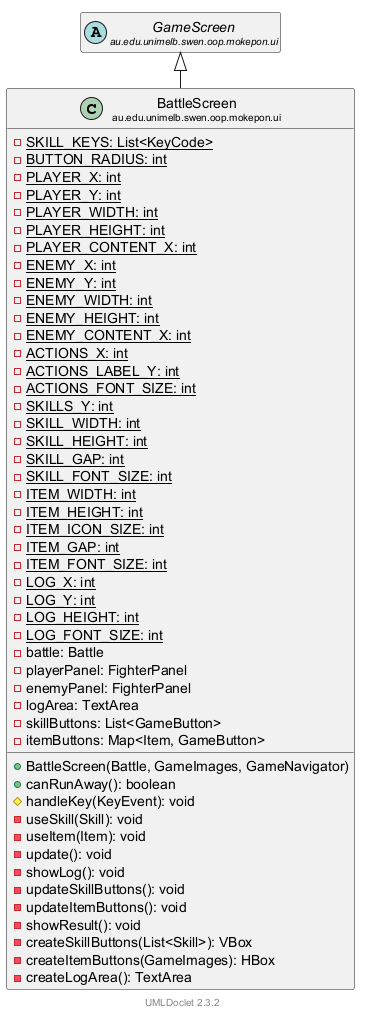
在这张图上找本章的内容
- 最上面 29 行带下划线的:static 常量。
SKILL_KEYS是数字键列表(第 8 节),BUTTON_RADIUS是技能按钮的圆角,其余 27 个是这一节的坐标、尺寸和字号。 - 接着 6 行:第 1 节那 6 个字段,图上写着名字和类型(
battle: Battle、playerPanel: FighterPanel……)。actionLabel、skillButtonColumn、itemButtonRow不在图上:它们是局部变量,UML 不画。 - 绿色圆点:构造器(第 3 节)和
canRunAway()(第 8 节)。 - 黄色菱形:
handleKey(KeyEvent),父类留给子类填的那一步(第 8 节)。 - 红色方块的 10 个方法:
useSkill、useItem、update、showLog、两个update…Buttons、showResult(第 8 节),三个create…(第 7 节)。它们都是 private:只有这个类自己用。
图上看不出来、要靠你自己说的
- 常量的值(50、272、550……)和它们之间的算式:图上只有名字和类型。
playerPanel和enemyPanel是同一个类的两个对象,参数不同(第 4 节)。- 哪些字段是自己 new 的(组合),哪些是别人交进来的(关联):UMLDoclet 图不画这些线,要从代码里看。
- 字段
skillButtons、itemButtons在声明时就 new 好了集合(第 3 节)。 handleKey是被父类 final 的handleKeyPress调用的(模板方法)。
3. 构造器:先造零件,再按顺序放进 view
上一节说的是“放在哪”。这一节看“怎么造出来”。整个画面是 CBattleScreen 的构造器(第 73–97 行)造的。它分三段,一定要分清:
- 造(第 74–89 行):new 出所有零件。造好的零件只是内存里的对象,还没有放进 view(这时 view 里只有第 74 行父类放进去的背景图)。
- 放(第 92–95 行):
addToView(...)把它们按顺序加进 view。后加的画在上面。 - 填(第 96 行):
update()把 CBattle 里的数字填上去。
下面一步一步看。代码框里亮的行是这一步运行的;截图上亮起的框,是这一步造的零件最后会出现的位置;层图是 view 里此刻真有的节点。编号:1 背景,2 你的面板,3 敌人面板,4 Actions,5 技能按钮,6 道具按钮,7 日志框。
73 public BattleScreen(Battle battle, GameImages images, GameNavigator navigator) {74 super(navigator);75 this.battle = battle;76 77 /* Only the player's panel shows numbers on its bars. */78 playerPanel = new FighterPanel(battle.getPlayer(),79 new Rectangle2D(PLAYER_X, PLAYER_Y, PLAYER_WIDTH, PLAYER_HEIGHT),80 PLAYER_CONTENT_X, true);81 enemyPanel = new FighterPanel(battle.getEnemy(),82 new Rectangle2D(ENEMY_X, ENEMY_Y, ENEMY_WIDTH, ENEMY_HEIGHT),83 ENEMY_CONTENT_X, false);84 85 Label actionLabel = UiStyle.createCenteredLabel("Actions",86 UiStyle.loadGameFont(ACTIONS_FONT_SIZE), ACTIONS_X, ACTIONS_LABEL_Y, SKILL_WIDTH);87 VBox skillButtonColumn = createSkillButtons(battle.getPlayer().getSkills());88 HBox itemButtonRow = createItemButtons(images);89 logArea = createLogArea();91 /* Add nodes in drawing order: later nodes are drawn on top. */92 addToView(playerPanel.getNodes());93 addToView(enemyPanel.getNodes());94 addToView(skillButtonColumn, itemButtonRow, actionLabel, logArea,95 playerPanel.getFaintMask(), enemyPanel.getFaintMask());96 update();97 }- 1编号:1 背景(整个画面),2 你的面板,3 敌人面板,4 Actions,5 技能按钮,6 道具按钮,7 日志框。框 = 这个零件以后出现的位置;第 1–7 步只是“造”,零件还只在内存里
- 7第 96 行 update() 写进去的第一句日志(放大)
- CGameWindow.startBattle 调用
new BattleScreen(world.createBattle(), images, this)。第 74 行super(navigator)先跑 AGameScreen 的构造器:存下 navigator(就是传进来的this,窗口自己;参数类型写的是接口 IGameNavigator,第 8 节),把 view 设成 1280 × 768,放进铺满整个画面的背景图(框 1,层图最下面那格)。第 75 行把battle存进字段:后面画的每一个数字都从它读。 - 第 78–80 行造你的面板:
new FighterPanel(你的 Fighter, new Rectangle2D(50, 272, 550, 455), 92, true)。最后的true就是第 77 行注释说的“条上写数字”。CFighterPanel 的构造器里又 new 了卷轴、头像、名字和两根条(第 4 节)。它们只是造好了,还不在屏幕上:层图里还是只有背景。 - 第 81–83 行:同一个类再 new 一次,给敌人。区域是 (900, 40, 330, 450),内容从 x = 937 开始,最后是
false:条上不写数字(框 3)。 - 第 85–86 行:
UiStyle.createCenteredLabel造一个黑字Label,文字 “Actions”,哥特字体 24 号,左上角 (376, 368),宽 180(和技能按钮一样宽),字在这 180 里居中(框 4)。 - 第 87 行
createSkillButtons(battle.getPlayer().getSkills()):Impike 有 3 个技能,就造 3 个按钮,装进一个VBox交回来;每个按钮同时存进字段skillButtons(框 5,第 7 节细看)。 - 第 88 行
createItemButtons(images):3 个道具按钮装进一个HBox,同时存进itemButtons。这时按钮上只有图标,还没有数字:造按钮时文字是空字符串""(框 6)。 - 第 89 行
createLogArea():一个空的TextArea,存进字段logArea(框 7)。到这里零件都造齐了,view 里却还只有一张背景图(层图只亮最下面一格)。 - 第 92 行开始“放”。
playerPanel.getNodes()交出你的面板的 7 个节点:卷轴、头像、名字、HP 条、HP 数字、能量条、能量数字,装在一个List里。传 List 用的是 AGameScreen 里addToView(List<Node>)那个版本(同名方法有两个,叫重载,这个动画后面马上细说)。它们按这个顺序接在背景后面,是第 1–7 个。 - 第 93 行:敌人面板的节点,也是一个 List,第 8–12 个。只有 5 个,因为敌人的两根条没有写数字的
Label。 - 第 94–95 行一个一个传了 6 个 Node,用的是另一个版本
addToView(Node...)(可变参数):技能按钮列、道具行、Actions、日志框是第 13–16 个,最后是两个红色遮罩,第 17–18 个。遮罩现在是隐藏的,可它们排在最后,将来一显示,就盖在卷轴、头像、按钮的上面。最上面那格(对话框)要等打完才加。 - 第 96 行
update():按battle现在的数据全部对一遍(第 8 节)。道具按钮写上 0、1、0(框 6),日志框写上第一句Player chose Impike. Began a fight against enemy Galecrest!(框 7,下面的放大图)。条和数字在造的时候就按起始值画好了,这里再对一遍(框 2)。构造器返回以后,CGameWindow 的showScreen才把这个 view 放进窗口。
两个 addToView:同一个名字,两个版本
59 /* Add nodes in drawing order: later nodes are drawn on top. */60 protected void addToView(Node... nodes) {61 view.getChildren().addAll(nodes);62 }63 64 protected void addToView(List<Node> nodes) {65 view.getChildren().addAll(nodes);66 }证据:后放的盖住先放的
第 59 行 AGameScreen.addToView 的注释写着 later nodes are drawn on top(绘制顺序)。E 局 Owlet 输掉的那一刻,能直接看到这条规则:
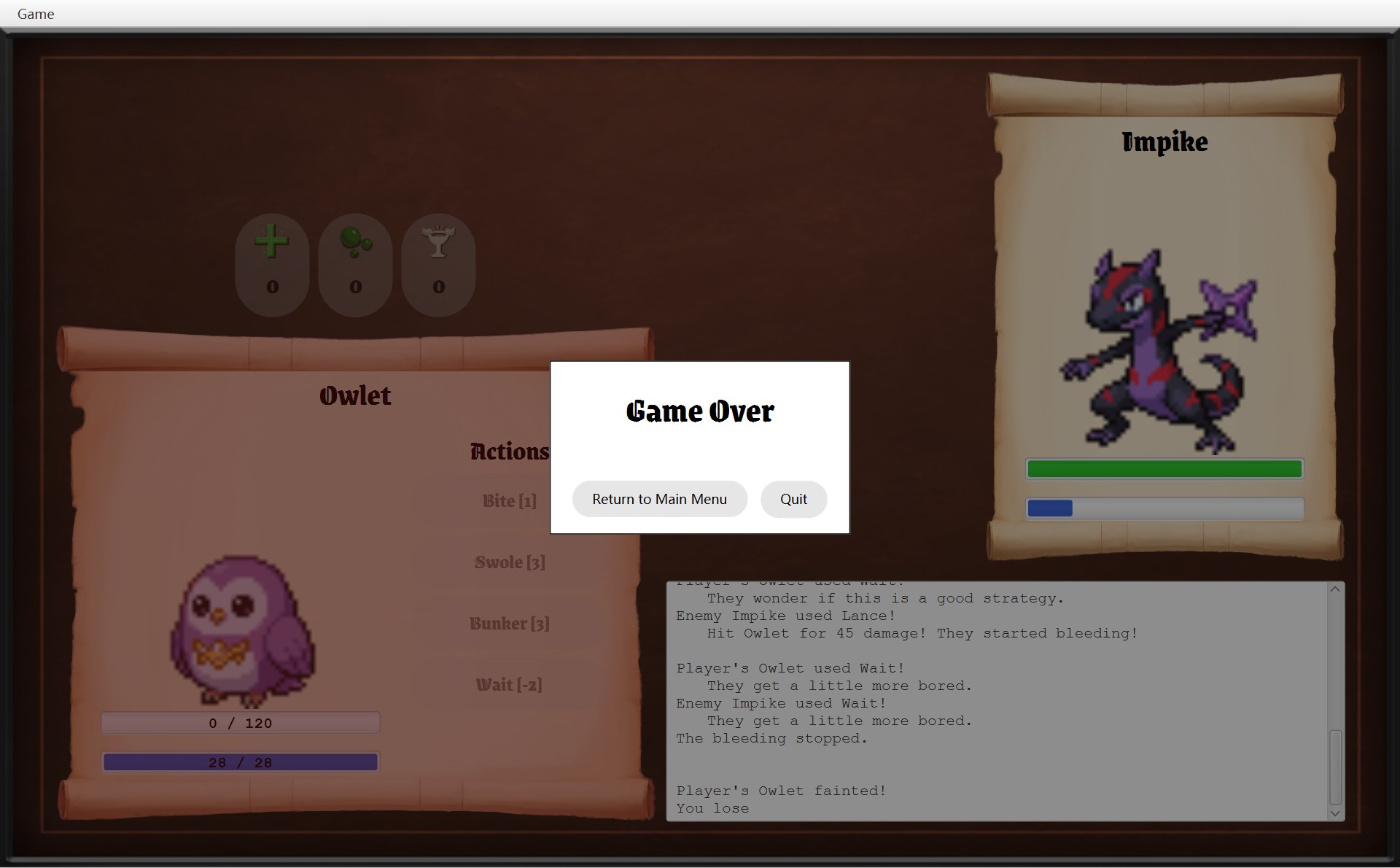 123456
- 1你的红色遮罩(第 17 个)显示出来了:整张卷轴都变红(框只框了左边这一块,免得红线压在对话框上)
- 2Actions(第 15 个)在遮罩下面,字也被染成暗红
- 3技能按钮(装在第 13 个节点 VBox 里;最上面的 Bite 被对话框挡住了一半,框只框了下面 3 个)也在遮罩下面。它们看起来这么淡,还有一个原因:战斗结束了,updateSkillButtons 把它们设成了 40% 不透明(第 8 节)
- 4对话框的深色 layer(第 19 个)在最上面:整个画面连红色一起变暗
- 5日志框在卷轴外面,遮罩盖不到它
- 6敌人没倒下:它的遮罩(第 18 个)还是隐藏的
如果有人把第 95 行的两个 getFaintMask() 挪到第 92 行之前,遮罩就成了第 1、2 个,后加的卷轴图片会把它整个盖住,倒下了也看不出来。所以 CFighterPanel.getNodes 故意不包含遮罩,遮罩要单独用 getFaintMask() 拿(CFighterPanel 第 70 行注释:so it can be drawn on top of everything else)。遮罩本身怎么做的,在第 6 节。
4. FighterPanel:一个类,两个面板
两个面板长得一样,只是大小和位置不同
你的面板和敌人的面板,零件一模一样:卷轴、名字、头像、HP 条、能量条。同号的框是同一种零件(一个在你的卷轴上、一个在敌人的卷轴上):
11223344- 1卷轴
scroll(一个 CFighterScroll):铺满整块区域 - 2名字
name(Label):这个 Label 和卷轴一样宽,字在里面居中(框只框了字) - 3头像
portrait(ImageView):256 × 256 - 4两根条:上面绿色的是
hpBar,下面蓝色的是energyBar
所以只写了一个类,new 两次。两次 new 的时候传的参数不同(第 3 节第 2、3 步)。fighter 是 battle.getPlayer() 或 battle.getEnemy() 交出来的那个 CFighter(这一场战斗用的对象,第 10 章);area 是一个 Rectangle2D:左上角 x、y,宽,高(都是 view 里的坐标):
| 参数 | 你的面板 | 敌人面板 |
|---|---|---|
fighter | Impike | Galecrest |
area | 50, 272, 550, 455 | 900, 40, 330, 450 |
contentX | 92 | 937 |
showNumbers | true | false |
构造器:每个零件的位置都从 area 算
- 1第 41 行:卷轴铺满 area
- 2第 44–46 行:名字。Label 从 x = 50 起、宽 550,字在里面居中(框只框了字)
- 3第 42–43 行:头像,x = contentX = 92
- 4第 51 行:showNumbers 是 true,HP 条是 LabelledStatBar
- 5第 53 行:能量条也是 LabelledStatBar
33 /* The scroll fills the area, and the picture and bars start at contentX.34 * Only the player's bars write their numbers on top, so showNumbers is false35 * for the enemy.36 */37 public FighterPanel(Fighter fighter, Rectangle2D area, double contentX,38 boolean showNumbers) {39 this.fighter = fighter;40 double top = area.getMinY();411 scroll = new FighterScroll(area.getMinX(), top, area.getWidth(), area.getHeight());423 portrait = UiStyle.createImageView(UiStyle.loadImage(fighter.getImagePath()),43 contentX, top + PORTRAIT_OFFSET, PORTRAIT_SIZE, PORTRAIT_SIZE);442 name = UiStyle.createCenteredLabel(fighter.getName(),45 UiStyle.loadGameFont(NAME_FONT_SIZE), area.getMinX(), top + NAME_OFFSET,46 area.getWidth());47 48 double hpY = top + HP_BAR_OFFSET;49 double energyY = top + ENERGY_BAR_OFFSET;50 if (showNumbers) {514 hpBar = new LabelledStatBar(contentX, hpY, HP_COLOUR,52 fighter.getHp(), fighter.getMaxHp());535 energyBar = new LabelledStatBar(contentX, energyY, ENERGY_COLOUR,54 fighter.getEnergy(), fighter.getMaxEnergy());55 } else {56 hpBar = new StatBar(contentX, hpY, HP_COLOUR, fighter.getHp(), fighter.getMaxHp());57 energyBar = new StatBar(contentX, energyY, ENERGY_COLOUR,58 fighter.getEnergy(), fighter.getMaxEnergy());59 }60 }- 第 40 行
top = area.getMinY():卷轴的顶边。下面的零件都是“顶边往下多少”,四个距离是第 20–24 行的常量(注释:How far each part is below the top of the scroll)。 - 第 41 行:
new FighterScroll(x, top, 宽, 高),卷轴铺满整块区域。 - 第 42–43 行:
UiStyle.loadImage读出fighter.getImagePath()那张图(就是这只 Mokepon 自己的图片),UiStyle.createImageView再把它缩放成 256 × 256、左上角放在 (contentX, top + 95)。 - 第 44–46 行:名字的 x 是
area.getMinX(),宽是area.getWidth(),createCenteredLabel让字在这个宽度里居中,所以名字总在卷轴正中。 - 第 48–59 行:两根条。整个类里只有这一处
if (showNumbers)区分“你”和“敌人”:true 造 CLabelledStatBar,false 造普通的 CStatBar。颜色是第 16–17 行的常量"limegreen"和"royalblue"。
| 零件 | y 的算式 | 你的(top 272)→ 截图 | 敌人的(top 40)→ 截图 |
|---|---|---|---|
| 名字 | top + 42 | 314 → 339 | 82 → 107 |
| 头像 | top + 95 | 367 → 392 | 135 → 160 |
| HP 条 | top + 353 | 625 → 650 | 393 → 418 |
| 能量条 | top + 389 | 661 → 686 | 429 → 454 |
x 方向:敌人的 ENEMY_CONTENT_X = ENEMY_X + 37。37 = (330 − 256) ÷ 2,正好让 256 宽的头像在 330 宽的卷轴里居中。你的是 PLAYER_X + 42,头像靠左,因为卷轴右半边要放 Actions 和技能按钮。
字段:hpBar 的类型写的是 StatBar
和上一节一样:fighter 是 CBattleScreen 交进来的(关联),其余 5 个零件都是 CFighterPanel 自己在构造器里 new 的(组合)。再看两根条的字段声明和赋值:
26 private final Fighter fighter;27 private final FighterScroll scroll;28 private final ImageView portrait;29 private final Label name;30 private final StatBar hpBar;31 private final StatBar energyBar;⋯ 省略第 32–49 行50 if (showNumbers) {51 hpBar = new LabelledStatBar(contentX, hpY, HP_COLOUR,52 fighter.getHp(), fighter.getMaxHp());53 energyBar = new LabelledStatBar(contentX, energyY, ENERGY_COLOUR,54 fighter.getEnergy(), fighter.getMaxEnergy());55 } else {56 hpBar = new StatBar(contentX, hpY, HP_COLOUR, fighter.getHp(), fighter.getMaxHp());57 energyBar = new StatBar(contentX, energyY, ENERGY_COLOUR,58 fighter.getEnergy(), fighter.getMaxEnergy());59 }- 第 30–31 行:字段声明成
StatBar(父类)。 - 第 51 行:你的面板(
showNumbers是 true)往里装一个new LabelledStatBar(...):子类的对象。 - 第 56 行:敌人面板装一个
new StatBar(...):父类本身的对象。
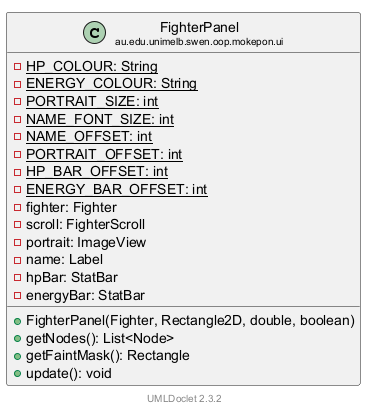
打印的 UML 上,CFighterPanel 只写着 hpBar: StatBar、energyBar: StatBar,看不出你的面板里其实是 CLabelledStatBar。这是声明类型和实际类型的区别:字段写父类,可以装子类的对象(多态)。考试时可以这样说:hpBar is declared as StatBar; the player's panel stores a LabelledStatBar in it.
另外三个方法:getNodes、getFaintMask、update
62 /* The parts to add to the screen, in drawing order. */63 public List<Node> getNodes() {64 List<Node> nodes = new ArrayList<>(List.of(scroll.getScroll(), portrait, name));65 nodes.addAll(hpBar.getNodes());66 nodes.addAll(energyBar.getNodes());67 return nodes;68 }69 70 /* The red tint is added separately, so it can be drawn on top of everything else. */71 public Rectangle getFaintMask() {72 return scroll.getFaintMask();73 }74 75 /* Make the bars and the red tint match the fighter. */76 public void update() {77 hpBar.update(fighter.getHp(), fighter.getMaxHp());78 energyBar.update(fighter.getEnergy(), fighter.getMaxEnergy());79 scroll.setFainted(!fighter.isAlive());80 }getNodes()(第 63–68 行):交出要放进画面的节点,顺序就是画的顺序:卷轴、头像、名字,然后是 HP 条自己的节点、能量条自己的节点。条有几个节点,它不管,问条要(hpBar.getNodes()):CLabelledStatBar 给 2 个(条 + 数字),CStatBar 给 1 个。所以你的面板一共 3 + 2 + 2 = 7 个,敌人的 3 + 1 + 1 = 5 个。getFaintMask()(第 71–73 行):单独交出红色遮罩,让 CBattleScreen 放到最后(上一节)。update()(第 76–80 行):每回合调用。读出fighter现在的 HP 和能量交给两根条,再按isAlive()决定显不显示红色遮罩。面板在 new 的时候存下了自己那个 CFighter(第 39 行),所以不用别人告诉它数字。
5. StatBar 和 LabelledStatBar:条怎么画、数字怎么写
StatBar:包着一个 ProgressBar
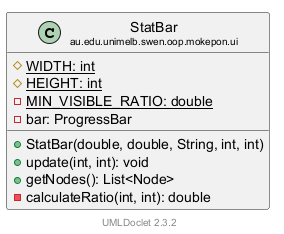
条本身是 JavaFX 的进度条 ProgressBar:给它一个 0 到 1 之间的比例,它就填那么长。CStatBar 把它包起来,只多做一件事:把“当前值 / 最大值”变成比例。下面是 A 局用了 Poison 以后的敌人两根条:
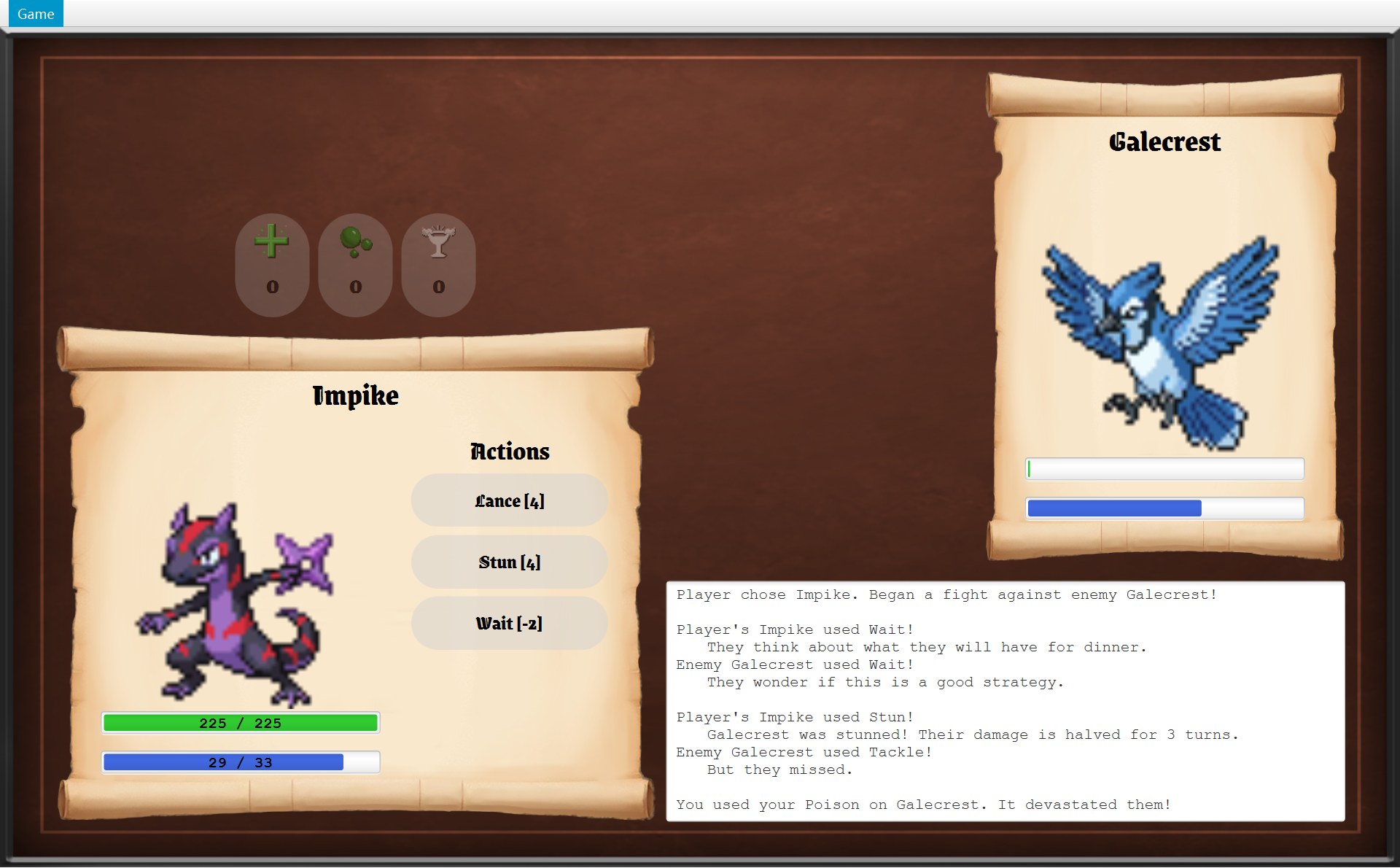
- 1HP 1 / 93 = 0.0108,比 0.03 小,第 41 行取 0.03:最左边留一丝绿色
- 2第 19–22 行的 ProgressBar,颜色 royalblue:能量 9 / 14 = 0.6429,填了大约 64%
7/* A coloured bar showing how much HP or energy is left. */8public class StatBar {9 protected static final int WIDTH = 256;10 protected static final int HEIGHT = 22;11 12 /* Keep a small sliver visible for any value above zero. */13 private static final double MIN_VISIBLE_RATIO = 0.03;14 15 private final ProgressBar bar;16 17 /* Create the bar already showing the starting value. */18 public StatBar(double x, double y, String colour, int current, int max) {192 bar = new ProgressBar(calculateRatio(current, max));20 bar.setPrefWidth(WIDTH);21 bar.setPrefHeight(HEIGHT);22 bar.setStyle("-fx-accent: " + colour + ";");23 bar.setLayoutX(x);24 bar.setLayoutY(y);25 }26 27 /* Show the current value out of the maximum. */28 public void update(int current, int max) {29 bar.setProgress(calculateRatio(current, max));30 }31 32 /* The parts to add to the screen. */33 public List<Node> getNodes() {34 return List.of(bar);35 }36 37 private double calculateRatio(int current, int max) {38 if (current <= 0) {39 return 0;40 }411 return Math.max(MIN_VISIBLE_RATIO, current * 1.0 / max);42 }43}- 第 18–25 行,构造器:第 19 行
new ProgressBar(calculateRatio(current, max)),造出来就已经是起始比例;第 20–21 行大小是WIDTH × HEIGHT= 256 × 22;第 22 行setStyle("-fx-accent: " + colour + ";")用 JavaFX 样式设填充颜色(CFighterPanel 传进来的 limegreen 或 royalblue);第 23–24 行放到 (x, y)。 - 第 28–30 行
update(current, max):只有一句bar.setProgress(...),换一个新比例。 - 第 33–35 行
getNodes():只有一个节点,就是这根条。 - 第 37–42 行
calculateRatio:第 38 行current <= 0(小于等于 0)就直接返回 0(提前返回);否则算current * 1.0 / max,再和MIN_VISIBLE_RATIO(0.03)比,Math.max取大的那个。第 12 行注释:Keep a small sliver visible for any value above zero. 只要还有 1 点 HP,就留一丝颜色,免得看起来像已经倒下了。
真实运行时的比例(current / max 那一列是 CFighter 里的数,最后一列是条上真正设的 progress):
| 截图 | 哪根条 | current / max | calculateRatio 返回 |
|---|---|---|---|
| battle-stun | 你的能量 | 29 / 33 | 0.8788 |
| battle-stun | 敌人能量 | 9 / 14 | 0.6429 |
| battle-tackle-disabled | 你的能量 | 3 / 12 | 0.25 |
| battle-poison | 敌人 HP | 1 / 93 | 0.0108 → 0.03 |
| battle-win | 敌人 HP | 0 / 93 | 0(第 38–40 行) |
| battle-only-wait | 你的能量 | 0 / 12 | 0 |
把 A 局敌人的两根条连起来看(每一帧都是 CBattleScreen.update 跑完以后的真实画面):
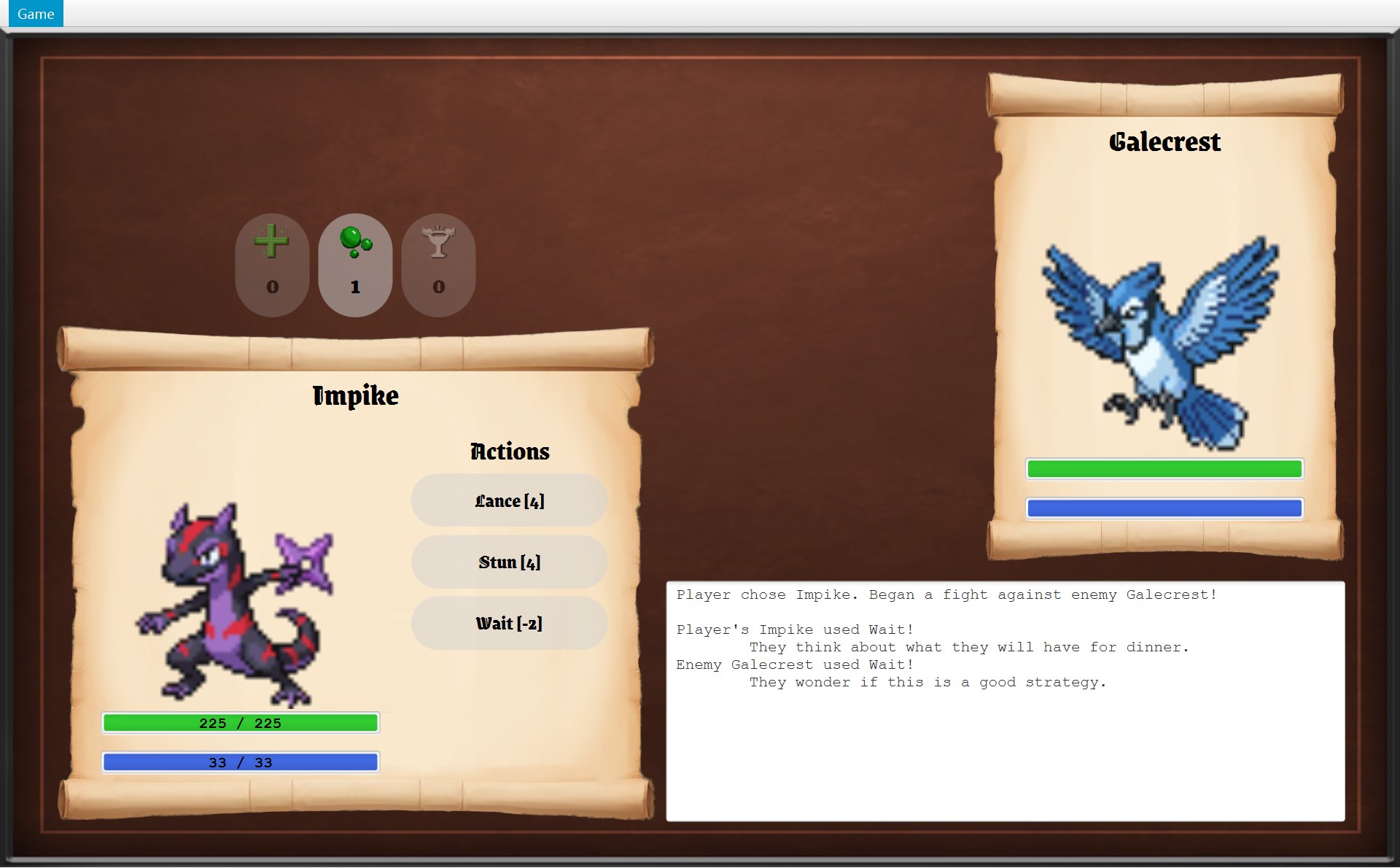
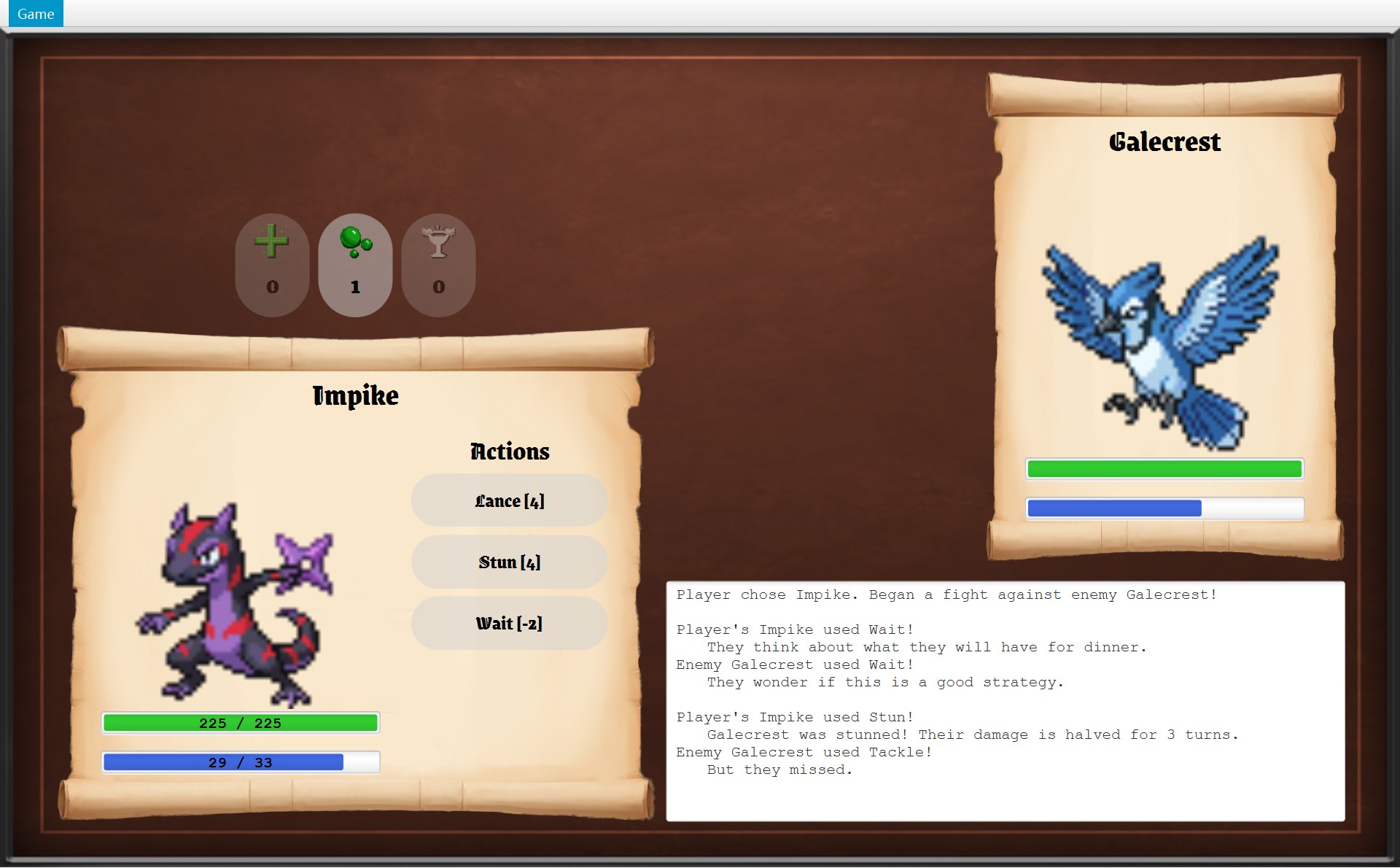
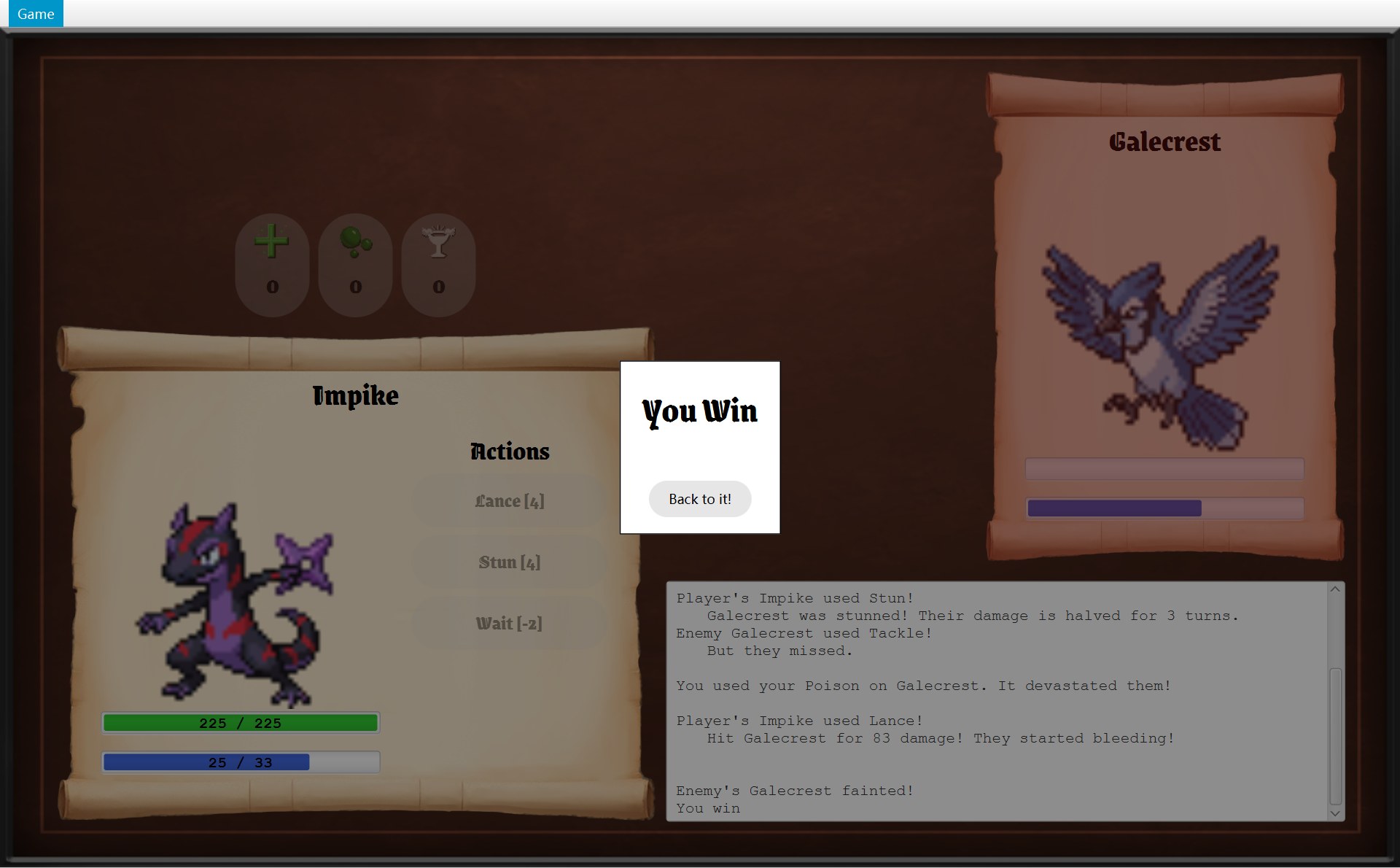
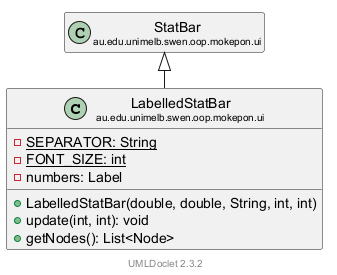
LabelledStatBar:继承 StatBar,再多写一行数字
- 1第 18 行
super(...):先让父类造好这根条 - 2第 19–24 行:数字
numbers,一个 Label,和条一样大、放在同一个位置,字居中 - 3第 29 行
super.update:条只填到 29 / 33 ≈ 0.88,右边空出一截 - 4第 30 行:数字改成 29 / 33
10/* A stat bar that also writes the numbers on top of it, for example "180 / 180". */11public class LabelledStatBar extends StatBar {12 private static final String SEPARATOR = " / ";13 private static final int FONT_SIZE = 14;14 15 private final Label numbers;16 17 public LabelledStatBar(double x, double y, String colour, int current, int max) {181 super(x, y, colour, current, max);192 numbers = UiStyle.createLabel(current + SEPARATOR + max,20 UiStyle.createMonospaceFont(FontWeight.BOLD, FONT_SIZE));21 numbers.setLayoutX(x);22 numbers.setLayoutY(y);23 numbers.setPrefSize(WIDTH, HEIGHT);24 numbers.setAlignment(Pos.CENTER);25 }26 27 @Override28 public void update(int current, int max) {293 super.update(current, max);304 numbers.setText(current + SEPARATOR + max);31 }32 33 /* The numbers go after the bar so they are drawn on top of it. */34 @Override35 public List<Node> getNodes() {36 List<Node> nodes = new ArrayList<>(super.getNodes());37 nodes.add(numbers);38 return nodes;39 }40}- 第 11 行
extends StatBar:CLabelledStatBar 是 CStatBar 的子类,条的所有功能都继承下来(继承)。 - 第 18 行
super(x, y, colour, current, max):构造器第一行调用父类的构造器,条由父类造(super)。 - 第 19–24 行:再造一个
Label,文字是current + SEPARATOR + max(SEPARATOR是第 12 行的常量" / "),粗体等宽 14 号(第 13 行的FONT_SIZE)。setPrefSize(WIDTH, HEIGHT)用的是父类的常量 256 和 22:它们是 protected 的,子类可以直接用(UML 上是黄色菱形)。 - 第 27–31 行:改写(override)父类的
update,方法上面写着@Override。第 29 行先super.update(current, max),让父类那一句改条的长短;第 30 行再改数字。父类的代码没有重抄一遍,只加了自己多出来的那一行。 - 第 34–39 行:改写
getNodes。先拿父类给的(那根条),再把numbers加在后面。第 33 行注释:The numbers go after the bar so they are drawn on top of it. 反过来的话,绿色的条会把数字盖住。
现在回到 CFighterPanel.update 的那一句 energyBar.update(fighter.getEnergy(), fighter.getMaxEnergy())。两个面板写的是同一句,跑的却是不同的代码。下面用 battle-stun 那一回合的真实数字(读法见第 1 章第 3 节:每根竖虚线是一个对象,从上往下是时间,实线箭头 = 调用,绕回自己 = 调用自己的方法):
运行时才看对象到底是哪个类、执行哪个版本的方法,这叫动态绑定。CBattle 调用 skill.use(...) 时也是同一个道理(第 12 章)。好处:“你的条有数字、敌人的没有”这个区别,只在 CFighterPanel 构造器的那个 if 里决定一次。以后 update、getNodes 都不用再问“这是谁的条”。CStatBar 也不是抽象类:敌人的条就是 CStatBar 本身的对象。
6. FighterScroll:倒下时的红色遮罩
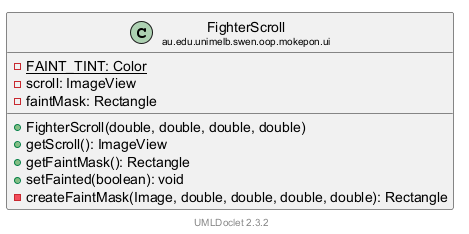
同一张敌人卷轴,开打时和倒下时(同样大小的放大图),下面是造它的整个类。图上的编号和代码行的编号一一对应:
- 2第 31 行
setFainted(false)(还活着):遮罩就在这里(第 18 个节点),只是看不见。第 45 行一造出来就先把它藏起来了
- 1第 10 行的颜色
FAINT_TINT:35% 不透明的深红色,所以下面的头像、名字、条都还看得见 - 3第 37 行造的红色长方形:330 × 450,和卷轴一样大,第 42–43 行放在 (900, 40),截图里是 (900, 65)。倒下以后第 31 行
setFainted(true)让它显示出来
8/* The scroll behind a fighter, with a red tint that covers it when the fighter faints. */9public class FighterScroll {101 private static final Color FAINT_TINT = Color.web("#b41e1e", 0.35);11 12 private final ImageView scroll;13 private final Rectangle faintMask;14 15 public FighterScroll(double x, double y, double width, double height) {16 Image scrollImage = UiStyle.loadImage(UiStyle.SCROLL_FILE);17 scroll = UiStyle.createImageView(scrollImage, x, y, width, height);18 faintMask = createFaintMask(scrollImage, x, y, width, height);19 }20 21 public ImageView getScroll() {22 return scroll;23 }24 25 /* The mask is returned separately so it can be drawn on top of everything else. */26 public Rectangle getFaintMask() {27 return faintMask;28 }29 30 public void setFainted(boolean fainted) {312 faintMask.setVisible(fainted);32 }33 34 /* Clip a red rectangle to the scroll's shape so only the scroll turns red. */35 private Rectangle createFaintMask(Image scrollImage, double x, double y,36 double width, double height) {373 Rectangle mask = new Rectangle(width, height, FAINT_TINT);38 ImageView scrollShape = new ImageView(scrollImage);39 scrollShape.setFitWidth(width);40 scrollShape.setFitHeight(height);41 42 mask.setLayoutX(x);43 mask.setLayoutY(y);444 mask.setClip(scrollShape);45 mask.setVisible(false);46 return mask;47 }倒下以后整块卷轴变红,但头像、名字、两根条都还看得见:遮罩是半透明的(alpha 0.35)。整张图比开打时暗,是因为对话框的那一层又盖在遮罩上面(第 8 节)。一行一行看:
- 第 10 行(编号 1):
Color.web("#b41e1e", 0.35)。#b41e1e是深红色(红 180、绿 30、蓝 30),第二个数 0.35 是不透明度。它是 static final:所有卷轴共用这一个颜色。 - 第 15–19 行,构造器:第 16 行读一次卷轴图片
assets/scroll.png(UiStyle.SCROLL_FILE),用了两次:第 17 行做成看得见的卷轴(拉伸到 宽 × 高),第 18 行交给createFaintMask当遮罩的“形状”。 - 第 30–32 行(编号 2):
setFainted(fainted)就是faintMask.setVisible(fainted)。谁调用它?CFighterPanel.update 第 79 行:scroll.setFainted(!fighter.isAlive())。每回合都调用:活着传 false,倒下传 true。 - 第 37 行(编号 3):
new Rectangle(width, height, FAINT_TINT):一个和卷轴一样大的红色长方形。这个Rectangle是能画出来的形状,和第 4 节那个只装数字的Rectangle2D不是一回事。 - 第 38–40 行:再造一个同样图片、同样大小的
ImageView,叫scrollShape。它不放进画面,只当模具用。 - 第 44 行(编号 4):
mask.setClip(scrollShape):裁剪。只有卷轴图片上有颜色的地方,红色长方形才显示;图片透明的地方(卷轴波浪边外面、四个角)被剪掉。所以变红的是卷轴的形状,不是一个方块。 - 第 45 行:一开始隐藏,等第 31 行来决定显不显示。
clip 到底剪掉了什么
先看第 37–44 行做的三件事,再把 battle-win 里敌人卷轴的左上边放大,找一块“在长方形里面、却在卷轴图片外面”的地方:
- 3x = 900:红色长方形的左边。再往左是长方形外面
- 4长方形里面、卷轴图片外面(波浪边凹进去的地方):颜色和长方形外面一样,没有变红。这一块被第 44 行的 clip 剪掉了
- 1卷轴图片上:被染红
7. 技能按钮、道具按钮、日志框:三个 create 方法
构造器第 87–89 行调用了三个 private 方法造零件。按钮都是 CGameButton(半透明灰底的按钮,第 6 章第 7 节)。
createSkillButtons:有几个技能就几个按钮
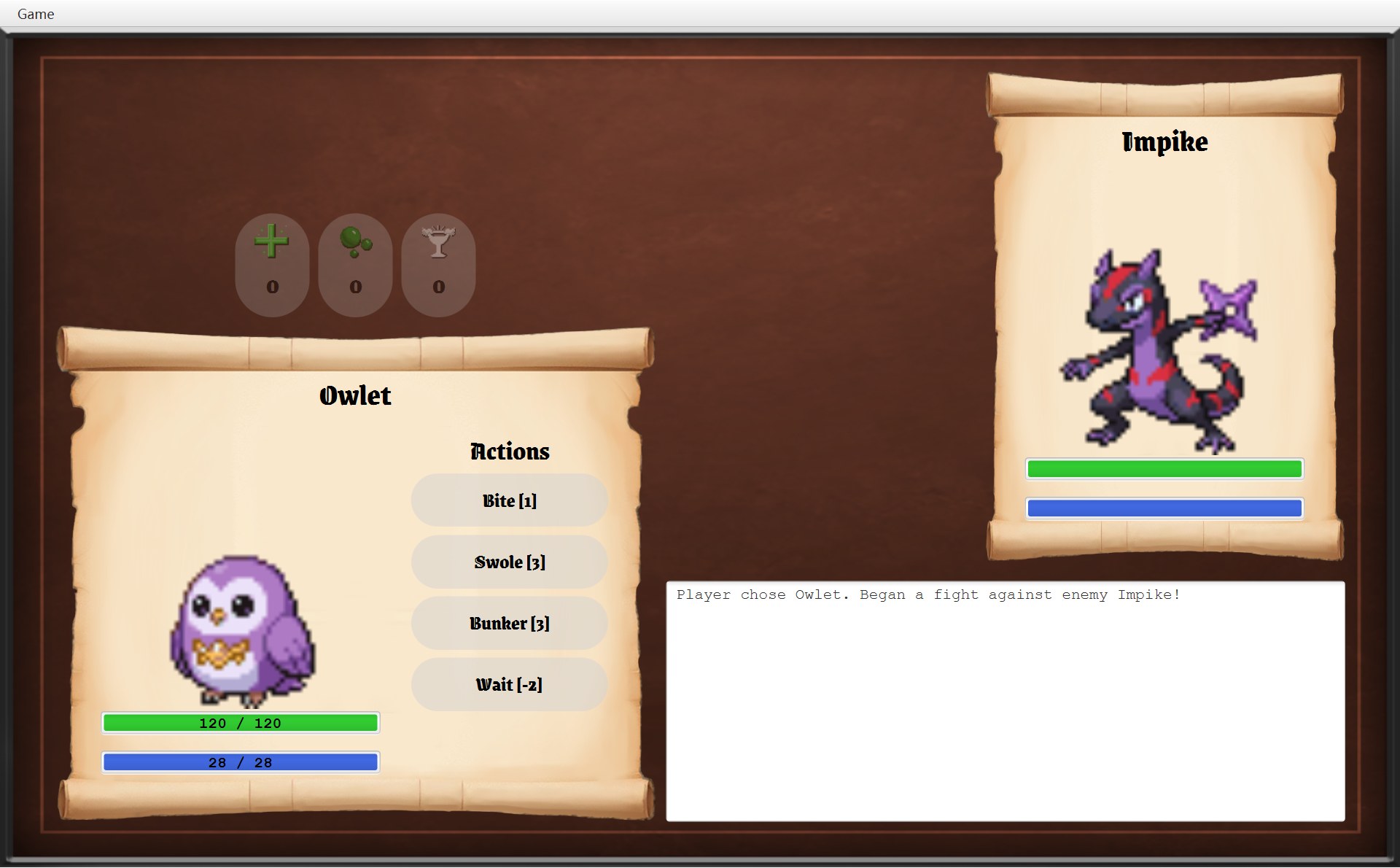
- 1第 183–185 行:一个 VBox,按钮竖着排,间隔 SKILL_GAP 8,左上角 (376, 408)
- 2第 189 行:文字 = 名字 + " [" + 能量消耗 + "]",这里是 Swole [3]
- 3第 191 行:每个都是 180 × 48
- 4第 193 行:点 Wait [-2] 就运行
useSkill(这个 Wait 对象)
181 /* One button per skill, showing its energy cost, e.g. "Bite [1]". */182 private VBox createSkillButtons(List<Skill> skills) {1831 VBox buttonColumn = new VBox(SKILL_GAP);184 buttonColumn.setLayoutX(ACTIONS_X);185 buttonColumn.setLayoutY(SKILLS_Y);186 187 Font font = UiStyle.loadGameFont(SKILL_FONT_SIZE);188 for (Skill skill : skills) {1892 GameButton button = new GameButton(skill.getName() + " [" + skill.getEnergyCost()190 + "]", font, BUTTON_RADIUS);1913 button.setPrefSize(SKILL_WIDTH, SKILL_HEIGHT);192 button.addPressEffect();1934 button.setOnAction(event -> useSkill(skill));194 skillButtons.add(button);195 buttonColumn.getChildren().add(button);196 }197 return buttonColumn;198 }- 第 188 行
for (Skill skill : skills):for-each,对 Mokepon 的每个技能做一遍(第 2 章第 4 节)。技能有 3 个就 3 个按钮,4 个就 4 个,不是写死的。 - 第 189–190 行:
new GameButton(文字, 字体, BUTTON_RADIUS),圆角 30。按钮只有 48 高,圆角比一半还大,所以两头看起来是圆的。skill.getEnergyCost()是 int,和字符串用+连起来会自动变成文字。 - 第 192 行
addPressEffect():鼠标按下去时,背景的浅灰变浓(0.5 → 0.75),看起来更亮;松开变回去(第 6 章第 7 节)。 - 第 193 行
button.setOnAction(event -> useSkill(skill)):lambda,“点了以后做什么”(第 2 章第 8 节)。箭头左边的event是点击事件,右边是要做的事。网页字体把-和>画成了一个箭头,真实代码里是减号加大于号两个字符。每一圈的skill不一样,每个 lambda 记住的是自己那一圈的 skill(变量捕获),所以点 Swole 就用 Swole。 - 第 194–195 行:同一个按钮放进两个地方:字段
skillButtons(以后 update 和数字键要用),和这个VBox(为了排版、放进画面)。
createItemButtons:图标在上,数量在下
- 1第 211 行:顺序来自
ItemCatalogue.getBattleOrder():Health Tonic、Poison、Coffee - 2第 213–214 行:
setGraphic放一个 32 × 32 的图标 - 3第 215 行:
ContentDisplay.TOP,图在上、字在下。数字 1 是 update 写的 - 4第 216 行:68 × 94;第 212 行圆角 68 / 2 = 34
200 /* One button per kind of item, with its image above its quantity.201 * The row is centred above the player's scroll.202 */203 private HBox createItemButtons(GameImages images) {204 HBox buttonRow = new HBox(ITEM_GAP);205 buttonRow.setAlignment(Pos.CENTER);206 buttonRow.setLayoutX(PLAYER_X);207 buttonRow.setLayoutY(PLAYER_Y - ITEM_HEIGHT - ITEM_GAP);208 buttonRow.setPrefWidth(PLAYER_WIDTH);209 210 Font font = UiStyle.loadGameFont(ITEM_FONT_SIZE);2111 for (Item item : ItemCatalogue.getBattleOrder()) {212 GameButton button = new GameButton("", font, ITEM_WIDTH / 2);2132 button.setGraphic(UiStyle.createIcon(UiStyle.loadImage(images.getItemImage(item)),214 ITEM_ICON_SIZE));2153 button.setContentDisplay(ContentDisplay.TOP);2164 button.setPrefSize(ITEM_WIDTH, ITEM_HEIGHT);217 button.addPressEffect();218 button.setOnAction(event -> useItem(item));219 itemButtons.put(item, button);220 buttonRow.getChildren().add(button);221 }222 return buttonRow;223 }- 第 204–208 行:一行横着排的
HBox,间隔 8,居中,宽 550(第 2 节算过 215 是怎么来的)。 - 第 211 行:CItemCatalogue 是静态目录类,全游戏每种道具只有一个对象。战斗画面的顺序(Health Tonic、Poison、Coffee)和地图卷轴的顺序(Health Tonic、Coffee、Poison)不一样,CItemCatalogue 第 16 行注释说这是为了和样例截图一样。道具本身在 第 13 章。
- 第 212 行:
new GameButton("", font, ITEM_WIDTH / 2):文字是空的。数量要等update()才写上(第 3 节第 11 步)。68 / 2是整数除法,正好 34。 - 第 213–214 行:
images.getItemImage(item)从 CGameImages 拿到图片路径(数据文件里的items.heal=assets/sprite_heal.png等),UiStyle.loadImage读图,UiStyle.createIcon(..., 32)缩成 32 像素、保持比例。这是images参数在整个类里唯一用到的地方,所以它没有存成字段。 - 第 215 行:ContentDisplay.TOP:按钮上的图形放在文字的上面。
- 第 217–218 行:和技能按钮一样,先装“按下去背景变浓、看起来更亮”的效果,再登记一个 lambda:
event -> useItem(item),点了就用这一圈的道具。第 8 节的useItem就是从这里被调用的。 - 第 219–220 行:和技能按钮一样,同一个按钮放进两个地方。
itemButtons.put(item, button):键是道具对象,值是它的按钮;buttonRow.getChildren().add(button):放进这一行HBox,用来排版。itemButtons是 LinkedHashMap,记得放进去的顺序,以后 update 也按这个顺序一个一个处理。
createLogArea:只能看、不能改的等宽文本框
- 1第 227–228 行:左上角,代码里是 (609, 506),截图里是 (609, 531)
- 2第 232 行:等宽字体 Monospaced 14 号,每个字母一样宽。缩进是日志里的
\t(制表符)
225 private TextArea createLogArea() {226 TextArea area = new TextArea();2271 area.setLayoutX(LOG_X);228 area.setLayoutY(LOG_Y);229 area.setPrefWidth(ENEMY_X + ENEMY_WIDTH - LOG_X);230 area.setPrefHeight(LOG_HEIGHT);231 area.setEditable(false);2322 area.setFont(UiStyle.createMonospaceFont(FontWeight.NORMAL, LOG_FONT_SIZE));233 return area;234 }第 229–230 行定宽高 621 × 220(第 2 节算过),第 231 行 setEditable(false):你点进去也打不了字,只能看。TextArea 是能显示很多行、能滚动的文本框。造出来的时候是空的,内容由 showLog() 每次整段写进去(下一节)。日志的每一句是谁写的,在 第 11 章。
8. update():每次操作以后,把画面和 Battle 对一遍
点技能按钮走 useSkill,点道具按钮走 useItem。两个方法都只有两行:先让 CBattle 改数据(委托给 battle.playTurn 或 battle.useItem),再 update()。构造器的最后一行也是 update()。所以屏幕上的东西只在 update() 里改。
117 private void useSkill(Skill skill) {118 battle.playTurn(skill);119 update();120 }121 122 private void useItem(Item item) {123 battle.useItem(item);124 update();125 }126 127 /* Make everything on the screen match the battle, and show the result once it is over. */128 private void update() {129 playerPanel.update();130 enemyPanel.update();131 showLog();132 updateSkillButtons();133 updateItemButtons();134 135 if (battle.isFinished() && !isDialogOpen()) {136 showResult();137 }138 }第 11 章第 6 节用最后一回合(赢了)走过一遍 update。这里换一个“什么都没怎么变”的回合:A 局第一下点 Wait [-2],从 battle-start 到 battle-wait。这次一直跟到最底层,看每根条、每个按钮被调用了什么方法。上面的代码框一直是 update;下面换成这一步真正跑到的那段代码。截图上的红框编号:1 你点的按钮,2 你的 HP 数字,3 你的能量数字,4 敌人的两根条,5 日志,6 技能按钮,7 道具按钮,8 结果对话框的位置。
128 private void update() {129 playerPanel.update();130 enemyPanel.update();131 showLog();132 updateSkillButtons();133 updateItemButtons();134 135 if (battle.isFinished() && !isDialogOpen()) {136 showResult();137 }138 }- 1你点的 Wait [-2]
- 2HP:还是 225 / 225
- 3能量:还是 33 / 33
- 4敌人两根条:还是满的
- 5新多的一个空行和 4 行
- 6三个按钮都能点
- 70(灰)、1、0(灰)
8- 8赢的时候 You Win 框出现在这里(输了的 Game Over 框更宽);现在没有
117 private void useSkill(Skill skill) {118 battle.playTurn(skill);119 update();120 }75 /* Make the bars and the red tint match the fighter. */76 public void update() {77 hpBar.update(fighter.getHp(), fighter.getMaxHp());78 energyBar.update(fighter.getEnergy(), fighter.getMaxEnergy());79 scroll.setFainted(!fighter.isAlive());80 }27 @Override28 public void update(int current, int max) {29 super.update(current, max);30 numbers.setText(current + SEPARATOR + max);31 }28 public void update(int current, int max) {29 bar.setProgress(calculateRatio(current, max));30 }⋯ 省略第 31–36 行37 private double calculateRatio(int current, int max) {38 if (current <= 0) {39 return 0;40 }41 return Math.max(MIN_VISIBLE_RATIO, current * 1.0 / max);42 }140 /* Show all messages and scroll to the latest one. */141 private void showLog() {142 logArea.setText(String.join("\n", battle.getLog()));143 logArea.positionCaret(logArea.getLength());144 logArea.setScrollTop(Double.MAX_VALUE);145 }147 /* A skill can only be used while the battle is running and there is enough energy. */148 private void updateSkillButtons() {149 List<Skill> skills = battle.getPlayer().getSkills();150 for (int i = 0; i < skillButtons.size(); i++) {151 boolean usable = !battle.isFinished() && battle.getPlayer().canUse(skills.get(i));152 skillButtons.get(i).setUsable(usable);153 }154 }156 /* Each item button shows how many are left, and is disabled when there are none. */157 private void updateItemButtons() {158 Inventory inventory = battle.getInventory();159 for (Map.Entry<Item, GameButton> entry : itemButtons.entrySet()) {160 Item item = entry.getKey();161 GameButton button = entry.getValue();162 button.setText(String.valueOf(inventory.getCount(item)));163 button.setUsable(!battle.isFinished() && inventory.has(item));164 }165 }- 你点 Wait [-2](框 1)。它的 lambda 是造按钮时第 193 行登记的
event -> useSkill(skill),skill 就是 Wait 那个对象。第 118 行让 CBattle 算完这一回合(委托),日志已经变成 6 行,可屏幕还是截图上的样子;第 119 行update()才去改屏幕。 - 第 129 行
playerPanel.update(),跑的是下面那段 CFighterPanel.update。第 77 行hpBar.update(fighter.getHp(), fighter.getMaxHp()),就是update(225, 225);第 78 行energyBar.update(33, 33);第 79 行setFainted(!true),也就是setFainted(false):遮罩继续隐藏。 - 第 77 行的
hpBar.update(225, 225)真正跑的是哪段?你的hpBar里装的是 CLabelledStatBar,所以跑它改写的 update(下面第一段)。第 29 行super.update走到 CStatBar 第 29 行(下面第二段):calculateRatio(225, 225)在第 41 行算Math.max(0.03, 225 * 1.0 / 225)= 1.0,条设成 1.0。回到第 30 行,数字写成 225 / 225(框 2)。 - 第 78 行
energyBar.update(33, 33)走的是同一条路,条 1.0,数字 33 / 33(框 3)。Wait 的消耗是 −2,为什么没变成 35?能量早在第 118 行playTurn里就算好了:ASkill.use 调用spendEnergy(-2),里面是Math.min(33 - (-2), getMaxEnergy())=Math.min(35, 33)= 33(CFighter 第 89–92 行,第 10 章第 5 节)。update 只是把 33 读出来,它自己从来不改数字。截图下面灰色说明里的“能量 +2”,这一回合并没有发生。 - 第 130 行
enemyPanel.update():同一个方法、同样三行。不同的只是敌人的条是普通 CStatBar,只改长短,没有数字。敌人也用了 Wait,能量 14 / 14 还是满的,HP 93 / 93,两根条都设成 1.0(框 4)。 - 第 131 行
showLog():第 142 行String.join("\n", battle.getLog())用换行符把 6 行连成一段,整段setText进日志框;第 143–144 行把光标放到最后、滚到最底下(写法见下面的小课堂)。这是这一回合屏幕上真正变了的地方(框 5)。 - 第 132 行
updateSkillButtons():第 150 行用下标 i 一个一个走:第 i 个按钮对应第 i 个技能。第 151 行算usable= 战斗没结束&&能量够:33 ≥ 4(Lance)、33 ≥ 4(Stun)、33 ≥ −2(Wait)都成立;第 152 行setUsable(true):能点,不透明度 1(框 6)。 - 第 133 行
updateItemButtons():第 159 行走一遍itemButtons里的每一对(道具, 按钮),顺序就是放进去的顺序。第 162 行写上背包里剩几个(String.valueOf 把 int 变成文字),第 163 行决定能不能点:Health Tonic 0 个 → 灰;Poison 1 个 → 能点;Coffee 0 个 → 灰(框 7)。 - 第 135 行:
battle.isFinished()是 false,不调用showResult(),不弹框(框 8 是赢的时候框会出现的地方)。update 结束。回头看:它调用了一长串 set 方法(setProgress、setText、setVisible、setUsable……),屏幕上真正变的只有日志。它不去判断“什么变了”,而是每次都按 CBattle 现在的数据全部重设一遍。
连着看几回合:条、数字和按钮一起变
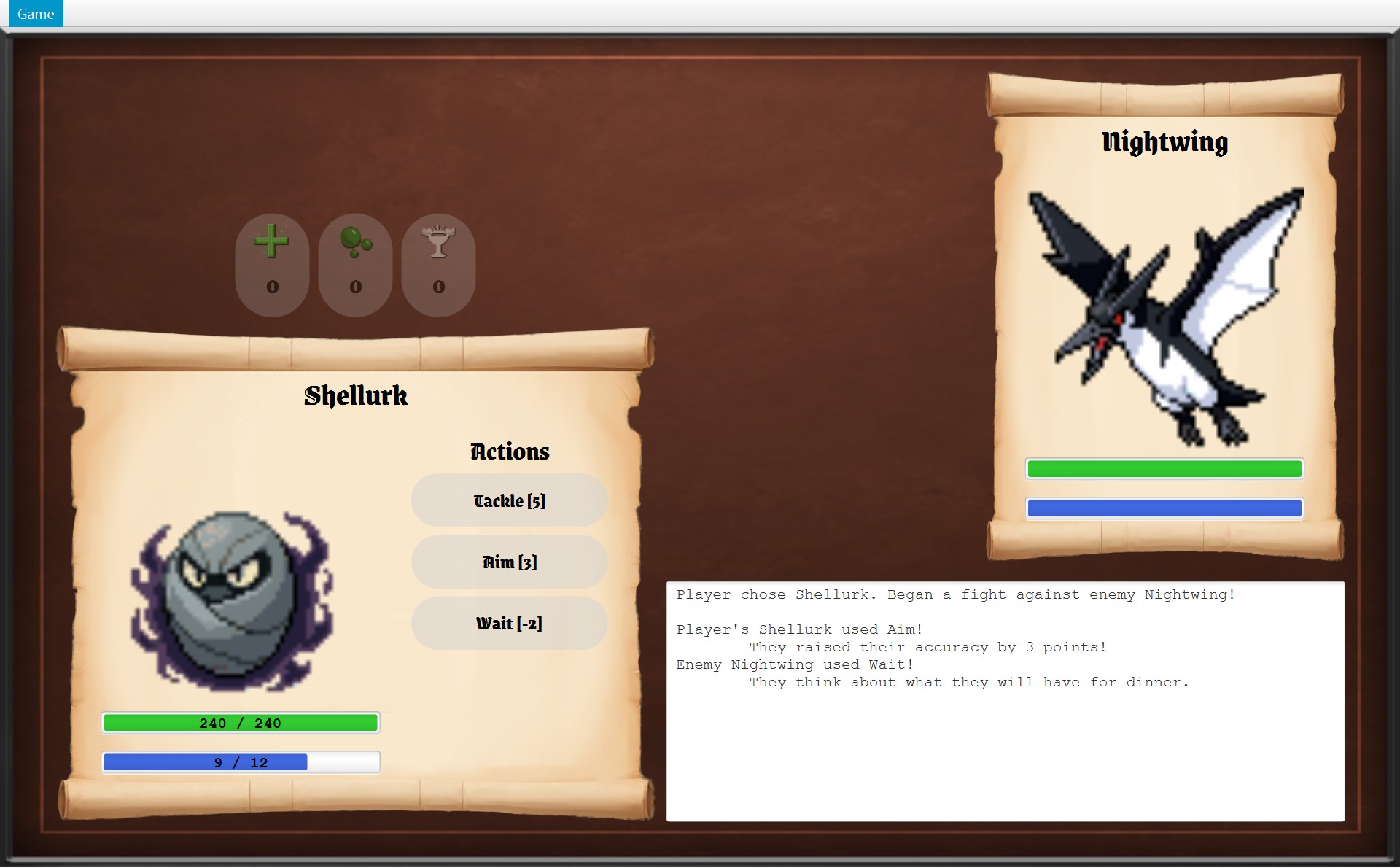
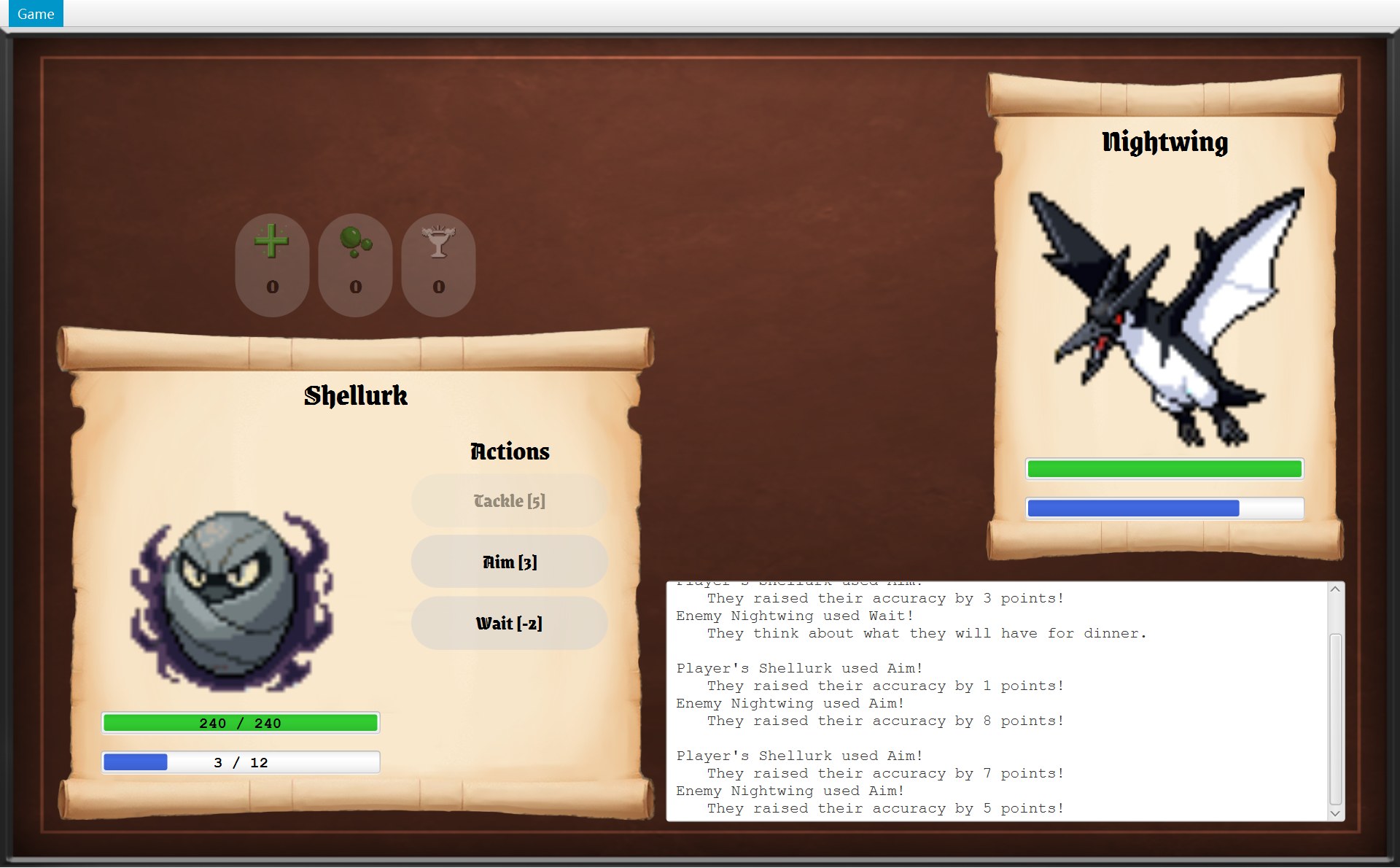
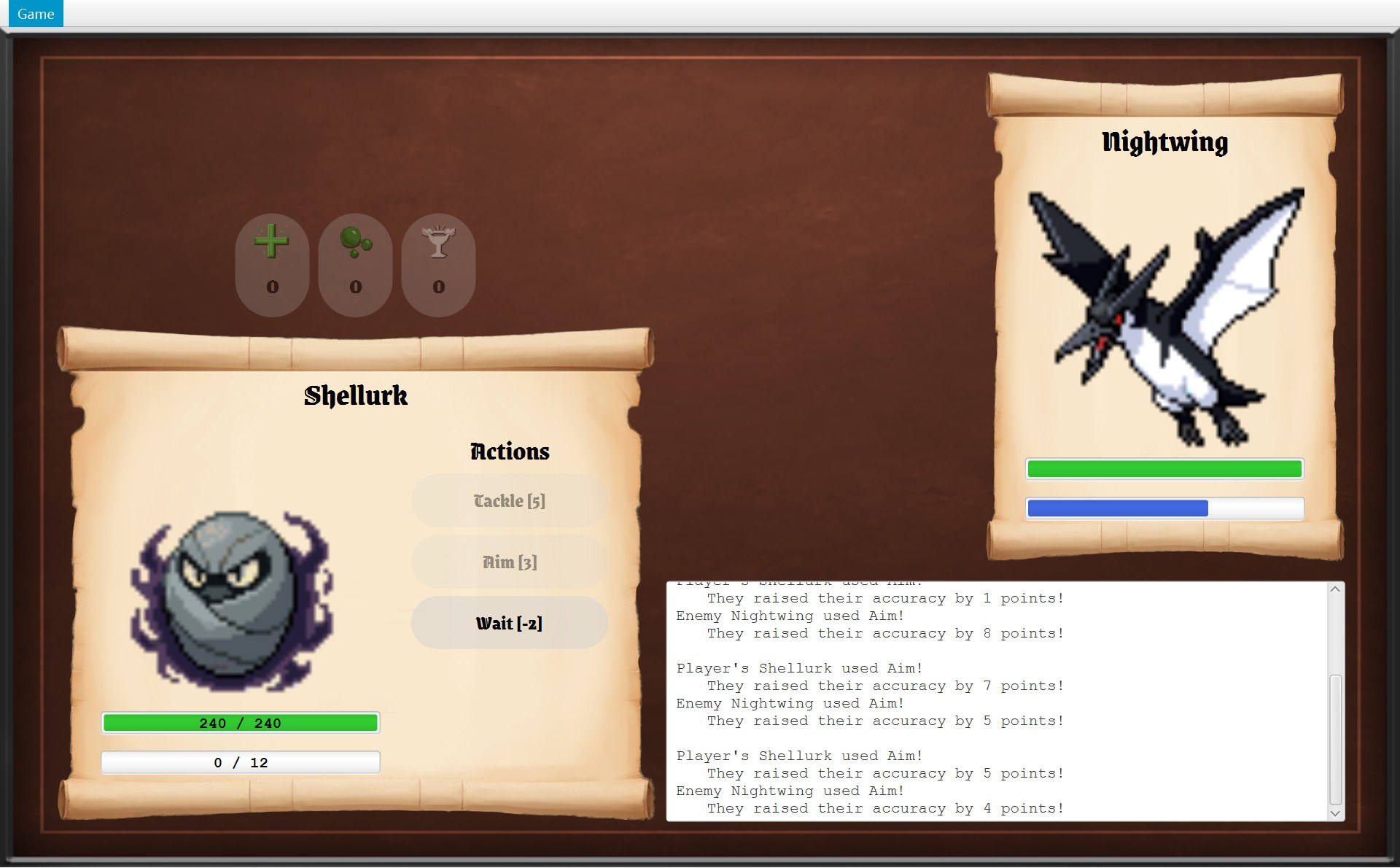
B 局你的 Shellurk 一直用 Aim(消耗 3)。每一帧都是一次 update 的结果:能量条、能量数字、技能按钮的亮和灰一起变。
![Shellurk 的战斗开始:技能 Tackle [5]、Aim [3]、Wait [-2],能量 12](shots/battle-start-b.jpg)
51 public void setUsable(boolean usable) {521 setDisable(!usable);53 setBackgroundOpacity(NORMAL);542 setOpacity(usable ? 1 : DISABLED_OPACITY);55 }- 1第 52 行
setDisable(!usable):不能用 → 禁用,点不动,fire()也没用 - 2第 54 行:usable 是 false,取
DISABLED_OPACITY,setOpacity(0.4):整个按钮(字也一起)只剩 40%
灰按钮为什么是“20% 的灰”(第 11 章留下的问题):按钮的背景本来是 50% 不透明的浅灰(CGameButton 的 NORMAL = 0.5,第 53 行每次都重设一遍),setOpacity(0.4) 让整个按钮再乘 0.4,0.5 × 0.4 = 0.2。CGameButton 第 11–13 行的注释就是这么写的(第 6 章)。
打完了:showResult 和两个对话框
update 的最后(第 135 行)发现战斗结束、又没有对话框开着,就调用 showResult()。!isDialogOpen() 保证框只弹一次。
- 1这一片背景也变暗了:对话框的 layer 是 45% 的黑,盖住整个 view
- 2第 173 行:
new ModalDialog("You Win") - 3第 174 行:Back to it! →
getNavigator().winBattle() - 4红色遮罩也在那一层下面
167 /* Show the winning or the losing dialog.168 * The battle is over, so the menu is updated to turn off "Run away".169 */170 private void showResult() {171 getNavigator().updateMenu();172 if (battle.hasPlayerWon()) {1732 ModalDialog dialog = new ModalDialog("You Win");1743 dialog.addButton("Back to it!", event -> getNavigator().winBattle());175 showDialog(dialog);176 } else {177 showDialog(createGameEndDialog("Game Over"));178 }179 }- 第 171 行:先
getNavigator().updateMenu(),让菜单重新问一遍(下面细看)。 getNavigator()是父类 AGameScreen 的 protected 方法,交出构造时存下的字段navigator。它的类型是接口 IGameNavigator;运行时真正的对象是 CGameWindow,就是 startBattle 第 67 行new BattleScreen(..., this)里的那个this。CBattleScreen 只认识接口,不认识 CGameWindow 这个类(第 6 章第 2 节)。- 第 172–175 行:赢了就自己 new 一个 CModalDialog,只有一个按钮。lambda
event -> getNavigator().winBattle():点了以后请窗口回到地图(第 15 章第 5 节)。 - 第 175 行
showDialog(dialog):父类 AGameScreen 的方法,把对话框那一层加到 view 的最后(第 19 个节点),所以它盖住包括红色遮罩在内的一切(框 1、4)。对话框的结构在 第 6 章第 6 节。 - 第 177 行:输了用父类的
createGameEndDialog("Game Over"):
- 5第 90 行:
navigator.returnToMainMenu() - 6第 91 行:
navigator.quit()
87 /* A dialog for the end of a game, with buttons to go back to the menu or to quit. */88 protected ModalDialog createGameEndDialog(String heading) {89 ModalDialog endDialog = new ModalDialog(heading);905 endDialog.addButton("Return to Main Menu", event -> navigator.returnToMainMenu());916 endDialog.addButton("Quit", event -> navigator.quit());92 return endDialog;93 }走到出口时的 “You finished the game!” 框也是这个方法造的,所以两个框的按钮一模一样。
菜单里的 Run away 为什么跟着变灰
战斗中 Game 菜单里的 Run away 能点;打完以后应该不能点了(仗都打完了,不能再逃)。可 CGameMenu 不会自己发现战斗结束,只有别人叫它 update 时它才检查。这就是第 171 行的作用:
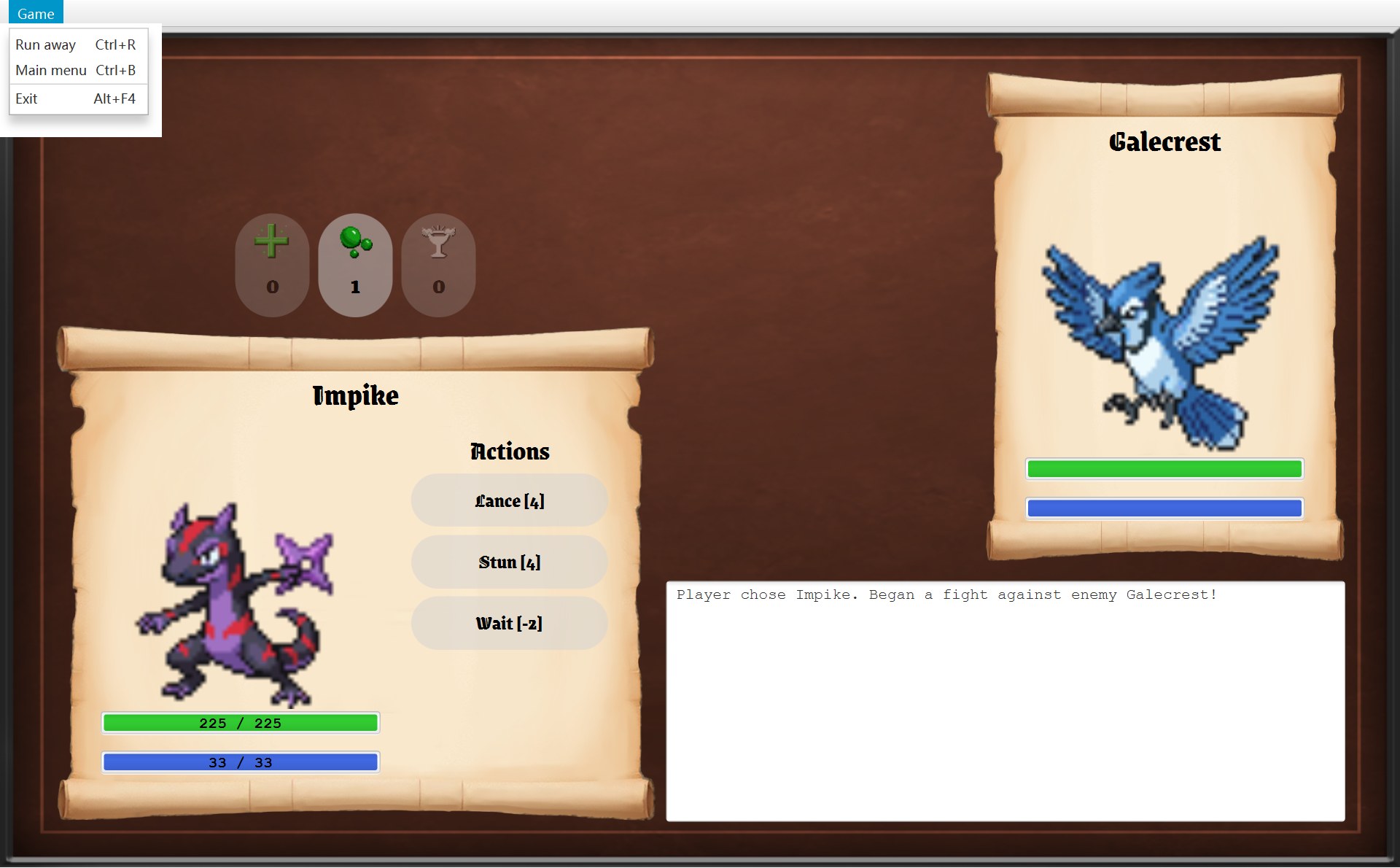
- 1战斗中:
canRunAway()返回!battle.isFinished()= true,第 47 行setDisable(false),Run away 能点 - 2第 48 行:
canReturnToMainMenu()用的是父类的版本,返回 true,Main menu 也能点
43 /* Turn the options on or off to match the screen being shown.44 * A disabled option also ignores its keyboard shortcut.45 */46 public void update(GameScreen screen) {471 runAway.setDisable(!screen.canRunAway());482 mainMenu.setDisable(!screen.canReturnToMainMenu());49 }99 /* The battle screen is the only screen where the player can run away.100 * Running away cancels the battle, so it is not possible once the battle is over.101 */102 @Override103 public boolean canRunAway() {1041 return !battle.isFinished();105 }41 /* Whether the "Run away" option can be used. Only the battle screen allows it. */42 public boolean canRunAway() {43 return false;44 }45 46 /* Whether the "Main menu" option can be used. Most screens allow it. */47 public boolean canReturnToMainMenu() {482 return true;49 }CGameMenu.update 的参数类型是 AGameScreen,它里面写了两行:第 47 行 runAway.setDisable(!screen.canRunAway()),第 48 行 mainMenu.setDisable(!screen.canReturnToMainMenu())。父类的 canRunAway() 永远返回 false;只有 CBattleScreen 改写了它,返回 !battle.isFinished():打着的时候 true,打完 false。canReturnToMainMenu() CBattleScreen 没有改写,用的是父类的 true。菜单不用知道现在是哪个画面,问一句就行(多态)。
那开打时 Run away 是谁点亮的?startBattle 第 67 行 new 出画面以后调用 showScreen,CGameWindow.showScreen 第 104 行也调用 updateMenu()。那时战斗还没结束,canRunAway() 是 true,所以 Run away 亮起来,就是上面截图的样子(第 15 章第 4 节)。打赢那一刻(battle-win)记录下来的菜单状态是:Run away 禁用,Main menu 可用。打完以后菜单打开的样子这里没有图,变灰的效果和第 6 章地图画面里的 Run away 一样。
键盘 1–4:handleKey(详见第 6 章)
数字键 1–4 也能用技能。这一整条路(Scene 的过滤器 → handleKeyPress → handleKey)已经在 第 6 章第 4 节用真实截图一步一步走过,这里只补一句和 update 有关的:handleKey 第 112 行 skillButtons.get(index).fire() 用代码“点一下”第 index 个技能按钮(fire()),跑的就是第 193 行登记的同一个 lambda;update 把按钮设成灰的以后,fire() 对它没反应,所以键盘也用不了付不起的技能。第 113 行 event.consume()(consume())把这个按键标成“已经处理完了”,不再交给别的部件。handleKey 是父类 AGameScreen 的模板方法 handleKeyPress 留给子类填的那一步:对话框开着时父类不会调用它,所以打完以后按数字键也没反应。
9. 为什么这样设计
1. 规则和画面分开
CBattle 只改战斗者、道具和日志,一个 JavaFX 类都不 import,也没有任何字段指向界面。CBattleScreen 通过 getter 读它,通过 playTurn / useItem 把操作交给它(委托 delegation,规则与界面分离)。好处:规则可以不开窗口单独测试;换一种画法也不用动规则。
2. 每次全部重画
屏幕不存自己的一份数据,update() 每次都照着 CBattle 现在的样子把条、数字、日志、按钮全部重设。屏幕和数据永远一致;不管是哪种操作改了数字,都只有这一个地方负责显示。“不能用”长什么样(40% 不透明)只写在 CGameButton.setUsable 里,CBattleScreen 只决定能不能用。
3. 一个类用两次,子类只加差别
CFighterPanel 用构造器参数决定位置、大小和写不写数字,所以你的和敌人的面板是同一份代码。CLabelledStatBar 继承 CStatBar,改写 update 和 getNodes 时先调用 super,只加数字那一部分。
4. 常量和绘制顺序
每个位置都是有名字、互相推出来的常量,改一处其他跟着变。节点按顺序放进 view:遮罩最后放,所以能盖住一切;对话框比遮罩还晚,所以盖住遮罩。
5. 每场战斗一个新画面
CGameWindow.startBattle 每次都 new BattleScreen(...)。字段 battle 是 final 的,一个画面一辈子只显示一场战斗;下一场换新画面,按钮也按新的 Mokepon 的技能重新造。零件都是画面自己造的(组合),所以旧画面连同它的零件一起丢掉。
6. 画面只认识接口
要换画面、改菜单时,CBattleScreen 找的是 getNavigator() 交出的 IGameNavigator 接口,不是 CGameWindow 这个类。菜单也只通过 AGameScreen 这个父类型问 canRunAway()。这就是依赖倒置(第 16 章)。
下一章:这一章一直待在战斗画面里。第 15 章看怎么离开它:战斗中用菜单 Run away 逃跑、打赢后点 Back to it! 回到地图、回主菜单,还有走到出口时弹出的结束框。
自测
代码里 PLAYER_Y = 272,为什么截图里你的卷轴顶边在 y = 297?
PLAYER_Y 是 layoutY,相对于父容器 view 的上边。CGameWindow 把 view 放在 25 像素高的菜单栏下面,截图拍的是整个窗口,所以 272 + 25 = 297。x 不用加。Layout coordinates are relative to the screen's view, which sits below the 25-pixel menu bar.
日志框的宽 621 是怎么来的?如果把 PLAYER_WIDTH 改成 500,日志框会怎样?
宽 = ENEMY_X + ENEMY_WIDTH - LOG_X = 900 + 330 − 609 = 621,而 LOG_X = PLAYER_X + PLAYER_WIDTH + 9 = 609。改成 500 后 LOG_X = 559,宽变成 1230 − 559 = 671:日志框往左挪、变宽,右边还对齐敌人卷轴。这就是常量互相推出来的好处。
如果把第 95 行的两个 getFaintMask() 挪到第 92 行之前,倒下时会怎样?
遮罩会变成 view 里的第 1、2 个节点,后加的卷轴、头像、按钮都画在它上面。卷轴图片几乎不透明,会把遮罩整个盖住,倒下了也看不到红色。Nodes added later are drawn on top, so the masks must be added last.
FighterPanel 的字段 hpBar,声明类型是什么?你的面板里实际装的是什么?调用 hpBar.update 时跑的是哪段代码?
声明类型是 CStatBar(第 30 行);你的面板里装的是子类 CLabelledStatBar(第 51 行,因为 showNumbers 是 true),敌人的装的是 CStatBar(第 56 行)。运行时按对象的真实类型:你的条跑 CLabelledStatBar.update(先 super.update 改条,再改数字),敌人的跑 CStatBar.update(只改条)。这是多态和动态绑定。
敌人 HP 只剩 1 / 93 时,条为什么还看得到一点绿?HP 是 0 时呢?
calculateRatio(1, 93):1 > 0,算出 1 × 1.0 / 93 ≈ 0.0108,再 Math.max(0.03, 0.0108) = 0.03,所以留一丝。HP 0 时第 38 行 current <= 0 成立,直接返回 0,条全空。如果没有 * 1.0,1 / 93 是整数除法得 0,条会提前变空。
BattleScreen 和 FighterPanel 是什么关系?和 Battle 又是什么关系?用课程用语说。
CBattleScreen 和两个 CFighterPanel 是组合:它在构造器里自己 new 出来,别人不存着,画面丢掉它们也一起丢掉。和 CBattle 是关联:CBattle 是 CEncounter 造好、经 CGameWindow.startBattle 交进来的,CBattleScreen 只是一直存着它、调用它;每回合 useSkill 把活交给 battle.playTurn(skill),这是委托。BattleScreen is composed of two FighterPanels; it is associated with the Battle it is given and delegates each turn to it.
A 局第一下点 Wait,屏幕上只有日志变了。为什么 update() 还要把两个面板、日志、技能按钮、道具按钮全部重设一遍,而不是只改“变了的”那一块?
CBattleScreen 自己不存 HP、能量、日志的副本,屏幕上的一切都从 CBattle 和两个 CFighter 现读。每次全部重设,屏幕就不可能和数据对不上:不管这一回合是技能、道具、流血还是倒下改了数字,update() 都照着最新的数字画,也不用写一堆“这次改了什么”的判断。显示只在这一个方法里做,构造器、useSkill、useItem 最后都调用它。代价只是几个没用的 set,一回合才点一次,不值一提。update() resets every part of the screen from the current state of the Battle, so the screen never keeps its own copy of the data and cannot get out of step with it.
战斗结束后,菜单里的 Run away 为什么会变灰?把调用顺序说出来。
update() 发现 isFinished(),调用 showResult()。它第一行 getNavigator().updateMenu():getNavigator() 交出的字段类型是接口 IGameNavigator,运行时就是 CGameWindow 对象 → CGameWindow.updateMenu → menu.update(currentScreen) → CGameMenu 调用 screen.canRunAway(),CBattleScreen 改写的版本返回 !battle.isFinished() = false → runAway.setDisable(true)。同一个方法第 48 行再问 canReturnToMainMenu(),CBattleScreen 没改写,父类返回 true,所以 Main menu 还能点。BattleScreen asks its navigator (a GameNavigator, really the GameWindow) to update the menu, and GameMenu calls the overridden canRunAway(), which now returns false.